Screen Ruler - Measure Precise

Screen Ruler - Measure Precise

Scarica su App Store
Logo di Screen Ruler - Measure Precise

Righello Schermo - Misura Precisa: Il Tuo Strumento Tascabile Professionale per l'Accuratezza Istantanea

Smetti di cercare un metro a nastro. Trasforma il tuo iPhone o iPad in uno strumento di misurazione perfettamente calibrato e ad alta precisione per progetti fai-da-te, artigianato e attività quotidiane.

Scarica su App Store

Editore

向阳 杨

Categoria

Utilities

Download

82K+

Valutazione

3.9/5

Valutazioni totali

100

Lingue

4

Accuratezza a Colpo d'Occhio

Scopri l'interfaccia usata da 82K+ utenti.
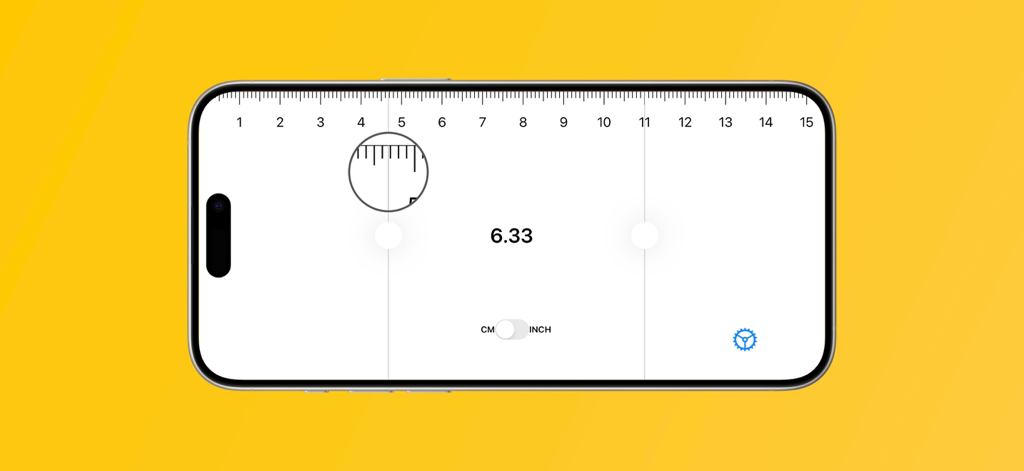
App righello digitale che visualizza una misurazione precisa in centimetri con uno strumento di ingrandimento su uno schermo iPhone

App righello digitale che visualizza una misurazione precisa in centimetri con uno strumento di ingrandimento su uno schermo iPhone

Precisione Professionale in Tasca

Gli strumenti che rendono questa app unica, scelti da 82K+ utenti.

🎯

Calibrazione di Grado Professionale

Elimina le congetture con la calibrazione personalizzata che garantisce un'accuratezza pixel-perfect sia in pollici che in centimetri.

🔍

Dettaglio Ingrandito

Utilizza la modalità Lente d'ingrandimento e il feedback aptico per ottenere un allineamento perfetto anche per gli oggetti e i componenti più piccoli.

📏

Versatilità con Doppia Unità

Passa senza problemi tra unità imperiali e metriche, ideale per progetti internazionali, artigianato o verifica di acquisti online.

Info sull'app

Tutto quello che devi sapere su Screen Ruler - Measure Precise.

Descrizione

Transform your iPhone or iPad into a precise measuring tool that's always with you! Whether at home, office, or outdoors, easily measure various lengths with confidence. Key Features • Dual Units: Seamlessly switch between centimeters and inches for any measurement need • Precision Calibration: Custom calibration ensures accurate and reliable results • Magnifier Mode: Provides zoomed view for fine measurements and perfect alignment • Haptic Feedback: Tactile feedback during measurements enhances the user experience • Clean Interface: Clear scale markings with simple, intuitive operation • Universal Compatibility: Perfectly adapted for all iPhone and iPad models, including the latest devices Perfect For • Daily Life: Measure small objects, photo frames, furniture dimensions • Office & Study: Quick measurements for documents, notebooks, supplies • DIY Projects: Convenient measurements for home improvement and crafts • On-the-Go: Your mobile measuring tool anywhere, anytime Technical Excellence The Ruler App is perfectly adapted to all iPhone and iPad devices, utilizing high-precision algorithms to ensure accurate and reliable measurement results. The sleek and intuitive interface is designed to maximize your user experience, making it easy to get started even on first use. Save and label your measurements to easily track your progress. Feedback & Suggestions We value your feedback and suggestions! If you have any comments, suggestions, or ideas for improving our Ruler App, please don't hesitate to contact us at ankek1er@gmail.com. We are always looking for ways to make our app better and more user-friendly. Download now and start measuring like a pro!

Ultima versione

1.9.3

Dimensione

18.1 MB

Data di lancio

11 nov 2016

Pronto a misurare con precisione di livello professionale?

Unisciti a migliaia di appassionati del fai-da-te e professionisti che hanno trasformato il loro iPhone in uno strumento perfettamente calibrato. Scarica Righello Schermo oggi stesso e non cercare mai più un metro a nastro.

Scarica su App Store

App information, icons, screenshots, and descriptions displayed on this page are sourced from the Apple App Store and are the property of their respective developers. Download estimates and rankings are based on MWM's proprietary models and may not reflect actual figures. This page is provided for informational and analytical purposes only.

Believe this page infringes your intellectual property? File a dispute








