Sound Level Analyzer PRO
Scarica su App Store

Questa pagina non è una pagina ufficiale dell'app o del suo sviluppatore, ma una pubblicazione editoriale indipendente creata a scopo informativo e di commento. Salvo espressa indicazione contraria, né l'app né il suo sviluppatore sono affiliati, approvati, sponsorizzati, autorizzati o altrimenti ufficialmente collegati a MWM, Apple, Google Play, all'editore dell'app o allo sviluppatore dell'app, e nulla in questa pagina implica che l'app sia stata sviluppata utilizzando i servizi di MWM. Tutti i marchi, loghi, screenshot e altri contenuti rimangono di proprietà dei rispettivi proprietari.

Logo di Sound Level Analyzer PRO
Scarica su App Store

Sound Level Analyzer PRO

Potenzia i tuoi progetti professionali con analisi dello spettro FFT in tempo reale, dati in bande da 1/3 d'ottava e statistiche complete sul rumore: ingegneria del suono di precisione nel palmo della tua mano.

Numeri Chiave

Download

3K+

Valutazione

1.0/5

Valutazioni totali

0

Editore

TOON,LLC

Categoria

Utilities

Lingue

1

Ultima versione

8.0

Dimensione

0.7 MB

Data di lancio

12 dic 2017
Funzioni

Intelligenza Acustica di Livello Professionale

Dall'identificazione dei ronzii a bassa frequenza alla documentazione del rumore ambientale, trasforma il tuo iPhone in uno strumento di misurazione di precisione con analisi dati di qualità da laboratorio.

Registrazione Dati Basata sull'Evidenza

Registra fino a 8 ore di cronologia e istogrammi statistici per fornire prove oggettive e concrete per reclami sul rumore o audit sulla sicurezza sul lavoro.

Analisi dello Spettro in Tempo Reale

Analizza le sorgenti sonore utilizzando le risposte professionali FFT e a bande da 1/3 d'ottava per ottimizzare i sistemi audio di fascia alta e isolare i colpevoli di frequenze specifiche.

Gli screenshot e la descrizione seguenti provengono direttamente dall'elenco ufficiale dello store dell'app e sono di proprietà dello sviluppatore.

App Store

Screenshot
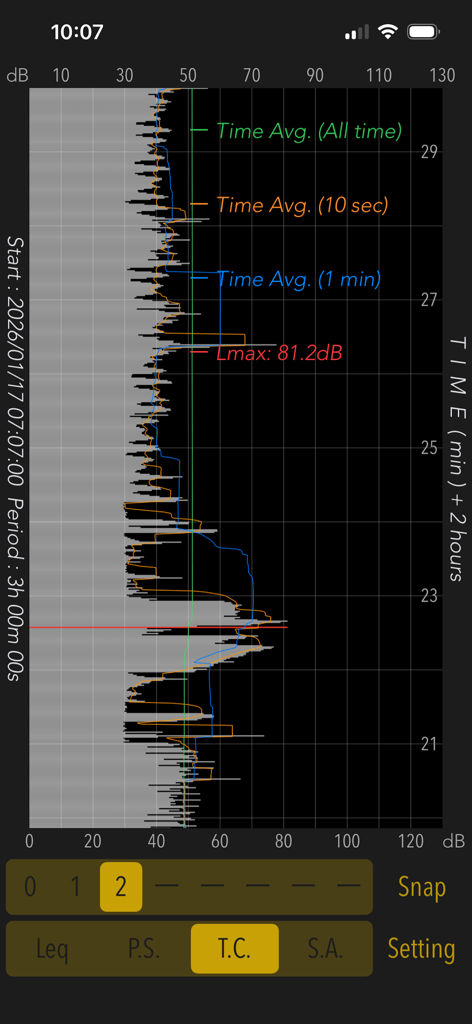
Sound Level Analyzer PRO - L'app Sound Level Analyzer PRO mostra un grafico della cronologia dei livelli sonori su un periodo di tre ore
L'app Sound Level Analyzer PRO mostra un grafico della cronologia dei livelli sonori su un periodo di tre ore

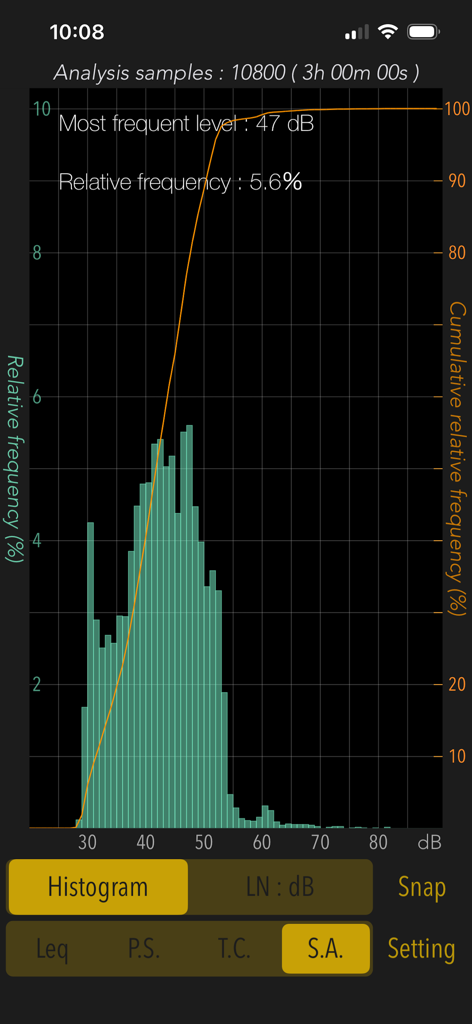
Sound Level Analyzer PRO - Istogramma di analisi statistica in Sound Level Analyzer PRO che mostra la distribuzione dei livelli di rumore su tre ore
Istogramma di analisi statistica in Sound Level Analyzer PRO che mostra la distribuzione dei livelli di rumore su tre ore

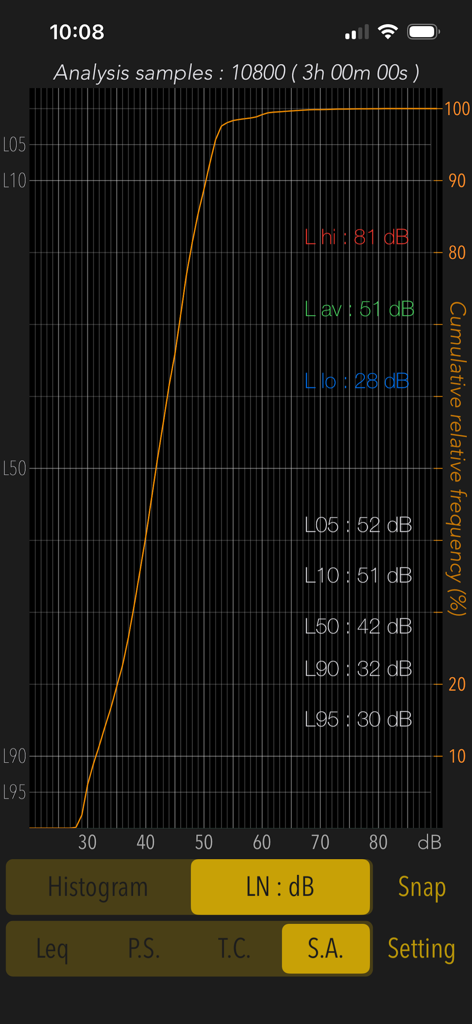
Sound Level Analyzer PRO - Schermata di analisi statistica che mostra la frequenza relativa cumulativa e i livelli percentili di decibel su tre ore
Schermata di analisi statistica che mostra la frequenza relativa cumulativa e i livelli percentili di decibel su tre ore

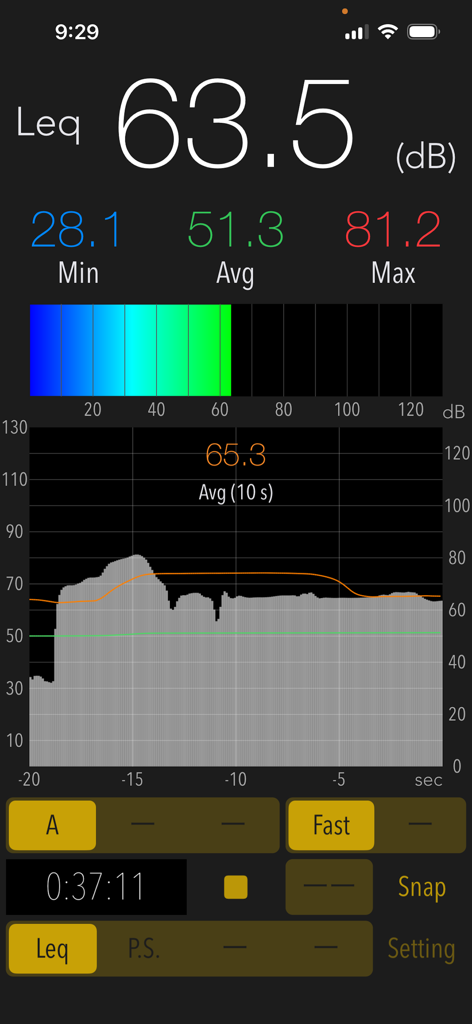
Sound Level Analyzer PRO - Interfaccia di misurazione dei decibel in tempo reale dell'app Sound Level Analyzer PRO che mostra i livelli sonori correnti, min, max e medi.
Interfaccia di misurazione dei decibel in tempo reale dell'app Sound Level Analyzer PRO che mostra i livelli sonori correnti, min, max e medi.

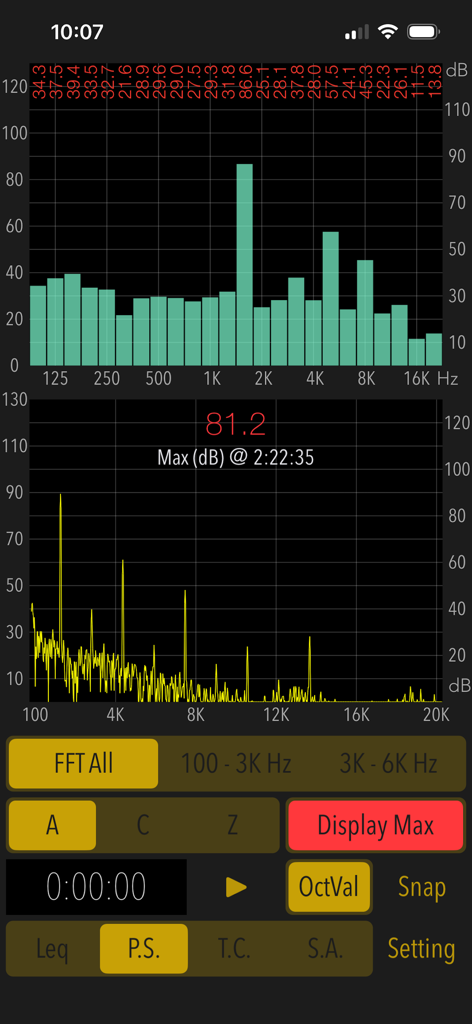
Sound Level Analyzer PRO - Schermata di analisi dello spettro di potenza e della frequenza FFT sull'app Sound Level Analyzer PRO
Schermata di analisi dello spettro di potenza e della frequenza FFT sull'app Sound Level Analyzer PRO

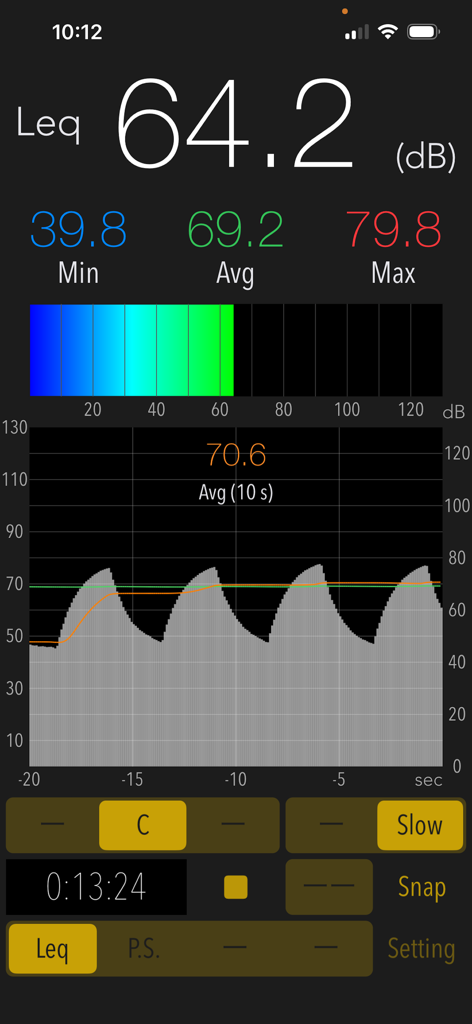
Sound Level Analyzer PRO - Interfaccia dell'app Sound Level Analyzer PRO che mostra una misurazione in tempo reale dei decibel di 64,2 dB con un grafico della cronologia del suono e statistiche
Interfaccia dell'app Sound Level Analyzer PRO che mostra una misurazione in tempo reale dei decibel di 64,2 dB con un grafico della cronologia del suono e statistiche

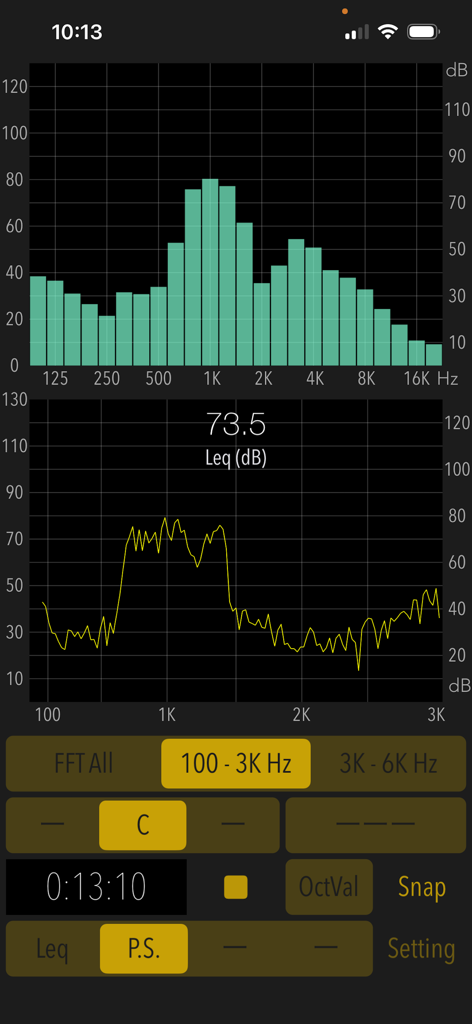
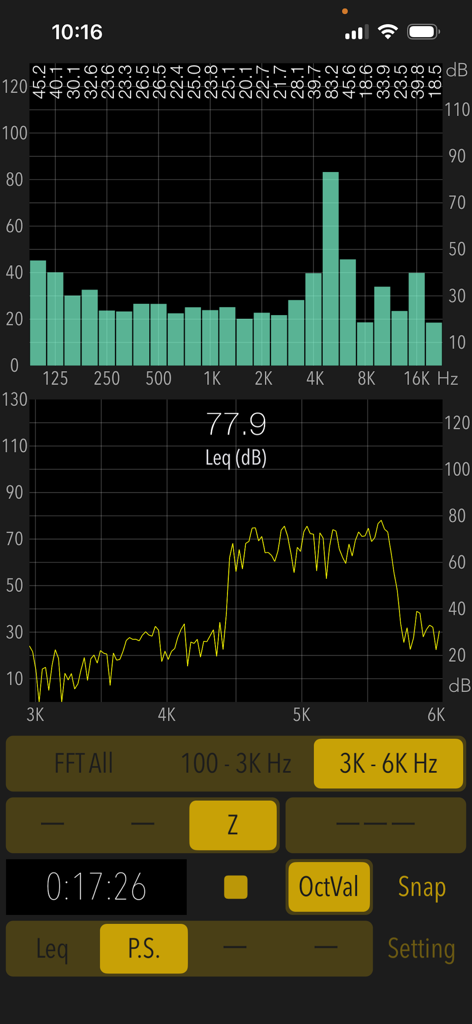
Sound Level Analyzer PRO - Interfaccia di Sound Level Analyzer PRO che mostra l'analisi dello spettro di frequenza in tempo reale e i livelli di decibel
Interfaccia di Sound Level Analyzer PRO che mostra l'analisi dello spettro di frequenza in tempo reale e i livelli di decibel

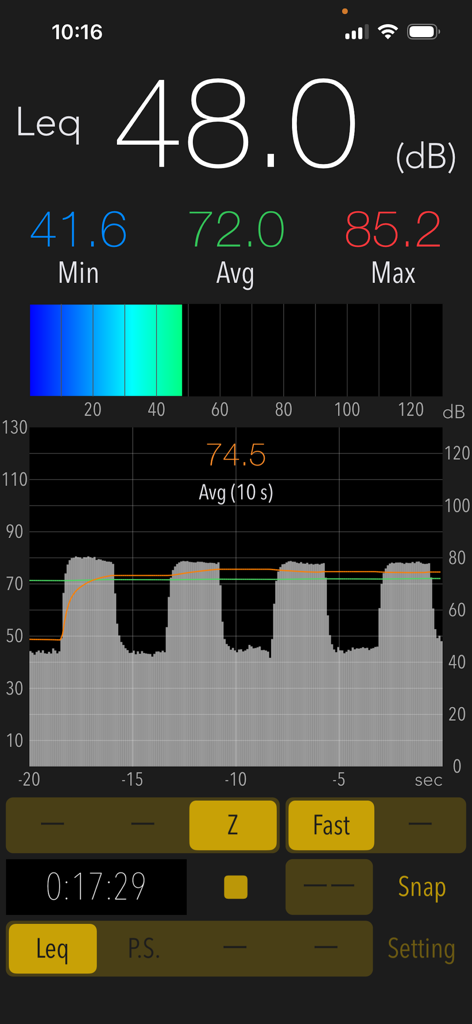
Sound Level Analyzer PRO - Interfaccia di Sound Level Analyzer PRO che mostra misurazioni in tempo reale dei decibel e un grafico della cronologia dei livelli di rumore
Interfaccia di Sound Level Analyzer PRO che mostra misurazioni in tempo reale dei decibel e un grafico della cronologia dei livelli di rumore

Sound Level Analyzer PRO - Interfaccia dell'app Sound Level Analyzer PRO che mostra grafici di analisi FFT e a bande da 1/3 d'ottava in tempo reale.
Interfaccia dell'app Sound Level Analyzer PRO che mostra grafici di analisi FFT e a bande da 1/3 d'ottava in tempo reale.

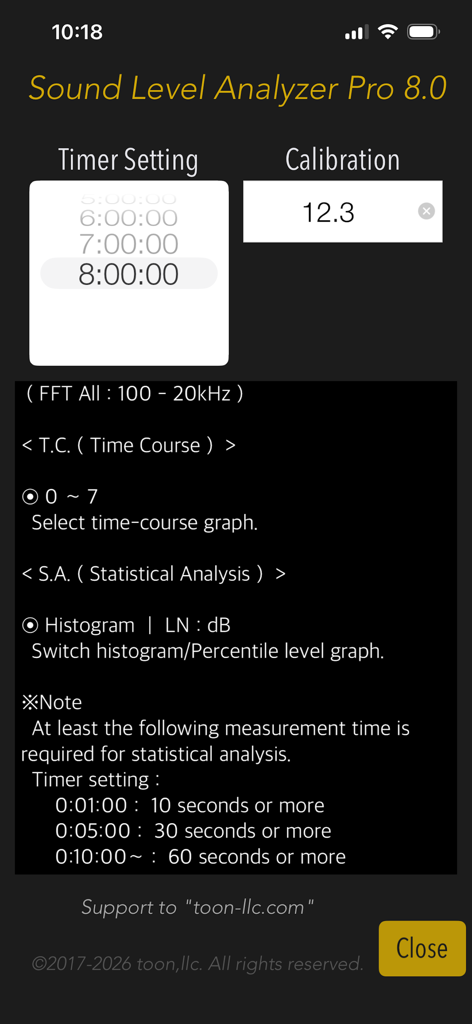
Sound Level Analyzer PRO - Schermata di configurazione di Sound Level Analyzer PRO che mostra le impostazioni del timer e della calibrazione

Schermata di configurazione di Sound Level Analyzer PRO che mostra le impostazioni del timer e della calibrazione

Descrizione

"Sound Level Analyzer PRO" is an integrated sound measurement app featuring a sound level meter and powerful acoustic analysis tools. It is available for a wide variety of applications, such as measuring ambient noise in neighborhoods, testing audio systems, checking interior noise in vehicles, checking sound at live events, and much more. Its advanced sound analysis capabilities allow you to perform real-time frequency spectrum analysis, time-varying level measurement, and in-depth statistical analysis of sound levels. It can also be used to analyze the multifaceted characteristics and trends in the occurrence frequency of any sound source. # Measurement functions Main (Leq): Sound level measurement in real-time. - Sound level measurement (dB): Leq (equivalent sound level), Min (minimum value), Max (maximum value), Avg (time-averaged equivalent sound level) - Frequency weighting correction characteristics: A (general sound level measurement with auditory correction), C (sound level measurement with almost flatter correction than A correction, e.g. peak evaluation at high volume), Z (flat characteristics without auditory correction, physical sound level measurement) - Time weighting characteristics: Fast=0.125 sec, Slow=1.0 sec Power Spectrum (P.S.): View of frequency spectrum analysis in real-time. - Spectrum analyzer function: FFT analysis, 1/3-octave band response analysis. - FFT frequency range settings: 100Hz - 20kHz (FFT All) / 100Hz - 3kHz / 3kHz - 6kHz - Measured value display function in 1/3 oct band response analysis. (OctVal) - Power spectrum display function at the occurrence time of maximum level. (Display Max) Time Course (T.C.): View of time-history of the sound level. (Graphical representation after measuring completion.) - Time-domain fluctuation level display function: up to 8 hours linked on a timer. Statistical Analysis (S.A.): Statistical analysis of sound level at A-weighting and Fast. (Analysis display after measuring completion.) - Histogram: Displays all detected sound level distribution as a percentage. - Percentile Level (LN:dB): Display the levels of L05 / L10 / L50 / L90 / L95 on the percentile level graph. # Control functions - Calibration function: level correction value setting, -20 to +20dB - Measurement timer function: 1 minute / 5 minutes / 10 minutes / 15 minutes / 20 minutes / 30 minutes / 1 - 8 hours (1 hour unit) - Snapshot: Save measurement display with time stamp to Photos. # Examples of usage scenes: - Measure the noise situation in the workplace. - Examine the frequency component and time variation of noise target. - Check the sound level and background noise level during music performance. - To know the sound volume of snoring at sleep. - Measure the quiet characteristics of electric products for the judgment of purchase. - To know the noise level of the car. Also, as a purchase consideration material for automobiles, measure the in-car noise level at the test drive and compare it. - To know the noise situation in my home. Also, when buying a house, knowing the noise situation of the surrounding environment. # Example of the noise level situation: - 130dB: Engine sound of Airplane - 110dB: Horn of Car - 100dB: Noise of passing train - 90dB: In loud factory - 80dB: In the train, Vacuum cleaner - 70dB: Noisy office, Noisy Street - 60dB: Quiet Car, Normal conversation - 50dB: Quiet office - 40dB: In the library, Quiet residential area - 30dB: Outskirts of midnight, Whisper - 20dB: Sounds of rubbing leaves # Note: At the time of the first access to Microphone and Photos after installing the app, you will be asked authorization to access them by the iOS system. If you have not enabled this setting, the app cannot access them by privacy restrictions of the iOS system. Please enable the access permission on the iOS setting, "Settings > Privacy & Security > Photos or Microphone". Please visit our iOS App support page for more information on this app.

Download

Scarica su App Store

Questa pagina non è una pagina ufficiale dell'app o del suo sviluppatore, ma una pubblicazione editoriale indipendente creata a scopo informativo e di commento. Salvo espressa indicazione contraria, né l'app né il suo sviluppatore sono affiliati, approvati, sponsorizzati, autorizzati o altrimenti ufficialmente collegati a MWM, Apple, Google Play, all'editore dell'app o allo sviluppatore dell'app, e nulla in questa pagina implica che l'app sia stata sviluppata utilizzando i servizi di MWM. Tutti i marchi, loghi, screenshot e altri contenuti rimangono di proprietà dei rispettivi proprietari.








