Textcraft

Textcraft

Scarica su App Store
Logo di Textcraft

Textcraft: L'utility di testo all-in-one per creatori e professionisti

Trasforma istantaneamente qualsiasi testo con oltre 100 formati. Dai font estetici per i social media e gli stili dei meme alla potente pulizia e codifica dei dati, Textcraft è il coltellino svizzero nativo per iOS creato per il tuo flusso di lavoro digitale.

Scarica su App Store

Editore

Pixelfolio Inc.

Categoria

Utilities

Download

1K+

Valutazione

4.3/5

Valutazioni totali

0

Lingue

1

Uno sguardo all'interno

Scopri l'interfaccia usata da 1K+ utenti.
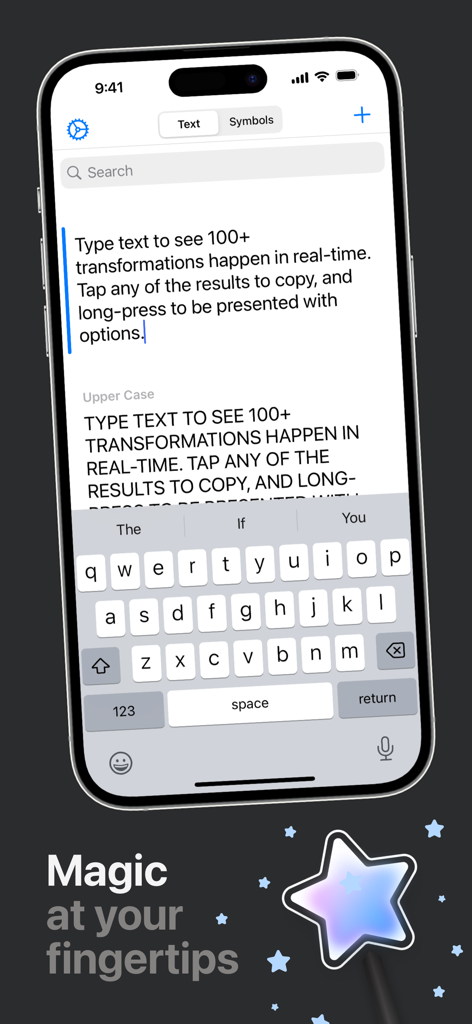
Interfaccia dell'app Textcraft per iOS che dimostra la trasformazione e la conversione del testo in tempo reale.

Interfaccia dell'app Textcraft per iOS che dimostra la trasformazione e la conversione del testo in tempo reale.

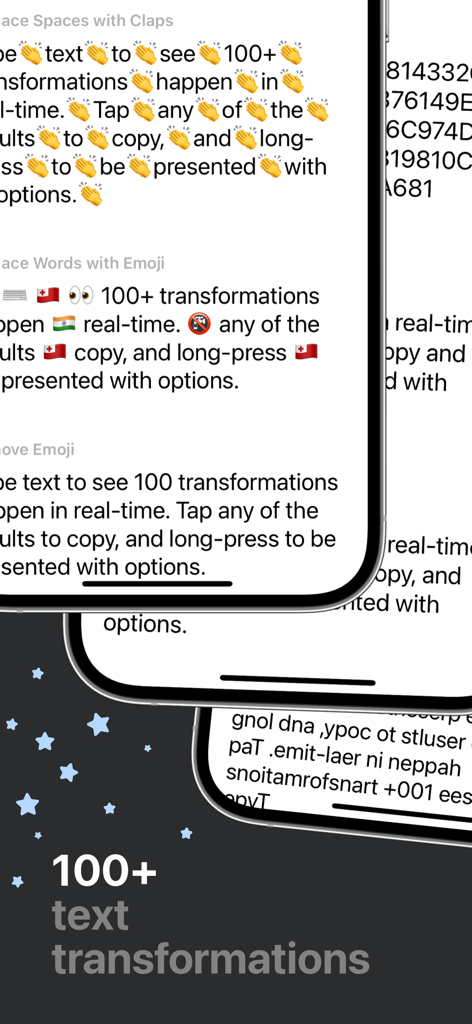
Interfaccia dell'app Textcraft che mostra diversi formati di trasformazione del testo su iPhone.

Interfaccia dell'app Textcraft che mostra diversi formati di trasformazione del testo su iPhone.

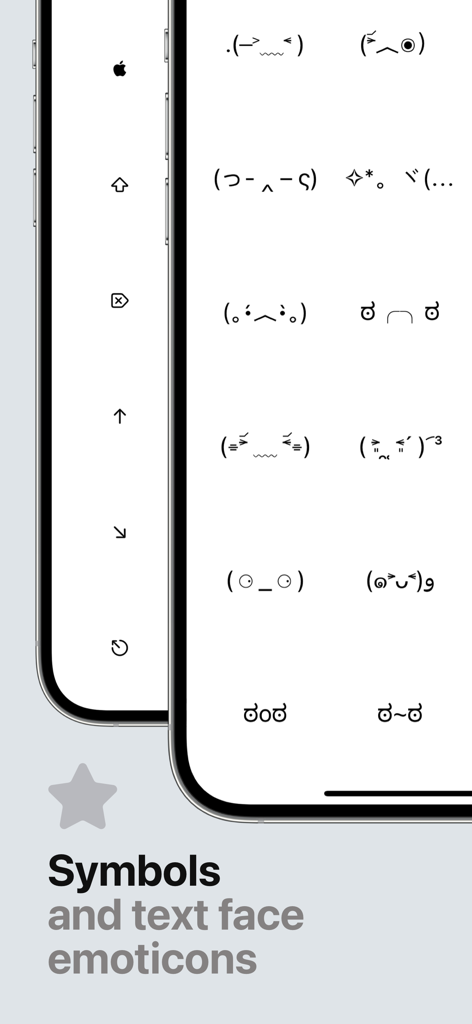
Interfaccia dell'app Textcraft che visualizza una libreria di emoticon e simboli ASCII per la copia.

Interfaccia dell'app Textcraft che visualizza una libreria di emoticon e simboli ASCII per la copia.

Padroneggia il tuo testo in tempo reale

Gli strumenti che rendono questa app unica, scelti da 1K+ utenti.

Esprimi il tuo stile unico

Dal corsivo estetico al mitico caso 'Mocking Spongebob', trasforma i tuoi messaggi per adattarli al tuo stile su ogni piattaforma social.

🧹

Raffinamento istantaneo dei dati

Pulisci senza sforzo testi disordinati rimuovendo HTML, eliminando interruzioni di riga o convertendo elenchi, facendoti risparmiare minuti di modifica manuale ogni giorno.

Prestazioni native iOS

Costruito per la velocità con supporto Dark Mode, Drag & Drop e Multi-finestra, garantendo un'esperienza fluida che sembra una parte nativa del tuo dispositivo.

Info sull'app

Tutto quello che devi sapere su Textcraft.

Descrizione

Textcraft is a magical utility that allows you to transform any text in real-time into a variety of 100+ different formats. WHY YOU’LL LOVE TEXTCRAFT: It’s built with iOS design guidelines in mind to look great in light and dark mode alike, along with containing multiple tints and themes to tweak the app your way. The intuitive ‘tap to copy’, and ‘long-press to share’ gestures coupled with the keyboard shortcuts also makes using the app super simple to pick up and use. Multi-window support coupled with Drag and Drop is also extremely useful for quickly and easily dragging text from other apps directly into the app for quick transforming. Whether this is to add hashtags to words social picture sharing sites, or mimic mocking Spongebob in conversation with your friends, there’s something for everyone. There are also various ASCII text face emoticons for quick and easy copying. Text transformations include: - Upper Case - Lower Case - Word Case - Alternating Case - Remove All Spaces - Remove Multiple Spaces - Add Spaces - Reversed Characters - Reversed Words - Replace Spaces with Underscores - Replace Underscores with Spaces - Replace Spaces with Dashes - Replace Dashes with Spaces - Replace Underscores with Dashes - Replace Dashes with Underscores - Initials - Initials with Dot Separation - Initials with Dash Separation - Initials with Underscore Separation - ROT13 - Bold - Italics - Underline - Strikethrough - Slashthrough - Upside Down - Bubble - Filled Bubble - Square - Filled Square - Cursive - Gothic - Monospace - Demonic - Satanic - Replace Spaces with Claps - Replace Words with Emoji - Remove Emoji - Remove Punctuation - Classified - Hashtags - Full Stops - Remove Links - Strip HTML - URL Encoded - URL Decoded - Base64 Encoded - Base64 Decoded - Replace Spaces with Pluses - Replace Pluses with Spaces - SHA256 Hex - SHA512 Hex - Remove Commas - Remove Single Quotes - Remove Double Quotes - Flatten List Using Commas - Flatten List Using Full Stops - Flatten List Using Pipes - Flatten List Using Underscores - Flatten List Using Pluses - Flatten List Using Forward Slashes - Flatten List Using Backslashes - Replace Single Quotes with Double Quotes - Replace Double Quotes with Single Quotes - Remove Vowels - Remove Consonants - Remove Numbers - Dashed to Bulleted List - Bulleted to Dashed List - MD5 Hash - Add Commas - Replace Line Breaks with \\n - Single Quotes Around Words - Double Quotes Around Words - Convert to Dashed List - Convert to Bulleted List - Convert Commas to Dashed List - Convert Commas to Bulleted List - Hex to Binary - Binary to Hex - 1337 - Superscript - Remove Line Breaks - Remove Line and Paragraph Breaks - Random Case - Sentence Case - Trim Whitespace - Trim Whitespace and New Lines - Small Caps - Lightning - Double Lightning - Double line breaks - Zalgo - Colons to dashes - Dashes to colons - Numeronym - Add percent encoding - Remove percent encoding - Remove citation numbers - Remove citations - Came case to spaces - Spaces to camel case - Numbers to text GET IN TOUCH: If you have any questions or feedback, please get in touch. Textcraft was created by an incredibly small team of one and I’d love to hear your thoughts. I’m available through Twitter @JPEGuin.

Ultima versione

1.2.0

Dimensione

7.4 MB

Data di lancio

31 dic 2020

Eleva ogni parola che digiti

Unisciti a migliaia di creatori e power user che utilizzano Textcraft per stilizzare i feed social e automatizzare la produttività. Ottieni oltre 100 trasformazioni di testo native su tutti i tuoi dispositivi.

Scarica su App Store

App information, icons, screenshots, and descriptions displayed on this page are sourced from the Apple App Store and are the property of their respective developers. Download estimates and rankings are based on MWM's proprietary models and may not reflect actual figures. This page is provided for informational and analytical purposes only.

Believe this page infringes your intellectual property? File a dispute