Tunetag MP3 Tag Editor

Tunetag MP3 Tag Editor


Scarica su App Store
Logo di Tunetag MP3 Tag Editor

Tunetag MP3 Tag Editor: Controllo professionale dei metadati per iOS

Prendi il controllo totale della tua collezione musicale locale. Modifica tag in batch, aggiorna copertine e automatizza i metadati utilizzando token di sostituzione direttamente dall'app File, senza bisogno di un computer desktop.

Scarica su App Store

Editore

Justin Xin

Categoria

Utilities

Download

13K+

Valutazione

4.0/5

Valutazioni totali

0

Lingue

2

La tua libreria, perfezionata

Scopri l'interfaccia usata da 13K+ utenti.
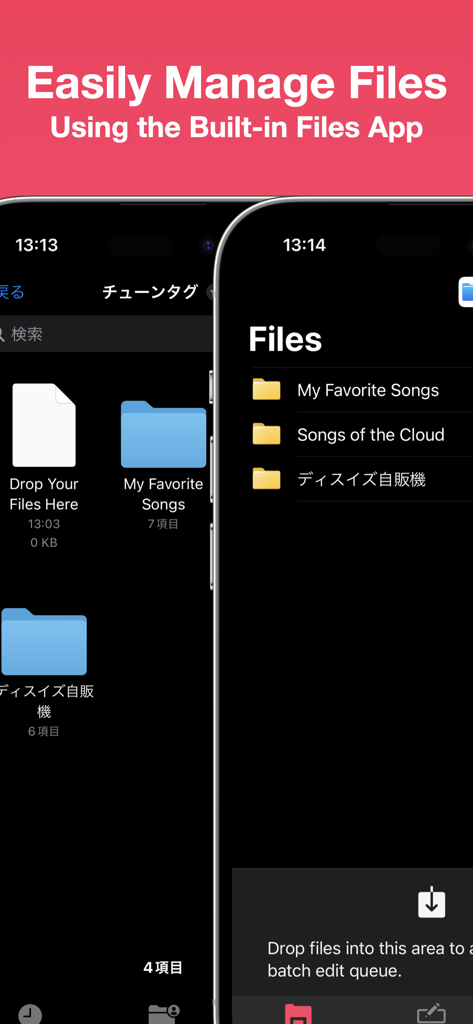
Screenshot di Tunetag MP3 Tag Editor che mostra l'integrazione con l'app File di iOS per la gestione delle cartelle musicali

Screenshot di Tunetag MP3 Tag Editor che mostra l'integrazione con l'app File di iOS per la gestione delle cartelle musicali

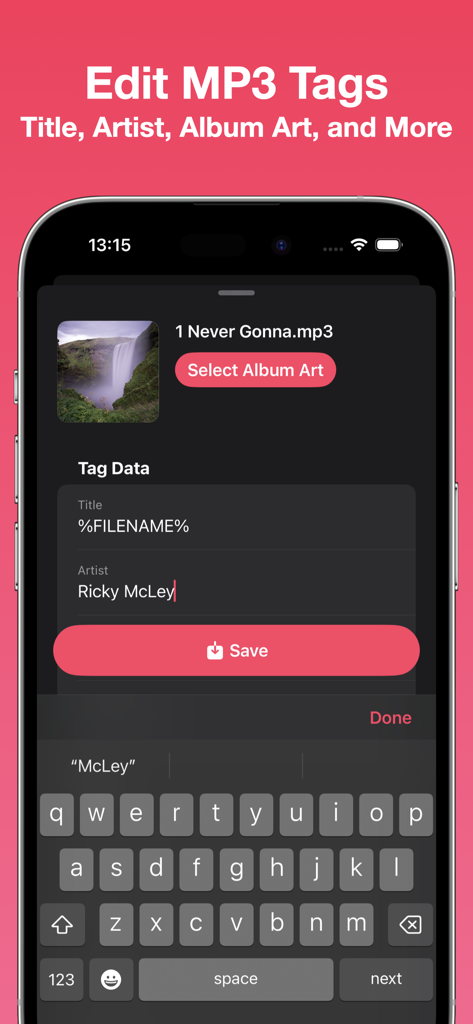
Interfaccia dell'editor di tag MP3 di Tunetag per la modifica dei metadati delle canzoni su iPhone

Interfaccia dell'editor di tag MP3 di Tunetag per la modifica dei metadati delle canzoni su iPhone

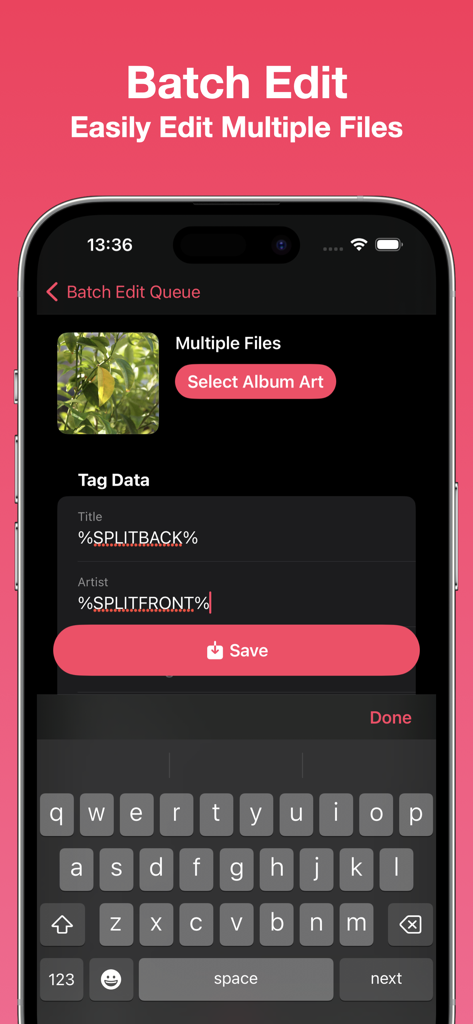
Schermata dell'app Tunetag per la modifica in batch dei metadati di più file musicali utilizzando token di automazione

Schermata dell'app Tunetag per la modifica in batch dei metadati di più file musicali utilizzando token di automazione

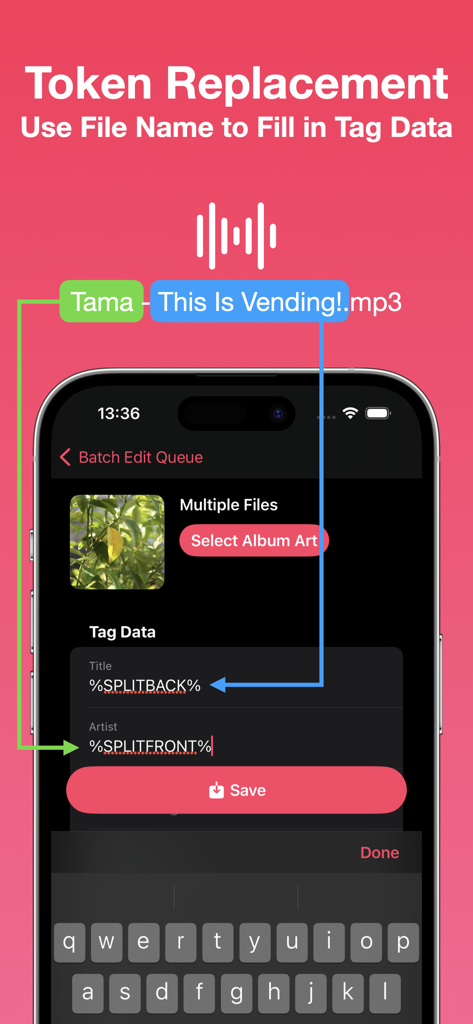
Interfaccia dell'app Tunetag che spiega come utilizzare i token dei nomi dei file per compilare automaticamente i tag dei metadati

Interfaccia dell'app Tunetag che spiega come utilizzare i token dei nomi dei file per compilare automaticamente i tag dei metadati

Perfeziona la tua libreria musicale locale

Gli strumenti che rendono questa app unica, scelti da 13K+ utenti.

🏷️

Controllo avanzato dei metadati

Modifica titoli, artisti e copertine ad alta risoluzione con facilità. Assumi la piena proprietà dell'aspetto e dell'organizzazione della tua libreria multimediale.

🪄

Automazione intelligente in batch

Risparmia ore con i token di sostituzione. Converti automaticamente nomi di file disordinati in metadati strutturati su centinaia di brani contemporaneamente.

📂

Integrazione nativa con File

Abbandona la dipendenza dal computer. Accedi e modifica file MP3 direttamente dall'app File di iOS, da iCloud o dai tuoi SSD USB-C esterni.

Info sull'app

Tutto quello che devi sapere su Tunetag MP3 Tag Editor.

Descrizione

Edit your MP3 files' tags easily with Tunetag. - File Management Tunetag supports file management directly from the built-in iOS/iPadOS Files app, so you never have to fumble with share sheets or AirDrop.  Move your downloaded MP3 files directly to the Tunetag folder in the 'On My iPhone/On My iPad' folder, and Tunetag will automatically pick them up. If you're not sure where to go, simply tap the 'Open Files App' button in-app. Need to open files and folders from an external folder or drive? Use the Batch Editor to open them. - Tag Editor Tunetag supports editing the following fields in MP3 files: Title, Artist, Album, Album Artist, Year, Track Number, Genre, Composer, Disc Number. You can also select an album art to attach to your MP3 files. Additionally, you can use replacement tokens that use information from a file's file name to fill out tag data. - Batch Editor You can easily edit multiple files at one go, changing only the fields you want to change. The same replacement tokens you can use in the Tag Editor can also be used here. Have many files? Select files or a folder to add them to the Batch Editor, or long press a folder to add files recursively.  You can also drag files from the Files app directly into the Batch Editor. Note: Editing many files at once, or using large album art images may result in longer save times.

Ultima versione

1.3

Dimensione

4.4 MB

Data di lancio

13 set 2023

Perfeziona la tua libreria musicale, senza PC.

Unisciti a oltre 13.000 collezionisti di musica e utenti esperti che organizzano le loro collezioni audio in movimento. Scarica Tunetag oggi stesso e prendi il pieno controllo dei tuoi metadati.

Scarica su App Store

App information, icons, screenshots, and descriptions displayed on this page are sourced from the Apple App Store and are the property of their respective developers. Download estimates and rankings are based on MWM's proprietary models and may not reflect actual figures. This page is provided for informational and analytical purposes only.

Believe this page infringes your intellectual property? File a dispute