Advancer AD20

Advancer AD20

ダウンロード: App Store
ロゴ: Advancer AD20

Advancer AD20:プロのカー診断があなたの指先に

チェックエンジンランプの推測はやめましょう。リアルタイムのヘルスチェック、メンテナンスランプのリセット、詳細なエンジンデータでDIY精神を向上させ、あらゆる旅で時間とお金を節約しましょう。

ダウンロード: App Store

開発元

Shenzhen Yunjia Future Intelligent Technology Co., Ltd.

カテゴリ

Utilities

ダウンロード

1K+

ユーザー評価

3.1/5

評価数

0

対応言語

14

プロの診断があなたのポケットに

このインターフェースを利用する 1K+ 人のユーザー.

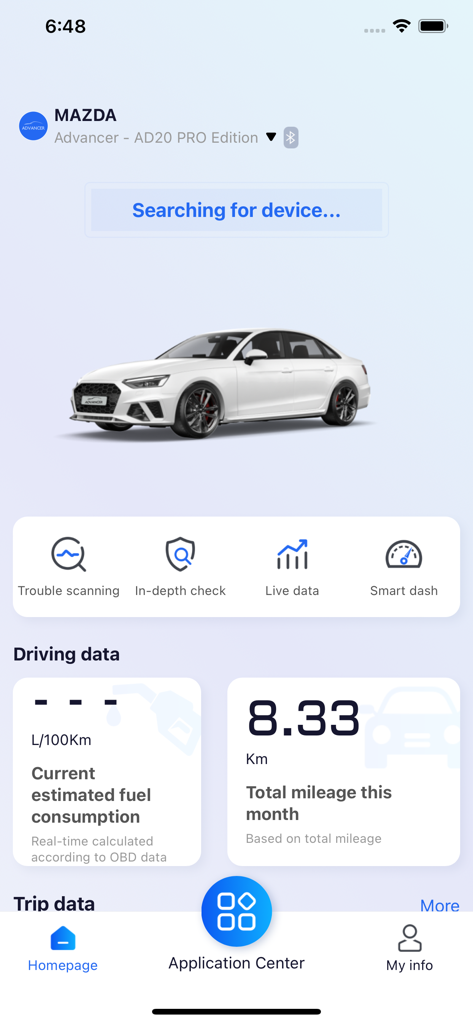
Advancer AD20アプリのホームページに、マツダ車の車両診断、ライブ運転データ、燃料消費量が表示されています。

Advancer AD20アプリのホームページに、マツダ車の車両診断、ライブ運転データ、燃料消費量が表示されています。

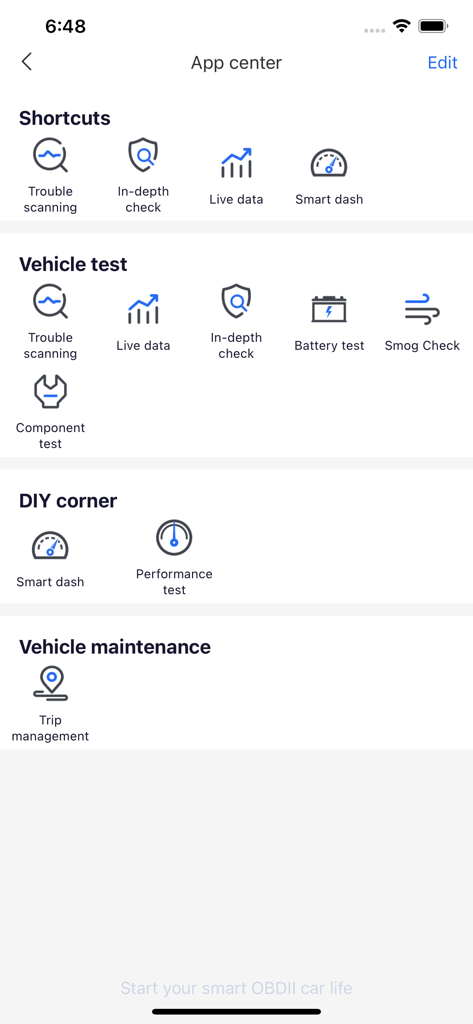
Advancer AD20アプリの中央に、車両テスト、診断、メンテナンスツールのカテゴリが表示されています。

Advancer AD20アプリの中央に、車両テスト、診断、メンテナンスツールのカテゴリが表示されています。

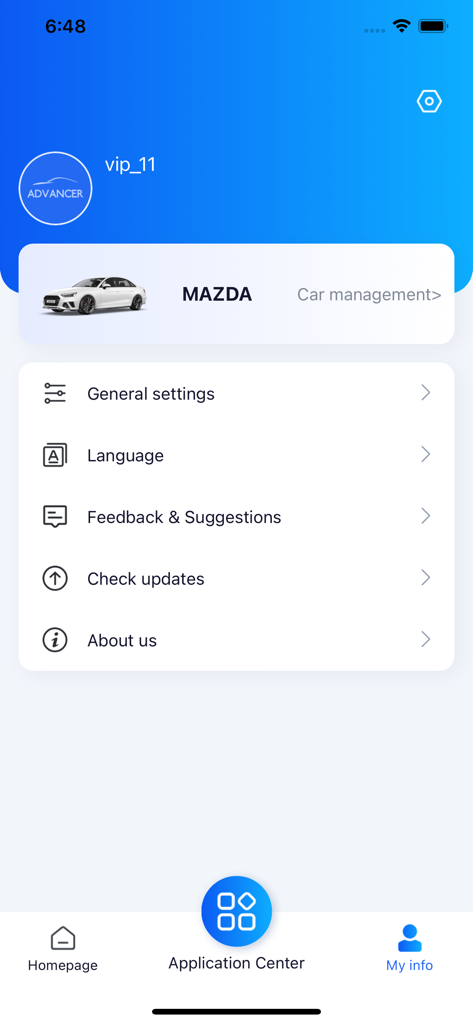
Advancer AD20アプリの画面に、マツダ車のユーザープロファイル情報と車両管理が表示されています。

Advancer AD20アプリの画面に、マツダ車のユーザープロファイル情報と車両管理が表示されています。

あなたの車の健康状態をマスターする

このアプリを際立たせるツール、 1K+ 人のユーザーが選択.

🛡️

整備士の不安を解消

「チェックエンジン」ランプを瞬時に解読し、メンテナンスのアドバイスを得て、修理工場で自信を持って過剰請求を回避できます。

🔧

DIYメンテナンスコントロール

車のサービスを自分で管理しましょう。点検整備後にオイル交換時期やメンテナンスリマインダーを自分でリセットし、高額なディーラーへの訪問をスキップしましょう。

📈

ライブロード対応モニタリング

バッテリーの状態、冷却水レベル、燃費をリアルタイムで追跡し、毎日の通勤や長旅に常に車両が対応できるようにします。

アプリについて

について知っておくべきこと Advancer AD20.

説明

Advancer Smart OBD Dongle (AD20/AD20 Pro) is a smart diagnosis terminal that communicates with your iOS devices via BT 5.0. With the Advancer app, AD20 provides services like vehicle health check, diagnosis, driving habits analysis for car owners. Help the vehicle owner to check at any time whether the vehicle is out of order, display the cause of the fault and maintenance suggestions, monitor the status of the vehicle in real time and alert the safety hazards early to ensure your driving safety 1)OBD-II Diagnosis Advancer AD20 can read and categorize the fault codes (DTCs) that storage inside the vehicle ECU via standard OBD-II protocols. 2)In-depth Check In-depth check function allows you to do thorough check on vehicle systems like engine, powertrain, brakes, steering, safety, infotainment and so on, which helps owners to know the health condition of the car clearly and provide safe and comfortable driving experience on travels. Note: In-depth check on all systems is only supported on AD20 Pro; AD20 supports in-depth check on engine only. 3)Live Data When the car is started, Advancer will provide and demonstrate detailed vehicle status like battery voltage, engine revolution speed, coolant temperature, engine load, fuel trimming and so on. This will help you to get the real-time working conditions of the car. 4)Maintenance Light Reset Reset the maintenance counter and turn off the maintenance light after finishing maintenance. For your driving safety, make sure you have followed the manual when doing maintenance to your own car. Note: Maintenance light is a reminder set by car manufacturer, which reminds drivers to do maintenances when needed. When the reminder is on, the car will show info on the dashboard screen, or simply shows a light. 5)Trip Recorder When driving, Advancer will record the index like average speed, fuel consumption, mileage, max engine revolution speed, max coolant temperature and shows them on the app. This will help you to know vehicle status and fuel consumption info on the entire trip. 6)Driving Habits Monitor With the G-sensors inside Advancer, all the sharp turns, emergency brakes and sudden accelerations will be recorded and shown on the app after analyzed. This function will provide data support if you are willing to improve your driving skills.

最新バージョン

1.15

サイズ

426.4 MB

リリース日

2022年12月6日

エンジンランプと高額な修理のストレスから解放されましょう

自分で車両を診断してお金を節約している何千人もの自立したドライバーに加わりましょう。今すぐAdvancer AD20をダウンロードして、iPhoneをプロ仕様の整備士に変え、安心してお出かけください。

ダウンロード: App Store
FAQ

よくある質問

について知っておくべきこと Advancer AD20

Advancer AD20スマートOBDドングルとは何ですか?

Advancer AD20は、Bluetooth 5.0を介してiOSデバイスと通信するスマートOBDドングルです。Advancerアプリを通じて車両の健康状態チェック、診断、運転習慣分析を提供し、包括的な車両監視を実現します。

Advancerアプリにはどのようなコア機能がありますか?

Advancerアプリは、OBD-II診断、詳細な車両チェック、ライブデータ監視、メンテナンスライトリセット、トリップ記録、運転習慣分析を提供します。これらの機能は、ユーザーが車両の状態とパフォーマンスを理解するのに役立ちます。

Advancer AD20はどのように車両診断を実行しますか?

Advancer AD20は、標準OBD-IIプロトコルを介して車両のECUに保存されている障害コード(DTC)を読み取り、分類することで診断を実行します。障害の原因とメンテナンスの提案をアプリに直接表示します。

Advancer AD20 ProはAD20よりも詳細なチェックをサポートしていますか?

はい、Advancer AD20 Proは、エンジン、ブレーキ、ステアリングを含むすべての車両システムの詳細なチェックをサポートしています。標準のAD20モデルは、エンジンシステムの詳細なチェックのみをサポートしています。

Advancerアプリはリアルタイムの車両パフォーマンスデータを表示できますか?

はい、Advancerアプリは、車が始動したときのリアルタイムの車両状態を示すライブデータを提供します。これには、バッテリー電圧、エンジン速度、冷却水温度、エンジン負荷、燃料トリミング情報が含まれます。

Advancer AD20は運転習慣の分析にどのように役立ちますか?

Advancer AD20は、内蔵のGセンサーを使用して、急カーブ、緊急ブレーキ、急加速を記録します。次に、アプリがこのデータを分析して表示し、運転スキルの向上に役立つ洞察を提供します。

Advancerアプリにはメンテナンスライトのリセット機能が含まれていますか?

はい、Advancerアプリにはメンテナンスライトのリセット機能が含まれています。ユーザーが車両の必要なメンテナンスを完了した後、メンテナンスカウンターをリセットし、ダッシュボードのリマインダーライトを消灯させることができます。

Advancerアプリは、トリップごとにどのような運転統計を記録しますか?

Advancerアプリは、平均速度、燃料消費量、走行距離、エンジンの最高回転速度、冷却水温度の最高値など、トリップごとのさまざまな運転統計を記録します。これにより、トリップの効率を監視できます。

Advancer AD20はiOSデバイスとの接続にどのような種類の接続を使用しますか?

Advancer AD20は、iOSデバイスとの通信にBluetooth 5.0を使用します。これにより、車両データをAdvancerアプリに転送して分析するための、安定した効率的なワイヤレス接続が保証されます。

Advancerアプリの「詳細チェック」のようなコア診断機能はどこにありますか?

「詳細チェック」のようなコア診断機能は、Advancerアプリのホームページからショートカットとしてアクセスできます。また、「アプリケーションセンター」の「車両テスト」セクション内にも、詳細な操作のために配置されています。

App information, icons, screenshots, and descriptions displayed on this page are sourced from the Apple App Store and are the property of their respective developers. Download estimates and rankings are based on MWM's proprietary models and may not reflect actual figures. This page is provided for informational and analytical purposes only.

Believe this page infringes your intellectual property? File a dispute