avAltimeter

avAltimeter

ダウンロード: App Store
ロゴ: avAltimeter

avAltimeter:プロ仕様の気圧高度計と飛行の安全性

パイロットのための精密デジタル高度計。デバイス内蔵のBosch気圧センサーを活用し、コールスマン調整、密度高度計算、FAA酸素警告機能を備えています。

ダウンロード: App Store

開発元

Aviametrix, LLC

カテゴリ

Lifestyle

ダウンロード

13K+

ユーザー評価

4.6/5

評価数

0

対応言語

1

一目でわかる精度

このインターフェースを利用する 13K+ 人のユーザー.

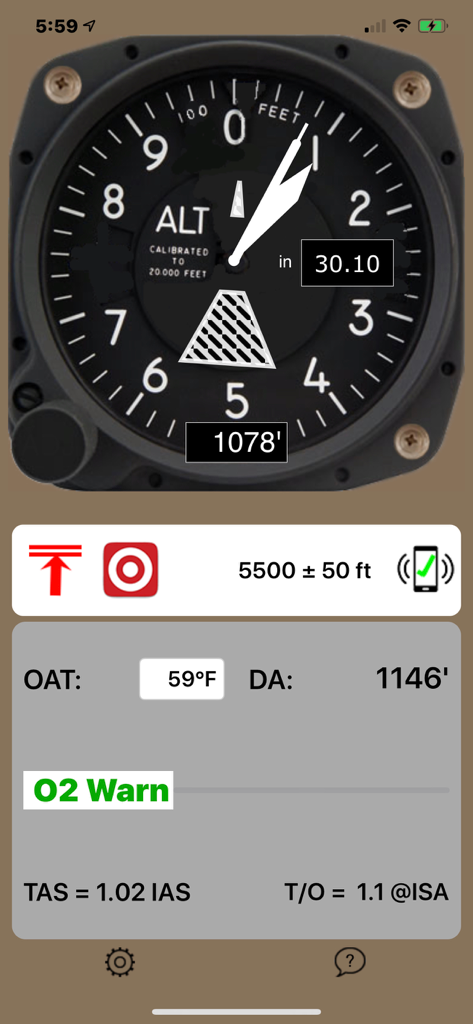
高度と密度高度データを表示するデジタル航空高度計インターフェース

高度と密度高度データを表示するデジタル航空高度計インターフェース

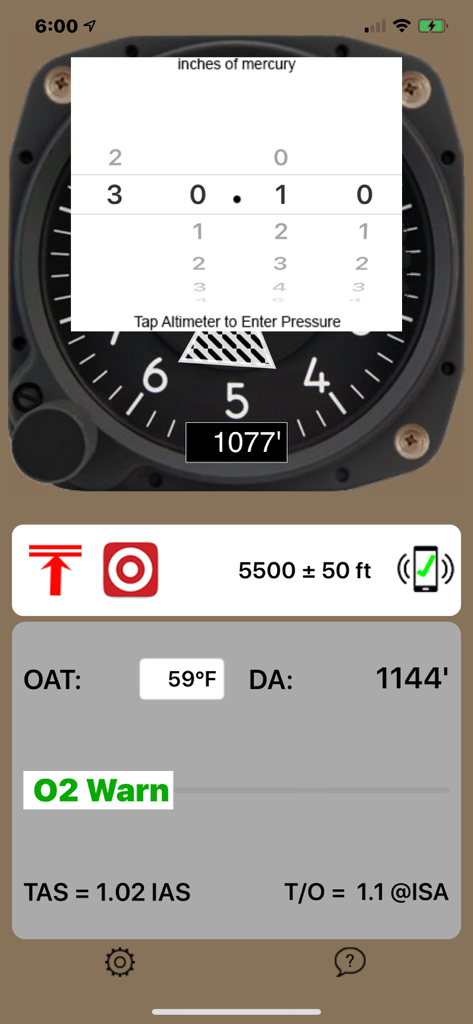
気圧設定と密度高度データを表示するavAltimeterアプリ画面

気圧設定と密度高度データを表示するavAltimeterアプリ画面

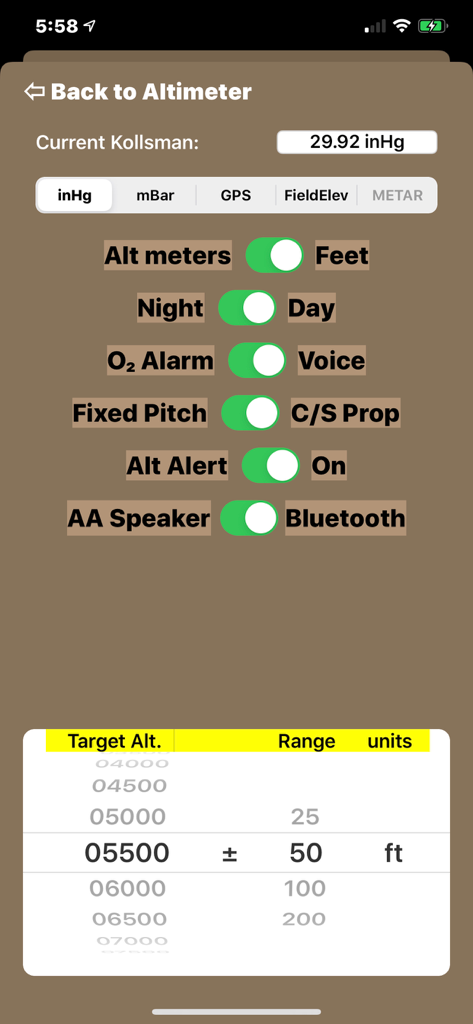
高度単位、酸素アラーム、ナイトモードの設定オプションを表示するavAltimeterアプリの設定画面

高度単位、酸素アラーム、ナイトモードの設定オプションを表示するavAltimeterアプリの設定画面

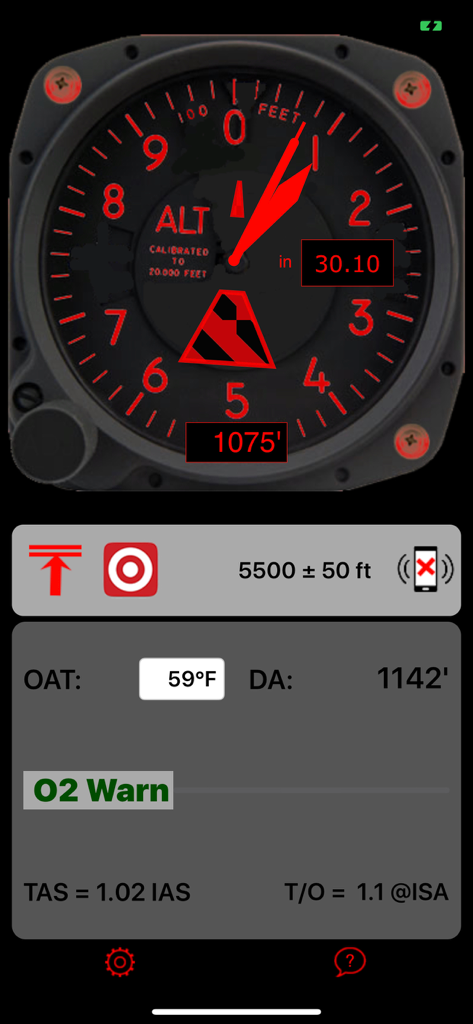
赤いナイトモードでデジタル航空高度計のダイヤルと密度高度データを表示するavAltimeterアプリのインターフェース

赤いナイトモードでデジタル航空高度計のダイヤルと密度高度データを表示するavAltimeterアプリのインターフェース

コックピットのためのプロ仕様デジタル計器

このアプリを際立たせるツール、 13K+ 人のユーザーが選択.

📉

真の気圧精度

GPSによる推定値はもう不要です。内蔵のBoschセンサーと手動のコールスマン窓調整により、現在の気圧設定と同期させ、信頼性の高い気圧高度を確認できます。

📐

スマートな性能指標

密度高度、真対気速度、推定離陸距離を自動計算。高温や高標高環境での安全な運航をサポートします。

🚨

重要な安全モニタリング

飛行に集中してください。アプリが高度を追跡し、FAAが定める酸素使用基準に達した際に自動的に警告を発します。

アプリについて

について知っておくべきこと avAltimeter.

説明

Simple and Effective! avAltimeter is a digital, aviation-oriented altimeter. It is the only altimeter app which has the Kollsman adjustment so you can adjust the altimeter to the current barometer setting, or to 29.92 inches of mercury for the pressure altitude. Need a quick backup for your panel? avAltimeter uses the latest Apple and Bosch technology built into the iPhone 6 and later models. Earlier models of the iPhone and iPads before iPad Air 2 or Mini 4 do not have the required pressure sensing hardware and do not work. All iPad Pro models work too! Smart! avAltimeter calculates the temperature sensitive Density Altitude. Based on the Density Altitude, the app also calculates True Airspeed as a function of Indicated Airspeed. avAltimeter calculates a rough estimate of the increased required Take-Off distance from that at seal level from increased Density Altitude as well. You can even set the App to obtain automatically obtain the latest barometric pressure from the closest reporting airport. The barometer setting will auto-update every 20 minutes, or if you move more than 25 miles from your previous location. When using the live METAR update feature, the App will display which airport pressure it is using, and how old the reading is. This feature requires an internet connect and active GPS, so it will not work well if you are flying inside a jet. In a jet, the App works great to track the cabin pressure if you just leave the barometric pressure set at 29.92 inHg. Increased Safety! Know your oxygen requirements. avAltimeter tracks your altitude and provides a warning to use oxygen when you exceed FAA mandated limits. Customizable! avAltimeter is customizable. Choose Imperial or Metric units. Set the Altimeter Setting through a popup Kollsman window or by directly setting the field altitude. The field altitude can be set manually or automatically by GPS. Select Day or Night illumination. Turn the audio alarms for oxygen on or off. Improve the take-off performance estimate by selecting your propellor type: constant speed or fixed pitch. Sensitive! The Bosch sensor chip built in to the iPhone 6 and later is sensitive to changes in altitude of three feet or less and has an estimated range from -1500 feet to over 20,000 feet. Unique! Unlike other aviation apps, avAltimeter uses actual barometric pressure to calculate altitude, not a GPS estimate. The barometer is only available in iPhone 6 and later or the iPad iPad Air 2, Mini 4 as well as all iPad Pro! Legal Disclaimer This is an app, not an FAA approved flight instrument. It has not been certified as meeting the relevant TSO specifications. This app can not be used as a primary flight instrument.

最新バージョン

1.25

サイズ

1.9 MB

リリース日

2016年6月8日

精密デジタル高度計をフライトバッグに加えましょう

内蔵のBosch気圧センサーを利用して、リアルタイムの気圧高度、密度高度、FAA酸素警告を取得。iPhoneやiPadでコールスマン調整可能な計器の信頼性を手に入れましょう。

ダウンロード: App Store

App information, icons, screenshots, and descriptions displayed on this page are sourced from the Apple App Store and are the property of their respective developers. Download estimates and rankings are based on MWM's proprietary models and may not reflect actual figures. This page is provided for informational and analytical purposes only.

Believe this page infringes your intellectual property? File a dispute