
このページはアプリまたはその開発者の公式ページではなく、情報提供および論評を目的として作成された独立した編集出版物です。明示的に別段の記載がない限り、アプリおよびその開発者は、MWM、Apple、Google Play、アプリのパブリッシャー、またはアプリの開発者と提携、承認、後援、認可、またはその他の公式的な関係はなく、このページのいかなる内容も、アプリがMWMのサービスを使用して開発されたことを意味するものではありません。すべての商標、ロゴ、スクリーンショット、その他のコンテンツはそれぞれの所有者の財産です。


ダウンロード
50M+ユーザー評価
評価数
2.0M開発元
カテゴリ
Lifestyle対応言語
73最新バージョン
1.7.41サイズ
931.6 MBリリース日
2017年6月20日SmartThings アプリの機能分析
スマートホーム統合の核心を紐解く
リモートコントロールと監視
ユーザーは外出先からでも自宅のスマートデバイスを操作し、状況を確認することが可能です。
自動化ルーチンの設定
時間、天気、デバイスの状態に基づいた自動化ルーチンを構築することで、自宅がスムーズに機能するように設定できます。
マルチブランド互換性とシーン設定
SmartThingsは多様なスマートホームブランドと互換性を持ち、ユーザーは異なるメーカーのデバイスを連携させ、特定の状況に合わせて一括で動作する「シーン」を設定できます。
音声アシスタント連携
Googleアシスタントを含む音声アシスタントを通じて、スマートデバイスを音声で操作することが可能です。
エネルギー監視と節約
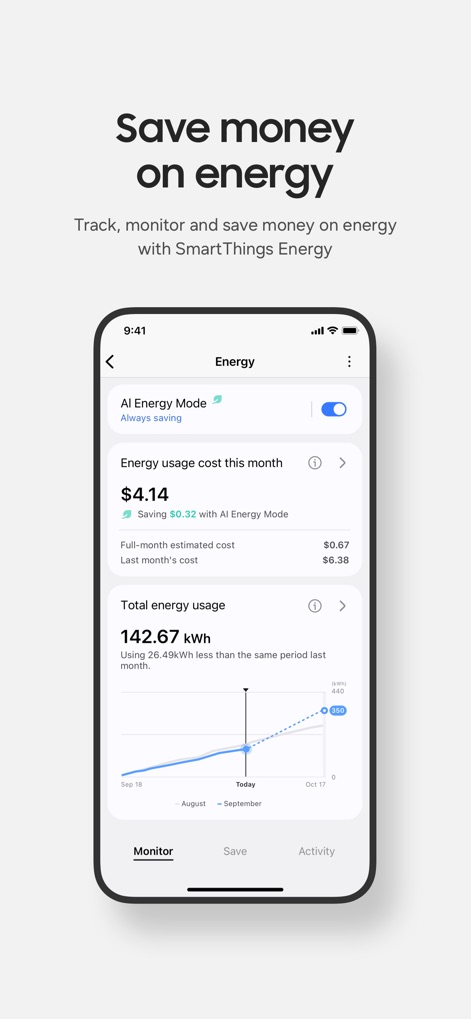
SmartThings Energyを利用して、エネルギー消費を追跡、監視し、AI節約モードやオフピーク時間でのデバイス稼働スケジュール設定により、電気代を節約できます。
自動通知による状態更新
デバイスの状況に関する自動通知を受信することで、ユーザーは常に自宅の状態を把握できます。
複数ユーザーによる共有制御
ユーザーは、他の家族や同居人にデバイスへのアクセス権を付与し、共同でスマートホームを管理できます。
SmartThings Cookingによるレシピ提案
SmartThings Cookingは、食事キット、ワイン、肉をスキャンすることでレシピの提案を受け取り、献立計画、買い物、食事の準備をサポートします。
よくある質問
について知っておくべきこと SmartThings
What is SmartThings?
SmartThings is an app designed to quickly and easily connect and control smart home devices from various brands. It allows users to manage their smart home gadgets, including Samsung Smart TVs and appliances, all from one application.
What smart home brands are compatible with SmartThings?
SmartThings is compatible with hundreds of smart home brands. These include Samsung, Ring, Nest, and Philips Hue, allowing users to control diverse devices from a single app.
Can I control my Samsung Smart TV with SmartThings?
Yes, you can control your Samsung Smart TV through the SmartThings app. It integrates Samsung's smart TVs and smart home appliances, along with other compatible devices, into one central control hub.
Does SmartThings support voice control for devices?
Yes, SmartThings supports voice control for your smart devices. You can use voice assistants, including Google Assistant, to manage and interact with your connected smart home ecosystem.
How does SmartThings Energy help save money?
SmartThings Energy helps save money by tracking and monitoring energy usage. It offers features like AI saving mode and allows scheduling devices during off-peak hours to reduce costs and manage energy consumption efficiently.
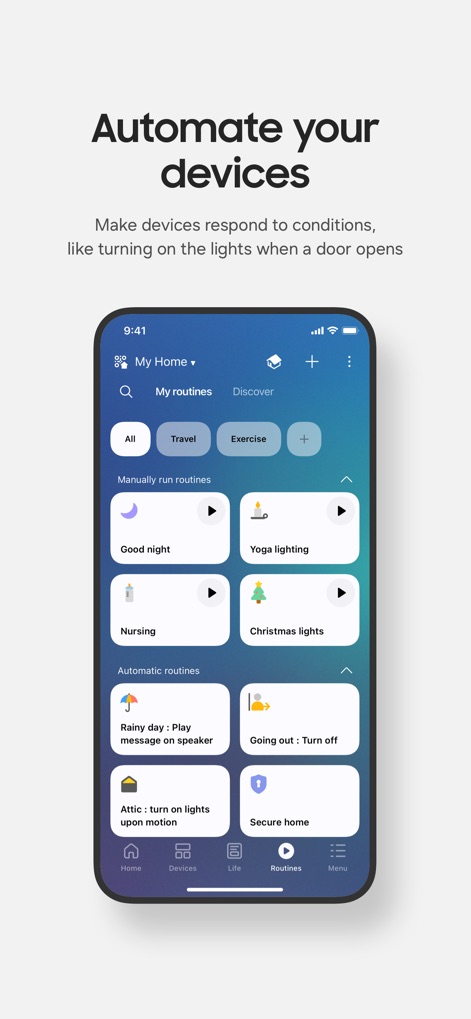
Can I automate routines for my devices in SmartThings?
Yes, SmartThings allows you to build routines that automate your devices. These routines can be triggered by conditions such as time, weather, or device status, making your home run smoothly in the background.
What are the system requirements for the SmartThings app on iOS?
The SmartThings app requires iOS 17.0 or later. It is compatible with iPhone XR or later models and iPad 6 or later models to ensure full functionality.
Can SmartThings provide recipe recommendations and cooking assistance?
Yes, SmartThings offers cooking assistance through SmartThings Cooking. It provides recipe recommendations by scanning meal kits, wine, and meat, and helps plan, shop, and prep meals.
Does SmartThings allow shared control of smart devices?
Yes, SmartThings allows for shared control of smart devices. You can grant access to other users, enabling multiple people to manage and operate the connected smart home devices.
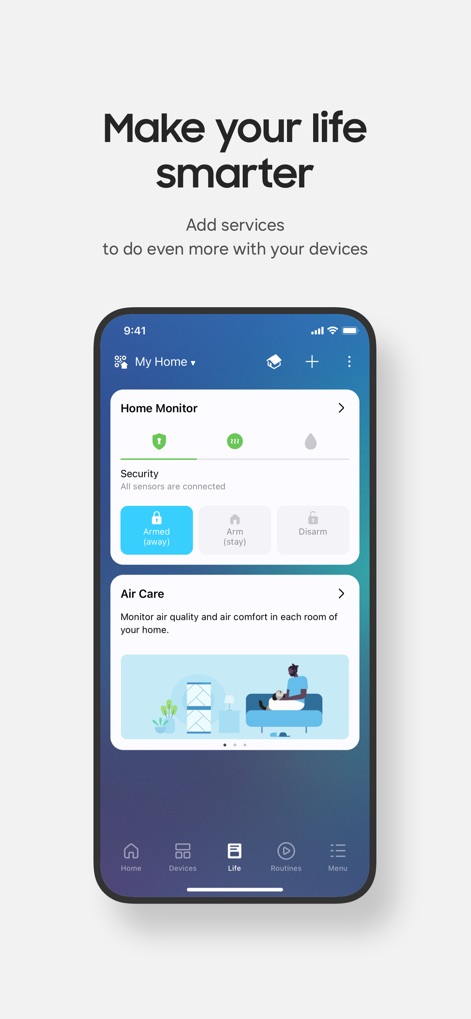
Can I monitor my home's security and air quality using SmartThings?
Yes, you can monitor your home's security and air quality with SmartThings. The "Life" tab features modules like Home Monitor for security and Air Care for air quality monitoring.
What is the 3D Map View feature in SmartThings?
The 3D Map View feature in SmartThings provides intuitive controls of your devices. It uses maps that resemble your actual home, offering a visual and organized way to manage your smart home layout.
以下のスクリーンショットと説明は、アプリの公式ストアリスティングから直接取得されたものであり、アプリ開発者の所有物です。
アプリストア
スクリーンショット
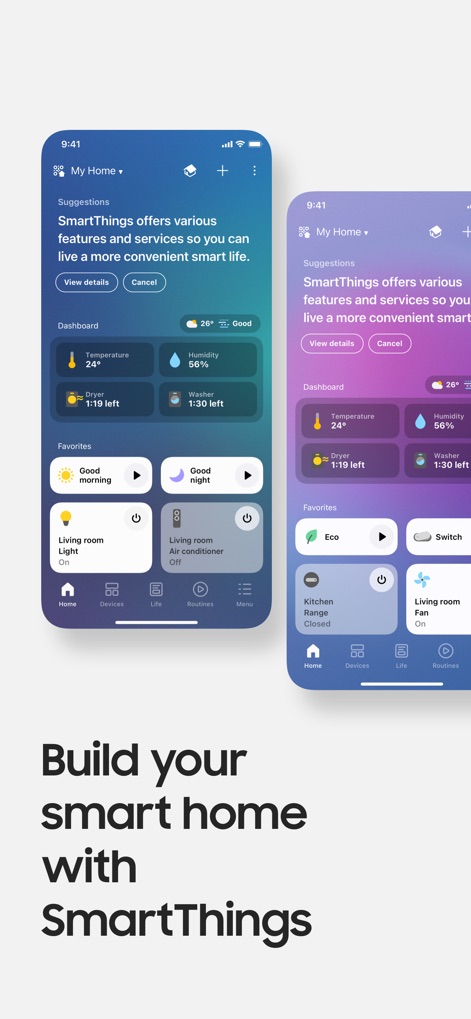
ホームを一元管理
このアプリは「Suggestions(提案)」機能により、ユーザーの生活をさらに便利にするための情報を提供し、「Dashboard(ダッシュボード)」では、温度や湿度などのリアルタイムデータを確認できます。
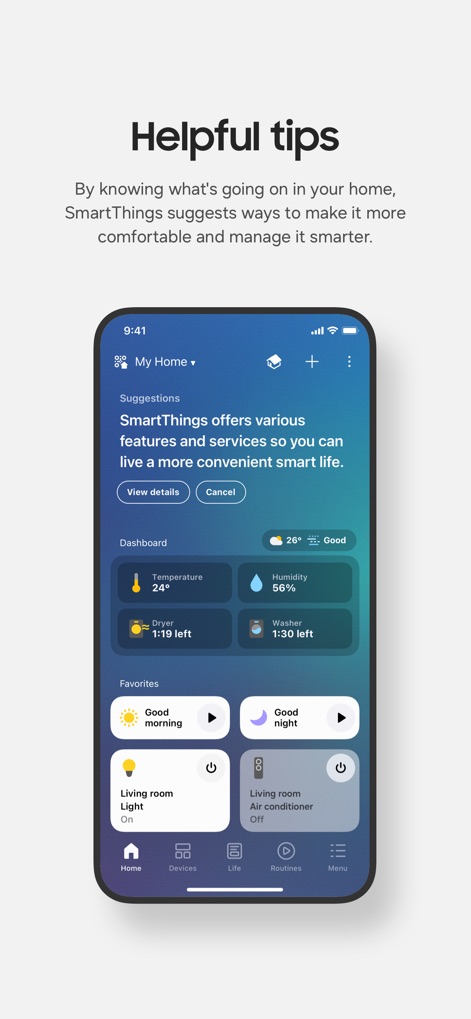
スマートな提案
「Suggestions(提案)」機能がユーザーのスマートホーム利用をサポートし、「Favorites(お気に入り)」セクションでは、「Good morning」や「Good night」といったよく使うアクションへ素早くアクセスできます。
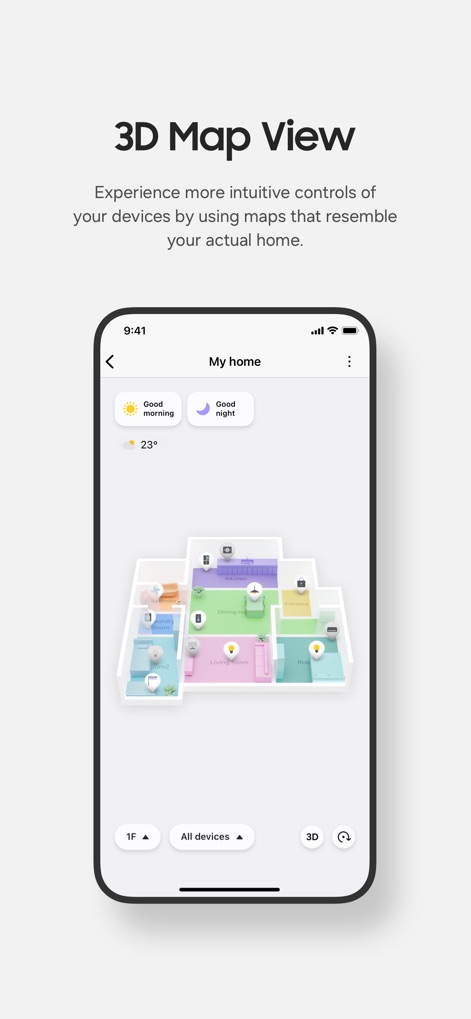
直感的な3Dマップ
本ツールは、実際の家を模した「3Dマップビュー」でデバイスの配置を視覚化し、「1F」や「All devices」などのフィルターで表示を切り替えることで、直感的な操作を可能にします。
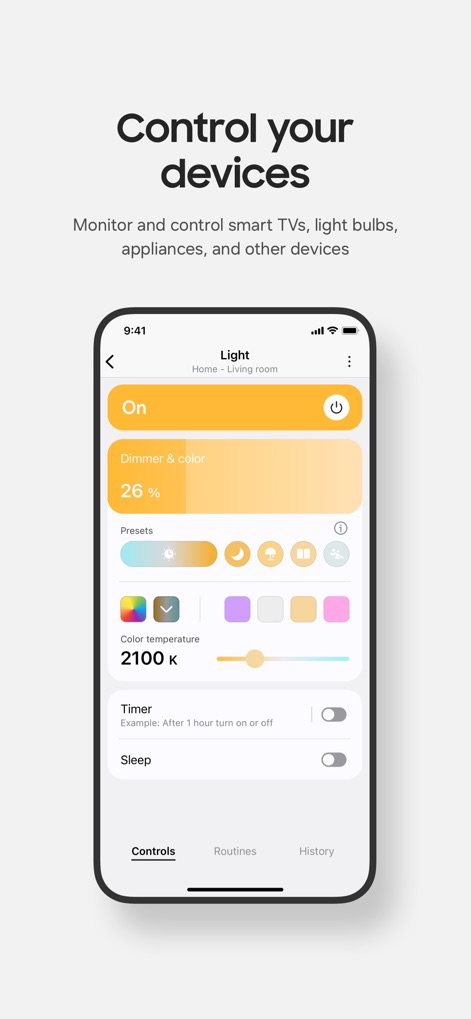
デバイスを自在に制御
ユーザーは「Dimmer & color(調光・調色)」機能を使って照明の明るさと色温度を細かく調整でき、複数の「Presets(プリセット)」からお気に入りの設定を簡単に選択できます。
エネルギーを節約
SmartThings Energyでは、「Energy usage cost this month(今月のエネルギー使用料金)」で費用を明確に表示し、「Total energy usage(総エネルギー使用量)」のグラフで過去の消費傾向を視覚的に把握できます。
スマートな生活機能
「Home Monitor(ホームモニター)」で家のセキュリティ状態を一目で確認でき、「Air Care(空気ケア)」機能を通じて室内の空気品質に関する情報が得られ、より快適な居住空間を実現します。
デバイスを自動化
「Manually run routines(手動実行ルーティン)」では、「Good night」や「Yoga lighting」といったシーンをワンタップで実行でき、「Automatic routines(自動ルーティン)」では、天気や時間に基づいたスマートな自動化を設定できます。
説明
Download
類似アプリ
似た機能とユーザー体験を持つアプリ

TP-Link Tapo
TP-Link Systems Inc.

Дом с Алисой
DIRECT CURSUS COMPUTER SYSTEMS TRADING LLC

VeSync
Vesync Technology Corporation

Kasa Smart
TP-Link Systems Inc.

ecobee
ecobee Ltd.

Hubspace
Afero, Inc.

ADT Control ®
ADT LLC

First Alert by Resideo
Resideo Technologies, Inc.

Mibo Smart: Casa Inteligente
Intelbras S.A. Ind. de Telecom. Elet. Brasileira
このページはアプリまたはその開発者の公式ページではなく、情報提供および論評を目的として作成された独立した編集出版物です。明示的に別段の記載がない限り、アプリおよびその開発者は、MWM、Apple、Google Play、アプリのパブリッシャー、またはアプリの開発者と提携、承認、後援、認可、またはその他の公式的な関係はなく、このページのいかなる内容も、アプリがMWMのサービスを使用して開発されたことを意味するものではありません。すべての商標、ロゴ、スクリーンショット、その他のコンテンツはそれぞれの所有者の財産です。