
このページはアプリまたはその開発者の公式ページではなく、情報提供および論評を目的として作成された独立した編集出版物です。明示的に別段の記載がない限り、アプリおよびその開発者は、MWM、Apple、Google Play、アプリのパブリッシャー、またはアプリの開発者と提携、承認、後援、認可、またはその他の公式的な関係はなく、このページのいかなる内容も、アプリがMWMのサービスを使用して開発されたことを意味するものではありません。すべての商標、ロゴ、スクリーンショット、その他のコンテンツはそれぞれの所有者の財産です。


Microsoft Teams
散らばる情報、錯綜する会話。その全てを一手に掌握し、デジタルチームを絶対的に統制する。
ダウンロード
250M+ユーザー評価
評価数
11.4M開発元
カテゴリ
Business対応言語
48最新バージョン
8.5.1サイズ
450.0 MBリリース日
2016年11月2日Microsoft Teams: 多機能型コラボレーションプラットフォーム分析
リモートワークとハイブリッドワーク環境における生産性と連携を強化する主要機能
統合型コミュニケーションとコラボレーションプラットフォーム
本アプリは、チャット、チャンネル、会議、通話、イベント、カレンダーといった複数の機能を一箇所に集約し、ユーザーは効率的なコミュニケーションとコラボレーションを実現できます。リモートワークやハイブリッドワーク環境での生産性向上に貢献します。
情報アクセス管理とエンタープライズレベルのセキュリティ
本アプリは、データへのアクセスを管理し、適切な人物が適切な情報にアクセスできるようにします。Microsoft 365から期待されるエンタープライズレベルのセキュリティとコンプライアンスが提供され、ユーザーに安心感を与えます。
セキュアなオーディオおよびビデオ会議
ユーザーは、コミュニティ、チームメイト、家族、友人との間で安全な環境でオーディオおよびビデオ通話に参加できます。高セキュリティは、重要なビジネスコミュニケーションにおいて特に重要です。
ドキュメントの共同編集とクラウドストレージ
本ツールは、ユーザーがドキュメントをリアルタイムで共同編集し、ファイルや写真を内蔵のクラウドストレージに安全に保存することを可能にします。これにより、情報共有とプロジェクト管理が効率化されます。
チームとチャネルによる情報整理
ユーザーは、特定のトピックやプロジェクトごとに会話を整理するためのチームとチャネルを作成できます。これにより、情報の散逸を防ぎ、必要な情報に素早くアクセスすることが可能になります。
タスク管理機能
本アプリには、タスクリストを使用してプロジェクトと計画を管理する機能が備わっています。ユーザーはタスクの割り当て、期限設定、完了済みアイテムのチェックが可能で、チーム全員が同じ進捗状況を共有できます。
簡単な会議設定と招待
ユーザーは数秒で会議を設定し、リンクやカレンダー招待を共有することで誰でも招待できます。この機能は、迅速なコミュニケーションが必要な場合に特に便利です。
コミュニティ機能
ユーザーは特定のトピックを議論したり、計画を立てたりするための専用コミュニティを作成できます。これにより、共通の関心を持つグループ間の連携を強化し、情報交換を促進します。
よくある質問
について知っておくべきこと Microsoft Teams
What is Microsoft Teams?
Microsoft Teams is a comprehensive application that brings people together for communication and collaboration. It combines communities, events, chats, channels, meetings, storage, tasks, and calendars into a single platform.
What communication features does Microsoft Teams include?
Microsoft Teams offers secure audio and video calls, 1-1 or group chats, @mentions, and integrations like Skype chats and contacts. Users can express themselves with GIFs, emojis, and message animations.
Can users collaborate on documents and files within Microsoft Teams?
Yes, Microsoft Teams allows users to collaborate on documents and store files and photos using built-in cloud storage. Shared content can be organized within communities, and meetings feature screen sharing and whiteboards.
Does Microsoft Teams support video meetings and calls?
Yes, Microsoft Teams supports video meetings and calls. Users can connect with anyone securely, set up meetings instantly, and invite participants via link or calendar invite. The app displays multiple participants in a grid view.
Can I manage tasks and projects directly within Microsoft Teams?
Yes, Microsoft Teams allows users to manage projects and plans. It includes task lists to assign tasks, set due dates, and track completion, ensuring everyone remains synchronized on project progress.
What security and privacy features does Microsoft Teams provide?
Microsoft Teams provides secure collaboration, user control over data, and tools for community owners to remove inappropriate content or members. It incorporates enterprise-level security and compliance from Microsoft 365.
Is Microsoft Teams free to use?
Yes, basic features of Microsoft Teams are available for free. However, commercial features require a paid Microsoft 365 commercial subscription or a trial subscription of Microsoft Teams for work.
Does Microsoft Teams allow switching between work and personal accounts?
Yes, Microsoft Teams supports switching easily between work and personal accounts. The app provides an interface where users can select or add different organizational or individual profiles from a dedicated menu.
How does Microsoft Teams help organize community events?
Microsoft Teams provides a dedicated space to organize community events, along with photos, links, and files. Users can view and join scheduled events directly from their calendar within the app interface.
Does Microsoft Teams integrate with Skype?
Yes, Skype is now part of Microsoft Teams. Users can continue their chats, calls, and access contacts from Skype directly within Microsoft Teams Free, consolidating communication efforts.
以下のスクリーンショットと説明は、アプリの公式ストアリスティングから直接取得されたものであり、アプリ開発者の所有物です。
アプリストア
スクリーンショット

統合チャット体験
この画面では、ユーザーは多様なチャットリストを一覧でき、各チャットにはプロフィール写真が表示され、誰と会話しているか一目で分かります。

イベント参加と交流
本画面では、サッカークラブのミーティング招待ポップアップを通じてイベント参加を促し、豊富な絵文字を活用したメッセージリストで活発な交流が表現されています。

高音質なビデオ通話
この画面は、複数の参加者がグリッド形式で表示されるビデオ通話の様子を示しており、下部にはマイクやカメラのオンオフなどの直感的な通話コントロールが配置されています。

コミュニティを統合
本画面では、「ホーム」画面にアイコンと名称が示されたコミュニティリストが表示され、各コミュニティの参加者数が明確に表示されることで、ユーザーは所属するグループを一元的に把握できます。

共有スペースで協業
このチームスペースの画面では、上部に「イベント」や「写真」といったコンテンツ管理用のタブが配置され、投稿された情報に対して複数のユーザーからのリアクションと返信が表示されることで活発な議論を促します。

組織的な議論
本画面は、ピン留めされたチャンネルやチーム内のチャンネルリストを階層的に表示し、未読メッセージを示す赤色の通知バッジにより、ユーザーは重要な情報を見逃すことなく効率的にコミュニケーションを進められます。
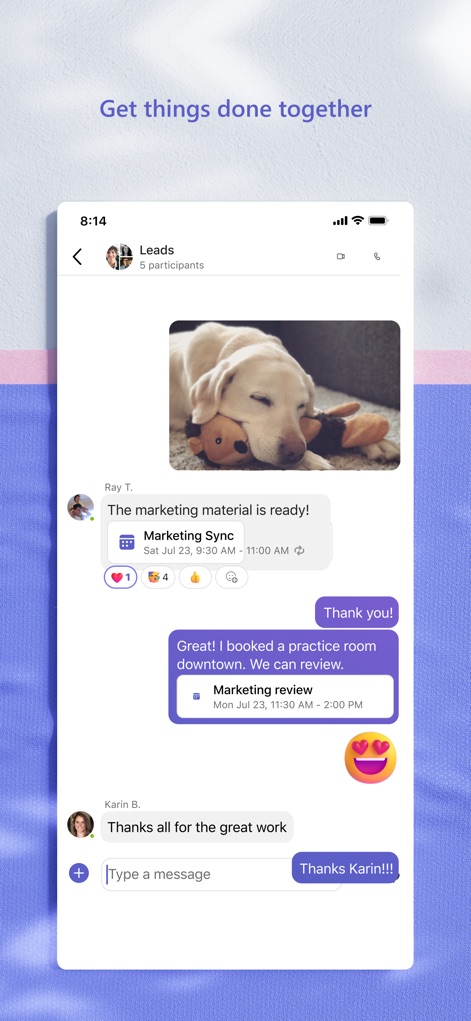
チャットで共同作業
このチャット画面では、ユーザーは画像やカレンダーイベントを共有しながらメッセージを交換でき、さらに豊富な絵文字やテキスト入力フィールドを活用して、より表現豊かなコミュニケーションが可能です。

アカウントを切り替え
本画面は、ユーザーのプロフィール情報とステータスが表示されるメニューを提供し、さらにビジネス用と個人用の複数アカウントを簡単に切り替える機能を通じて、柔軟な利用をサポートします。

スケジュールを管理
このカレンダー画面では、月ごとのイベントが一覧で表示され、各ミーティングやイベントには「Join」ボタンが明確に配置されているため、ユーザーはスムーズに会議に参加し、スケジュールを管理できます。
説明
Download
類似アプリ
似た機能とユーザー体験を持つアプリ

GoTo
GoTo Group, Inc.

Lark - Team Collaboration
LARK TECHNOLOGIES PTE. LTD.

RingCentral
RingCentral, Inc

MTS Link
VEBINAR TEKHNOLOGII, OOO

Pronto Team Communication
Hit Labs, Inc.

Zoho Cliq - Team Communication
Zoho Corporation

Zoom Workplace
Zoom Communications, Inc.

Google Meet
Google LLC

Google Chat
Google LLC
このページはアプリまたはその開発者の公式ページではなく、情報提供および論評を目的として作成された独立した編集出版物です。明示的に別段の記載がない限り、アプリおよびその開発者は、MWM、Apple、Google Play、アプリのパブリッシャー、またはアプリの開発者と提携、承認、後援、認可、またはその他の公式的な関係はなく、このページのいかなる内容も、アプリがMWMのサービスを使用して開発されたことを意味するものではありません。すべての商標、ロゴ、スクリーンショット、その他のコンテンツはそれぞれの所有者の財産です。