CalCs - Calendar Complications

CalCs - Calendar Complications


ダウンロード: App Store
ロゴ: CalCs - Calendar Complications

CalCs - Apple Watch 用究極のカレンダーとリマインダーコンプリケーション

携帯電話を見るのをやめましょう。整理整頓されたプロフェッショナルのために設計されたコンプリケーションで、月間グリッド、イベントリスト、リマインダーに直接、手首で瞬時にアクセスできます。

ダウンロード: App Store

開発元

Akihiro Usui

カテゴリ

Utilities

ダウンロード

26K+

ユーザー評価

3.6/5

評価数

300

対応言語

1

手首の上の精度

このインターフェースを利用する 26K+ 人のユーザー.

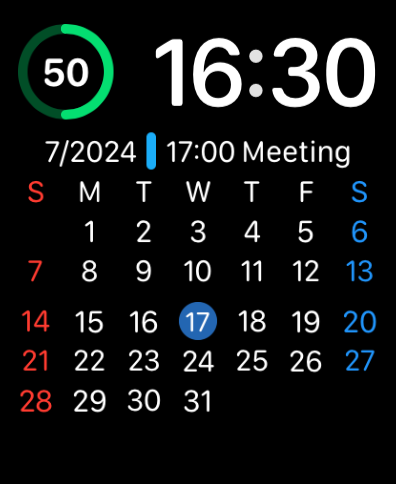
月間カレンダーグリッドと今後の会議情報を表示する Apple Watch の文字盤

月間カレンダーグリッドと今後の会議情報を表示する Apple Watch の文字盤

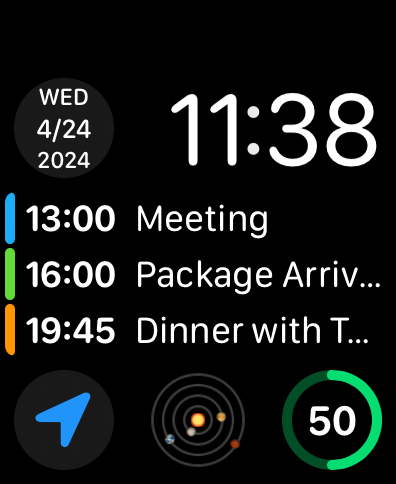
今後のイベントリストと日付コンプリケーションを表示する Apple Watch の文字盤

今後のイベントリストと日付コンプリケーションを表示する Apple Watch の文字盤

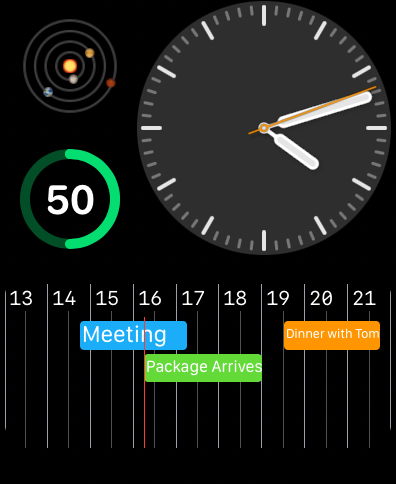
スケジュールされたイベントとリマインダーが表示された水平カレンダータイムラインを表示する Apple Watch の文字盤

スケジュールされたイベントとリマインダーが表示された水平カレンダータイムラインを表示する Apple Watch の文字盤

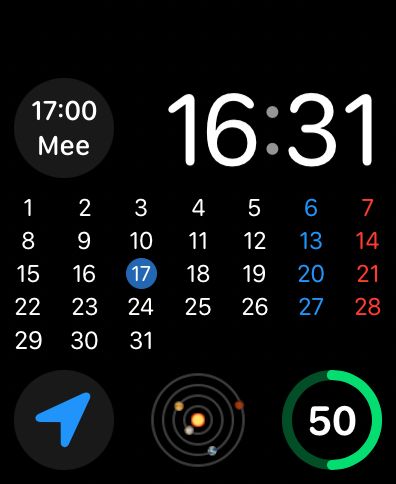
CalCs コンプリケーションを使用して、完全な月間カレンダーグリッドと予約の詳細を表示する Apple Watch の文字盤

CalCs コンプリケーションを使用して、完全な月間カレンダーグリッドと予約の詳細を表示する Apple Watch の文字盤

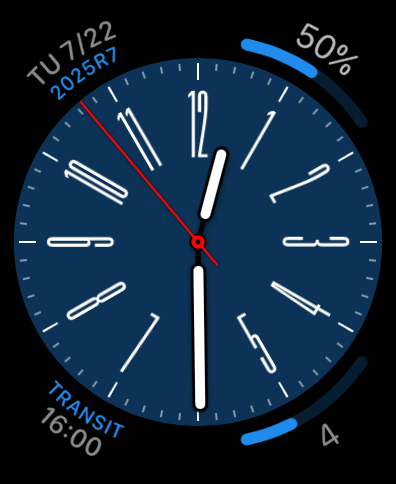
青い文字盤にカスタムカレンダーとリマインダーコンプリケーションを備えたアナログ Apple Watch の文字盤。

青い文字盤にカスタムカレンダーとリマインダーコンプリケーションを備えたアナログ Apple Watch の文字盤。

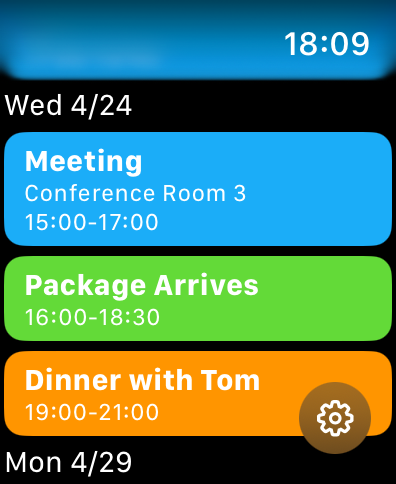
Apple Watch の画面に表示された、色分けされたカレンダーイベントとリマインダーのリスト

Apple Watch の画面に表示された、色分けされたカレンダーイベントとリマインダーのリスト

一目でわかる生産性向上

このアプリを際立たせるツール、 26K+ 人のユーザーが選択.

📅

月間グリッド表示

watchOS のギャップを埋める、完全な月間概要を文字盤に直接表示し、数秒で日付を確認して計画を立てることができます。

高密度コンプリケーション

円形、角型、長方形のフォーマットで画面スペースを最大化し、携帯電話を見る必要なく次のイベントや保留中のリマインダーを表示します。

🛠️

プロフェッショナルなカスタマイズ

個人のワークフローやプロフェッショナルのワークフローに合わせて、特定のカレンダーリストをフィルタリングし、好みの週の開始日を設定することで、エクスペリエンスをカスタマイズできます。

アプリについて

について知っておくべきこと CalCs - Calendar Complications.

説明

CalCs (short for "Calendar Complications") is a watchOS-only app that provides various complications related to the calendar. ---Important Notes--- The features built into the main body of this app are limited to listing events/reminders & displaying a monthly calendar. All other features are provided through complications & the Smart Stack. ●If you download CalCs from the iPhone App Store, due to synchronization issues between the iPhone & Apple Watch, CalCs may not appear on the Apple Watch. According to Apple's specifications, watchOS-only apps cannot be re-downloaded from the App Store app on the iPhone. Therefore, please use the App Store app "on your Apple Watch" and follow the steps below to re-download it. ・Scroll to the bottom → "Account" → "Purchased" → "CalCs" → re-download ------------------- Key Features ●Supports a variety of complications such as date display, events/reminders display, & monthly calendar display ・Date Display Displays the current date in various formats. ・Event/Reminder Display Displays events/reminders synced with your iPhone. You can choose whether or not to include all-day events. ・Monthly Calendar Display Displays the monthly calendar in various formats. You can choose to start the week on Monday. It also supports holidays in some areas. ●In the main app, events/reminders, & the monthly calendar are displayed Tapping the complication opens the app, where you can view the list of events/reminders synced with your iPhone, as well as the monthly calendar. *Only incomplete reminders are displayed. *The app currently does not have functionality to add, edit, or delete events/reminders, nor to mark reminders as complete. Please understand. ●Minimal Setting Options To avoid complicating settings on the small Apple Watch screen, the settings only allow you to select which calendar/reminder lists to display. *Notes ・The corner complications, circular complications, & large rectangular complications are supported only on Apple Watch Series 4 & later, so CalCs is not guaranteed to work on Series 3 or earlier models. ・Due to the limitations of watchOS complication display updates, complications may not immediately reflect changes when the date changes or after events or reminders are added or edited on the iPhone. ・After placing a complication for the 1st time, it may take some time for it to actually appear. ・If the complication is not updating, try tapping the complication to open CalCs, as this may refresh the data. ・If the complication is not updated even after launching CalCs, the issue may be resolved by one of the following methods. Please try them. 1. Restart both your iPhone and Apple Watch. 2. Force restart CalCs ① With CalCs open, press and hold the side button. ② When the screen for emergency call and power off appears, press and hold the Digital Crown. 3. Reinstall CalCs ① Press the Digital Crown to display the app list. ② Press and hold CalCs, then tap the × button to delete it when it appears. ③ Launch the App Store app on your Apple Watch. ④ Scroll to the bottom → "Account" → "Purchased" → "CalCs" → Re-download. ・If the complication does not update after force quitting and restarting CalCs, try restarting both your iPhone and Apple Watch, as it may resolve the issue. ・If event information is not displayed on the app's main event/reminder list screen or in complications, it may be because full access to the calendar has not been granted. The issue may be resolved by following the steps below to re-enable full access permission to the calendar. Please give it a try. ①Open the "Privacy & Security" section in the iPhone Settings app & tap "Calendars". ②Change CalCs' calendar access to "None", then select "Add Events Only". ③When you open CalCs, you will be prompted to grant full access, so tap "Allow Full Access".

最新バージョン

1.84

サイズ

4.8 MB

リリース日

2024年4月24日

Apple Watch の生産性を向上させる

携帯電話を見るのをやめましょう。CalCs を使用して、完全な月間カレンダーとリマインダーをまさにあるべき場所、つまり手首に表示させている数千人もの整理整頓されたプロフェッショナルの仲間入りをしましょう。

ダウンロード: App Store

App information, icons, screenshots, and descriptions displayed on this page are sourced from the Apple App Store and are the property of their respective developers. Download estimates and rankings are based on MWM's proprietary models and may not reflect actual figures. This page is provided for informational and analytical purposes only.

Believe this page infringes your intellectual property? File a dispute