Count Widget

Count Widget

ダウンロード: App Store
ロゴ: Count Widget

Count Widget: 何でも、どこでも、ワンタップで追跡

習慣、フィットネス、趣味のための美しく、おしゃれなカウンターでホーム画面をカスタマイズしましょう。アプリを開くことなく、即座に進捗状況を監視できます。

ダウンロード: App Store

開発元

Francis Bonnin

カテゴリ

Utilities

ダウンロード

2K+

ユーザー評価

3.5/5

評価数

0

対応言語

8

すべてのカウントを、視覚化

このインターフェースを利用する 2K+ 人のユーザー.

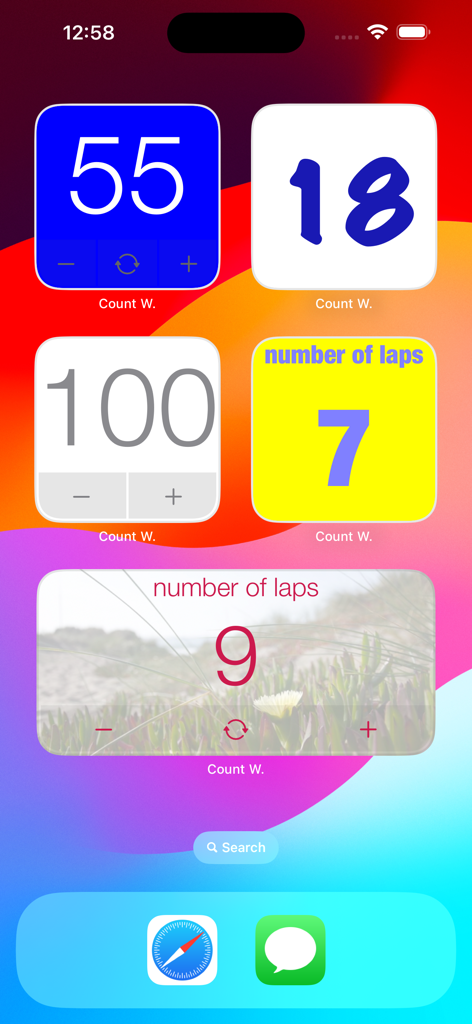
iPhoneホーム画面に表示された、さまざまな色とスタイルの複数のカスタマイズ可能なCount Widgetカウンター。

iPhoneホーム画面に表示された、さまざまな色とスタイルの複数のカスタマイズ可能なCount Widgetカウンター。

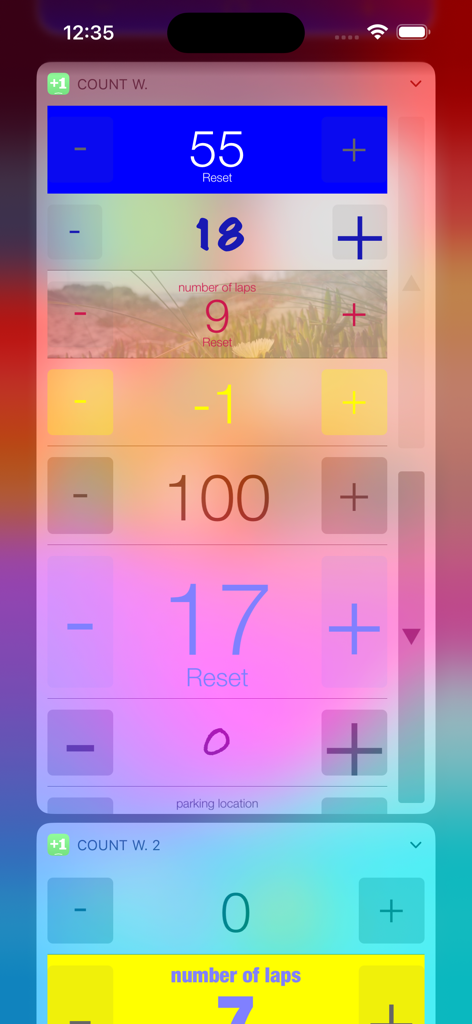
プラスとマイナスのボタンが付いたiPhoneホーム画面上の、さまざまなカスタマイズされた記録カウンターウィジェット。

プラスとマイナスのボタンが付いたiPhoneホーム画面上の、さまざまなカスタマイズされた記録カウンターウィジェット。

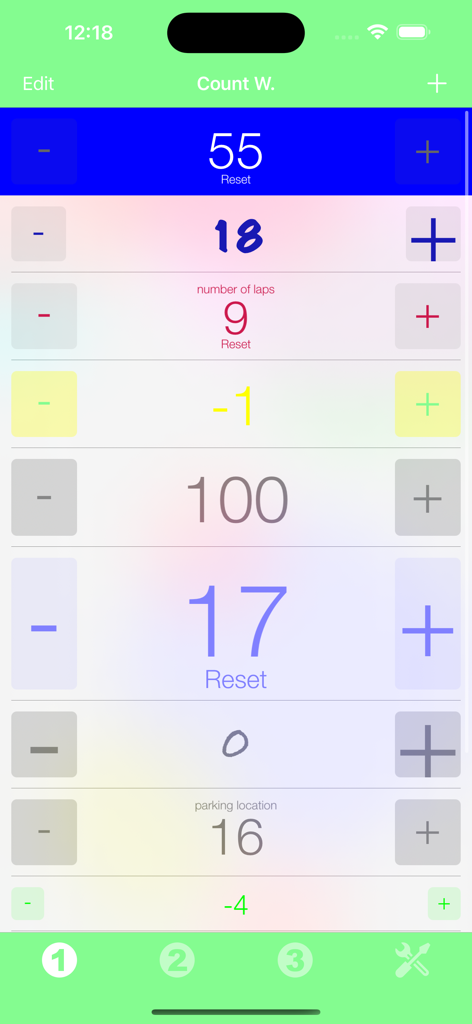
プラスとマイナスのボタンが付いた複数のカスタマイズ可能なカウンターのリストを表示するiPhoneアプリのインターフェイス。

プラスとマイナスのボタンが付いた複数のカスタマイズ可能なカウンターのリストを表示するiPhoneアプリのインターフェイス。

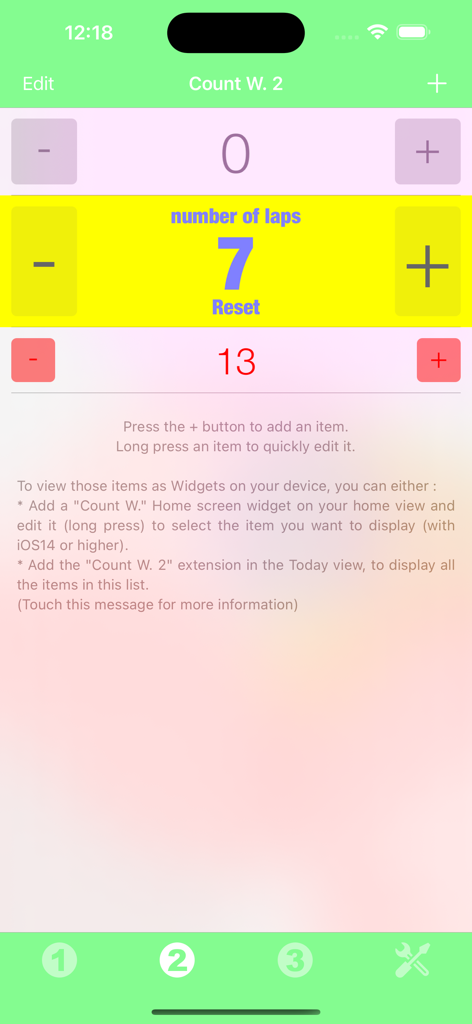
習慣やタスクの追跡のための複数のカスタマイズ可能なカウンターを表示するCount Widgetアプリのインターフェイス。

習慣やタスクの追跡のための複数のカスタマイズ可能なカウンターを表示するCount Widgetアプリのインターフェイス。

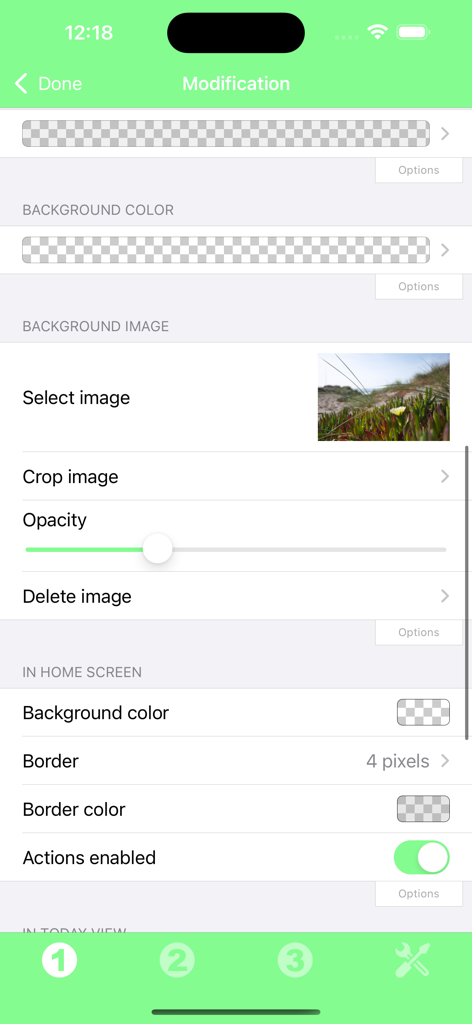
背景色、背景画像の選択、不透明度、境界線の設定オプションを示すCount Widgetアプリのカスタマイズ画面。

背景色、背景画像の選択、不透明度、境界線の設定オプションを示すCount Widgetアプリのカスタマイズ画面。

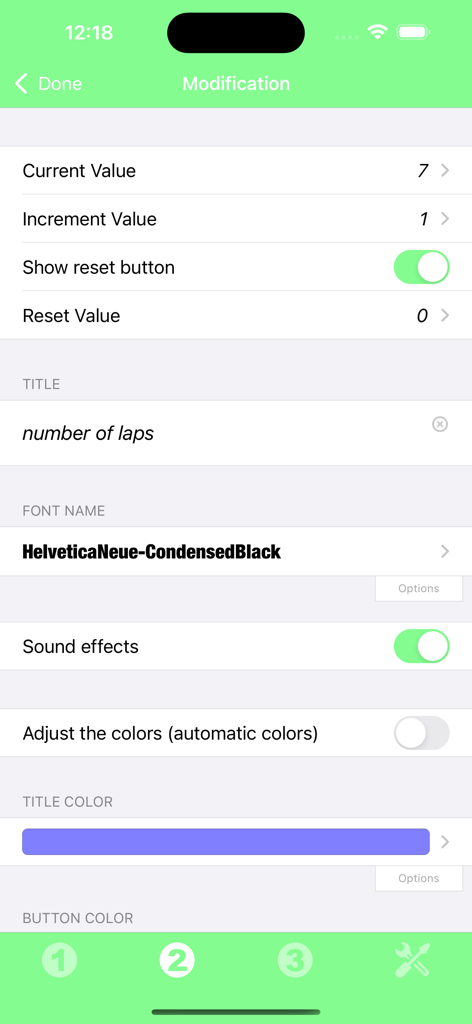
カウンターのタイトルのフォントと色設定を示すCount Widgetのカスタマイズ画面。

カウンターのタイトルのフォントと色設定を示すCount Widgetのカスタマイズ画面。

必要な場所で、楽々追跡

このアプリを際立たせるツール、 2K+ 人のユーザーが選択.

インスタントワンタップ追跡

ホーム画面から直接カウンターを増減またはリセットできます。メニューを探し回る必要はもうありません—タップするだけです。

🎨

あなたの美学に合わせたカスタマイズ

名前とスタイルをカスタマイズして、iOSレイアウトに完璧に溶け込ませましょう。進捗状況の追跡がこれほど美しく見えることはありませんでした。

🎯

あらゆる目標のために設計

ジムでのレップ数や水分摂取量の追跡から、編み物の段数のカウントまで、ウィジェットはあなたが選んだどんなプロジェクトや習慣にも適応します。

アプリについて

について知っておくべきこと Count Widget.

説明

Thanks to this application (and the other Widget apps from PacoLabs), you can now customize the Home screen and the Today view of your device, by adding custom widgets for some specific purposes. From anywhere in your device, you'll have access to your own information and actions. Each Count widget allows to manually count the various events or the things of your choice. The values of your counters can be incremented, decremented and also reset by touching the dedicated buttons. A custom name can be displayed and the look can be customized. Those Widgets are compatible with the new iOS 14 Home Screen Widgets. The application is really easy to use and is adapted to the fresh look of your device. Dark mode of iOS13 is supported. In Today view: You can add as many widgets as you want and they will be displayed in up to 3 different lists. Those same lists will be available in the Today view and in the application (although it is possible, if you want, to hide some widgets in the Today view). To avoid overloading the Today view, when too many widgets are displayed, an intuitive control will allow you to navigate from one widget to another. Even if the main purpose of the app is to view the widgets in the Today view, it can also be very handy to view them directly in the application (a long press on a widget in the Today view will open it directly in the main application).

最新バージョン

6.2

サイズ

12.8 MB

リリース日

2014年11月2日

成功を記録する準備はできましたか?

整理整頓を重視する最適化者や習慣トラッカーのコミュニティに参加しましょう。Count Widgetを今すぐダウンロードして、ホーム画面を、あなたが記録するすべてを管理するための、パーソナライズされた、手間のかからないコマンドセンターに変えましょう。

ダウンロード: App Store
FAQ

よくある質問

について知っておくべきこと Count Widget

Count Widget アプリとは何ですか?

Count Widget は、ユーザーがデバイスのホーム画面や今日の表示用にカスタムウィジェットを作成できるアプリケーションです。イベントやアイテムを手動でカウントし、増分、減分、リセット機能を提供します。

Count Widgets の外観をカスタマイズできますか?

はい、Count Widget は外観を大幅にカスタマイズできます。ユーザーは、各ウィジェットの背景色、画像、境界線、フォント名、タイトル色、ボタン色を変更できます。

Count Widget は iOS 14 ホーム画面ウィジェットをサポートしていますか?

はい、Count Widget は新しい iOS 14 ホーム画面ウィジェットと互換性があります。ユーザーは、カスタムカウンターウィジェットをホーム画面に直接追加して簡単にアクセスできます。

Count Widget でカウンターの値を変更するにはどうすればよいですか?

Count Widget では、カウンターの値を手動で増分、減分、リセットできます。ウィジェットインターフェイスにこれらのアクション専用のボタンが用意されています。

複数の Count Widget を使用できますか?

はい、ユーザーは今日の表示に好きなだけウィジェットを追加でき、最大 3 つの異なるリストに整理できます。これらのリストは、アプリケーション内でも利用できます。

Count Widget アプリはダークモードをサポートしていますか?

はい、Count Widget は iOS 13 以降のダークモードをサポートしています。アプリケーションは、システム全体のテーマ設定を含む、デバイスの新しいルックアンドフィールに適応します。

Count Widget を表示するにはどうすればよいですか?

Count Widget は、ホーム画面、今日の表示、およびアプリケーション内で直接表示できます。今日の表示ウィジェットを長押しすると、メインアプリで開きます。

Count Widget でカウンターのカスタム増分値を設定できますか?

はい、Count Widget では、各カウンターのカスタム増分値を設定できます。このオプションは、ウィジェットの編集設定で、他のカスタマイズ可能なプロパティと共に利用できます。

App information, icons, screenshots, and descriptions displayed on this page are sourced from the Apple App Store and are the property of their respective developers. Download estimates and rankings are based on MWM's proprietary models and may not reflect actual figures. This page is provided for informational and analytical purposes only.

Believe this page infringes your intellectual property? File a dispute