CSS Inspector for Safari

CSS Inspector for Safari


ダウンロード: App Store
ロゴ: CSS Inspector for Safari

Safari用CSSインスペクター:あらゆるウェブサイトの背後にあるデザインの秘密を暴く

デザイナーと開発者にとって究極のコンパニオン。人間が読めるインターフェースで、色、タイポグラフィ、レイアウトを瞬時に検査 — iPhone、iPad、Macに最適化されています。

ダウンロード: App Store

開発元

Alfredo Grassau

カテゴリ

Developer Tools

ダウンロード

1K+

ユーザー評価

1.0/5

評価数

0

対応言語

12

一目でわかる精度

このインターフェースを利用する 1K+ 人のユーザー.

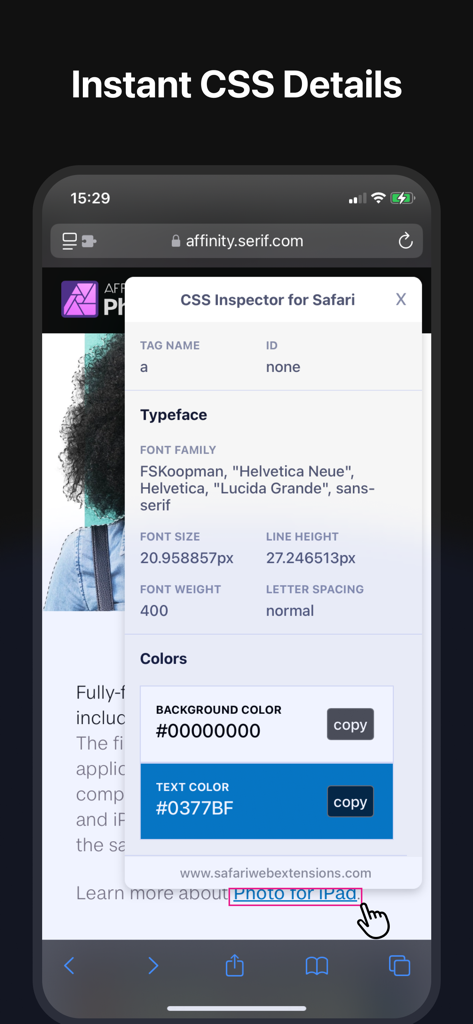
Safari用CSSインスペクターのモバイルインターフェース。選択されたウェブページ要素のフォントとカラープロパティを表示しています

Safari用CSSインスペクターのモバイルインターフェース。選択されたウェブページ要素のフォントとカラープロパティを表示しています

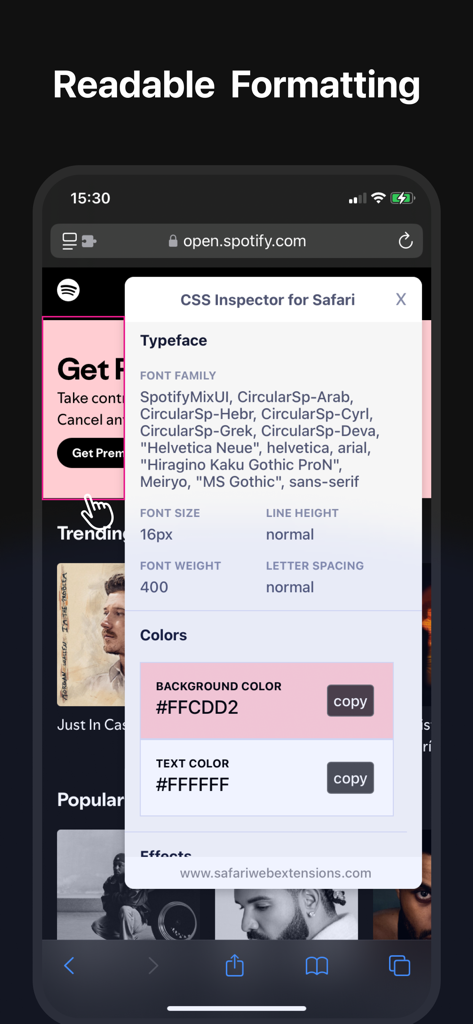
Safari用CSSインスペクターのモバイルビュー。フォントファミリーとHEXカラーコードを表示しています

Safari用CSSインスペクターのモバイルビュー。フォントファミリーとHEXカラーコードを表示しています

Safari用CSSインスペクター。iPhone、iPad、MacBookに表示されたインターフェースで、フォントとカラーの詳細を表示しています

Safari用CSSインスペクター。iPhone、iPad、MacBookに表示されたインターフェースで、フォントとカラーの詳細を表示しています

Webデザインを楽々マスター

このアプリを際立たせるツール、 1K+ 人のユーザーが選択.

🎯

インタラクティブなレイアウト検査

カーソルを合わせるかタップすると、あらゆるウェブサイトの隠された構造が明らかになります。ラップトップを開くことなく、マージン、パディング、要素の階層を瞬時に視覚化できます。

🎨

デザインデータをシンプルに

複雑なコードを掘り下げる必要はもうありません。クリエイター向けに設計された、クリーンで人間が読める形式でタイポグラフィ、カラーパレット、スタイリングにアクセスできます。

ワンタップでデザインをキャプチャ

気に入った色やフォントが見つかりましたか?プロパティを瞬時にクリップボードにコピーし、iPhone、iPad、Mac全体でインスピレーションを同期しましょう。

💡

要素の属性を即座に取得

特定の要素のHTML、CSSプロパティ、および関連するスタイルシートを簡単に確認できます。

アプリについて

について知っておくべきこと CSS Inspector for Safari.

説明

Discover a world where understanding website designs becomes a breeze with the "CSS Inspector for Safari" extension. Have you ever looked at a website and wondered about its design intricacies? What colors are they using? What typography makes it stand out? Which margins and paddings are giving it that unique layout? Say goodbye to the complexities and dive into the world of CSS with unmatched ease. Features: Hover to Highlight: As you move your cursor across the page, every website element gets highlighted, enabling you to understand page structures without any guesswork. Click for Detailed Insights: Upon clicking an element, a dedicated small window pops up. Explore typography specifics, grasp color schemes, understand effects applied, and get details about sizes, margins, and paddings. Human-Readable Format: No more getting lost in technical jargon. The information is displayed in a well-organized, clear, and comprehensible manner. Quick Copy Feature: Found a color you like? Maybe a specific shade or gradient caught your eye? No need to jot it down or remember; with a simple click, you can copy information directly from the pop-up window. Cross-Device Compatibility: CSS Inspector is available on macOS, iOS, and iPadOS, ensuring that you have a consistent and optimized browsing experience across all your Apple devices. Beyond these features, "CSS Inspector for Safari" is built with user experience at its core. It’s lightweight, ensuring that your browsing speed remains unhindered. Whether you're a professional working on a project, a student learning about web designs, or someone who enjoys understanding the digital spaces they visit, "CSS Inspector for Safari" is your go-to tool. Experience a nuanced way to explore websites, gather design inspirations, or simply feed your curiosity. Join thousands of users who have transformed their Safari browsing experience. Equip yourself with a tool that not only adds value but also empowers your digital journey. Download "CSS Inspector for Safari" and make the web a canvas of learning and exploration!

最新バージョン

1.1.38

サイズ

5.4 MB

リリース日

2023年10月16日

見つけたあらゆるデザインを解読する準備はできましたか?

Safariを究極のデザインツールキットに変えた何千人ものデザイナーや開発者に加わりましょう。今すぐSafari用CSSインスペクターをダウンロードして、iPhone、iPad、Mac全体でプロフェッショナルな洞察を発見し始めてください。

ダウンロード: App Store

App information, icons, screenshots, and descriptions displayed on this page are sourced from the Apple App Store and are the property of their respective developers. Download estimates and rankings are based on MWM's proprietary models and may not reflect actual figures. This page is provided for informational and analytical purposes only.

Believe this page infringes your intellectual property? File a dispute