
このページはアプリまたはその開発者の公式ページではなく、情報提供および論評を目的として作成された独立した編集出版物です。明示的に別段の記載がない限り、アプリおよびその開発者は、MWM、Apple、Google Play、アプリのパブリッシャー、またはアプリの開発者と提携、承認、後援、認可、またはその他の公式的な関係はなく、このページのいかなる内容も、アプリがMWMのサービスを使用して開発されたことを意味するものではありません。すべての商標、ロゴ、スクリーンショット、その他のコンテンツはそれぞれの所有者の財産です。


ダウンロード
100M+ユーザー評価
評価数
15.2M開発元
カテゴリ
Developer Tools対応言語
33最新バージョン
4.1.0サイズ
16.7 MBリリース日
2014年7月23日TestFlight アプリケーション分析
ベータ版テストとフィードバック提供の核心機能
簡単なベータ版テスト体験
ユーザーはリリース前のアプリやApp Clipを容易にテストできます。
詳細なフィードバックの提供
テスターは開発者に直接、具体的な改善提案やバグ報告を送信できます。
自動クラッシュレポートと利用状況データの送信
アプリのクラッシュログや利用状況データが自動的に開発者に共有され、問題の特定と改善に役立ちます。
開発者によるフィードバックの活用
提供されたフィードバックは、開発者がアプリの品質向上や新機能の実装に直接活用されます。
柔軟なテスター招待システム
開発者はメールまたは公開リンクを通じてテスターを招待でき、ユーザーは多様な方法でベータプログラムに参加できます。
App Clipのテストサポート
ユーザーは通常のアプリだけでなく、App Clipのベータ版もテストできます。
よくある質問
について知っておくべきこと TestFlight
What is TestFlight and what does it do?
TestFlight enables users to test beta versions of apps and App Clips, providing valuable feedback directly to developers before their apps are released on the App Store.
How do developers invite testers to TestFlight?
Developers invite testers to TestFlight beta programs through email invitations or by providing a public link. Testers then accept these invitations to begin testing.
What data does TestFlight collect during beta testing?
When you test a beta app via TestFlight, Apple collects and sends crash logs, usage information, and any submitted feedback to the developer. Apple may also use crash logs and usage for its own product improvement.
How do developers use the data collected by TestFlight?
Developers use the information collected by TestFlight, including crash logs, usage data, and feedback, to improve their apps and related products before their official release.
Can users view all their beta apps in TestFlight?
Yes, TestFlight displays all beta apps a user is currently testing or has previously tested within its main interface. This includes apps that require updates.
Does TestFlight allow users to update beta apps?
Yes, TestFlight allows users to update beta apps directly from its interface. An 'Update' button appears next to apps with newer versions available for installation.
How do I accept a beta app invitation using TestFlight?
Yes, TestFlight presents a dedicated screen to accept beta app invitations, displaying app details, developer, category, and build expiration, with an 'Accept' button.
Can I send feedback to developers directly through TestFlight?
Yes, TestFlight provides a dedicated feedback interface where users can share thoughts, describe issues, and directly submit feedback to the app's developer.
Can I attach screenshots to my feedback in TestFlight?
Yes, TestFlight allows users to attach screenshots to their feedback submissions, providing developers with visual context for reported issues or suggestions.
Does TestFlight share my email address with developers when I submit feedback?
Yes, TestFlight indicates that beta feedback and device information are collected and shared with the developer, along with the user's email address.
Can I manage which devices I use for TestFlight beta testing?
Yes, TestFlight provides a settings menu where users can manage the devices they use for testing apps, listing current and other associated devices.
Does TestFlight support automatic updates for beta apps?
Yes, TestFlight features an option for 'Automatic updates for new apps'. This toggle enables automatic installation of new beta versions when they become available.
Can I provide feedback if I decide not to join a TestFlight beta app?
Yes, TestFlight allows users to provide feedback even if they choose not to join a beta app, using a 'Leave Feedback' option within the app list.
以下のスクリーンショットと説明は、アプリの公式ストアリスティングから直接取得されたものであり、アプリ開発者の所有物です。
アプリストア
スクリーンショット
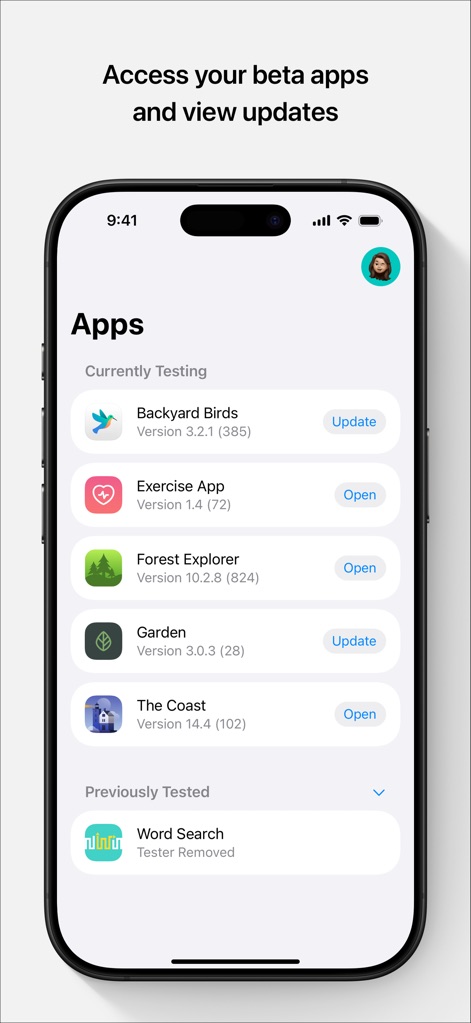
ベータ版アプリ管理
本ツールは、ユーザーがテスト中のベータ版アプリを一覧で確認できます。各アプリには「現在テスト中」のセクションにバージョン情報が表示され、「更新」または「開く」ボタンから最新ビルドへのアクセスやテストを開始できます。
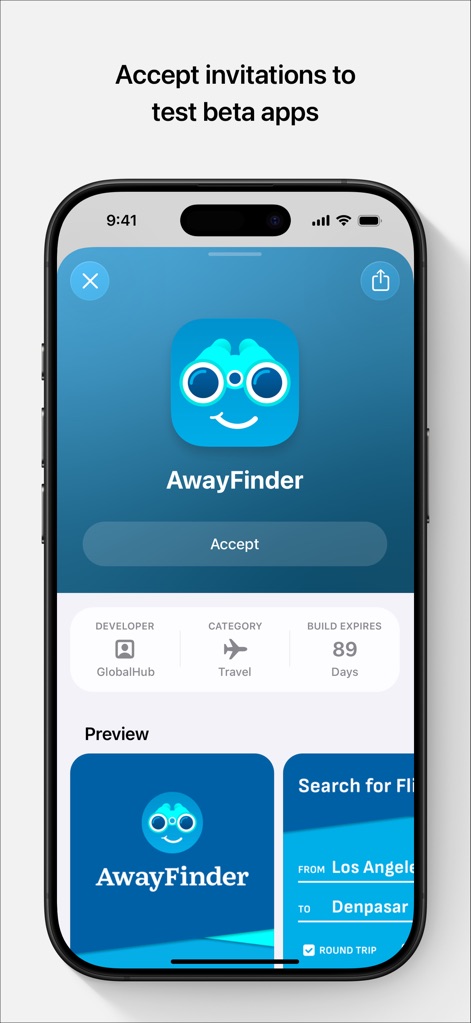
テスト招待を承諾
開発者からのベータ版テスト招待を承諾する画面です。ユーザーは「AwayFinder」アプリの招待を確認し「Accept」ボタンでテストに参加できます。また、開発者名やカテゴリ、ビルドの有効期限などの詳細情報と、アプリのプレビュー画面が表示されています。
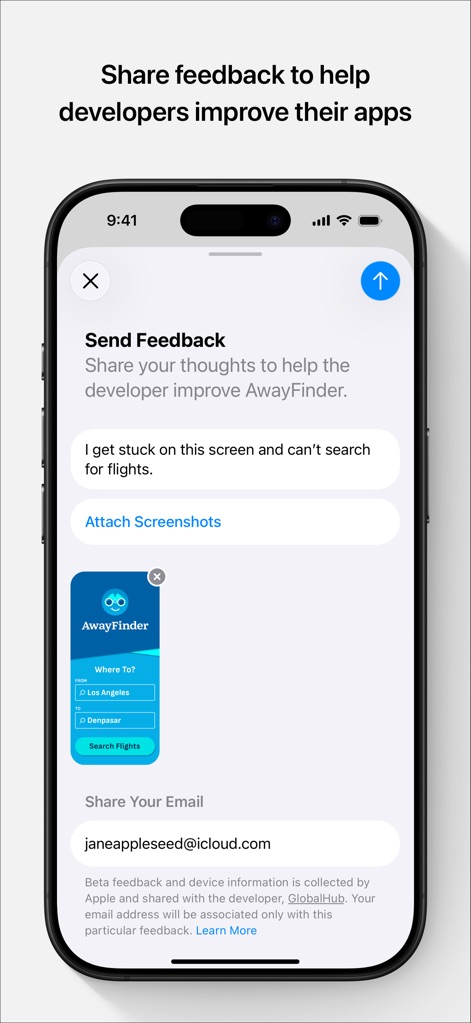
フィードバック送信
ユーザーは、テスト中に発見した問題や改善点を開発者に直接フィードバックできます。具体的な問題点を記述する入力欄が用意されており、視覚的な状況を伝えるためにスクリーンショットの添付機能も利用可能です。
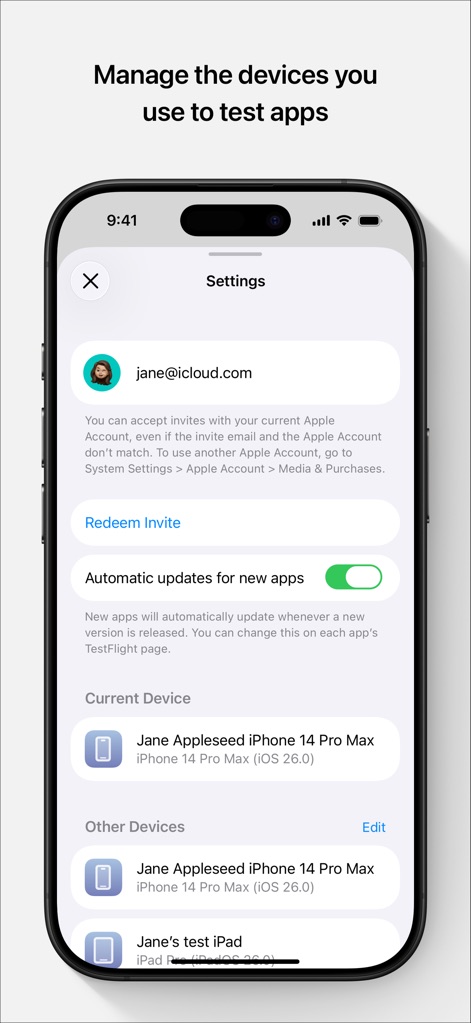
テストデバイス管理
本アプリでは、テストに使用するデバイスを管理できます。新アプリの「自動更新」をオン/オフする切り替えスイッチがあり、ユーザーの「現在利用中のデバイス」と「その他のデバイス」が一覧で表示されます。
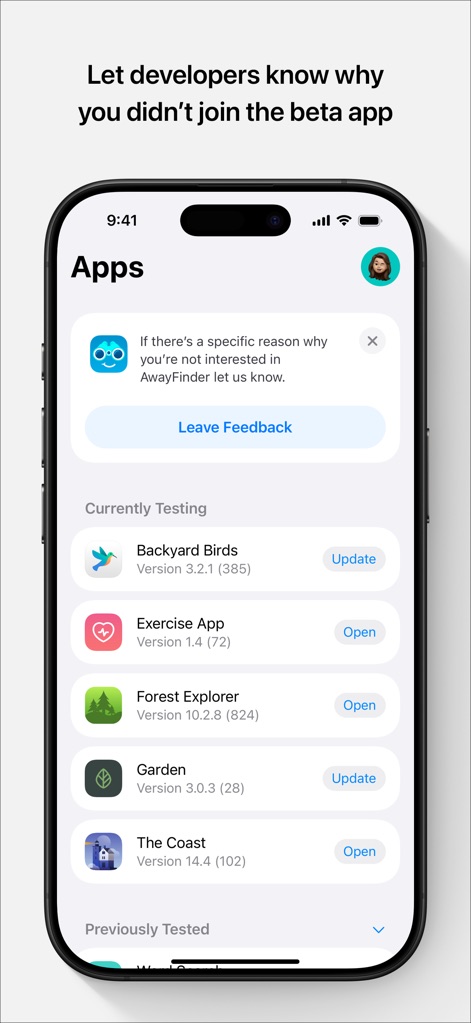
不参加理由を共有
ユーザーがベータ版テストに参加しなかった場合、その理由を開発者に伝えるための機能です。画面上部には、不参加の理由を尋ねるバナーが表示されており、ユーザーは「Leave Feedback」ボタンを通じて詳細な意見を送信できます。
説明
Download
類似アプリ
似た機能とユーザー体験を持つアプリ

このページはアプリまたはその開発者の公式ページではなく、情報提供および論評を目的として作成された独立した編集出版物です。明示的に別段の記載がない限り、アプリおよびその開発者は、MWM、Apple、Google Play、アプリのパブリッシャー、またはアプリの開発者と提携、承認、後援、認可、またはその他の公式的な関係はなく、このページのいかなる内容も、アプリがMWMのサービスを使用して開発されたことを意味するものではありません。すべての商標、ロゴ、スクリーンショット、その他のコンテンツはそれぞれの所有者の財産です。