Disk Decipher

Disk Decipher

ダウンロード: App Store
ロゴ: Disk Decipher

Disk Decipher: 暗号化ボリュームへの安全なモバイルアクセス

外出先でVeraCrypt、LUKS、TrueCryptコンテナのロックを解除。プロフェッショナルグレードの暗号化、リモートクラウドサポート、シームレスなiOS統合で機密データを管理。プライバシーを重視するパワーユーザー向け。

開発元

Richard Huveneers

カテゴリ

Utilities

ダウンロード

222K+

ユーザー評価

4.3/5

評価数

600

対応言語

16

あなたのモバイルフォートレスを視覚化

このインターフェースを利用する 222K+ 人のユーザー.

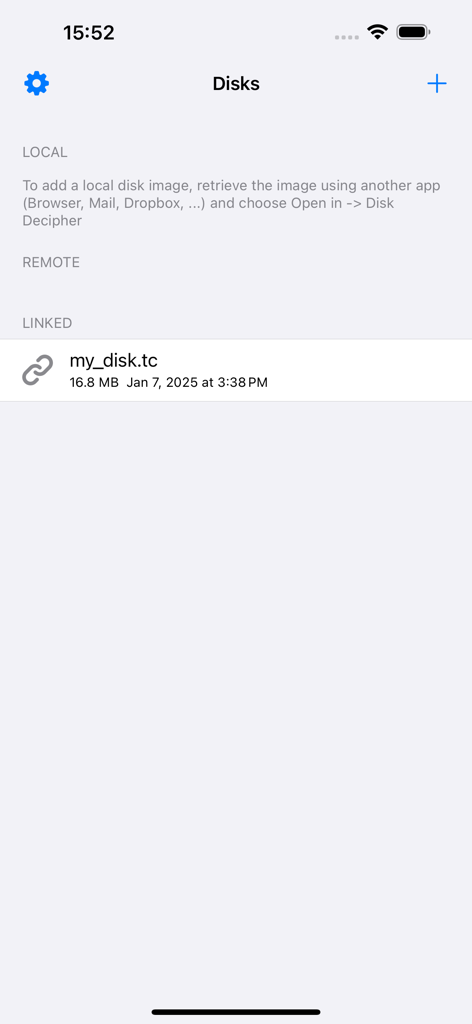
Disk Decipherアプリのインターフェース。リンクされたTrueCryptファイルを含む暗号化されたディスクイメージのリストが表示されています。

Disk Decipherアプリのインターフェース。リンクされたTrueCryptファイルを含む暗号化されたディスクイメージのリストが表示されています。

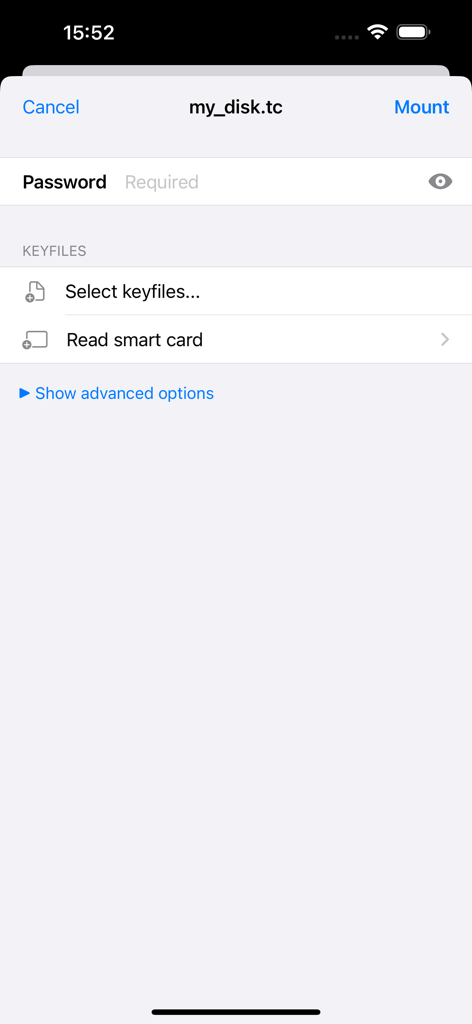
Disk Decipherアプリの暗号化されたディスクイメージをマウントするためのインターフェース。パスワードとキーファイルの入力フィールドが表示されています。

Disk Decipherアプリの暗号化されたディスクイメージをマウントするためのインターフェース。パスワードとキーファイルの入力フィールドが表示されています。

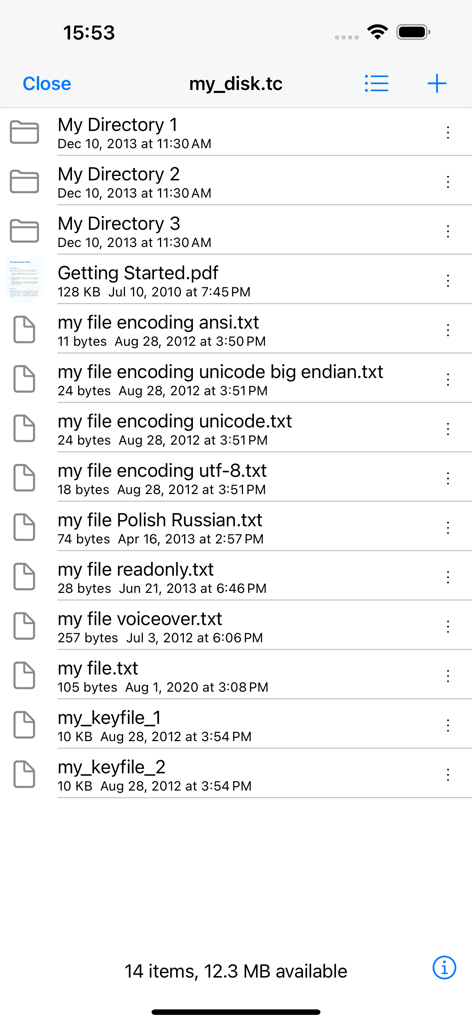
Disk Decipherアプリのインターフェース。暗号化されたTrueCryptコンテナ内のファイルとフォルダーのリストが表示されています。

Disk Decipherアプリのインターフェース。暗号化されたTrueCryptコンテナ内のファイルとフォルダーのリストが表示されています。

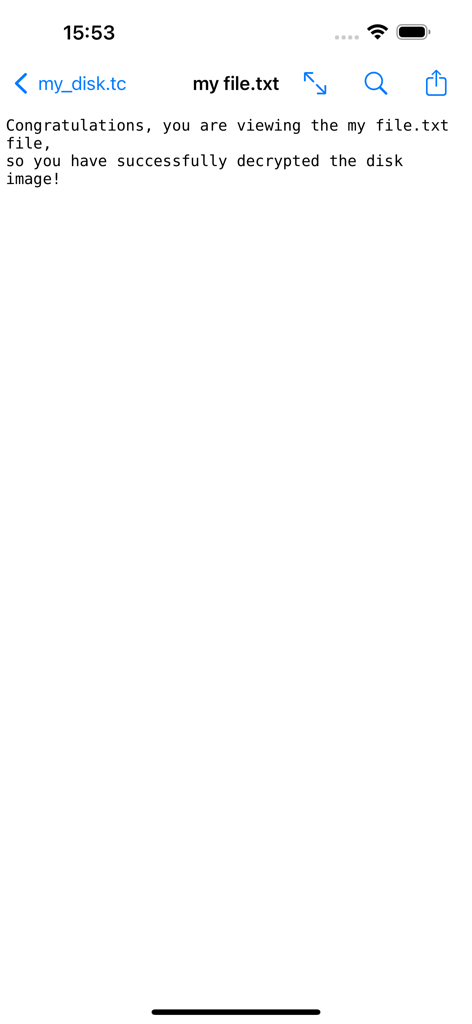
Disk Decipherアプリケーション内で正常に復号化されたテキストファイルが表示されています。

Disk Decipherアプリケーション内で正常に復号化されたテキストファイルが表示されています。

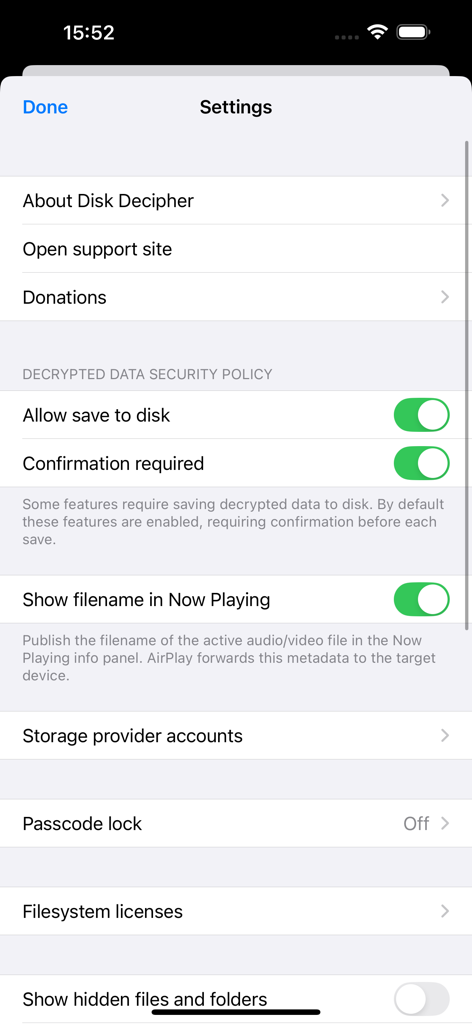
Disk Decipherアプリの設定画面。セキュリティポリシー、ストレージプロバイダーオプション、パスコードロック設定が表示されています。

Disk Decipherアプリの設定画面。セキュリティポリシー、ストレージプロバイダーオプション、パスコードロック設定が表示されています。

ポケットの中のデスクトップグレードのセキュリティ

このアプリを際立たせるツール、 222K+ 人のユーザーが選択.

🔐

ユニバーサルボリュームサポート

VeraCrypt、LUKS、TrueCrypt、DMGのネイティブサポート。ワークステーションで行うのと同じように、隠しボリューム、キーファイル、カスタムPIM設定を処理します。

☁️

選択的なリモートマウント

ファイル全体をダウンロードせずに、S3、WebDAV、Dropboxに保存されたマルチギガバイトコンテナにアクセス。Disk Decipherは、帯域幅を節約するために必要なセクターのみを取得します。

🆔

シームレスなiOSワークフロー

FaceIDまたはスマートカードでロックを解除し、ネイティブiOSファイルアプリを介して直接ファイルを閲覧。セキュリティ体制を損なうことなく、他のアプリで直接ドキュメントを編集し、メディアをストリーミングできます。

アプリについて

について知っておくべきこと Disk Decipher.

説明

Disk Decipher allows mobile access to your encrypted virtual disks. Do you have your passwords or other sensitive information stored in a VeraCrypt or TrueCrypt container or LUKS, DMG or ProxyCrypt volume? Disk Decipher will allow you to access that information from your iPhone or iPad. Disk Decipher currently supports: - Multiple disks - Storage provider: local filesystem (transfer the disk image from another app using the Open In menu, using iTunes to transfer disk images or importing from other apps supporting document providing) - Storage provider: remote (Disk Decipher will download only the necessary parts of the disk image, allowing access to disk images of arbitrary size. More details are available on the support website) - Remote storage providers: HTTP/HTTPS (WEBDAV), NFS, Dropbox, Google Drive, Microsoft OneDrive and OneDrive for Business, Box, pCloud, S3, SugarSync, Filen - Storage provider: linked (Disk Decipher will access the container stored in another app using the iOS File Provider. More details are available on the support website) - Disk image format: TrueCrypt (header version 4 and 5, created by TrueCrypt 6.0 or later) • Hidden volumes supported • Keyfiles supported - Disk image format: LUKS (version 1 and 2) - Disk image format: VeraCrypt (header version 5, created by VeraCrypt 1.0) • Hidden volumes • Keyfiles supported • PIM supported - Disk image format: encrypted and unencrypted DMG (Apple Disk Image, version 2) • Password protected • Compression (zlib, LZFSE, LZMA) - Disk image format: ProxyCrypt (version 2) - Filesystems: FAT (FAT12, FAT16 and FAT32), exFAT (in-app purchase), HFS+ and HFSX, NTFS (NTFS compression and encryption are not supported), APFS, Linux ext4 (and ext2 / ext3) - File viewer supports - many document types (Word, Excel, PDF, RTF, plain-text, images, Markdown, etc.) - streaming audio playback (MP3, WAV, etc.) - streaming movie playback (MP4, MOV, etc.) - background audio, AirPlay and Picture in Picture video - printing of all supported document types - saving images to Photos library - built-in editing of plain-text files - swiping to next/previous file - ZIP files - Open In menu to transfer decrypted files to other apps - Passcode protection with Touch ID and Face ID support - Write support (details are available on the support website) - Photo camera to store new photos securely in your encrypted container - Import files from other apps supporting document providing - Import photos and videos from iOS Photo Library - iCloud support - iOS Files external storage (as Linked Disk) - Tiled directory view (presents files as tiles, a small preview will be shown for image and PDF files to simplify browsing) - iOS File Provider (this allows accessing files inside your encrypted containers from other apps, like iOS Files) - drag & drop (or copy & paste) files in and out mounted encrypted container - optionally save disk passwords in iOS keychain - GUID Partition Table - Create new disk - Sparse Bundle / sparsebundle - Sparse Image / sparseimage (readonly, UDSP and ASIF) - Self-signed certificate - Launch URL - Keyfiles stored on smart card - Unencrypted disk images

最新バージョン

6.3.0

サイズ

14.5 MB

リリース日

2012年4月24日

外出先でもデジタルフォートレスを保護

デスクトップ暗号化とiOSの間のギャップを埋めます。プライバシーを重視するパワーユーザーのために構築されたツールで、VeraCrypt、LUKS、TrueCryptコンテナにアクセス。

ダウンロード: App Store
FAQ

よくある質問

について知っておくべきこと Disk Decipher

Disk Decipherとは何ですか?

Disk Decipherは、iPhoneまたはiPadで暗号化された仮想ディスクにモバイルアクセスを提供するアプリケーションです。VeraCrypt、TrueCrypt、LUKSなどのさまざまな形式をサポートしています。

Disk Decipherはどの暗号化ディスク形式をサポートしていますか?

Disk Decipherは、TrueCrypt(v4/v5)、LUKS(v1/v2)、VeraCrypt(v5)、暗号化/非暗号化DMG(v2)、ProxyCrypt(v2)ディスクイメージ形式をサポートしています。

Disk Decipherはクラウドストレージサービスからファイルにアクセスできますか?

はい、Disk Decipherは、Dropbox、Google Drive、Microsoft OneDrive、Box、pCloud、S3、SugarSync、FilenなどのリモートストレージプロバイダーをHTTP/HTTPS(WEBDAV)およびNFS経由でサポートしています。

Disk DecipherはFace IDやTouch IDのような生体認証セキュリティを提供していますか?

はい、Disk Decipherは、暗号化されたコンテナのセキュリティを強化するために、Touch IDとFace IDの両方をサポートするパスコード保護を提供します。

Disk Decipherでローカルディスクイメージを開くにはどうすればよいですか?

ローカルディスクイメージを開くには、別のアプリでイメージを取得し、「開く」→「Disk Decipher」を選択します。iTunesやドキュメント提供をサポートする他のアプリを使用することもできます。

Disk DecipherはVeraCryptのキーファイルと隠しボリュームをサポートしていますか?

はい、Disk Decipherは、隠しボリューム、キーファイル、PIM(Personal Iterations Multiplier)を完全に互換性のあるVeraCrypt(ヘッダーバージョン5)をサポートしています。

Disk Decipherは暗号化されたコンテナ内でファイルを書き込んだり変更したりできますか?

はい、Disk Decipherは書き込み操作をサポートしています。この機能に関する詳細は、アプリケーションのサポートWebサイトで確認できます。

Disk Decipherはどのファイルシステムをサポートしていますか?

Disk DecipherはFAT、exFAT(アプリ内購入)、HFS+、HFSX、NTFS、APFS、Linux ext4(ext2/ext3を含む)をサポートしています。NTFSの圧縮と暗号化はサポートされていません。

Disk Decipherで復号化されたファイルをデバイスのディスクに保存できますか?

はい、Disk Decipherは復号化されたデータをディスクに保存することを許可します。この機能には、デフォルトで確認が必要なセキュリティポリシー設定が含まれています。

Disk Decipherはスマートカードに保存されたキーファイルへのアクセスをサポートしていますか?

はい、Disk Decipherは、暗号化されたディスクのセキュリティを強化するために、スマートカードから直接キーファイルにアクセスするサポートを提供しています。

App information, icons, screenshots, and descriptions displayed on this page are sourced from the Apple App Store and are the property of their respective developers. Download estimates and rankings are based on MWM's proprietary models and may not reflect actual figures. This page is provided for informational and analytical purposes only.

Believe this page infringes your intellectual property? File a dispute