eSign: Fill and Sign Documents

eSign: Fill and Sign Documents

ダウンロード: App Store
ロゴ: eSign: Fill and Sign Documents

eSign: 書類に記入・署名 – ログイン不要、サブスクリプション不要

モバイルデバイスからPDFをスキャン、記入、署名する最速の方法。月額料金やアカウント登録なしで、数秒でプロフェッショナルな結果が得られます。

ダウンロード: App Store

開発元

Babacan BURAK

カテゴリ

Utilities

ダウンロード

16K+

ユーザー評価

4.5/5

評価数

0

対応言語

7

あなたのモバイルオフィスを実際に

このインターフェースを利用する 16K+ 人のユーザー.

E-Signature Assistantアプリの画面。プロフェッショナルな女性と、文書に署名、収集、共有するオプションが表示されている。

E-Signature Assistantアプリの画面。プロフェッショナルな女性と、文書に署名、収集、共有するオプションが表示されている。

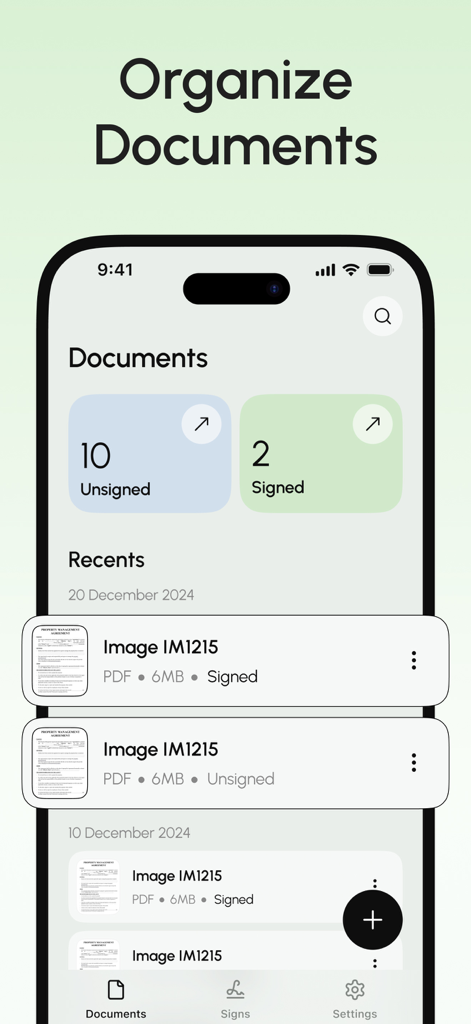
eSignアプリのドキュメント管理インターフェイス。署名済みおよび未署名のPDFファイルの一覧が表示されている。

eSignアプリのドキュメント管理インターフェイス。署名済みおよび未署名のPDFファイルの一覧が表示されている。

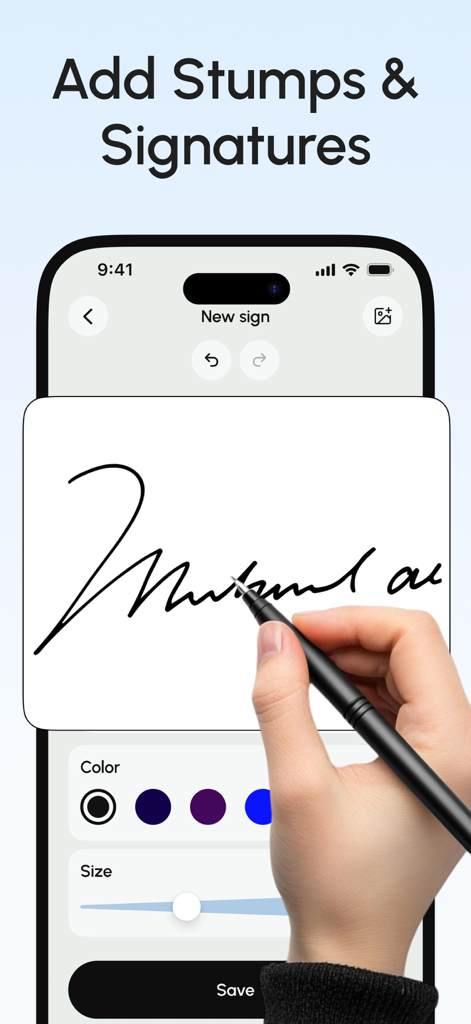
eSignアプリを使用して、iPhone上でスタイラスでデジタル署名を描くユーザー。

eSignアプリを使用して、iPhone上でスタイラスでデジタル署名を描くユーザー。

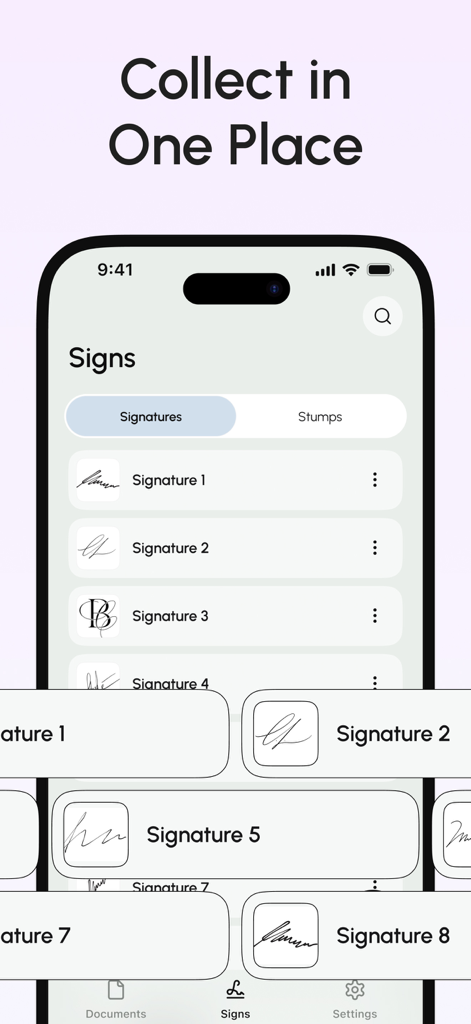
ドキュメントへの署名を容易にするために、保存された複数のデジタル署名が一箇所に整理されている様子を示すモバイルアプリの画面。

ドキュメントへの署名を容易にするために、保存された複数のデジタル署名が一箇所に整理されている様子を示すモバイルアプリの画面。

手間のかからないプロフェッショナルなドキュメントツール

このアプリを際立たせるツール、 16K+ 人のユーザーが選択.

💸

サブスクリプション料金ゼロ

サブスクリプション経済から抜け出しましょう。月額料金、隠れたコスト、またはさらに別のアカウントを作成する必要なく、書類に署名・送信できます。

✍️

リアルなデジタル署名

指やスタイラスで署名してプロフェッショナルな外観を維持するか、実際のペンで書いた署名をキャプチャして任意のデジタルドキュメントに挿入します。

📱

あなたのモバイルオフィススイート

内蔵スキャナーでどんな紙のページもプロフェッショナルなPDFに変換し、フォームに記入したり、Google DriveやDropboxからファイルを瞬時にインポートしたりできます。

アプリについて

について知っておくべきこと eSign: Fill and Sign Documents.

説明

Easily sign and send documents with Scan, eSign & Fill Documents, all at your fingertips. It’s the simplest solution for your business needs, without any login or registration, and no expensive subscription charges. You can easily scan a document using your device’s camera, fill your documents within the app, and add your real signature with your finger or using a stylus. If you prefer a pen-drawn signature, you can simply sign on paper, capture a photo, and insert it into your document. Import and prepare your document entirely on your device and share it instantly. KEY FEATURES: SCAN: Quickly create a PDF scan from your camera within the app and digitize your paper documents. FILL: Fill out documents and forms with multiple options for adding Text, Checkmarks, Date, Images, QR Code, and more. SIGN: Sign realistically with hand-drawn signatures or add Initials within the app and digitally sign your documents. IMPORT: Import documents from Dropbox, OneDrive, Google Drive, iTunes Share, URL, and through other apps with “Open In” functionality. ATTACH DOCUMENTS: Attach any document at the end of your ready PDF and send it wherever you like. PRINT: You may even print your documents directly from your device and handle paperwork efficiently. Privacy Policy: https://telegra.ph/Privacy-Policy-03-04-99 Terms of use: https://telegra.ph/Terms-of-Use-03-04-2

最新バージョン

1.0.1

サイズ

30.2 MB

リリース日

2025年3月24日

数秒で署名・送信 – サブスクリプション不要

月額プランの支払いとアカウント作成はもうやめましょう。プライバシーを守りながら、瞬時にPDFをスキャン、記入、署名する何千人ものユーザーに加わりましょう。

ダウンロード: App Store

App information, icons, screenshots, and descriptions displayed on this page are sourced from the Apple App Store and are the property of their respective developers. Download estimates and rankings are based on MWM's proprietary models and may not reflect actual figures. This page is provided for informational and analytical purposes only.

Believe this page infringes your intellectual property? File a dispute