EyeDropAlarm

EyeDropAlarm

ダウンロード: App Store
ロゴ: EyeDropAlarm

EyeDropAlarm: 目の健康のためのシンプルで信頼性の高いリマインダー

手術後や慢性疾患の点眼薬管理に医師推奨のアプリ。ログイン不要—薬を選択し、点眼容器のキャップの色を確認するだけで、飲み忘れを防ぎます。

ダウンロード: App Store

開発元

Kayur Shah

カテゴリ

Medical

ダウンロード

4K+

ユーザー評価

4.6/5

評価数

200

対応言語

1

見てわかるシンプルさ

このインターフェースを利用する 4K+ 人のユーザー.

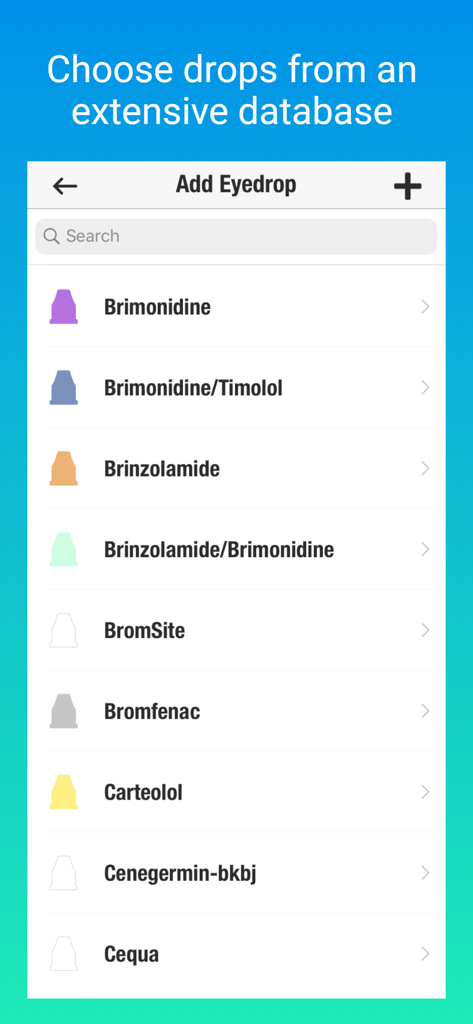
EyeDropAlarmアプリの画面。色付きの点眼容器キャップアイコン付きの点眼薬リストが表示されており、簡単に選択できます。

EyeDropAlarmアプリの画面。色付きの点眼容器キャップアイコン付きの点眼薬リストが表示されており、簡単に選択できます。

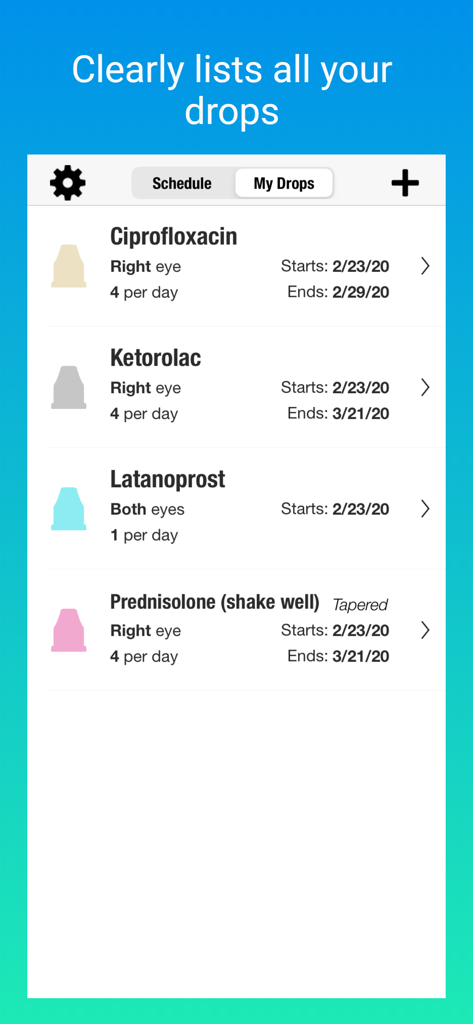
EyeDropAlarmアプリのスケジュールされた点眼薬リスト。名前、投与量、色付きの点眼容器キャップアイコンが表示されています。

EyeDropAlarmアプリのスケジュールされた点眼薬リスト。名前、投与量、色付きの点眼容器キャップアイコンが表示されています。

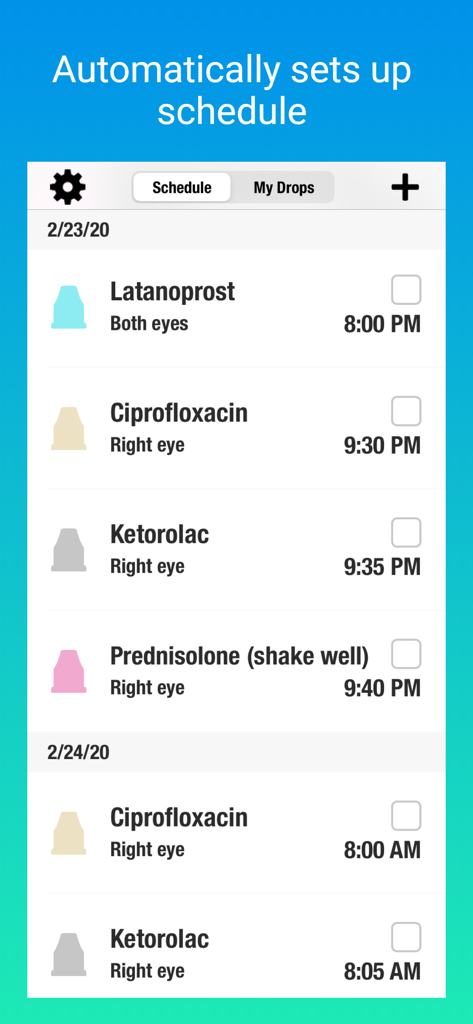
EyeDropAlarmアプリの毎日のスケジュール。薬の名前、時間、色分けされた点眼容器キャップアイコンが表示されています。

EyeDropAlarmアプリの毎日のスケジュール。薬の名前、時間、色分けされた点眼容器キャップアイコンが表示されています。

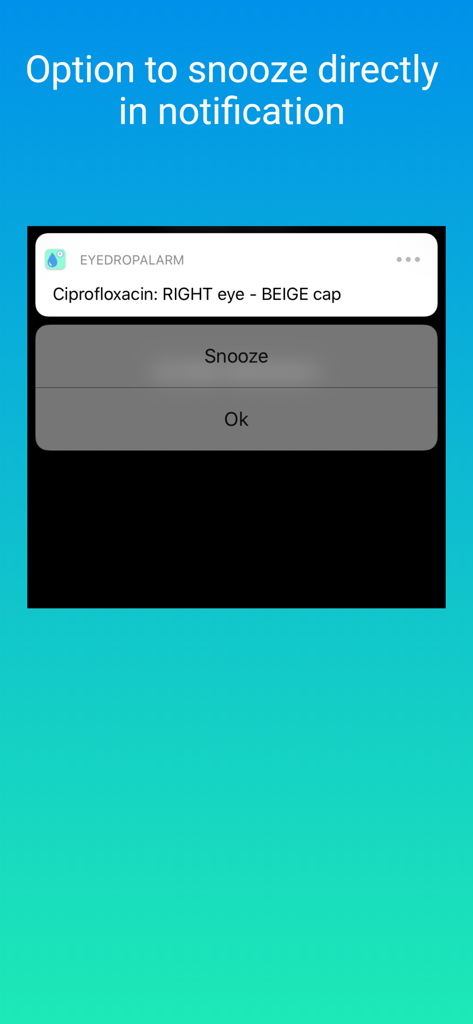
EyeDropAlarmの通知。点眼指示とスヌーズボタンが表示されています。

EyeDropAlarmの通知。点眼指示とスヌーズボタンが表示されています。

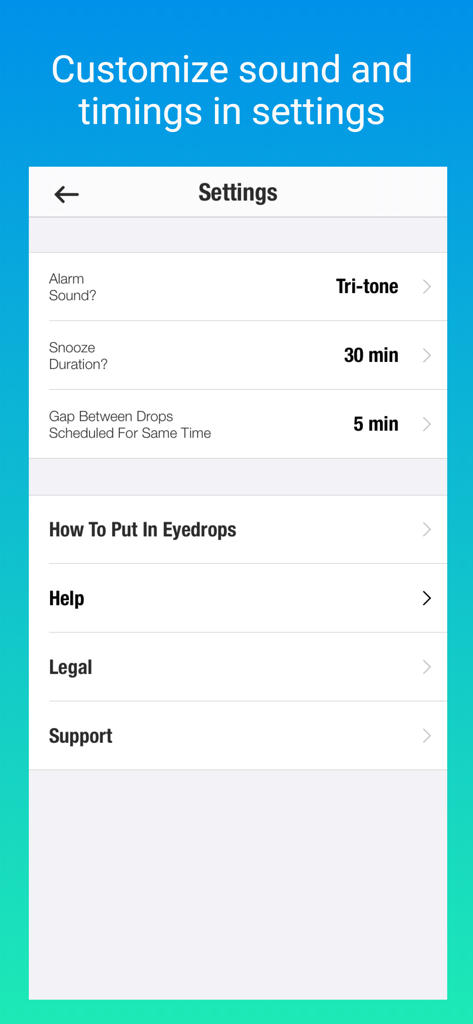
EyeDropAlarmの設定画面。アラーム音、スヌーズ時間、点眼間隔のオプションが表示されています。

EyeDropAlarmの設定画面。アラーム音、スヌーズ時間、点眼間隔のオプションが表示されています。

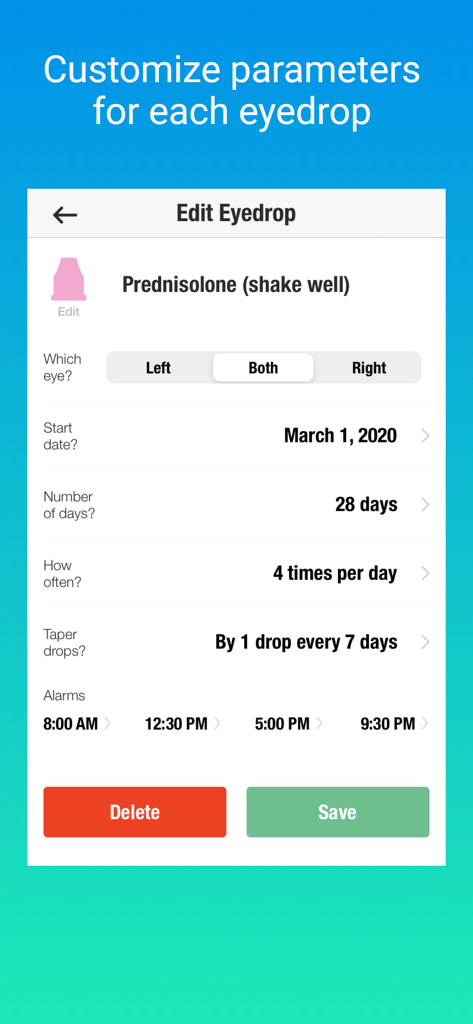
点眼スケジュールとアラームパラメータをカスタマイズするインターフェース。

点眼スケジュールとアラームパラメータをカスタマイズするインターフェース。

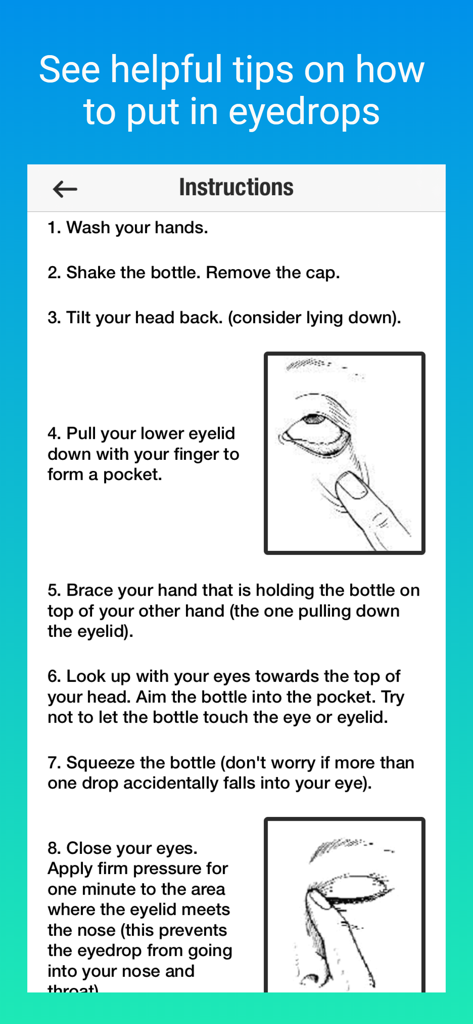
点眼薬を正しく投与する方法のステップバイステップの図解ガイド。

点眼薬を正しく投与する方法のステップバイステップの図解ガイド。

目のケアのストレスを解消

このアプリを際立たせるツール、 4K+ 人のユーザーが選択.

🎨

視覚的な服用ガイダンス

すべてのアラートで正確な点眼容器のキャップの色と正しい目を確認でき、手術後のぼやけた視界でも薬を簡単に識別できます。

⏱️

自動セーフティギャップ

当社のスマートスケジューラーは、異なる点眼薬を自動的に間隔を空けてスケジュールし、最大の吸収を確保し、医療のベストプラクティスを完全に遵守します。

🚀

瞬時のゼロ入力セットアップ

入力や面倒なログインは不要です。包括的なデータベースから処方箋を選択するだけで、すぐに回復スケジュールを開始できます。

アプリについて

について知っておくべきこと EyeDropAlarm.

説明

Eye Drop Alarm reminds you to put in your eyedrops. • Quick set up. No login required. • Recommended as "Top App for Patients" at the American Academy of Ophthalmology (AAO) Annual Conference. • Simply select your eyedrops from the app's extensive database. No need to type in each medication. • Alerts clearly indicate which eye and the bottle cap color. • Can set up schedule in advance. Ideal for drops prescribed before / after eye surgery (i.e., cataract surgery, LASIK, retina surgery, etc.). • Helpful reminders for people with glaucoma, dry eyes, allergies, infections, and uveitis (ocular inflammation). • Can set up alarms to match your doctor’s prescription (alarms can be as often as every hour if needed). • Automatically puts recommended gap between drops scheduled for the same time of day. • Includes step by step instructions on how to best put in eyedrops. • Includes a variety of alarm sounds to choose from. • Can view alerts on Apple Watch.

最新バージョン

2.1.2

サイズ

16.0 MB

リリース日

2017年11月3日

医師の指示に自信を持って従いましょう

点眼薬を管理し、視力を保護する最も簡単な方法。専門家が推奨し、患者に信頼され、ログイン不要で数秒で使い始められます。

ダウンロード: App Store
FAQ

よくある質問

について知っておくべきこと EyeDropAlarm

What is the EyeDropAlarm app?

EyeDropAlarmは、設定されたスケジュールに従って点眼薬を投与するようにユーザーにリマインドするアプリです。さまざまな眼疾患や術後のケアのための投薬ルーチンの管理を支援します。

Does EyeDropAlarm require a user login?

いいえ、EyeDropAlarmは、その機能を使用するためにユーザーアカウントの作成やログインを必要としません。セットアッププロセスは迅速かつ簡単です。

How does EyeDropAlarm help manage eyedrop schedules?

EyeDropAlarmを使用すると、広範なデータベースから点眼薬を選択してスケジュールを設定できます。目の色とボトルのキャップの色を示すアラートを送信し、同じ時間にスケジュールされたドロップを自動的に間隔を空けます。

Can EyeDropAlarm assist with post-surgery eyedrop schedules?

はい、EyeDropAlarmは、白内障手術、LASIK、網膜手術などの眼科手術の前後に処方された点眼薬のスケジュールに最適です。ユーザーは回復のために事前にスケジュールを設定できます。

What eye conditions does EyeDropAlarm support?

EyeDropAlarmは、緑内障、ドライアイ、アレルギー、感染症、ぶどう膜炎(眼の炎症)などの症状を持つ人々にとって役立つリマインダーを提供し、一貫した服薬遵守を支援します。

Can I customize alarm sounds in EyeDropAlarm?

はい、EyeDropAlarmには、ユーザーが選択できるさまざまなアラーム音が用意されています。ユーザーは、アプリの設定メニュー内で好みのサウンドをカスタマイズできます。

Can I snooze EyeDropAlarm notifications?

はい、EyeDropAlarmの通知では、アラートから直接スヌーズするオプションが提供されます。ユーザーは、アプリの設定でスヌーズ期間を構成することもできます。

Does EyeDropAlarm integrate with Apple Watch?

はい、EyeDropAlarmを使用すると、Apple Watchで点眼薬のアラートを直接確認でき、リマインダーに便利にアクセスできます。

How frequently can EyeDropAlarm set reminders?

EyeDropAlarmを使用すると、医師の処方に合わせてアラームを設定できます。必要に応じて、1時間ごとにリマインダーをスケジュールすることもできます。

Does EyeDropAlarm provide instructions on how to put in eyedrops?

はい、EyeDropAlarmには、点眼薬を効果的に使用するための明確なステップバイステップの手順が含まれており、ユーザーは適切な投与技術をガイドされます。

Can I choose specific eyedrops from a list in EyeDropAlarm?

はい、EyeDropAlarmを使用すると、アプリ内の広範なデータベースから点眼薬を選択できます。各薬の名前を手動で入力する必要はありません。

How does EyeDropAlarm manage multiple eyedrops scheduled at the same time?

EyeDropAlarmは、同じ時間にスケジュールされているドロップ間に推奨される間隔を自動的に挿入します。これにより、ユーザーの介入なしに適切な投与が保証されます。

How does EyeDropAlarm indicate which eye needs drops?

EyeDropAlarmのアラートは、どの目(例:右、左、両方)に点眼薬が必要か、およびボトルのキャップの色を明確に示し、混乱を防ぎ、正しい適用を保証します。

App information, icons, screenshots, and descriptions displayed on this page are sourced from the Apple App Store and are the property of their respective developers. Download estimates and rankings are based on MWM's proprietary models and may not reflect actual figures. This page is provided for informational and analytical purposes only.

Believe this page infringes your intellectual property? File a dispute