GV Connect

GV Connect

ダウンロード: App Store
ロゴ: GV Connect

GV Connect:Google Voiceの究極のパワーユーザーアプリ

自動設定、セキュアなオフラインアクセス、そして最大限の効率のために設計されたプロフェッショナルなiOSインターフェイスで、ビジネスコミュニケーションを完全に制御しましょう。

開発元

Andreas Amann

カテゴリ

Utilities

ダウンロード

247K+

ユーザー評価

3.3/5

評価数

2K+

対応言語

1

一目でわかるコントロール

このインターフェースを利用する 247K+ 人のユーザー.

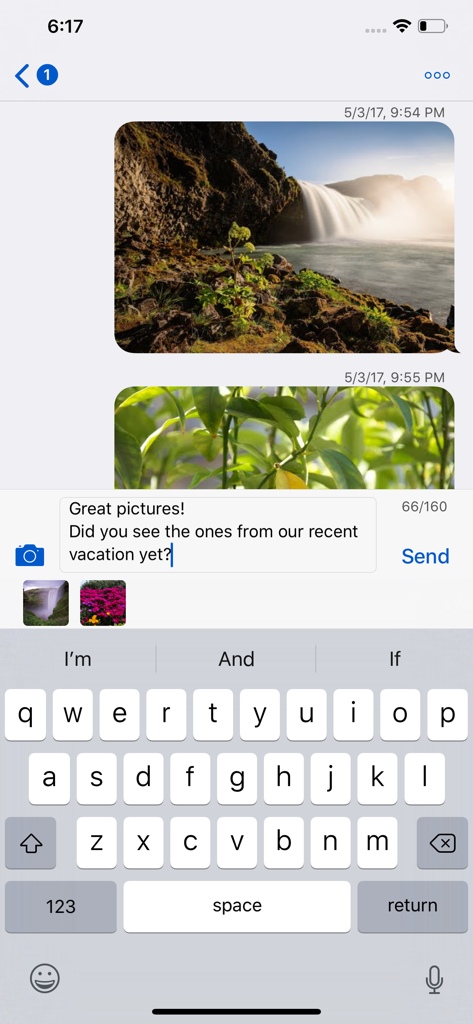
GV ConnectアプリがiPhoneに表示され、写真メッセージとiMessageのようなインターフェイスのテキスト会話を表示しています。

GV ConnectアプリがiPhoneに表示され、写真メッセージとiMessageのようなインターフェイスのテキスト会話を表示しています。

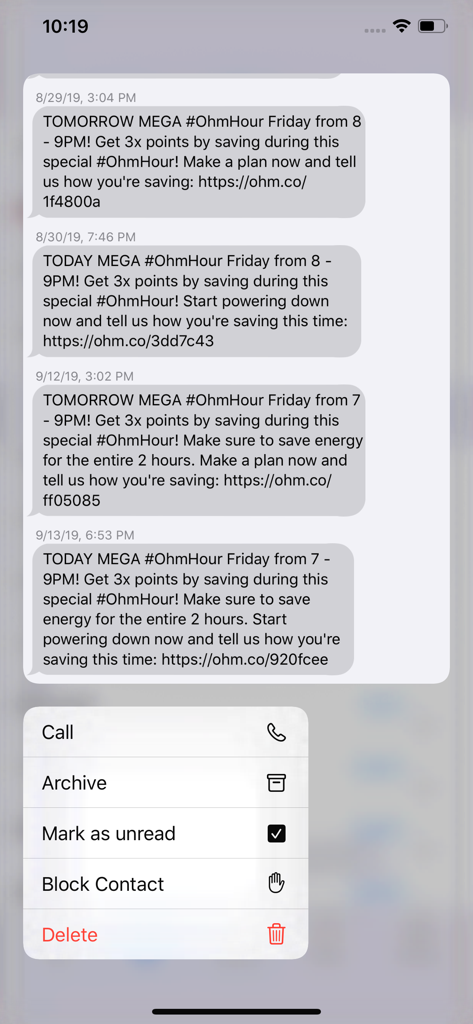
GV Connectモバイルアプリが、通話とアーカイブのアクションのコンテキストメニューと共にテキストメッセージ履歴を表示しています

GV Connectモバイルアプリが、通話とアーカイブのアクションのコンテキストメニューと共にテキストメッセージ履歴を表示しています

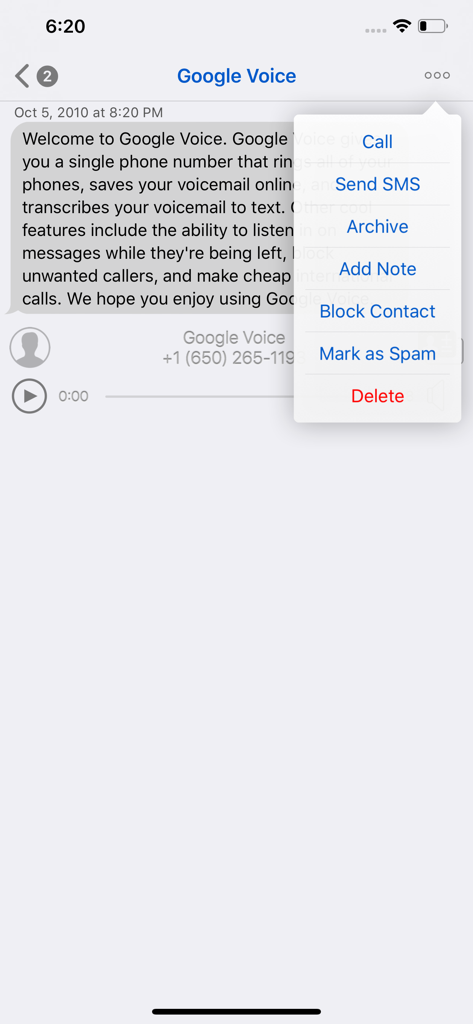
GV Connectアプリインターフェイスがメッセージ詳細と通話、SMS、アーカイブオプションを含むポップアップメニューを表示しています

GV Connectアプリインターフェイスがメッセージ詳細と通話、SMS、アーカイブオプションを含むポップアップメニューを表示しています

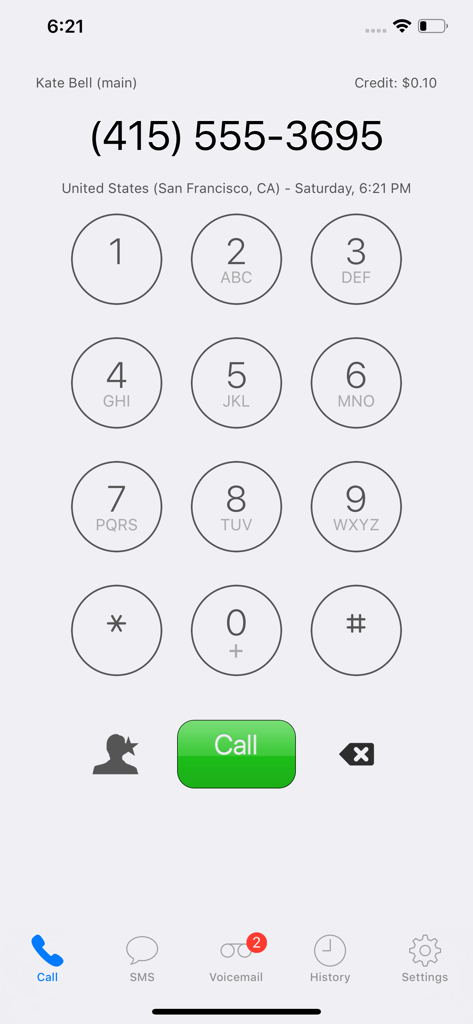
GV Connectアプリのダイヤラースクリーンに、電話キーパッドと通話ボタンが表示されています。

GV Connectアプリのダイヤラースクリーンに、電話キーパッドと通話ボタンが表示されています。

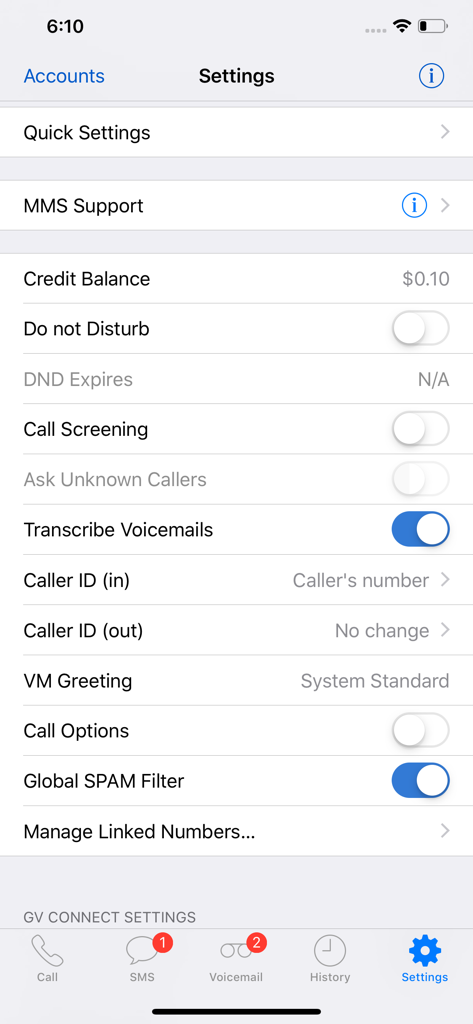
GV Connectアプリの設定メニューに、Google Voiceアカウント管理オプションが表示されています。

GV Connectアプリの設定メニューに、Google Voiceアカウント管理オプションが表示されています。

パワーユーザーコントロールでワークフローをマスターする

このアプリを際立たせるツール、 247K+ 人のユーザーが選択.

📍

場所認識型自動化

オフィスを出たり、自宅に到着したりすると、転送プロファイルが自動的に切り替わったり、おやすみモードが期限切れになります。

💼

ビジネスグレード管理

会話にプライベートノートを追加したり、スレッドをアーカイブしたり、オフラインで履歴全体を検索したりして、プロフェッショナルな生活を整理しましょう。

🛡️

ネイティブiOSセキュリティ

TouchIDまたはFaceIDでクライアントデータを保護し、デバイスのキーチェーンに認証情報を安全に保存して、シームレスでプライベートな体験を実現します。

アプリについて

について知っておくべきこと GV Connect.

説明

GV Connect is the most feature-complete Google Voice application available for your iPhone or iPad — text, call, and interact with your existing GV accounts using a beautiful and streamlined interface that gives you full control over your account settings: • Place calls using your Google Voice number rather than your mobile number - enter number directly, select a contact from your device's contacts, or call back any number in your history. The application supports direct call (iPhone only), callback (Click2Call), and offline calling (see application website for a description of these calling modes) • Send and receive text messages (SMS) from your Google Voice number - including support for long SMS, group messages, picture messages (MMS – available as In-App purchase), and support for non-English messages. Supports in-line replies with an iMessage-like interface • Automatically check for new messages and voicemails - even when the application is in the background • Listen to voicemails and recorded conversations right on your device (allowing you to pause, rewind, or fast forward to any point within the message) - voicemails will show the transcription of the message when available • Un/-archive messages, mark them as un-/read or starred, attach notes to conversations, block/unblock senders, trash or delete conversations • Easily search in your history by contact, message, or note text - supports continuing searches online for messages that have not yet been cached locally • Messages are stored on your device for offline access • Quickly change various Google Voice account settings (call forwarding, do-not-disturb — including the option to have DND automatically expire at a specified time, message notifications, …) • Add, verify, and remove forwarding phone numbers • Quick Settings allow saving and restoring complete account settings (DND, forwarding, …) for easy switching between different profiles • Support for automatic selection of Quick Settings based on current location (available as In-App Purchase) • Direct access to your device's contacts without needing to synchronize them with Google • Quick access to favorite phone numbers for calls and SMS • Universal application which runs optimized on iPhone (including iPhone X), iPod Touch, and iPad (including split-screen multi-tasking on supported devices running iOS 12.0 or later) • Optional application passcode lock (with TouchID/FaceID option on supported devices) • Supports gesture navigation when typing text for easier placement of the cursor: swipe left/right with one or two fingers to move the caret position backwards/forward by character or word. Swipe left/right with three fingers to go to the beginning/end of the existing text * Recipient of an honorable mention in the 2010 Best App Ever Awards * NOTE: An existing Google Voice account with a GV phone number is required to use this application - signup for new Google Voice accounts is currently limited to residents of the US. Please note that GV Connect is NOT a VoIP application and will not allow making or receiving calls from an iPad/iPod Touch without a separate VoIP application. GV Connect stores your account password securely in your device's Keychain for faster login when launching the application. All communication is done exclusively via secure connections (SSL) to the Google Voice servers owned and operated by Google and no contact information (other than the contact's phone number which is required to place a call or send a message) is sent to Google or any other party. All operations are fully synchronized with your Google Voice account. Please read the FAQ section on the application website if you encounter any issues or use the feedback email link in its about screen to ask for support.

最新バージョン

3.10.6

サイズ

6.2 MB

リリース日

2010年9月17日

Google Voiceのパワーユーザー向け、完成されたアプリ。

iPhoneおよびiPad向けの最も機能豊富なクライアントで、プロフェッショナルなコミュニケーションを完全に制御しましょう。247,000人以上のユーザーに加わり、今日あなたのワークフローをアップグレードしましょう。

ダウンロード: App Store
FAQ

よくある質問

について知っておくべきこと GV Connect

GV Connectとは何ですか?

GV Connectは、iPhoneとiPad向けのフル機能アプリケーションです。ユーザーは、Google Voiceアカウントを使用してテキストメッセージの送受信、通話、およびアカウント設定の全操作を行うことができます。

GV ConnectはGoogle Voice番号を使って電話をかけられますか?

はい、GV Connectは携帯電話番号ではなく、Google Voice番号を使用して電話をかけます。ダイレクトコール(iPhone)、コールバック(Click2Call)、オフラインコールモードをサポートしています。

GV Connectはテキストメッセージ(SMS)をサポートしていますか?

はい、GV ConnectはGoogle Voice番号からテキストメッセージ(SMS)を送受信することをサポートしています。長文SMS、グループメッセージ、画像メッセージ(MMS)、非英語メッセージも含まれます。

GV Connectは画像メッセージ(MMS)を送信できますか?

はい、GV Connectは画像メッセージ(MMS)の送信をサポートしています。この機能はアプリケーション内のアプリ内課金として利用可能です。設定画面にもMMSサポートが表示されます。

GV Connectは留守番電話をサポートしていますか?

はい、GV Connectは新しいメッセージと留守番電話を自動的にチェックします。ユーザーはデバイスで留守番電話を聞くことができ、文字起こしが提供されていれば利用できます。

GV Connectを通じてGoogle Voiceアカウントの設定を管理できますか?

はい、GV Connectを使用すると、通話転送、おやすみモード、メッセージ通知など、さまざまなGoogle Voiceアカウント設定を素早く変更できます。

GV Connectを使用するにはGoogle Voiceアカウントが必要ですか?

はい、GV Connectを使用するには、GV電話番号を持つ既存のGoogle Voiceアカウントが必要です。現在、新規Google Voiceアカウントの登録は米国内居住者に限定されています。

GV ConnectはセキュリティのためにTouchIDまたはFaceIDをサポートしていますか?

はい、GV Connectはオプションでアプリケーションのパスコードロックを提供しています。対応デバイスではTouchID/FaceIDオプションも含まれており、セキュリティが強化されています。

GV Connectは私のGoogle Voiceパスワードを保存しますか?

はい、GV ConnectはGoogle Voiceアカウントのパスワードをデバイスのキーチェーンに安全に保存し、ログインを高速化します。すべての通信はGoogle VoiceサーバーへのセキュアなSSL接続を使用します。

GV Connectで連絡先をブロックできますか?

はい、GV Connectでは送信者をブロックできます。この機能は、会話メニューや留守番電話オプションからアクセスでき、不要な連絡先を管理できます。

GV Connectはどのような種類のデバイスをサポートしていますか?

GV Connectは、iPhone(iPhone Xを含む)、iPod Touch、iPad向けに最適化されたユニバーサルアプリケーションです。iOS 12.0以降を実行する対応デバイスでは、スプリットスクリーンマルチタスクをサポートしています。

GV Connectで留守番電話を文字起こしできますか?

はい、GV Connectの留守番電話は、利用可能な場合に文字起こしを表示します。「留守番電話を文字起こし」という設定オプションでこの機能を有効にできます。

GV Connectはクイック設定を提供していますか?

はい、GV Connectにはアカウント設定全体を保存および復元するためのクイック設定が含まれています。また、アプリ内課金として、現在の位置情報に基づいた自動選択も提供しています。

GV ConnectはVoIPアプリケーションですか?

いいえ、GV ConnectはVoIPアプリケーションではありません。別途VoIPアプリケーションがない限り、iPad/iPod Touchからの通話の発着信はできません。

GV Connectでクレジット残高を確認するにはどうすればよいですか?

ユーザーはGV Connect内でクレジット残高を確認できます。残高は、アプリケーションの設定メニューとダイヤルパッドインターフェースに表示されます。

App information, icons, screenshots, and descriptions displayed on this page are sourced from the Apple App Store and are the property of their respective developers. Download estimates and rankings are based on MWM's proprietary models and may not reflect actual figures. This page is provided for informational and analytical purposes only.

Believe this page infringes your intellectual property? File a dispute