Photo Cut Out Editor

Photo Cut Out Editor

ダウンロード: App Store
ロゴ: Photo Cut Out Editor

フォト切り抜きエディター:数秒でプロ並みの背景削除とクリエイティブデザインを実現

400万人以上のクリエイターや起業家が愛用する、精密な切り抜き、一括編集、ワンクリック証明写真作成のための最高ツール。SNS、Etsyの商品登録、外出先でのプロ級デザインに最適です。

開発元

丽譞 牛

カテゴリ

Photo & Video

ダウンロード

4M+

ユーザー評価

4.7/5

評価数

55K+

対応言語

33

すべてのピクセルに精密さを

このインターフェースを利用する 4M+ 人のユーザー.

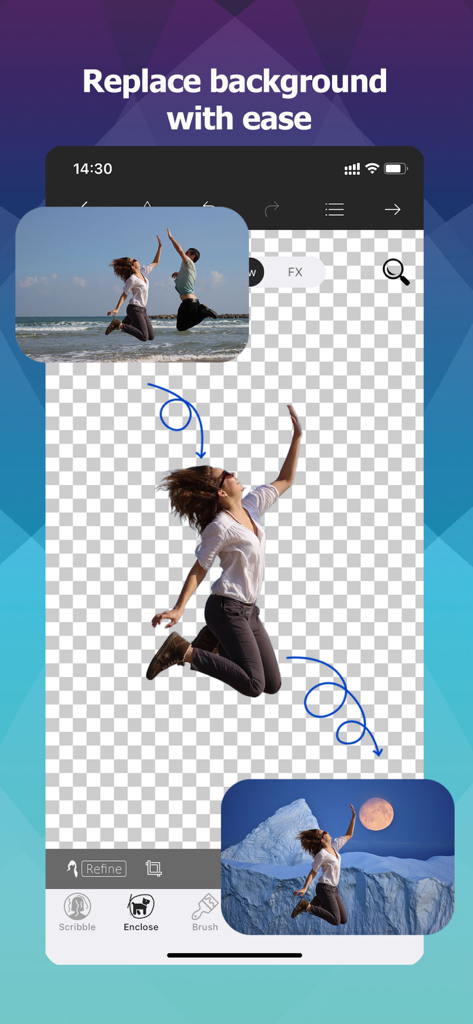
ビーチの写真から人物を切り抜き、新しい山の背景に配置するモバイルアプリのインターフェース

ビーチの写真から人物を切り抜き、新しい山の背景に配置するモバイルアプリのインターフェース

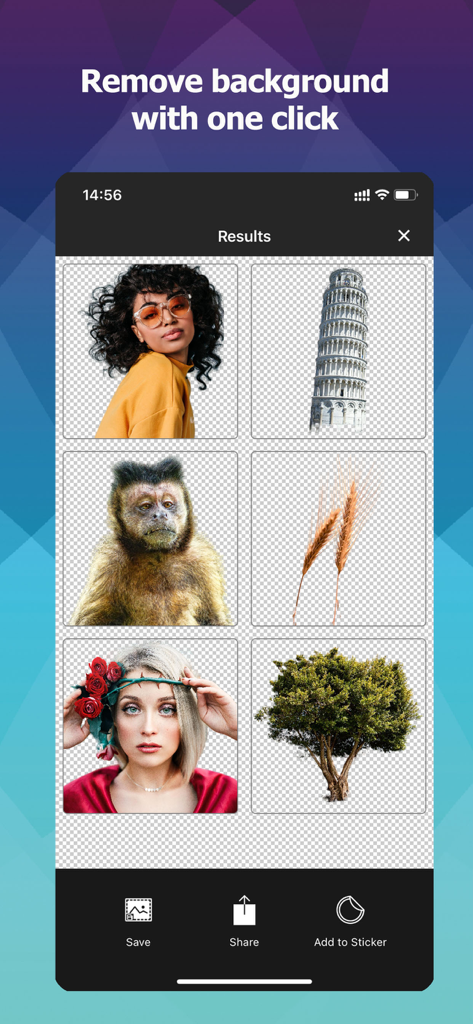
人物や木など、編集しやすいように背景が削除された様々な画像を表示するモバイルアプリのインターフェース

人物や木など、編集しやすいように背景が削除された様々な画像を表示するモバイルアプリのインターフェース

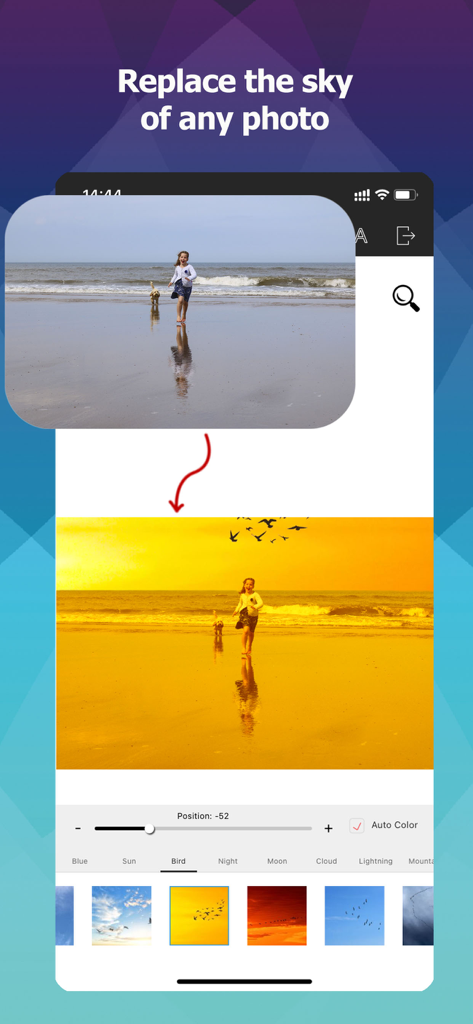
ビーチの写真の空を黄金色の夕焼けに変える空の入れ替え機能を表示するモバイルアプリのインターフェース

ビーチの写真の空を黄金色の夕焼けに変える空の入れ替え機能を表示するモバイルアプリのインターフェース

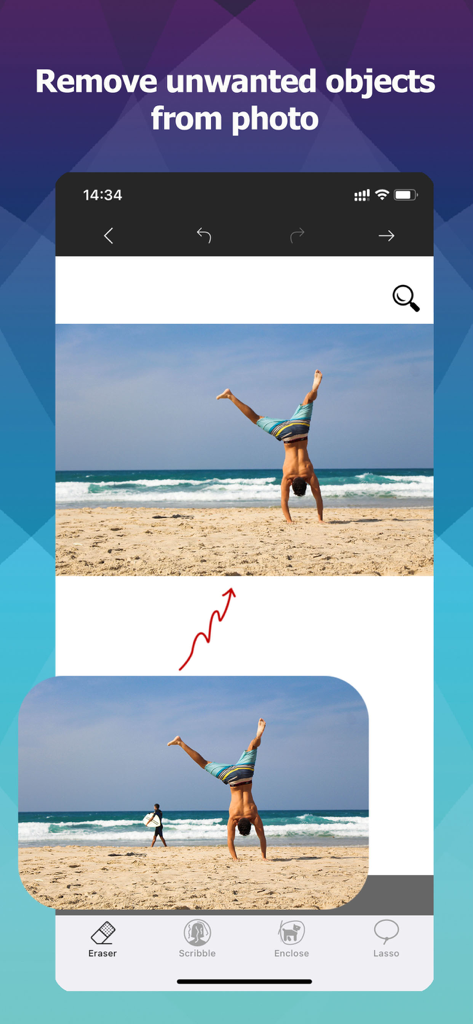
オブジェクト消しゴムツールを使用してビーチの写真から人物を削除する前後の比較

オブジェクト消しゴムツールを使用してビーチの写真から人物を削除する前後の比較

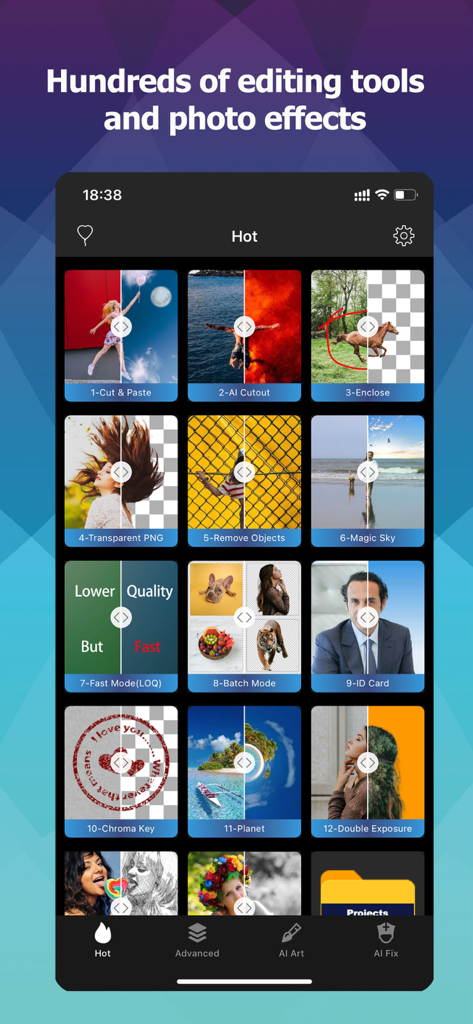
AI切り抜き、背景削除、一括処理ツールなどの機能グリッドを表示するフォト切り抜きエディターのモバイルインターフェース

AI切り抜き、背景削除、一括処理ツールなどの機能グリッドを表示するフォト切り抜きエディターのモバイルインターフェース

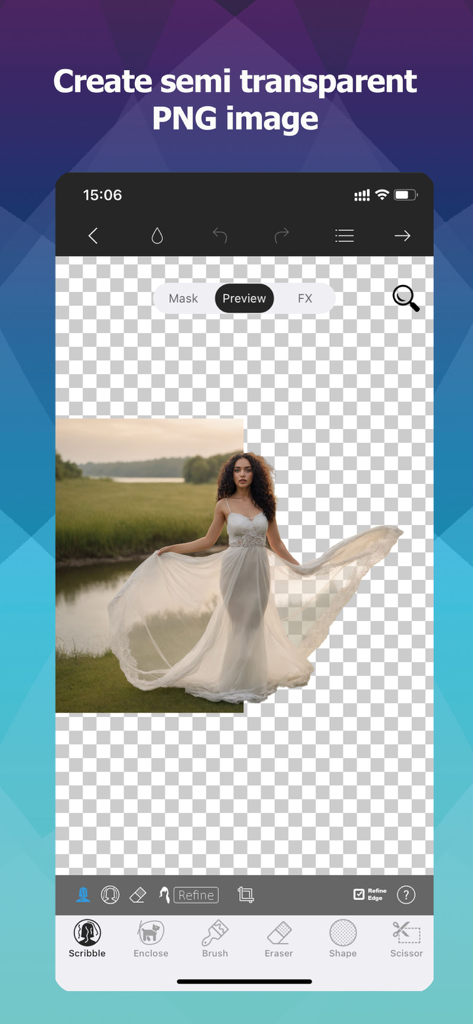
白いドレスを着た女性を背景から切り抜き、透明なPNG画像を作成するモバイルアプリのインターフェース

白いドレスを着た女性を背景から切り抜き、透明なPNG画像を作成するモバイルアプリのインターフェース

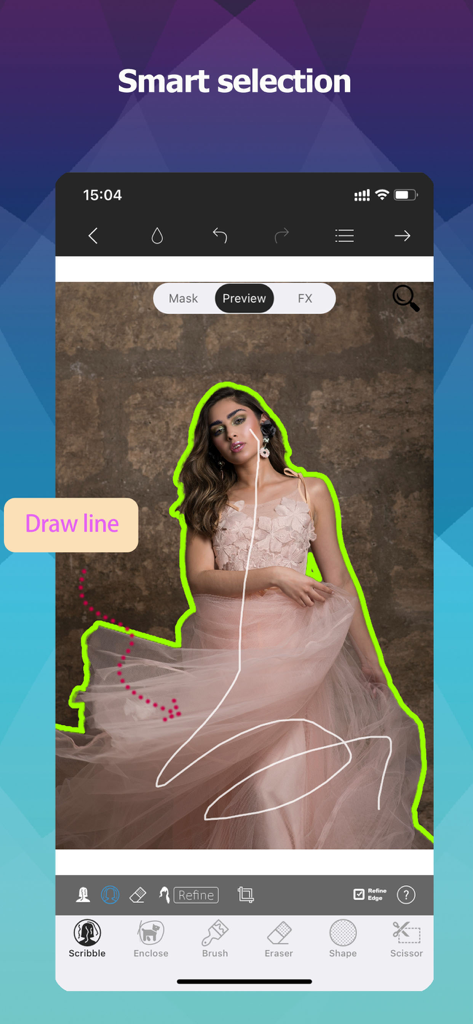
フォト切り抜きエディターアプリで、スマート選択ツールを使って線を描き人物を切り抜くユーザー

フォト切り抜きエディターアプリで、スマート選択ツールを使って線を描き人物を切り抜くユーザー

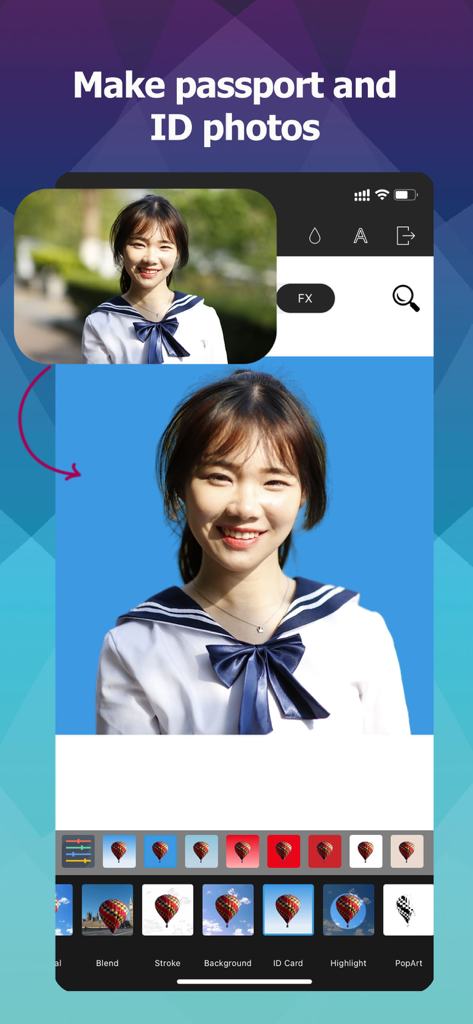
背景削除機能を使ってプロ仕様のパスポートや証明写真を作成する方法を示すモバイルアプリのインターフェース

背景削除機能を使ってプロ仕様のパスポートや証明写真を作成する方法を示すモバイルアプリのインターフェース

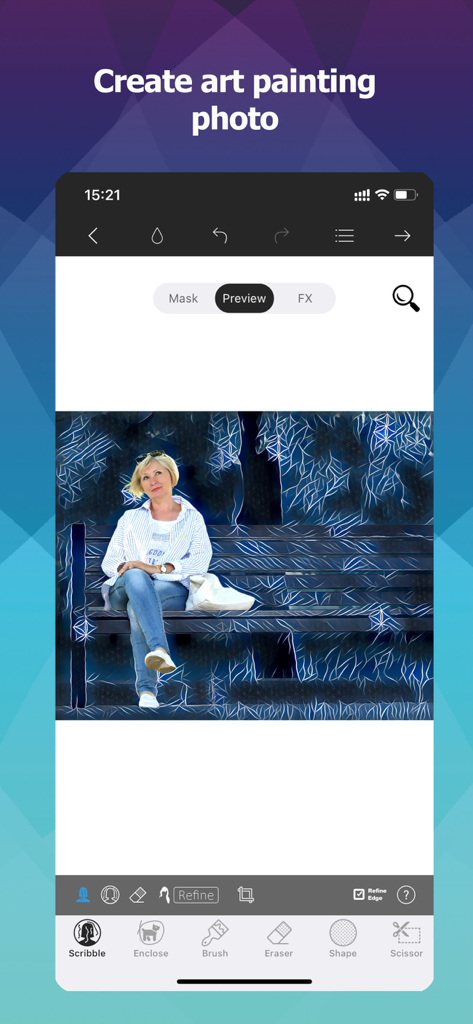
公園のベンチに座っている女性に芸術的な絵画フィルターを適用したモバイルアプリのインターフェース

公園のベンチに座っている女性に芸術的な絵画フィルターを適用したモバイルアプリのインターフェース

数タップでプロ並みの仕上がり

このアプリを際立たせるツール、 4M+ 人のユーザーが選択.

✂️

ピクセル単位の精密さ

ギザギザの境界線はもう不要。スマート選択ツールが髪の毛や毛皮などの複雑なディテールも簡単に処理し、毎回完璧な切り抜きを提供します。

🛍️

副業をスケールアップ

EtsyやPoshmarkのセラーに最適。瞬時に透明なPNGを作成し、一括処理機能で全商品の出品準備を数秒で完了できます。

🎨

充実のクリエイティブスタジオ

AIによる空の入れ替えから、高度なレイヤー編集、PSDサポートまで、スマホ一つであらゆる写真をプロの傑作に変貌させます。

アプリについて

について知っておくべきこと Photo Cut Out Editor.

説明

"makes editing photos on your iOS device easier than ever before" -TheiPhoneAppReview.com The Most Convenient Cutout Tool! Use Photo Cutout to cut out any desired object in seconds, down to the hair and fur. You can export transparent PNGs or choose from millions of background images. Batch cutouts can be performed and saved. You can freely choose to delete unwanted objects from photos. Advanced features for layer editing are available, supporting brushes, text, shapes, and various image editing tools. Supports one-click cutout of people, animals, plants, industrial products, personal items, down to the object's fine hair and edges! Supports one-click creation of ID photos, completely free! Supports one-click replacement of the photo sky, turning cloudy days into sunny days, daytime into starry night, with thousands of skies available! 7 Cutout Tools Provides both intelligent selection tools and manual selection tools, smart brush, brush, intelligent lasso, shapes, etc., totaling up to 7 types. Cutout tasks can be completed with just a few clicks. More than 40 Filters and Over 300 Predefined Effects You can create shadows, highlights, outlines, modern art, cartoons, blur, glass, pencil, comic book, mosaic, and various other effects. Most effects are unique and distinctive. 21 Image Compositing Modes 7 Selection Adjustment Tools Including feathering, expansion, transformation, gradient, etc. Supports Import/Export of PSD Images Fully Supports Transparent PNG Images Supports importing transparent PNG images, supports exporting transparent PNG images Supports importing transparent WEBP images, supports exporting transparent WEBP images Supports editing BMP and JPG images Subscription: • Payment will be charged to iTunes Account at confirmation of purchase • Subscription automatically renews unless auto-renew is turned off at least 24-hours before the end of the current period • Account will be charged for renewal within 24-hours prior to the end of the current period, and identify the cost of the renewal • Subscriptions may be managed by the user and auto-renewal may be turned off by going to the user's Account Settings after purchase • Any unused portion of a free trial period, if offered, will be forfeited when the user purchases a subscription to that publication, where applicable - Privacy Policy: http://ptuwang.com/conf/privacy_co.pdf - Terms of Use: http://ptuwang.com/conf/term.pdf

最新バージョン

13.0

サイズ

508.2 MB

リリース日

2015年11月13日

編集をスタジオクオリティへ

iOS向けの最も精密な切り抜きツールを使用している400万人のクリエイターや個人事業主の仲間入りをしましょう。今すぐダウンロードして、プロ級のビジュアル作成を始めましょう。

ダウンロード: App Store
FAQ

よくある質問

について知っておくべきこと Photo Cut Out Editor

Photo Cut Out Editor の主な機能は何ですか?

Photo Cut Out Editor は、主に写真からオブジェクトを切り抜き、髪の毛や毛皮のような細かい部分も透明なPNGとしてエクスポートできるようにします。

Photo Cut Out Editor は写真の背景を置き換えることができますか?

はい、Photo Cut Out Editor は写真の背景を簡単に置き換えることができ、ユーザーは希望のオブジェクトを切り抜いた後、何百万もの背景画像から選択できます。

Photo Cut Out Editor は透明な PNG 画像をサポートしていますか?

はい、Photo Cut Out Editor は透明な PNG 画像を完全にサポートしています。透明な PNG 画像のインポートとエクスポートの両方が可能です。

Photo Cut Out Editor は切り抜きにバッチ処理をサポートしていますか?

はい、Photo Cut Out Editor はバッチ切り抜きを実行します。ユーザーは複数の切り抜きを同時に保存できます。

Photo Cut Out Editor は写真から不要なオブジェクトを削除できますか?

はい、Photo Cut Out Editor を使用すると、ユーザーは消しゴム、落書き、囲み、投げ縄などのツールを使用して、写真から不要なオブジェクトを自由に選択して削除できます。

Photo Cut Out Editor は写真の空をどのように置き換えますか?

Photo Cut Out Editor は、写真の空をワンクリックで置き換えることをサポートしています。数千の空が用意されており、曇りの日を晴れた日に、または昼間を星空に変えることができます。

ユーザーは Photo Cut Out Editor で証明写真を作成できますか?

はい、Photo Cut Out Editor はワンクリックで証明写真を作成することをサポートしています。この機能はユーザーにとって完全に無料です。

Photo Cut Out Editor のサブスクリプション自動更新はどのように機能しますか?

サブスクリプションは、現在の期間が終了する少なくとも24時間前に自動更新をオフにしない限り、自動的に更新されます。更新料金は、有効期限の24時間以内に発生します。

ユーザーは Photo Cut Out Editor のサブスクリプションをどのように管理できますか?

ユーザーは、購入後にアカウント設定にアクセスすることで、Photo Cut Out Editor のサブスクリプションを管理し、自動更新をオフにすることができます。

Photo Cut Out Editor は編集のためにどのような画像形式をサポートしていますか?

Photo Cut Out Editor は、BMP および JPG 画像の編集をサポートしています。また、透明な PNG および WEBP 画像のインポートとエクスポート、PSD 画像のインポート/エクスポートもサポートしています。

App information, icons, screenshots, and descriptions displayed on this page are sourced from the Apple App Store and are the property of their respective developers. Download estimates and rankings are based on MWM's proprietary models and may not reflect actual figures. This page is provided for informational and analytical purposes only.

Believe this page infringes your intellectual property? File a dispute