Remote Terminal Companion

Remote Terminal Companion

ダウンロード: App Store
ロゴ: Remote Terminal Companion

Remote Terminal Companion: iPhoneからMacのコマンドラインを安全に制御

iPhoneから直接スクリプトを実行し、ファイルを参照し、システムパフォーマンスを監視します。プライバシーと速度を安全なローカル接続で重視する開発者のために構築されました。

ダウンロード: App Store

開発元

Pierre CARRON DE LA CARRIERE

カテゴリ

Developer Tools

ダウンロード

0

ユーザー評価

1.0/5

評価数

0

対応言語

1

指先で操作

このインターフェースを利用する 0 人のユーザー.

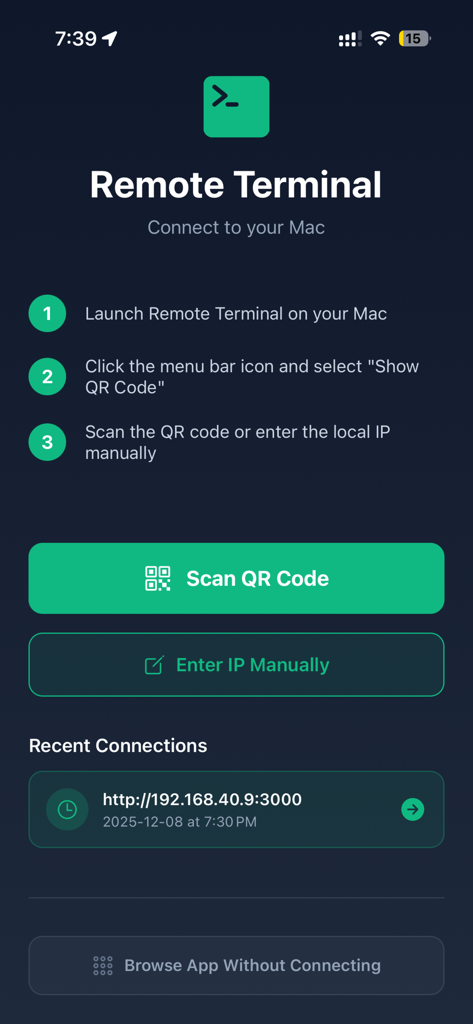
Remote Terminal connection screen showing QR code pairing instructions and recent connections

Remote Terminal connection screen showing QR code pairing instructions and recent connections

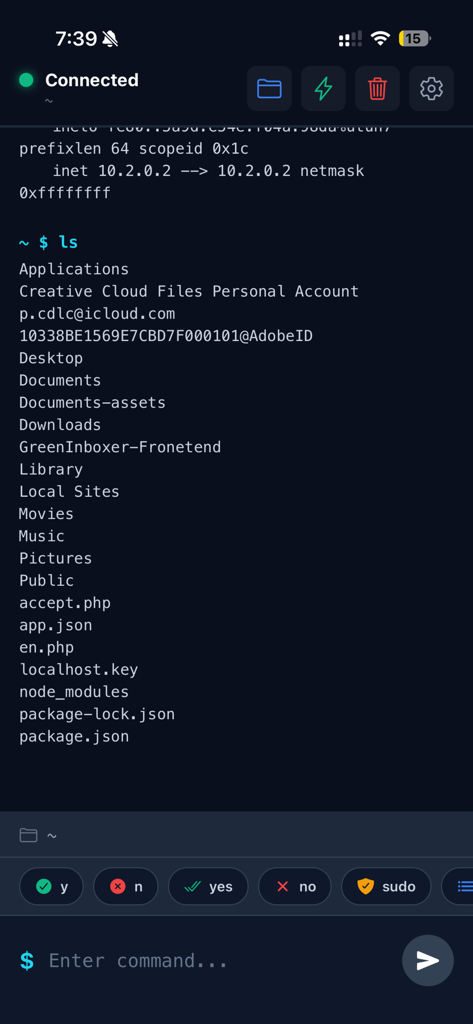
A mobile terminal interface on an iPhone showing a list of Mac files and directories after executing a command

A mobile terminal interface on an iPhone showing a list of Mac files and directories after executing a command

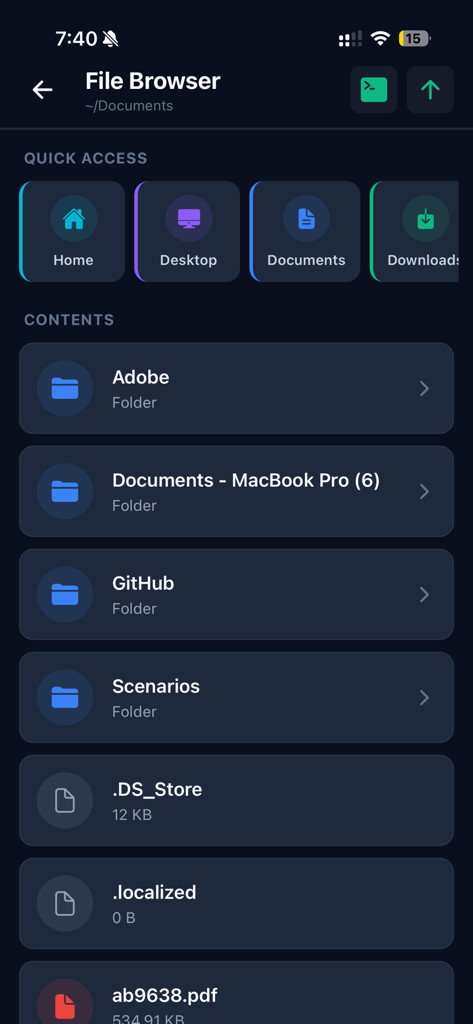
Remote Terminal Companion app file browser interface showing Mac folders and files on an iPhone

Remote Terminal Companion app file browser interface showing Mac folders and files on an iPhone

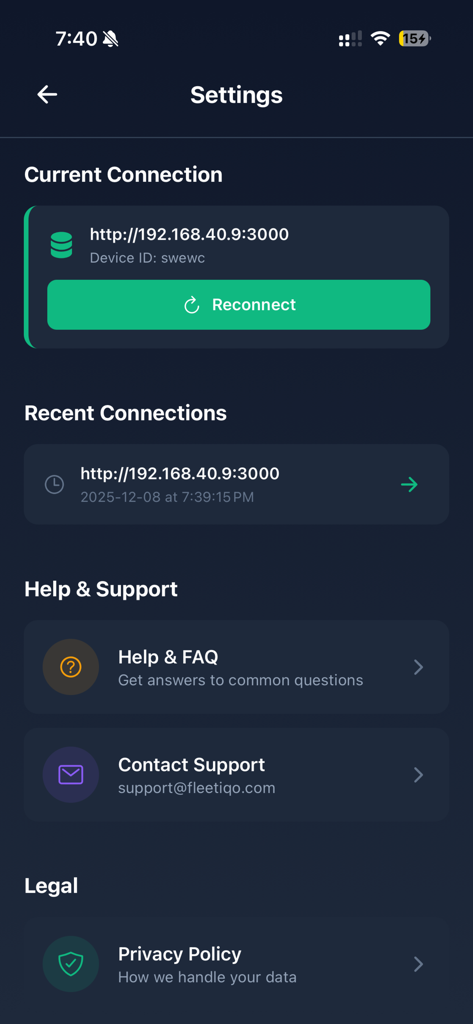
Settings screen of the Remote Terminal Companion app showing current and recent connection details help support and privacy policy

Settings screen of the Remote Terminal Companion app showing current and recent connection details help support and privacy policy

家のどこからでもMacを操作

このアプリを際立たせるツール、 0 人のユーザーが選択.

⌨️

リアルタイムターミナル制御

プロフェッショナルのワークフローに最適化されたライブモバイルCLIを通じて、スクリプトを実行し、プロセスを管理し、コマンドを実行します。

📂

シームレスなファイルブラウジング

直感的なビジュアルインターフェースでMacのファイルシステムを探索し、ドキュメントを見つけ、ネットワーク全体でディレクトリを管理します。

🛡️

プライバシーファーストアーキテクチャ

クラウドへの依存ゼロを体験してください。データはローカルWi-Fiネットワークから離れることはなく、完全なセキュリティと制御を保証します。

アプリについて

について知っておくべきこと Remote Terminal Companion.

説明

Manage Your Mac from Your iPhone Remote Terminal provides a convenient way to interact with your Mac’s command-line environment and browse files directly from your iPhone. Designed for developers, IT professionals, and advanced users, it offers a secure and streamlined tool to perform routine tasks on your Mac when both devices are on the same local network. Key Features Terminal Access Send commands to your Mac’s terminal and view the output in real time. Ideal for performing development tasks, checking system information, managing files, and running scripts you have created. File Browser Explore your Mac’s file system with an intuitive visual interface. Quickly access common folders such as Home, Desktop, Documents, Downloads, and iCloud Drive. Quick Actions Use predefined shortcuts to retrieve system details such as: • System information • Storage usage • Network configuration • Active processes Local & Secure Connection Remote Terminal operates only when your Mac and iPhone are connected to the same local Wi-Fi network. • No external servers • No cloud usage • No analytics or tracking • Data remains on your devices Simple Setup 1. Install the companion Remote Terminal desktop app on your Mac 2. Pair your devices by scanning a QR code 3. Start managing tasks on your Mac from your iPhone Ideal For • Developers • System administrators • IT teams • Power users who work with terminal tools • Anyone needing convenient access to their Mac’s command-line environment How It Works The companion Mac app runs in your menu bar and creates a secure local connection that your iPhone can access. Only devices on the same network can connect, ensuring full user control and privacy. What You Can Do • Execute commands you would normally run on your Mac’s terminal • Navigate folders and review file structure • View system details • Manage running tasks • Access frequently used directories and utilities Requirements • macOS 10.13 or later • Remote Terminal companion app for Mac (free download) • iPhone with iOS 13.0 or later • Both devices connected to the same Wi-Fi network Privacy Remote Terminal is designed with privacy in mind. All communication occurs directly between your iPhone and your Mac over your local network. No personal data, command content, or file information is transmitted externally. Support Access help anytime: • In-app FAQ • Email support: support@fleetiqo.com • Step-by-step setup guide

最新バージョン

1.1.0

サイズ

34.2 MB

リリース日

2025年12月10日

部屋のどこからでもMacを操作する準備はできましたか?

Total Privacyでシステムを管理する開発者やITプロフェッショナルに加わりましょう。クラウドなし、追跡なし—手のひらで安全なローカルターミナルアクセスを利用できます。

ダウンロード: App Store

App information, icons, screenshots, and descriptions displayed on this page are sourced from the Apple App Store and are the property of their respective developers. Download estimates and rankings are based on MWM's proprietary models and may not reflect actual figures. This page is provided for informational and analytical purposes only.

Believe this page infringes your intellectual property? File a dispute