School Assistant – Planner

School Assistant – Planner

ダウンロード: App Store
ロゴ: School Assistant – Planner
School Assistant – Planner: あなたの学業生活全体を、美しく整理された100%無料のプランナーに。

サブスクリプション疲れなしに、Google Classroomの課題やA/Bスケジュールをマスターしましょう。Appleエコシステムのために構築され、深いカスタマイズ、ウィジェット、そして広告ゼロを特徴としています—学生によって、学生のために。

開発元

Sun Apps, LLC

カテゴリ

Education

ダウンロード

234K+

ユーザー評価

4.8/5

評価数

4K+

対応言語

1

生産性の片鱗

このインターフェースを利用する 234K+ 人のユーザー.

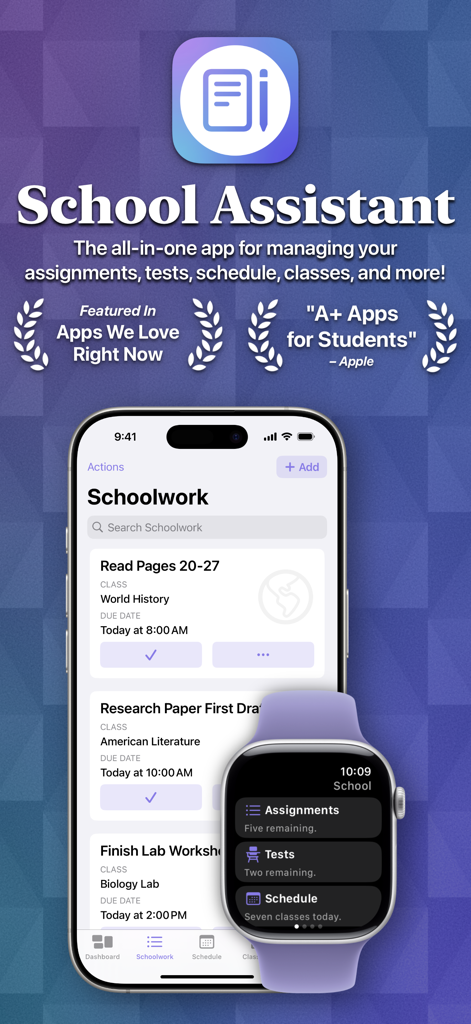
School Assistantアプリのインターフェース。iPhoneに学業の課題が表示され、Apple Watchに概要ダッシュボードが表示されている様子。

School Assistantアプリのインターフェース。iPhoneに学業の課題が表示され、Apple Watchに概要ダッシュボードが表示されている様子。

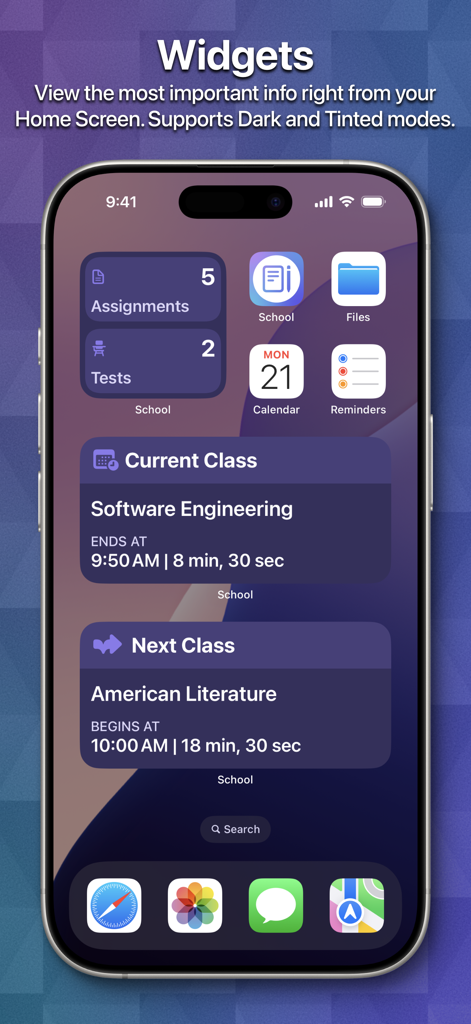
iPhoneのホーム画面。課題やクラスのスケジュール用のスクールプランナーウィジェットが表示されている様子。

iPhoneのホーム画面。課題やクラスのスケジュール用のスクールプランナーウィジェットが表示されている様子。

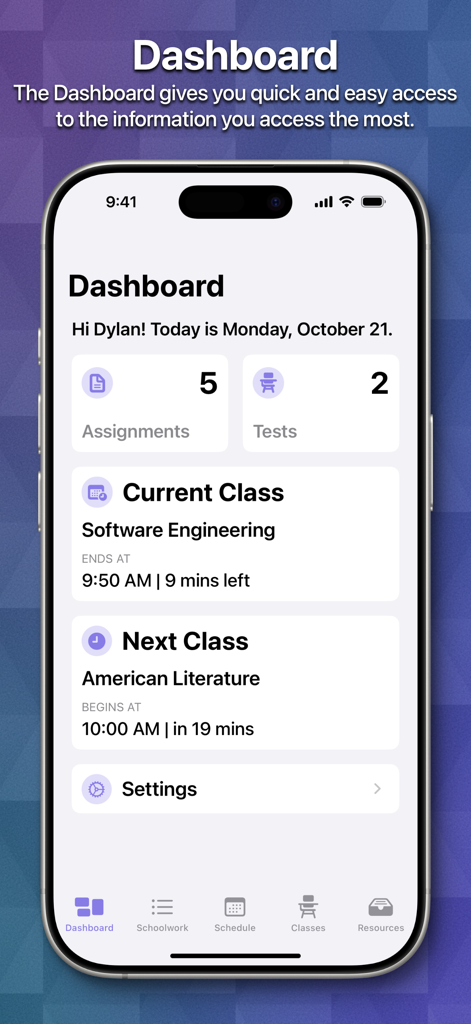
iPhone上のSchool Assistant Plannerアプリのダッシュボード。学生の課題、テスト、現在のクラスのスケジュール概要が表示されている様子。

iPhone上のSchool Assistant Plannerアプリのダッシュボード。学生の課題、テスト、現在のクラスのスケジュール概要が表示されている様子。

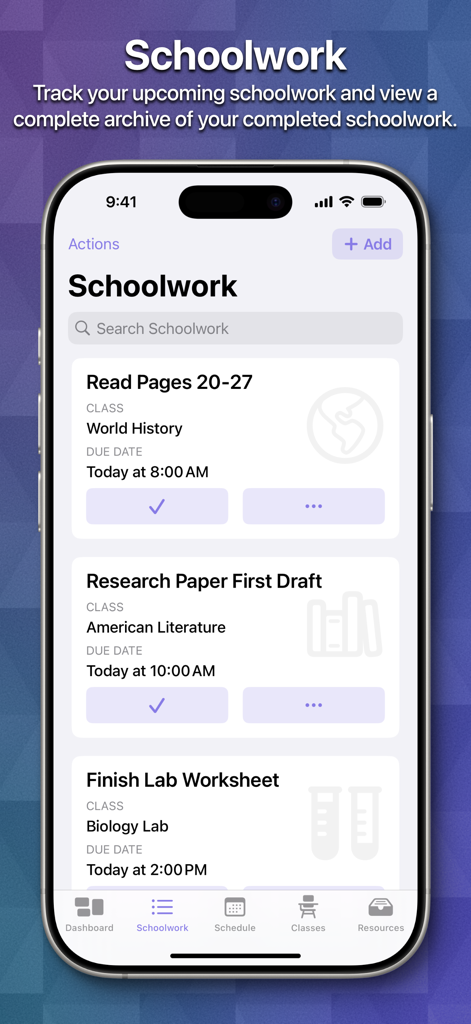
iPhone画面。School AssistantアプリのSchoolworkセクション。学生の課題や期日のリストが表示されている様子。

iPhone画面。School AssistantアプリのSchoolworkセクション。学生の課題や期日のリストが表示されている様子。

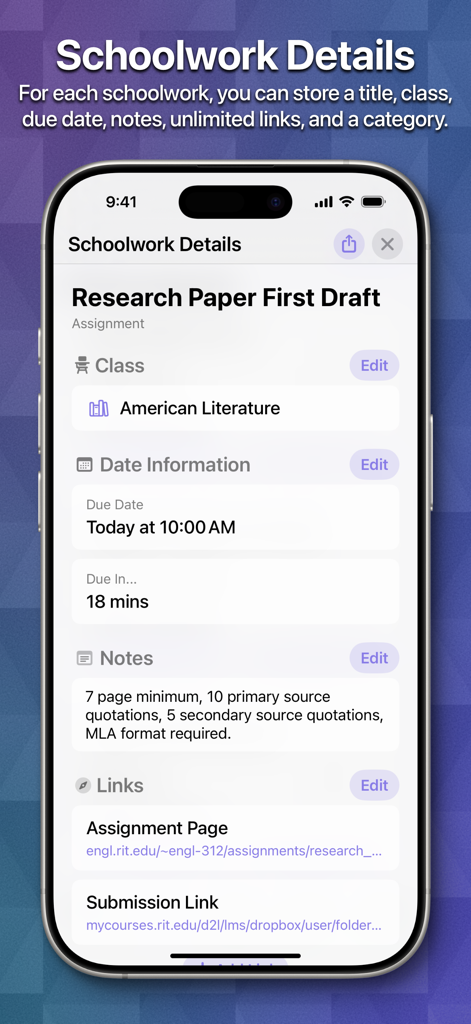
School AssistantアプリのSchoolwork Details画面のスクリーンショット。American Literatureクラスの研究論文の課題が表示されている様子。

School AssistantアプリのSchoolwork Details画面のスクリーンショット。American Literatureクラスの研究論文の課題が表示されている様子。

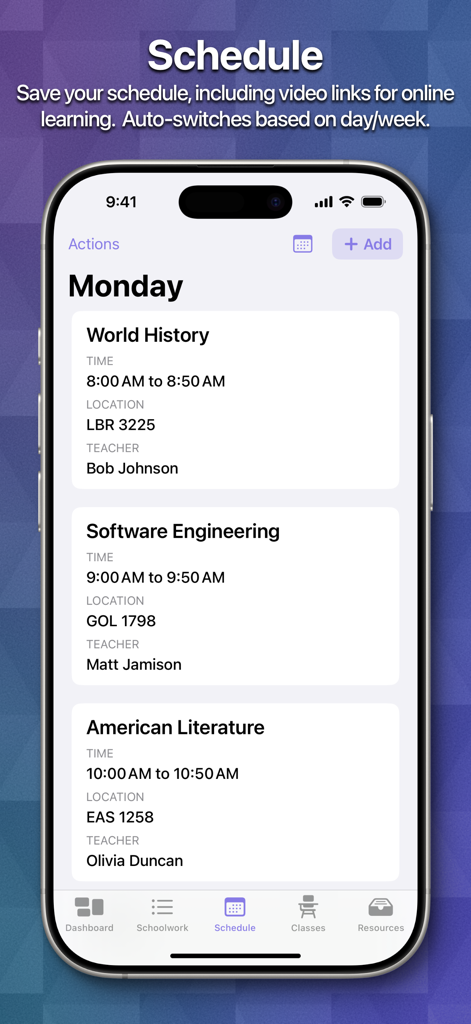
School Assistant Plannerアプリ。時間、場所、教師と共に毎日のクラスのスケジュールが表示されている様子。

School Assistant Plannerアプリ。時間、場所、教師と共に毎日のクラスのスケジュールが表示されている様子。

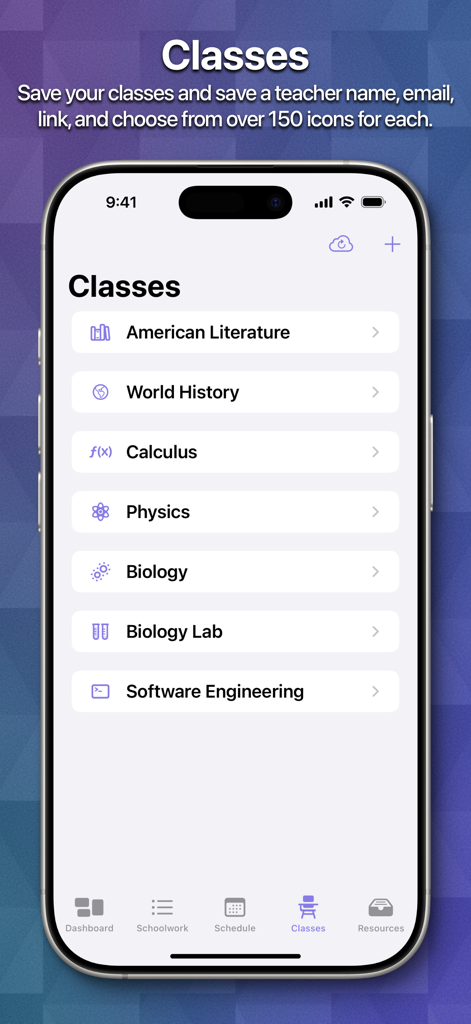
School Assistantアプリのスクリーンショット。文学、歴史、数学などの整理されたクラスのリストにカスタムアイコンが表示されている様子。

School Assistantアプリのスクリーンショット。文学、歴史、数学などの整理されたクラスのリストにカスタムアイコンが表示されている様子。

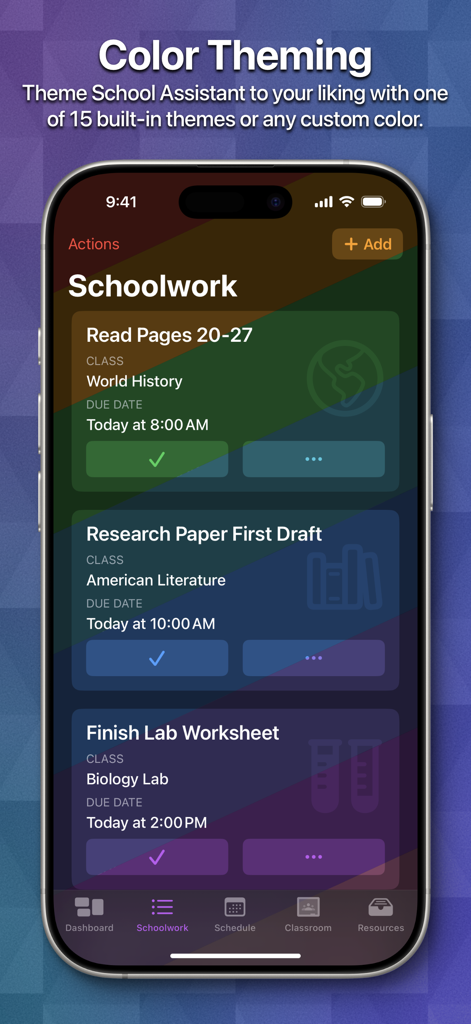
iPhone画面。School AssistantアプリのSchoolworkセクション。虹色のテーマと学業の課題のリストが表示されている様子。

iPhone画面。School AssistantアプリのSchoolworkセクション。虹色のテーマと学業の課題のリストが表示されている様子。

学業生活をマスターする

このアプリを際立たせるツール、 234K+ 人のユーザーが選択.

🎓

スマートGoogle Classroom同期

課題を統合ダッシュボードに直接取り込みます。期日、クラス、または優先度で並べ替えて、何に集中する必要があるかを正確に把握しましょう。

柔軟なスケジュール管理

複雑な米国のブロック授業に最適です。A/B週を自動的に切り替え、インタラクティブなウィジェットで次のクラスを一覧表示します。

シームレスなAppleエコシステム

iPhone、Mac、Apple Watch全体で同期を保ちます。iCloud統合により、手首やデスクトップから即座にスケジュールにアクセスできます。

アプリについて

について知っておくべきこと School Assistant – Planner.

説明

School Assistant by Sun Apps is a simple but powerful school planner app. It allows you to quickly and easily keep track of homework, tests, and your schedule, see and save Google Classroom assignments, quickly access saved websites, and more. First, as a student myself, I know how hard it can be to pay for these types of apps. So, School Assistant is 100% free: no subscriptions, no paywalls, no premium features, and no ads! There is a tip jar if you feel like supporting, though (these are the in-app purchases the App Store shows). Schoolwork: - Manage your upcoming assignments and tests - Sort by due date, class, category, alphabetically, or manually - Add a related class, due date, links, and notes - Schedule reminders - Highlight upcoming and overdue schoolwork - Keep an entire archive of your completed schoolwork - View how many assignments/tests you have right from your Home Screen / Desktop with Widgets Schedule: - Keep track of your classes for every day - Add associated teacher and room information (or, add a link for online classes) - Automatically switch days based on the day of the week - Automatically switch between two weeks (great for A/B week schedules) - Manually switch between up to ten weeks - See your current class and next class on the Dashboard and with Home Screen / Desktop Widgets Classes: - In addition to Schoolwork and Schedule, you can manage your classes with a dedicated feature - Store your teacher’s name and email - Store notes for each class - Assign an icon to each class, which also shows in Schoolwork Apple Watch App: - Super quick access to your most important information - View your Schoolwork, automatically sorted into assignments and tests - View your Schedule for any day - View your current and next classes, and how long you have left - Set a custom theme color to match your Watch, band, or outfit - Designed for quick interactions Other features: - Set a custom accent color - Theme the entire app with a color of your choosing - Over 20 app icon choices - Full and automatic data syncing over iCloud - Tight iOS and iPadOS integration with support for features like Slide Over and Split View, iPad cursor, keyboard shortcuts, system sidebars, Home Screen widgets, Dynamic Text, and multi-window support - Support for iPhone, iPad, iPod touch, Mac, Apple Watch, and Apple Vision Pro - Designed with quick and easy usability in mind - Full support for Dark Mode and Tinted Home Screens Legal disclaimers for Google Classroom: ©2018 Google LLC, used with permission. Google and the Google logo are registered trademarks of Google LLC.

最新バージョン

4.0

サイズ

117.4 MB

リリース日

2019年11月25日

学業生活を整理しましょう、100%無料

学生によって、学生のために作られたプランナーを使用する234,000人以上の学生に加わりましょう。サブスクリプションなし、広告なし—あなたのAppleエコシステム全体で純粋な集中力を。

ダウンロード: App Store
FAQ

よくある質問

について知っておくべきこと School Assistant – Planner

School Assistant – Planner は無料のアプリケーションですか?

はい、School Assistant – Planner は 100% 無料です。サブスクリプション、ペイウォール、プレミアム機能、広告はありません。サポートのためにオプションのチップジャーが用意されています。

School Assistant – Planner は学校の課題管理にどのように役立ちますか?

School Assistant – Planner は、今後の課題やテストの管理を支援し、並べ替え、期日やリンクなどの詳細の追加、リマインダーのスケジュール設定、完了した作業のアーカイブを可能にします。

School Assistant – Planner は Google Classroom と連携しますか?

はい、School Assistant – Planner では、Google Classroom の課題を表示および保存でき、この機能がアプリ体験に直接統合されています。

School Assistant – Planner はどのデバイスに対応していますか?

School Assistant – Planner は、iPhone、iPad、iPod touch、Mac、Apple Watch、Apple Vision Pro など、幅広い Apple デバイスに対応しており、iOS および iPadOS と密接に連携しています。

School Assistant – Planner にはホーム画面ウィジェットが含まれていますか?

はい、School Assistant – Planner はホーム画面およびデスクトップウィジェットを提供します。これらは、今後の課題/テスト、現在のクラス、次のクラスを表示し、ダークモードとティントモードをサポートしています。

School Assistant – Planner は複数のデバイス間でデータを同期しますか?

はい、School Assistant – Planner は iCloud を使用して、すべてのデバイス間で完全かつ自動的なデータ同期を提供し、情報が常に最新の状態であることを保証します。

School Assistant – Planner の Apple Watch アプリにはどのような機能がありますか?

School Assistant – Planner の Apple Watch アプリは、学校の課題、並べ替えられた課題とテスト、日々のスケジュール、現在のクラス/次のクラス、カスタムテーマカラーにすばやくアクセスできます。

ユーザーは School Assistant – Planner の外観をカスタマイズできますか?

はい、School Assistant – Planner では、カスタムアクセントカラーの設定、アプリ全体のテーマ設定、20 種類以上のアプリアイコンオプションからの選択など、 extensive なカスタマイズが可能です。

App information, icons, screenshots, and descriptions displayed on this page are sourced from the Apple App Store and are the property of their respective developers. Download estimates and rankings are based on MWM's proprietary models and may not reflect actual figures. This page is provided for informational and analytical purposes only.

Believe this page infringes your intellectual property? File a dispute