Scrcpy Remote

Scrcpy Remote

ダウンロード: App Store
ロゴ: Scrcpy Remote

Scrcpy Remote: 安全なデスクトップアクセスにおけるプロフェッショナルな選択

モバイルデバイスを高性能ワークステーションに変える。ゼロコンフィグのTailscale統合、VNCサポート、パワーユーザー向けに設計された低遅延画面ミラーリングで、Linux、macOS、Windowsを安全に制御します。

開発元

森 王

カテゴリ

Utilities

ダウンロード

22K+

ユーザー評価

4.0/5

評価数

100

対応言語

4

すべての画面をコマンド

このインターフェースを利用する 22K+ 人のユーザー.

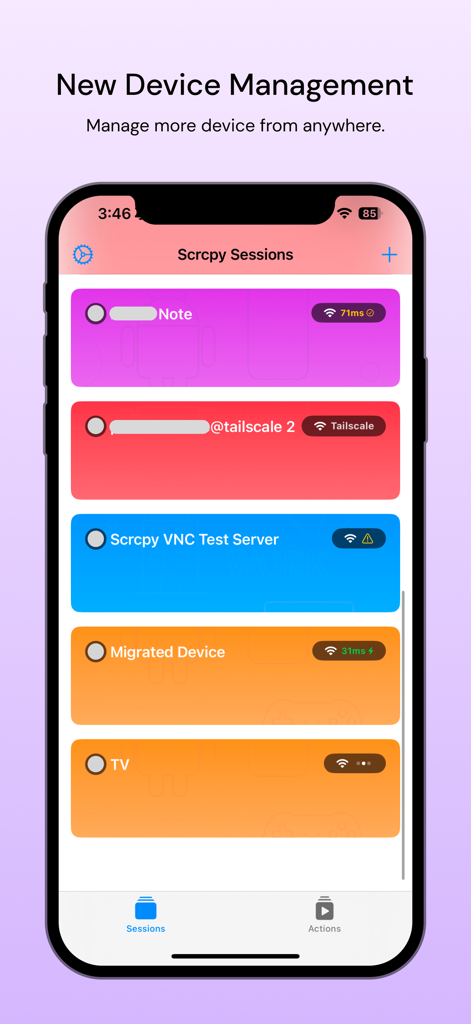
Scrcpy Remoteアプリのダッシュボードには、アクティブなデバイスセッションとTailscale接続のリストが表示されています。

Scrcpy Remoteアプリのダッシュボードには、アクティブなデバイスセッションとTailscale接続のリストが表示されています。

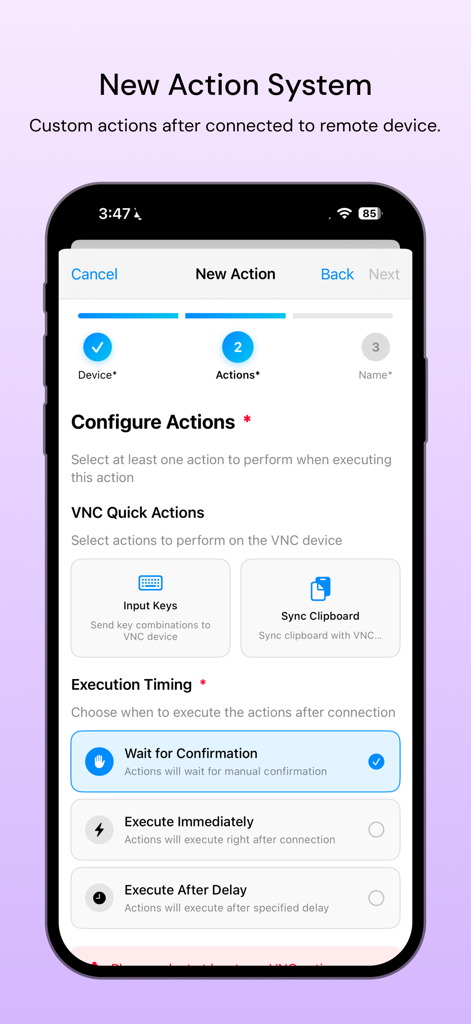
Scrcpy Remoteのカスタムアクションと実行タイミング設定画面

Scrcpy Remoteのカスタムアクションと実行タイミング設定画面

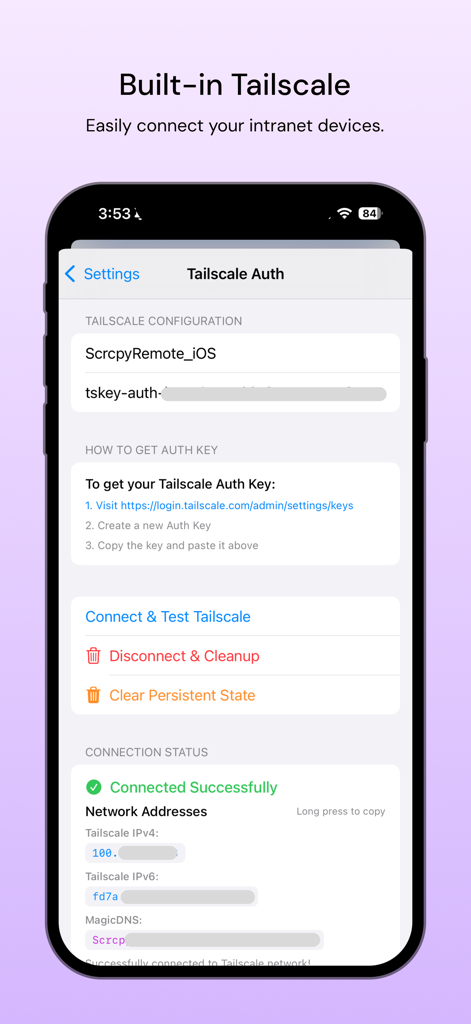
Scrcpy Remoteアプリのインターフェースには、安全なリモートデスクトップアクセス用の組み込みTailscale認証と設定設定が表示されています。

Scrcpy Remoteアプリのインターフェースには、安全なリモートデスクトップアクセス用の組み込みTailscale認証と設定設定が表示されています。

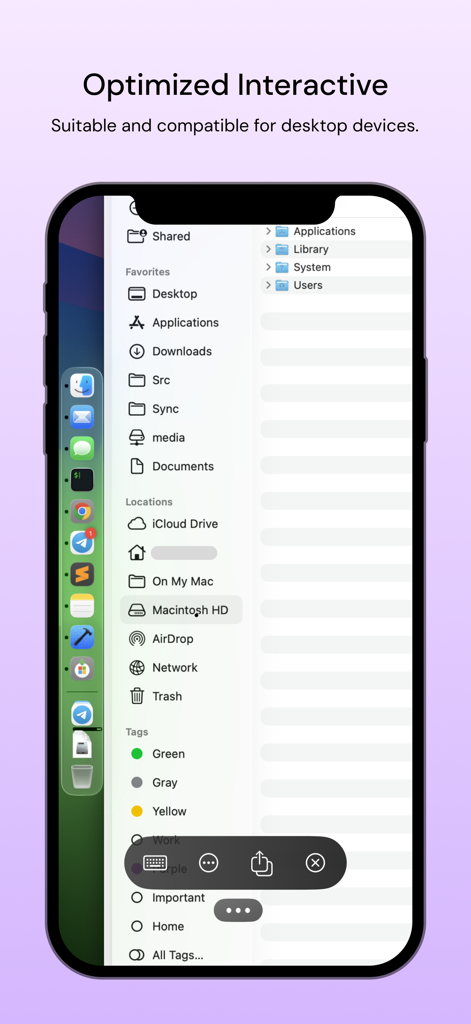
iPhone画面には、Scrcpy RemoteアプリがリモートmacOSデスクトップのファイルシステムを制御しているインターフェースが表示されています。

iPhone画面には、Scrcpy RemoteアプリがリモートmacOSデスクトップのファイルシステムを制御しているインターフェースが表示されています。

プロシューマー向け究極のデスクトップコントロール

このアプリを際立たせるツール、 22K+ 人のユーザーが選択.

🛡️

ゼロコンフィグの安全なネットワーキング

ネイティブTailscale統合を活用して、暗号化されたピアツーピア接続を実現。ポートフォワーディングのセキュリティリスクなしで、ホームラボやオフィスのワークステーションにアクセスできます。

🖥️

真のクロスプラットフォームの流動性

Linux、macOS、Windowsの完全サポートにより、OSのサイロを打破。低遅延VNCパフォーマンスで、マルチデバイス環境全体を1つのアプリで制御できます。

⌨️

プログレードの入力とミラーリング

iPadやiPhoneをモバイルシンクライアントに変えます。複雑な開発および管理タスク向けの正確なマウスとキーボードサポートにより、高品質な画面ミラーリングを体験してください。

アプリについて

について知っておくべきこと Scrcpy Remote.

説明

Scrcpy Remote - Desktop Remote Control Scrcpy Remote is a powerful remote desktop application that enables seamless control of your Linux, Windows, or macOS computers from anywhere. With built-in VNC server support, you can access your desktop remotely for work, device management, and productivity tasks. 1. Universal Desktop Access Connect to Linux, Windows, and macOS computers. Full desktop control with mouse and keyboard support. High-quality screen mirroring and interaction. 2. Flexible Connectivity Options Network Connection: Access devices over local network or internet. Tailscale Integration: Secure peer-to-peer connections through Tailscale network. Reliable connection management with automatic reconnection. 3. VNC Server Compatibility Works with any VNC-enabled computer. Easy setup and configuration. Optimized performance for smooth remote sessions.

最新バージョン

4.4.0

サイズ

65.6 MB

リリース日

2022年6月19日

リモートワークフローをマスターする準備はできましたか?

22,000人以上のテクノロジープロフェッショナルに加わり、iPadやiPhoneからLinux、Windows、macOSマシンを安全かつ高性能に制御する体験を。

ダウンロード: App Store

App information, icons, screenshots, and descriptions displayed on this page are sourced from the Apple App Store and are the property of their respective developers. Download estimates and rankings are based on MWM's proprietary models and may not reflect actual figures. This page is provided for informational and analytical purposes only.

Believe this page infringes your intellectual property? File a dispute