Screen Mirroring for Roku

Screen Mirroring for Roku


ダウンロード: App Storeダウンロード: Google Play
ロゴ: Screen Mirroring for Roku
Roku用スクリーンミラーリング:高解像度iPhoneからテレビへの共有

お気に入りの写真、ゲーム、プレゼンテーションを遅延ゼロでワイヤレスにミラーリングできます。iPhoneまたはiPadからのシームレスな、サブスクリプション不要の接続を望むRokuオーナーにとって最も信頼性の高いソリューションです。

開発元

Kraus und Karnath GbR 2Kit Consulting

カテゴリ

Productivity

ダウンロード

3M+

ユーザー評価

3.8/5

評価数

70K+

対応言語

1

あなたの画面が、もっと大きく

このインターフェースを利用する 3M+ 人のユーザー.

Rokuアプリ経由でテレビディスプレイにiPhone画面をミラーリング

Rokuアプリ経由でテレビディスプレイにiPhone画面をミラーリング

Roku TVにiPhone画面をミラーリングするコンテンツ

Roku TVにiPhone画面をミラーリングするコンテンツ

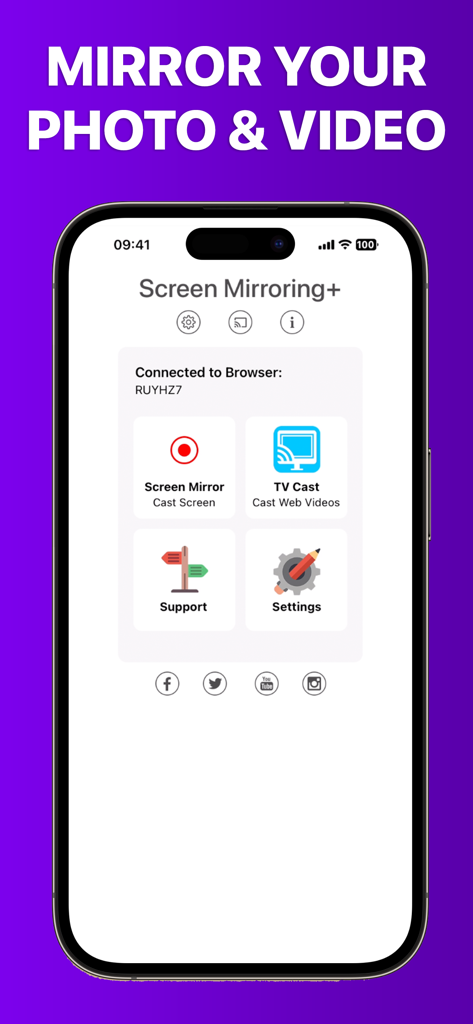
iPhone上のRoku用スクリーンミラーリングアプリのインターフェイス。画面ミラーリングとWebビデオキャストのオプションが表示されています。

iPhone上のRoku用スクリーンミラーリングアプリのインターフェイス。画面ミラーリングとWebビデオキャストのオプションが表示されています。

Roku TVの可能性を最大限に引き出す

このアプリを際立たせるツール、 3M+ 人のユーザーが選択.

遅延ゼロのパフォーマンス

サブ秒単位の遅延で、稲妻のような速さの画面共有を体験してください。まるでモバイルデバイスがテレビの一部になったかのように感じられます。

👨‍👩-👧

最高の瞬間を追体験

電話を回し見するのはもうやめましょう。写真ライブラリ全体やホームビデオを大画面にキャストして、家族全員で一緒に楽しみましょう。

📊

境界のない生産性

ホームオフィスに最適です。ドキュメント、Webサイト、スプレッドシートをiPadからRoku対応デバイスに瞬時にワイヤレスでミラーリングできます。

アプリについて

について知っておくべきこと Screen Mirroring for Roku.

説明

Screen Mirroring for Roku is the easy mirror app to share your iPhone or iPad screen on your Roku Streaming Player, Roku Stick or Roku TV. It's the most advanced screen mirroring solution with zero delay and the highest screen quality. Mirror photos, videos, games, websites, apps, presentations, documents and spreadsheets on Roku. * SUPPORTED Roku Players: Roku TV, Roku Streaming Stick, Roku Express, Roku Premiere, Roku Ultra, Roku 2, Roku 3, Roku 4, Roku HD (2500), Roku LT (2400+2450) Player. Please make sure that firmware 5.1 or later is installed. * SUPPORTED Roku TVs: Hisense, Sharp, TCL, Insignia, Hitachi, Philips, Element, JVC, Metz, Coocaa, Westinghouse, Onn * NOT SUPPORTED Roku Players: Roku classic models (N1000, N1050, N1100, N1101), Roku 2000, 2050, 2100, Telstra TV, NOW TV Stick & Box, Sky Ticket (WOW TV). * Your iPhone/iPad and your Roku must be connected to the same wifi to enable screen mirroring. Please do not use VPN, Proxy, VLANS and Subnets. * Latency is supreme (below 1 second) when you have good wifi network conditions * No hidden subscriptions or costs * Black screen issues: Some third party apps prevent screen mirroring. When you try to mirror them, you will just see a black screen on your TV, for example with Netflix and Disney+. This is a restriction chosen by Netflix and others, so we cannot fix it at the moment. If you like the app and our constant work on it, please give the app a positive rating on the App Store. Many thanks in advance from the development & support team. Disclaimer: This app is not affiliated with Roku or any other trademark mentioned here. ROKU, the ROKU Logo, STREAMING STICK, ROKU TV, ROKU POWERED, the ROKU POWERED Logo, ROKU READY, the ROKU READY Logo, "STOP DREAMING. START STREAMING.", "HAPPY STREAMING", "THERE'S A TON OF ENTERTAINMENT IN THIS LITTLE BOX," and "NOW THIS IS TV" are trademarks and/or registered trademarks of Roku, Inc. in the United States and other countries.

最新バージョン

3.7

サイズ

24.0 MB

リリース日

2019年6月7日

モバイル画面を巨大スクリーンへ

300万人以上のユーザーに加わり、Rokuデバイスで最高品質のスクリーンミラーリングをお楽しみください。ラグなし、隠れたコストなし、瞬時に接続できます。

ダウンロード: App Storeダウンロード: Google Play
FAQ

よくある質問

について知っておくべきこと Screen Mirroring for Roku

Roku用スクリーンミラーリングとは何ですか?

Roku用スクリーンミラーリングは、iPhoneまたはiPadの画面をRokuストリーミングプレーヤー、Rokuスティック、またはRoku TVに共有するアプリです。遅延ゼロと高画質で高度なスクリーンミラーリングを提供します。

Roku用スクリーンミラーリングはどのRokuデバイスをサポートしていますか?

Roku用スクリーンミラーリングは、Roku TV、Streaming Stick、Express、Premiere、Ultra、Roku 2、3、4、HD (2500)、およびLT (2400+2450) プレーヤーをサポートしています。また、Hisense、Sharp、TCL、Insignia、Hitachi、Philips、Element、JVC、Metz、Coocaa、Westinghouse、OnnなどのRoku TVもサポートしています。

NetflixやDisney+のようなアプリをRoku用スクリーンミラーリングでミラーリングできますか?

いいえ、NetflixやDisney+などの一部のサードパーティアプリはスクリーンミラーリングをブロックします。それらをミラーリングしようとすると、テレビに黒い画面が表示されます。これはこれらのアプリによって課された制限です。

Roku用スクリーンミラーリングに隠れた費用やサブスクリプションはありますか?

いいえ、Roku用スクリーンミラーリングには隠れたサブスクリプションや費用はありません。このアプリは追加料金なしでミラーリング機能を提供します。

Roku用スクリーンミラーリングが機能するためのネットワーク要件は何ですか?

iPhone/iPadとRokuデバイスは同じWi-Fiネットワークに接続する必要があります。最適な機能のため、VPN、プロキシ、VLAN、またはサブネットは使用しないでください。

Roku用スクリーンミラーリングは低遅延を提供しますか?

はい、Roku用スクリーンミラーリングは、良好なWi-Fiネットワーク条件下で、通常1秒未満の非常に低い遅延を提供します。これにより、スムーズなミラーリング体験が保証されます。

Roku用スクリーンミラーリングと互換性のないRokuモデルはどれですか?

Roku用スクリーンミラーリングは、Rokuクラシックモデル (N1000、N1050、N1100、N1101)、Roku 2000、2050、2100、Telstra TV、NOW TV Stick & Box、またはSky Ticket (WOW TV) はサポートしていません。

Roku用スクリーンミラーリングは写真、ビデオ、ゲームをミラーリングできますか?

はい、Roku用スクリーンミラーリングは、iOSデバイスからRokuへ写真、ビデオ、ゲーム、ウェブサイト、アプリ、プレゼンテーション、ドキュメント、スプレッドシートをミラーリングします。

App information, icons, screenshots, and descriptions displayed on this page are sourced from the Apple App Store and are the property of their respective developers. Download estimates and rankings are based on MWM's proprietary models and may not reflect actual figures. This page is provided for informational and analytical purposes only.

Believe this page infringes your intellectual property? File a dispute