Screen Mirroring ⋆ Miracast TV

Screen Mirroring ⋆ Miracast TV

ダウンロード: App Store
ロゴ: Screen Mirroring ⋆ Miracast TV

Screen Mirroring ⋆ Miracast TV:iPhone画面を大画面に、ハードウェア不要

iOSデバイスとあらゆるスマートTVのギャップを即座に埋めます。高価なハードウェアや煩雑なケーブルなしで、家族の思い出、フィットネスルーチン、プレゼンテーションを驚異的なHDで共有しましょう。

開発元

Plane Cubes

カテゴリ

Utilities

ダウンロード

1M+

ユーザー評価

4.6/5

評価数

14K+

対応言語

1

大画面を体験

このインターフェースを利用する 1M+ 人のユーザー.

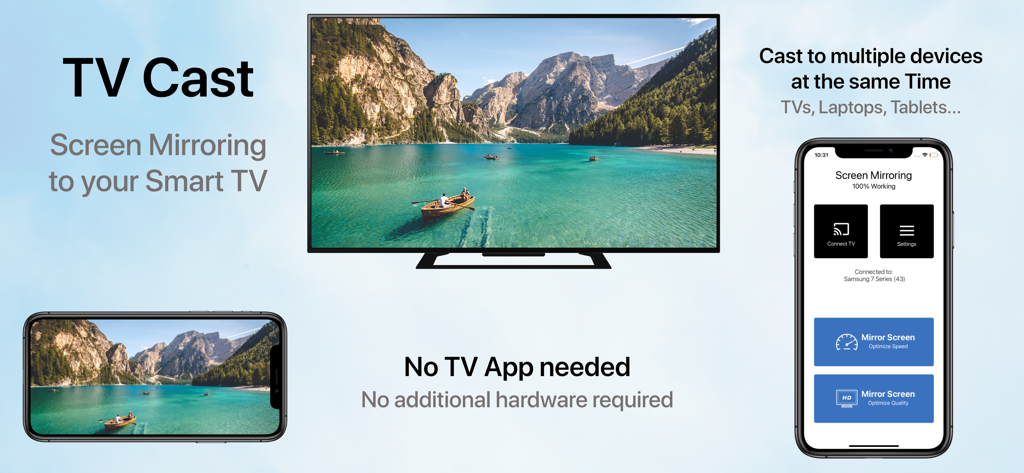
iPhone画面がスマートTVにミラーリングされ、横向きのビデオとアプリのインターフェースが横に表示されています

iPhone画面がスマートTVにミラーリングされ、横向きのビデオとアプリのインターフェースが横に表示されています

あらゆる瞬間を大画面で共有

このアプリを際立たせるツール、 1M+ 人のユーザーが選択.

📺

ユニバーサルTV互換性

Apple TV、ケーブル、または追加のハードウェアを必要とせずに、Samsung、LG、SonyなどのTVに画面をミラーリングします。

🚀

超低遅延モード

ブラウジング中のリアルタイム応答性のためのスピードモード、または高解像度の視覚的な輝きのためのクオリティモードを選択してください。

🔄

縦向きと横向きのサポート

TikTokをスクロールしているときも、ワイドスクリーンのホームムービーを見ているときも、すべてを完璧なビューでお楽しみください。

レビュー分析

ユーザーレビューの分析.

感情スコア

21%
ネガティブ

概要

User reviews for this mobile app are overwhelmingly negative, with a low overall sentiment score. The most significant complaint is that the app frequently 'does not work' as intended, especially concerning its core functionality of connecting to and finding smart TVs, with specific mentions of issues with LG TVs and iPhone 14 Pro to Mi TV box connections. Many users also expressed frustration with an abundance of intrusive advertisements, mandatory paywalls, hidden costs, and difficulty canceling subscriptions. A considerable number of reviews explicitly label the app as a 'scam' or 'fraudulent,' leading to a poor user experience, though a small minority found the app to be satisfactory.

主なテーマ

Functionality(17)
Cost & Subscriptions(14)
Connectivity(9)
Ads(8)
Scam Allegations(6)
Overall Experience(6)

アプリについて

について知っておくべきこと Screen Mirroring ⋆ Miracast TV.

説明

‣‣‣ Mirror your screen to your TV! ‣‣‣ Free and easy to use! " With Screen mirroring HD, it it now easy to mirror your iPhone or iPad!" "I love the fact that you can mirror simultaneously on different devices. "It is very useful to have both Portrait & Landscape modes available" FEATURES: - Mirror your screen to your TVs, Laptop's, Phones, Gaming consoles & Tablets - Two modes available: 'Speed Mode' for low latency and liquid speed & 'Quality Mode' for gorgeous full resolution HD broadcast - Mirror in Landscape or Portrait mode - Mirror to multiple devices simultaneously - No TV App or other software or hardware necessary HOW TO MIRROR: - Connect your iPhone/iPad and your TV to the same WiFi network - (Optional: connect your device to the app) - Choose your mirroring mode and tap on 'Start Mirroring' to start mirroring to your TV and other devices - Open your TV browser and tap the URL. (Tip: save the URL in your bookmarks for quicker access next time you want to mirror your screen.) - Watch your screen mirroring - To stop mirroring, tap 'Stop Mirroring' button or bar - NB: On other devices than TV, just type the URL in your device browser to watch the screen mirroring Download now and leave a review to let us know about your mirroring experience. SUPPORT: - Compatible TVs: Smart TVs with an integrated modern web browser: Samsung TV, LG TV, Sony TV, Panasonic TV,TV, Philips TV, Hitachi TV, TCL TV, Grundig TV... - Compatible Devices: any device (phone, laptop, tablet, Console) with a modern web browser: Safari, Brave, Chrome, Firefox, Edge... - Latency is supreme (0 seconds) when you have fast WiFi network conditions - Please do not use VPN, Proxy, VLANS and Subnets. - Sound is not yet support yet, we are working on it. In the meantime, please use Bluetooth speakers as a workaround. - Black screen issues: Some third party apps prevent screen mirroring. When you try to mirror them, you will just see a black screen on your TV, for example with Netflix... This is a restriction chosen by Netflix and others, so there is currently nothing we can do about it. - Our application has been tested carefully on many TV models, however we can unfortunately not guarantee the products works on ALL TV models. Reach out to us with your TV Brand and Model if you encounter issues. DISCLAIMER:This is not an official application. We are not affiliated with any brand mentioned in any way. SUBSCRIPTION: We offer 2 auto-renewing subscriptions: - Length: weekly and monthly - Payment will be charged to iTunes Account at confirmation of purchase - You will be able to access the Premium features of the app for the duration of the subscription - Subscription automatically renews for the same price and duration period as the original period unless auto-renew is turned off at least 24-hours before the end of the current period - The account will be charged for renewal within 24-hours prior to the end of the current period at the cost of the chosen package. - Subscriptions may be managed by the user and auto-renewal may be turned off by going to the user's iTunes Account Settings after purchase - No cancellation of the current subscription is allowed during the active subscription period - You may cancel a subscription during its free trial period via the subscription setting through your Apple account. This must be done 24 hours before the end of the subscription period to avoid being charged. Please visit https://support.apple.com/en-us/HT202039 for more information on how to proceed. - You may turn off the auto-renewal of your subscription via your Apple Account Settings. However, you are not able to cancel the current subscription during its active period - Any unused portion of a free-trial period will be forfeited when the user purchases a subscription. By using our app, you agree to our Terms of Use & Privacy Policy Terms: https://planecubes.com/terms/ Privacy: https://planecubes.com/privacy/

最新バージョン

1.1.0

サイズ

16.6 MB

リリース日

2020年10月1日

大画面で見る準備はできましたか?

100万人以上のユーザーに加わり、iPhoneとあらゆるスマートTVのギャップを埋めましょう。ケーブルなし、追加ハードウェアなし—ただ即時ミラーリング。

ダウンロード: App Store
FAQ

よくある質問

について知っておくべきこと Screen Mirroring ⋆ Miracast TV

Screen Mirroring ⋆ Miracast TV とは何ですか?

Screen Mirroring ⋆ Miracast TVは、iPhoneまたはiPadの画面を、テレビ、ラップトップ、電話、ゲーム機、タブレットなどのさまざまなデバイスにミラーリングするアプリケーションです。無料でお使いいただけます。

Screen Mirroring ⋆ Miracast TV は、別のテレビアプリやハードウェアが必要ですか?

いいえ、Screen Mirroring ⋆ Miracast TV は、別のテレビアプリ、追加のソフトウェア、またはハードウェアを必要としません。最新のウェブブラウザを搭載した互換性のあるデバイスに直接ミラーリングします。

Screen Mirroring ⋆ Miracast TV を使用して画面をミラーリングするにはどうすればよいですか?

ミラーリングするには、iPhone/iPadとテレビを同じWiFiに接続します。ミラーリングモードを選択し、「ミラーリング開始」をタップしてから、テレビのブラウザを開き、表示されたURLを入力します。

Screen Mirroring ⋆ Miracast TV は、複数のデバイスに同時にミラーリングできますか?

はい、Screen Mirroring ⋆ Miracast TV は、画面を複数のデバイスに同時にミラーリングできます。この機能により、テレビ、ラップトップ、電話、タブレットに同時にキャストできます。

Screen Mirroring ⋆ Miracast TV はどのようなミラーリングモードを提供していますか?

Screen Mirroring ⋆ Miracast TV は、「スピードモード」(低遅延)と「クオリティモード」(素晴らしいフル解像度のHDブロードキャスト体験)の2つのモードを提供しています。

Screen Mirroring ⋆ Miracast TV は音声ミラーリングをサポートしていますか?

いいえ、現在 Screen Mirroring ⋆ Miracast TV は音声に対応していません。音声出力の回避策として、Bluetoothスピーカーを使用してください。

Screen Mirroring ⋆ Miracast TV でミラーリングすると、一部のアプリで画面が黒くなるのはなぜですか?

Netflixなどの一部のサードパーティアプリは、独自の制限により画面ミラーリングを禁止しています。これにより、それらをミラーリングしようとすると、テレビに黒い画面が表示されます。

Screen Mirroring ⋆ Miracast TV と互換性のあるデバイスは何ですか?

Screen Mirroring ⋆ Miracast TV は、最新のウェブブラウザを搭載したスマートテレビ(例:Samsung、LG)および、最新のウェブブラウザを搭載したあらゆるデバイス(電話、ラップトップ、タブレット、ゲーム機)と互換性があります。

Screen Mirroring ⋆ Miracast TV はサブスクリプションを提供していますか?

はい、Screen Mirroring ⋆ Miracast TV は自動更新される週次および月次サブスクリプションを提供しています。購入確認時にiTunesアカウントに請求されます。

Screen Mirroring ⋆ Miracast TV のサブスクリプションをキャンセルするにはどうすればよいですか?

購入後、iTunesアカウント設定を通じて Screen Mirroring ⋆ Miracast TV のサブスクリプションを管理し、自動更新をオフにすることができます。アクティブ期間中のキャンセルは許可されていません。

App information, icons, screenshots, and descriptions displayed on this page are sourced from the Apple App Store and are the property of their respective developers. Download estimates and rankings are based on MWM's proprietary models and may not reflect actual figures. This page is provided for informational and analytical purposes only.

Believe this page infringes your intellectual property? File a dispute