Tunetag MP3 Tag Editor

Tunetag MP3 Tag Editor


ダウンロード: App Store
ロゴ: Tunetag MP3 Tag Editor

Tunetag MP3タグエディター: iOS向けプロフェッショナルメタデータコントロール

ローカル音楽コレクションを完全に管理しましょう。デスクトップ不要で、Filesアプリから直接、置換トークンを使用してタグの一括編集、アルバムアートの更新、メタデータの自動化を行います。

ダウンロード: App Store

開発元

Justin Xin

カテゴリ

Utilities

ダウンロード

13K+

ユーザー評価

4.0/5

評価数

0

対応言語

2

あなたのライブラリを完璧に

このインターフェースを利用する 13K+ 人のユーザー.

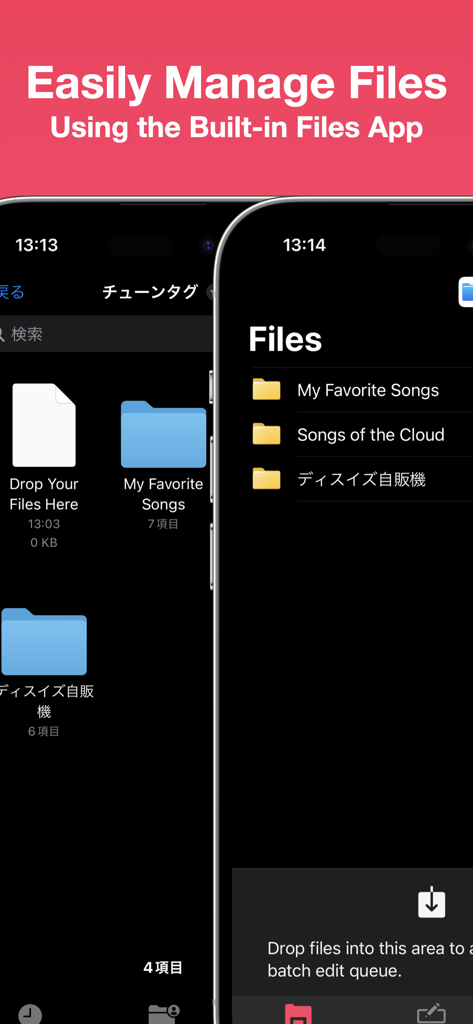
Tunetag MP3タグエディターのスクリーンショットで、音楽フォルダを管理するためのiOS Filesアプリとの統合を示しています

Tunetag MP3タグエディターのスクリーンショットで、音楽フォルダを管理するためのiOS Filesアプリとの統合を示しています

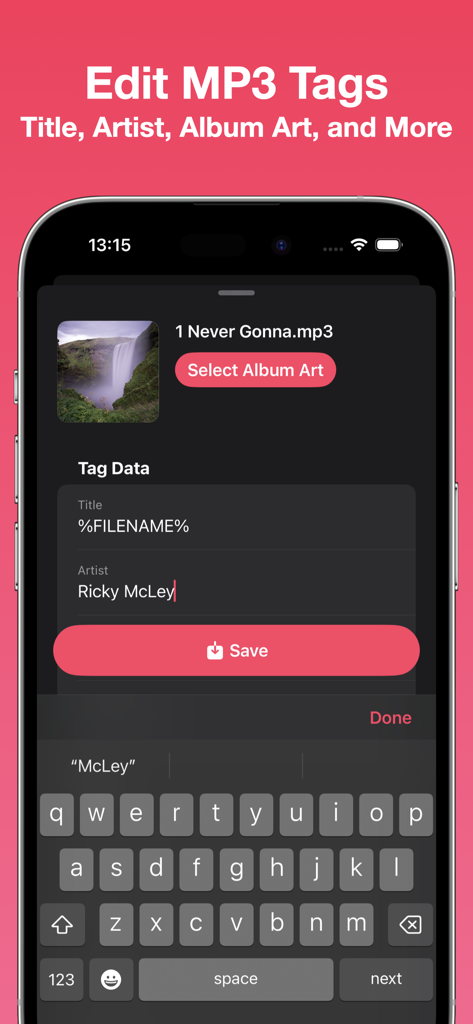
iPhoneで曲のメタデータを編集するためのTunetag MP3タグエディターインターフェイス

iPhoneで曲のメタデータを編集するためのTunetag MP3タグエディターインターフェイス

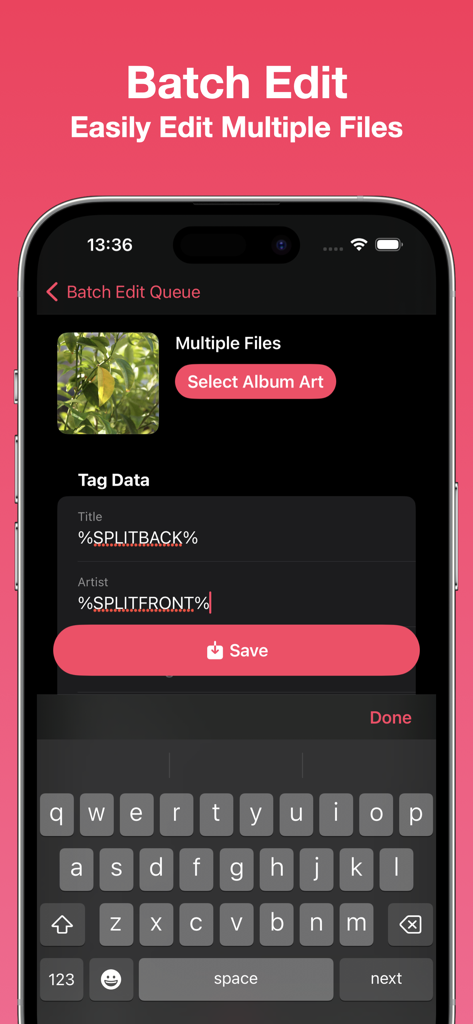
自動化トークンを使用して複数の音楽ファイルのメタデータを一括編集するためのTunetagアプリ画面

自動化トークンを使用して複数の音楽ファイルのメタデータを一括編集するためのTunetagアプリ画面

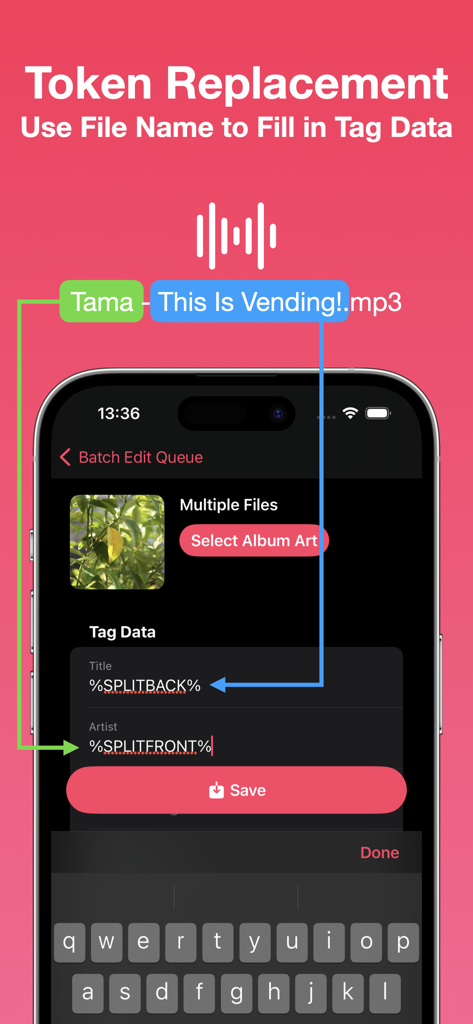
ファイル名トークンを使用してメタデータタグを自動的に入力する方法を説明するTunetagアプリインターフェイス

ファイル名トークンを使用してメタデータタグを自動的に入力する方法を説明するTunetagアプリインターフェイス

ローカル音楽ライブラリを完璧に

このアプリを際立たせるツール、 13K+ 人のユーザーが選択.

🏷️

高度なメタデータコントロール

タイトル、アーティスト、高解像度のアルバムアートを簡単に編集できます。メディアライブラリの外観と整理を完全に所有しましょう。

🪄

スマート一括自動化

置換トークンで時間を節約しましょう。数時間の手作業による入力を、数百ものトラックにわたって一度に構造化されたメタデータに自動変換します。

📂

ネイティブファイル統合

コンピューターへの依存をなくしましょう。iOS Filesアプリ、iCloud、または外部USB-C SSDから直接MP3にアクセスして編集します。

アプリについて

について知っておくべきこと Tunetag MP3 Tag Editor.

説明

Edit your MP3 files' tags easily with Tunetag. - File Management Tunetag supports file management directly from the built-in iOS/iPadOS Files app, so you never have to fumble with share sheets or AirDrop.  Move your downloaded MP3 files directly to the Tunetag folder in the 'On My iPhone/On My iPad' folder, and Tunetag will automatically pick them up. If you're not sure where to go, simply tap the 'Open Files App' button in-app. Need to open files and folders from an external folder or drive? Use the Batch Editor to open them. - Tag Editor Tunetag supports editing the following fields in MP3 files: Title, Artist, Album, Album Artist, Year, Track Number, Genre, Composer, Disc Number. You can also select an album art to attach to your MP3 files. Additionally, you can use replacement tokens that use information from a file's file name to fill out tag data. - Batch Editor You can easily edit multiple files at one go, changing only the fields you want to change. The same replacement tokens you can use in the Tag Editor can also be used here. Have many files? Select files or a folder to add them to the Batch Editor, or long press a folder to add files recursively.  You can also drag files from the Files app directly into the Batch Editor. Note: Editing many files at once, or using large album art images may result in longer save times.

最新バージョン

1.3

サイズ

4.4 MB

リリース日

2023年9月13日

デスクトップ不要で音楽ライブラリを完璧に

13,000人以上の音楽コレクターやパワーユーザーに加わり、外出先でオーディオコレクションを整理しましょう。今すぐTunetagをダウンロードして、メタデータを完全にコントロールしましょう。

ダウンロード: App Store

App information, icons, screenshots, and descriptions displayed on this page are sourced from the Apple App Store and are the property of their respective developers. Download estimates and rankings are based on MWM's proprietary models and may not reflect actual figures. This page is provided for informational and analytical purposes only.

Believe this page infringes your intellectual property? File a dispute