Website Downloader & Copier

Website Downloader & Copier

ダウンロード: App Store
ロゴ: Website Downloader & Copier

Webサイトダウンローダー&コピー:ワンクリックで任意のWebページをアーカイブ

デザイナー、開発者、研究者向けの軽量Safari拡張機能。HTML、CSS、アセットをローカルZIPアーカイブに簡単にキャプチャし、オフラインアクセスやデジタル保存に利用できます。

ダウンロード: App Store

開発元

Pierre Stanislas

カテゴリ

Utilities

ダウンロード

500

ユーザー評価

1.0/5

評価数

0

対応言語

1

内部を覗いてみましょう

このインターフェースを利用する 500 人のユーザー.

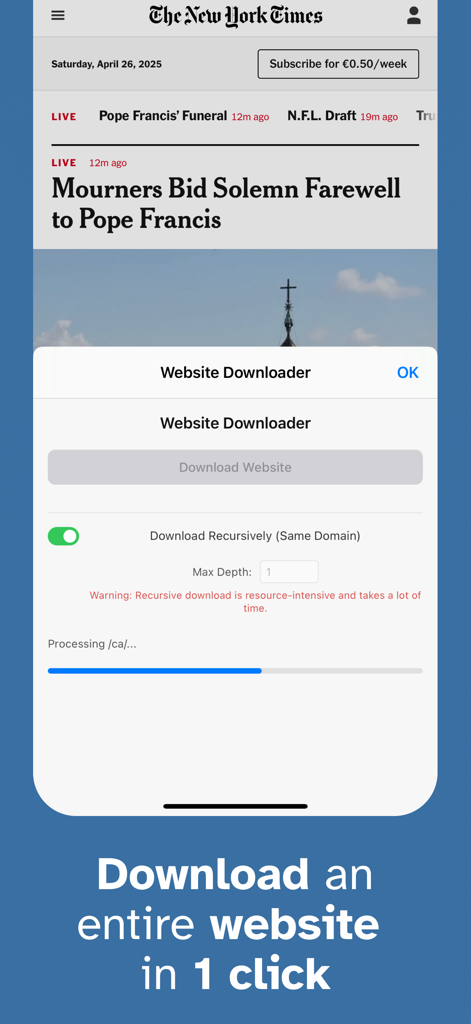
WebサイトダウンローダーSafari拡張機能のインターフェース。フルWebページをキャプチャするためのワンクリックダウンロードボタンと進捗バーが表示されています。

WebサイトダウンローダーSafari拡張機能のインターフェース。フルWebページをキャプチャするためのワンクリックダウンロードボタンと進捗バーが表示されています。

プロフェッショナルワークフローのためのパワフルな機能

このアプリを際立たせるツール、 500 人のユーザーが選択.

📦

完全なアセットキャプチャ

HTML、CSS、JavaScript、画像ファイルをすべて自動で取得します。ソースコードの学習や、個人的なデザインスワイプファイルの構築に最適です。

ワンクリックSafari連携

複雑なコマンドラインツールは不要です。クリーンでミニマルなインターフェースで、ブラウザから直接プログレードのWebサイトクローニングにアクセスできます。

📂

インスタントポータブルアーカイブ

ダウンロードは単一のZIPファイルにきれいにパッケージ化され、プロジェクトボードへの添付、クライアントとの共有、またはどこでもオフラインでの閲覧が簡単になります。

アプリについて

について知っておくべきこと Website Downloader & Copier.

説明

Website Downloader is a lightweight Safari extension that lets you capture and save the full content of any web page effortlessly. Whether you need a local backup, offline access, or a complete snapshot for research, Website Downloader makes the process as smooth as possible. → Key Features • One-Click Download Simply click the Website Downloader icon in your Safari toolbar and hit "Download Website" in the popup. Instantly start capturing everything you see. • Complete Resource Capture Downloads all vital resources of the current page, including: - HTML source code - CSS stylesheets (both linked and inline) - JavaScript files (both linked and inline) - Images (including background images in CSS) - Fonts and other embedded assets where feasible • Live Progress Tracking Stay informed with a clean, modern progress bar that clearly shows the status of your download in real time. • Instant Zip Archive Creation Once downloaded, all resources are neatly packaged into a single zip file. The archive is automatically named after the page title or defaults to "website_download.zip" if unavailable. • No Complicated Setup No additional configuration needed. Install, click, and download — all within seconds. → Built for a Seamless Experience Beautiful, minimalistic popup UI designed for clarity and ease of use Lightweight performance that won't slow down your browsing Designed to handle websites of varying complexity with graceful error handling for network issues and dynamic content limitations → Why Choose Website Downloader? • Offline browsing made effortless • Easy archival of important webpages • Useful for researchers, developers, students, and digital archivists • Privacy-conscious: your downloads stay local and secure Capture the web, your way — with Website Downloader for Safari.

最新バージョン

1.0

サイズ

13.8 MB

リリース日

2025年4月27日

ブックマークはやめて、アーカイブを始めましょう

プロのデザイナー、開発者、研究者が、高忠実度の完全なWebリソースをワンクリックでキャプチャしています。今日、Mac、iPhone、iPad用のSafari拡張機能を確保しましょう。

ダウンロード: App Store

App information, icons, screenshots, and descriptions displayed on this page are sourced from the Apple App Store and are the property of their respective developers. Download estimates and rankings are based on MWM's proprietary models and may not reflect actual figures. This page is provided for informational and analytical purposes only.

Believe this page infringes your intellectual property? File a dispute