WorkOutDoors

WorkOutDoors

ダウンロード: App Store
ロゴ: WorkOutDoors

WorkOutDoors:Apple Watch向けプログレードスポーツコンピューター

オフラインベクトルマップ、800以上のカスタマイズ可能なデータフィールド、高度なルートガイダンスで、あなたのウォッチを強力なナビゲーションおよびデータツールに変えましょう。サブスクリプションなし、制限なし—ランナー、ハイカー、サイクリストに究極のパフォーマンスを提供します。

開発元

Ian Muriss

カテゴリ

Health & Fitness

ダウンロード

479K+

ユーザー評価

4.7/5

評価数

8K+

対応言語

1

すべてのピクセルに精度を

このインターフェースを利用する 479K+ 人のユーザー.

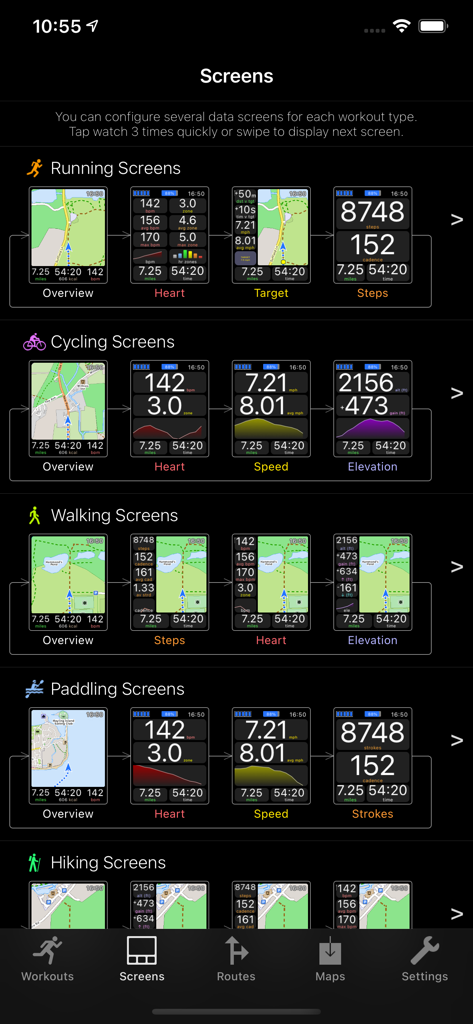
ランニング、サイクリング、ハイキングなどの様々なアクティビティ向けにカスタマイズ可能なデータ画面が表示されているWorkOutDoorsアプリのインターフェース

ランニング、サイクリング、ハイキングなどの様々なアクティビティ向けにカスタマイズ可能なデータ画面が表示されているWorkOutDoorsアプリのインターフェース

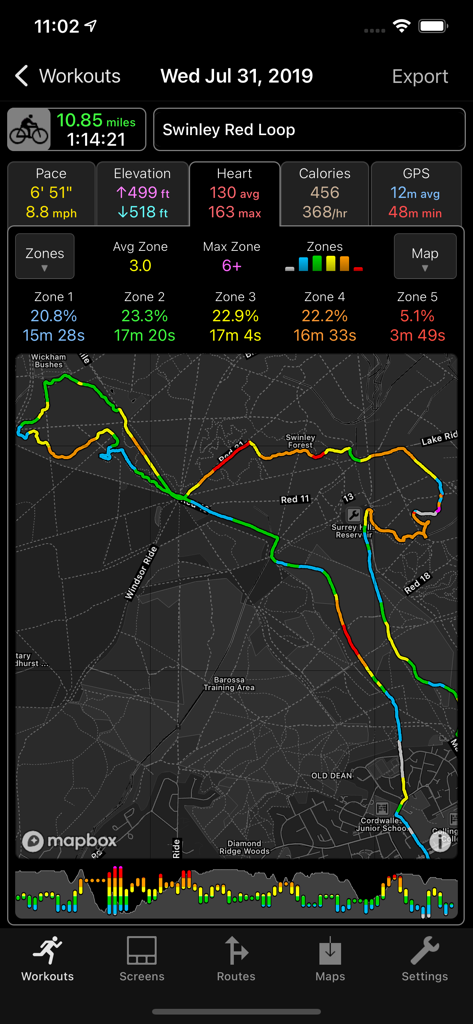
ルートマップと心拍ゾーンが表示されているWorkOutDoorsアプリの詳細なサイクリングワークアウトサマリー

ルートマップと心拍ゾーンが表示されているWorkOutDoorsアプリの詳細なサイクリングワークアウトサマリー

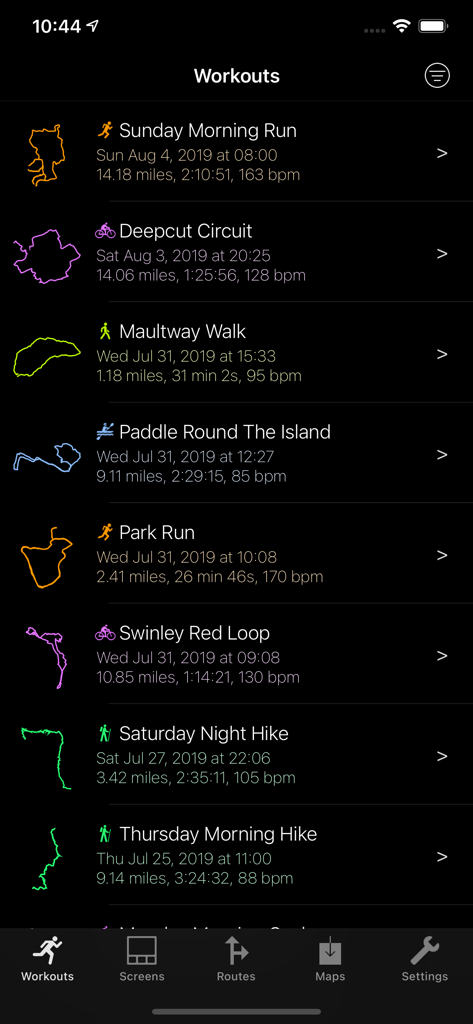
距離、時間、心拍数、GPSトラックが表示されているWorkOutDoorsアプリの完了したワークアウトのリスト

距離、時間、心拍数、GPSトラックが表示されているWorkOutDoorsアプリの完了したワークアウトのリスト

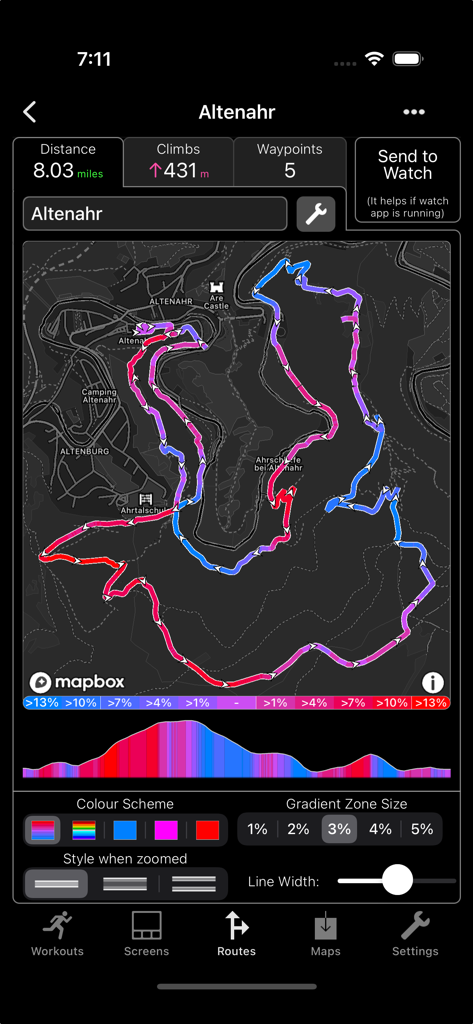
標高プロファイルと傾斜カラーコーディング付きの詳細な地形ルートマップを表示しているWorkOutDoorsアプリの画面

標高プロファイルと傾斜カラーコーディング付きの詳細な地形ルートマップを表示しているWorkOutDoorsアプリの画面

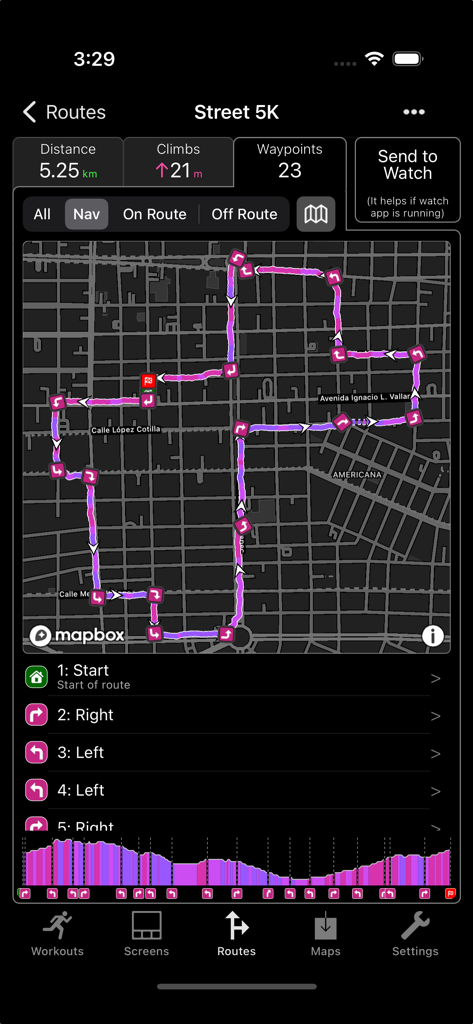
ターンバイターン指示と標高プロファイル付きの詳細な5Kルートマップを表示しているWorkOutDoorsアプリ

ターンバイターン指示と標高プロファイル付きの詳細な5Kルートマップを表示しているWorkOutDoorsアプリ

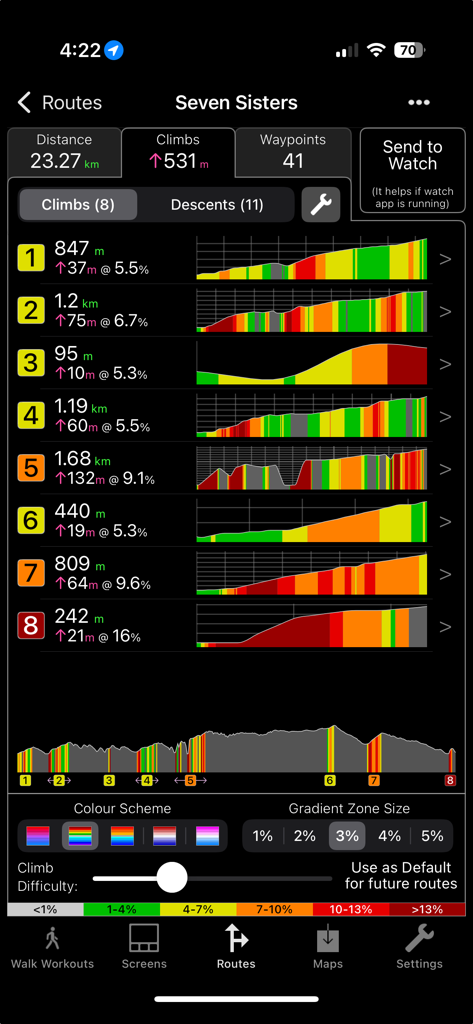
WorkOutDoorsアプリのハイキングルートの詳細な標高プロファイルと登坂統計

WorkOutDoorsアプリのハイキングルートの詳細な標高プロファイルと登坂統計

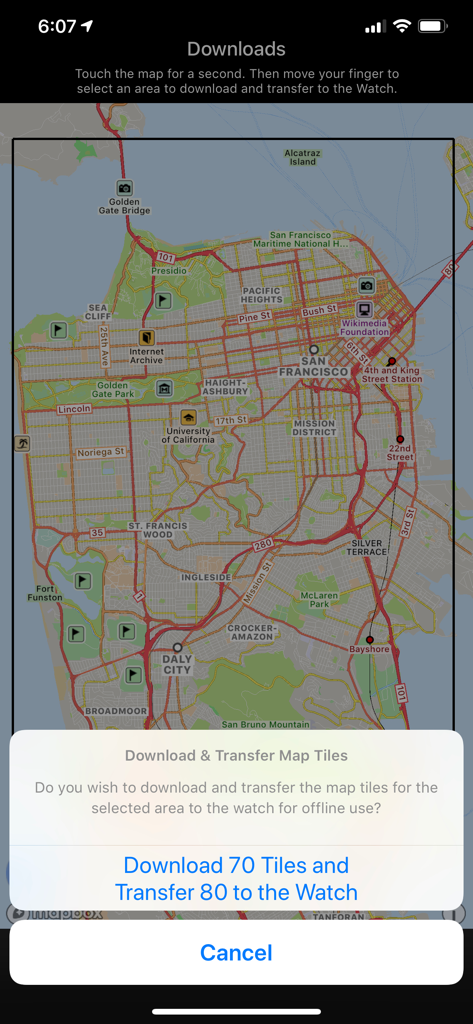
WorkOutDoorsアプリでApple Watch用のオフラインマップタイルのダウンロード

WorkOutDoorsアプリでApple Watch用のオフラインマップタイルのダウンロード

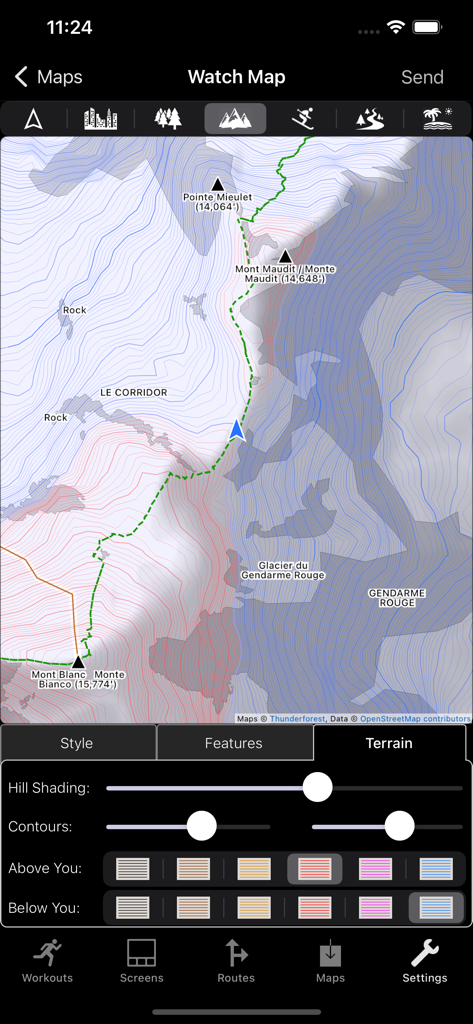
ヒルの陰影と等高線の色を含む地形マップの地形機能のカスタマイズ用WorkOutDoorsアプリインターフェース

ヒルの陰影と等高線の色を含む地形マップの地形機能のカスタマイズ用WorkOutDoorsアプリインターフェース

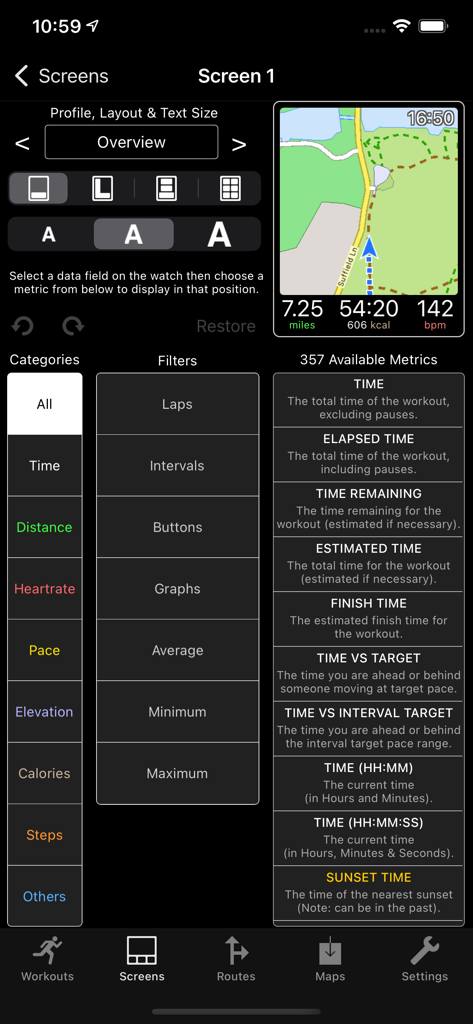
WorkOutDoors iPhoneアプリでのApple Watchワークアウト画面とデータフィールドのカスタマイズ用インターフェース

WorkOutDoors iPhoneアプリでのApple Watchワークアウト画面とデータフィールドのカスタマイズ用インターフェース

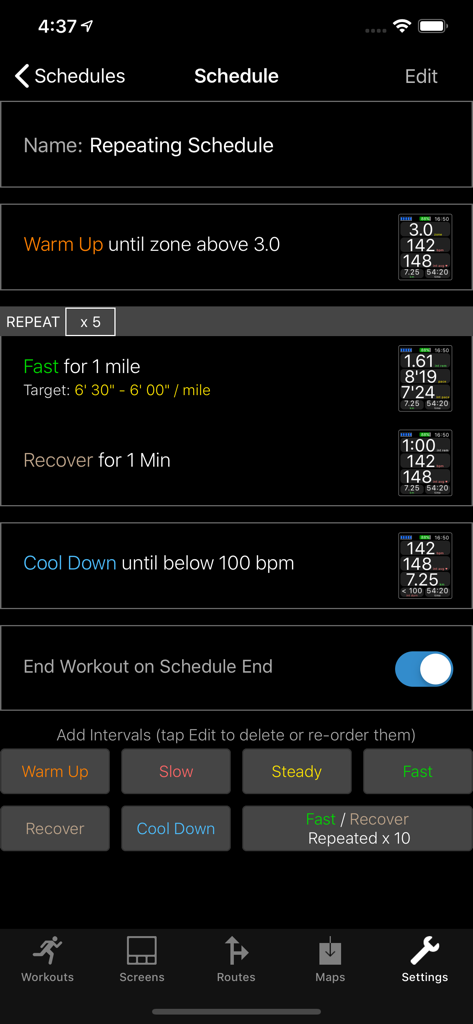
WorkOutDoorsアプリのApple Watchワークアウト用インターバルタイマースケジュールエディタ

WorkOutDoorsアプリのApple Watchワークアウト用インターバルタイマースケジュールエディタ

Apple Watchをプロスポーツコンピューターに変える

このアプリを際立たせるツール、 479K+ 人のユーザーが選択.

🗺️

高度なオフラインマッピング

セルラー信号がなくても完璧に機能する、スムーズなベクトルマップ、等高線、パンくずリストでバックカントリーのトレイルをナビゲートしましょう。

📊

究極のデータカスタマイズ

800以上のデータフィールドから選択して、完璧なディスプレイを作成しましょう。手首で直接、リアルタイムグラフで心拍ゾーン、パワー、ペースを監視しましょう。

🏷️

月額サブスクリプションなし

SaaS疲れにさよなら。すべてのプロ機能と将来のアップデートに、一度だけの支払いでアクセスできます。隠れたコストはなく、純粋なパフォーマンスだけです。

アプリについて

について知っておくべきこと WorkOutDoors.

説明

WorkOutDoors is the most advanced and most configurable workout app for the Apple Watch. It's perfect for running, cycling, hiking and any other indoor or outdoor activity. Note: WorkOutDoors requires an Apple Watch Series 3 or later. It is not necessary to have your iPhone with you during a workout. The app uses Apple’s workout system, so all workouts are saved to the Health system. However it also provides many extra features over Apple's app, such as: - a super-smooth vector map that can be shown during a workout; - multiple configurable screens with metrics and graphs from a pool of 800+ data fields; - route files can be imported and used for navigation (including turn by turn directions); - dozens of configurable alerts (e.g. every mile; high heart rate; low pace; off-route etc); - interval schedules can be created using the larger screen of the phone app; - climbs and descents are supported with notifications and on-screen data and graphs; - waypoints can be created, navigated to, and exported; - use shortcuts to associate operations with gestures (e.g. double tap to hear configurable metrics); - compare pace against a target or a previous workout (using metrics and a dot on the map); - show zones for pace and power as well as heart rate (with optional coloured backgrounds); - auto-pause is available for all outdoor activities; - shows GPS and heart rate before starting a workout, so that you can wait for good signals; - configure distance and pace for running / walking to come from Apple’s pedometer or from GPS; - workouts can be exported in FIT / TCX / GPX files, or automatically sent to Strava; - workouts created by the app can be analysed in great depth in the iPhone app. The app also has many more features. The map is a particular highlight. It uses OpenStreetMap, which provides worldwide coverage and includes the trails necessary for outdoor workouts. It also has several features that help you navigate during a workout: - maps can be smoothly panned and zoomed, and can rotate according to the compass; - a breadcrumb trail of your whole route is displayed on the map during the workout; - topographic data can be shown, with configurable contour colours and hill shading; - map-only mode is provided for when you don't want to start a workout and just need a map; - a circular scale is shown when you zoom, making it easy to see the distance to features; - maps can be stored on the watch for use when offline (they are downloaded as required if online); - a red compass points north and a green compass points to the start; - choose a waypoint to see a compass and distance to it in the corner of the map; - you can also navigate to waypoints on the map, such as hospitals, sights, cafes etc. If you load a route from a GPX / TCX / FIT file then navigation is even easier: - your position is shown on an elevation profile of the route; - the remaining distance, time and ascent can also be displayed; - you can get alerted when you go off-route; - when off-route then a compass is shown which points to the nearest part of the route; - if the route contains turn by turn directions then these can be used like a sat nav; - if there are no directions then the app can use “bend detection” to generate them; - the next direction is shown as an icon and distance in the corner of the map; - the map can automatically zoom in when you are approaching a turn; - you can use shake gestures to hear the distance to the next turn or the end of the route; - routes are coloured by gradient: from red for steep uphill to blue for steep downhill; - you can configure what information is displayed during a climb or descent. All this is included for a single one-off payment. No extra in-app purchases or subscriptions are required (although there is a completely optional in-app tip jar which was requested by long-term users). If you own an Apple Watch and do any form of exercise, then WorkOutDoors is the app for you. Give it a go!

最新バージョン

6.1

サイズ

45.8 MB

リリース日

2017年7月13日

Apple Watchをプロスポーツコンピューターに変える

479,000人以上のパワーユーザーに加わり、800以上のデータフィールド、オフラインベクトルマップ、エリートナビゲーションにアクセスしましょう—すべて一度だけの支払いで。サブスクリプションは一切不要です。

ダウンロード: App Store
FAQ

よくある質問

について知っておくべきこと WorkOutDoors

WorkOutDoorsとは何ですか?

WorkOutDoorsは、Apple Watch Series 3以降向けの高度で設定可能なワークアウトアプリケーションです。ランニング、サイクリング、ハイキングなど、さまざまな屋内および屋外のアクティビティをサポートしています。

WorkOutDoorsはワークアウト中にiPhoneを必要としますか?

いいえ、WorkOutDoorsはワークアウト中にiPhoneを必要としません。アプリケーションはApple Watch Series 3以降で直接動作します。

WorkOutDoorsはApple Healthとどのように連携しますか?

WorkOutDoorsはAppleのワークアウトシステムを使用しており、完了したすべてのワークアウトがHealthシステムに自動的に保存されます。詳細な分析のための多くの追加機能も提供しています。

ユーザーはWorkOutDoorsでワークアウトデータ画面をカスタマイズできますか?

はい、WorkOutDoorsではワークアウトデータ画面の広範なカスタマイズが可能です。ユーザーは800以上のデータフィールドのプールから選択したメトリックとグラフで複数の画面を設定できます。

WorkOutDoorsはターンバイターンルートナビゲーションを提供しますか?

はい、ルートファイルに方向指示が含まれている場合、WorkOutDoorsはターンバイターンナビゲーションを提供します。アプリは、方向指示が事前に存在しない場合でも、「ベンド検出」を通じて方向指示を生成することもできます。

WorkOutDoorsはApple Watchでのオフラインマップの使用をサポートしていますか?

はい、WorkOutDoorsはオフラインマップの使用をサポートしています。マップはApple Watchに直接保存でき、ワークアウト中のインターネット接続がない場合でもアクセスできます。

WorkOutDoorsの価格モデルは何ですか?

WorkOutDoorsは、単一の買い切り型支払いモデルを採用しています。追加のアプリ内購入やサブスクリプションは必要ありませんが、完全にオプションのチップジャーが利用可能です。

WorkOutDoorsはワークアウトアクティビティデータをエクスポートできますか?

はい、WorkOutDoorsはワークアウトアクティビティデータをエクスポートできます。ワークアウトはFIT、TCX、またはGPXファイル形式でエクスポートでき、Stravaに自動的に送信することもできます。

WorkOutDoorsは地形図データを提供しますか?

はい、WorkOutDoorsは地形図データを提供します。設定可能な等高線色と陰影表示を表示し、屋外アクティビティのナビゲーションを強化します。

WorkOutDoorsではインターバルワークアウトスケジュールが利用できますか?

はい、WorkOutDoorsにはインターバルワークアウトスケジュールが含まれています。これらのスケジュールは、関連付けられたiPhoneアプリのより大きな画面を使用して作成および設定されます。

WorkOutDoorsはどの活動をサポートしていますか?

WorkOutDoorsは、ランニング、サイクリング、ハイキング、その他の屋内または屋外のエクササイズを含む、幅広いアクティビティをサポートしています。Apple Watchでの包括的なワークアウト追跡のために設計されています。

WorkOutDoorsはルート中の登り坂と下り坂を追跡しますか?

はい、WorkOutDoorsは登りと下りを追跡します。高度変化に関する通知、画面上のデータ、グラフを提供し、ルートを勾配で色分けすることもできます。

App information, icons, screenshots, and descriptions displayed on this page are sourced from the Apple App Store and are the property of their respective developers. Download estimates and rankings are based on MWM's proprietary models and may not reflect actual figures. This page is provided for informational and analytical purposes only.

Believe this page infringes your intellectual property? File a dispute