CalCs - Calendar Complications

CalCs - Calendar Complications


다운로드: App Store
로고: CalCs - Calendar Complications

CalCs - Apple Watch를 위한 최고의 캘린더 및 미리 알림 컴플리케이션

스마트폰을 꺼내는 것을 멈추세요. 정리 정돈된 전문가를 위해 디자인된 컴플리케이션으로 시계 페이스에서 월간 그리드, 이벤트 목록, 미리 알림에 즉시 액세스하세요.

다운로드: App Store

개발사

Akihiro Usui

카테고리

Utilities

다운로드

26K+

사용자 평점

3.6/5

총 평가 수

300

지원 언어

1

손목 위의 정확성

이 인터페이스를 사용하는 26K+ 명의 사용자.

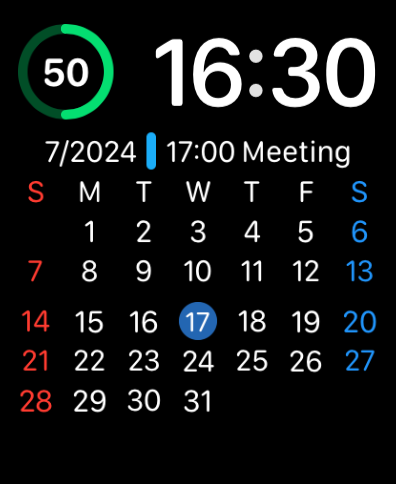
전체 월간 캘린더 그리드와 예정된 회의 정보를 표시하는 Apple Watch 페이스

전체 월간 캘린더 그리드와 예정된 회의 정보를 표시하는 Apple Watch 페이스

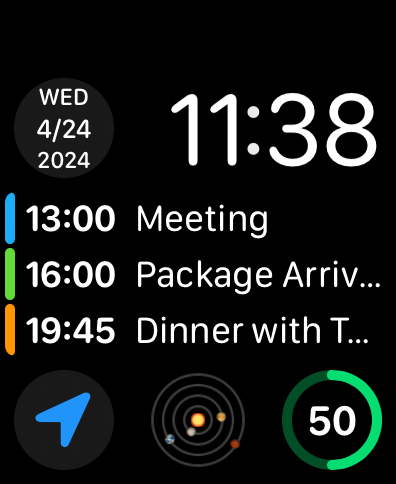
예정된 이벤트 목록과 날짜 컴플리케이션을 표시하는 Apple Watch 페이스

예정된 이벤트 목록과 날짜 컴플리케이션을 표시하는 Apple Watch 페이스

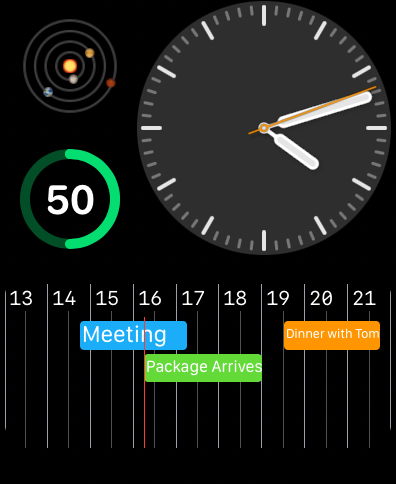
예정된 이벤트와 미리 알림이 있는 수평 캘린더 타임라인을 보여주는 Apple Watch 페이스

예정된 이벤트와 미리 알림이 있는 수평 캘린더 타임라인을 보여주는 Apple Watch 페이스

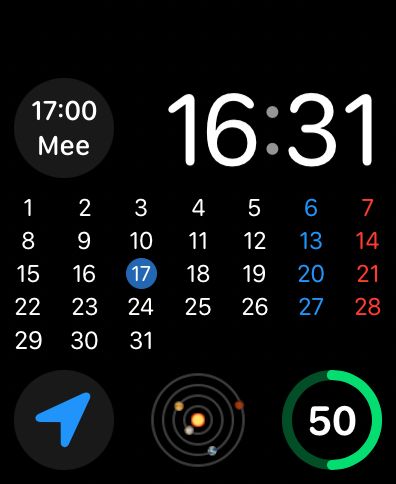
CalCs 컴플리케이션을 사용하여 전체 월간 캘린더 그리드와 약속 세부 정보를 표시하는 Apple Watch 페이스

CalCs 컴플리케이션을 사용하여 전체 월간 캘린더 그리드와 약속 세부 정보를 표시하는 Apple Watch 페이스

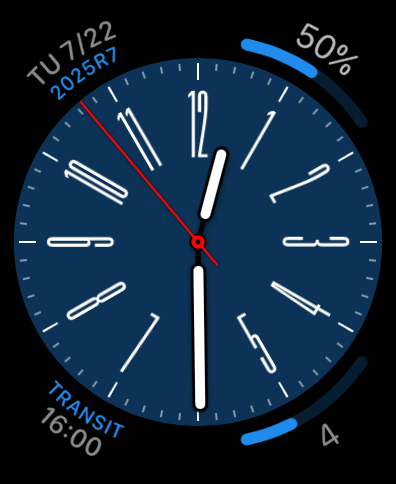
파란색 다이얼에 사용자 정의 캘린더 및 미리 알림 컴플리케이션이 있는 아날로그 Apple Watch 페이스.

파란색 다이얼에 사용자 정의 캘린더 및 미리 알림 컴플리케이션이 있는 아날로그 Apple Watch 페이스.

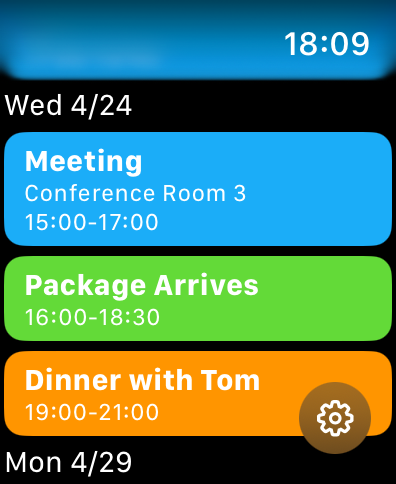
Apple Watch 화면에 색상으로 구분된 캘린더 이벤트 및 미리 알림 목록

Apple Watch 화면에 색상으로 구분된 캘린더 이벤트 및 미리 알림 목록

한눈에 보는 생산성 최적화

이 앱을 돋보이게 하는 도구, 26K+ 명의 사용자가 선택.

📅

전체 월간 그리드 보기

시계 페이스에서 완전한 월간 개요를 바로 볼 수 있는 watchOS의 격차를 해소하여 몇 초 안에 날짜를 확인하고 미리 계획할 수 있습니다.

고밀도 컴플리케이션

스마트폰을 꺼내지 않고도 다음 이벤트나 보류 중인 미리 알림을 표시하는 원형, 모서리 및 직사각형 형식으로 화면 공간을 최대화하세요.

🛠️

전문가 맞춤 설정

특정 캘린더 목록을 필터링하고 선호하는 요일 시작을 설정하여 개인 및 전문 워크플로에 맞게 환경을 조정하세요.

앱 소개

에 대해 알아야 할 모든 것 CalCs - Calendar Complications.

설명

CalCs (short for "Calendar Complications") is a watchOS-only app that provides various complications related to the calendar. ---Important Notes--- The features built into the main body of this app are limited to listing events/reminders & displaying a monthly calendar. All other features are provided through complications & the Smart Stack. ●If you download CalCs from the iPhone App Store, due to synchronization issues between the iPhone & Apple Watch, CalCs may not appear on the Apple Watch. According to Apple's specifications, watchOS-only apps cannot be re-downloaded from the App Store app on the iPhone. Therefore, please use the App Store app "on your Apple Watch" and follow the steps below to re-download it. ・Scroll to the bottom → "Account" → "Purchased" → "CalCs" → re-download ------------------- Key Features ●Supports a variety of complications such as date display, events/reminders display, & monthly calendar display ・Date Display Displays the current date in various formats. ・Event/Reminder Display Displays events/reminders synced with your iPhone. You can choose whether or not to include all-day events. ・Monthly Calendar Display Displays the monthly calendar in various formats. You can choose to start the week on Monday. It also supports holidays in some areas. ●In the main app, events/reminders, & the monthly calendar are displayed Tapping the complication opens the app, where you can view the list of events/reminders synced with your iPhone, as well as the monthly calendar. *Only incomplete reminders are displayed. *The app currently does not have functionality to add, edit, or delete events/reminders, nor to mark reminders as complete. Please understand. ●Minimal Setting Options To avoid complicating settings on the small Apple Watch screen, the settings only allow you to select which calendar/reminder lists to display. *Notes ・The corner complications, circular complications, & large rectangular complications are supported only on Apple Watch Series 4 & later, so CalCs is not guaranteed to work on Series 3 or earlier models. ・Due to the limitations of watchOS complication display updates, complications may not immediately reflect changes when the date changes or after events or reminders are added or edited on the iPhone. ・After placing a complication for the 1st time, it may take some time for it to actually appear. ・If the complication is not updating, try tapping the complication to open CalCs, as this may refresh the data. ・If the complication is not updated even after launching CalCs, the issue may be resolved by one of the following methods. Please try them. 1. Restart both your iPhone and Apple Watch. 2. Force restart CalCs ① With CalCs open, press and hold the side button. ② When the screen for emergency call and power off appears, press and hold the Digital Crown. 3. Reinstall CalCs ① Press the Digital Crown to display the app list. ② Press and hold CalCs, then tap the × button to delete it when it appears. ③ Launch the App Store app on your Apple Watch. ④ Scroll to the bottom → "Account" → "Purchased" → "CalCs" → Re-download. ・If the complication does not update after force quitting and restarting CalCs, try restarting both your iPhone and Apple Watch, as it may resolve the issue. ・If event information is not displayed on the app's main event/reminder list screen or in complications, it may be because full access to the calendar has not been granted. The issue may be resolved by following the steps below to re-enable full access permission to the calendar. Please give it a try. ①Open the "Privacy & Security" section in the iPhone Settings app & tap "Calendars". ②Change CalCs' calendar access to "None", then select "Add Events Only". ③When you open CalCs, you will be prompted to grant full access, so tap "Allow Full Access".

최신 버전

1.84

크기

4.8 MB

출시일

2024년 4월 24일

Apple Watch 생산성을 높이세요

스마트폰을 꺼내는 것을 멈추세요. CalCs를 사용하여 완전한 월간 캘린더와 미리 알림을 손목에 꼭 맞는 곳에 두는 수천 명의 정리 정돈된 전문가들과 함께하세요.

다운로드: App Store

App information, icons, screenshots, and descriptions displayed on this page are sourced from the Apple App Store and are the property of their respective developers. Download estimates and rankings are based on MWM's proprietary models and may not reflect actual figures. This page is provided for informational and analytical purposes only.

Believe this page infringes your intellectual property? File a dispute