Change Seats

Change Seats

다운로드: App Store
로고: Change Seats

Change Seats: 교실 좌석 배치도를 게임화하세요

룰렛 보너스를 통해 좌석 변경을 흥미진진한 교실 이벤트로 전환하고, 접근성 요구 사항 및 학생 배치를 완벽하게 제어하세요.

다운로드: App Store

개발사

Takatoshi Fukino

카테고리

Education

다운로드

12K+

사용자 평점

4.7/5

총 평가 수

500

지원 언어

3

내부 살짝 보기

이 인터페이스를 사용하는 12K+ 명의 사용자.

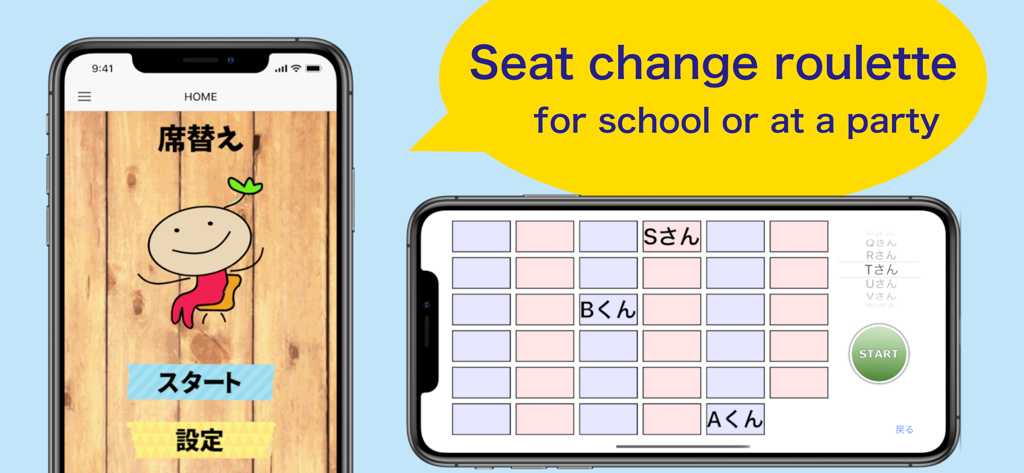
교실 좌석 배치도 및 홈 화면을 표시하는 Change Seats 앱의 스크린샷

교실 좌석 배치도 및 홈 화면을 표시하는 Change Seats 앱의 스크린샷

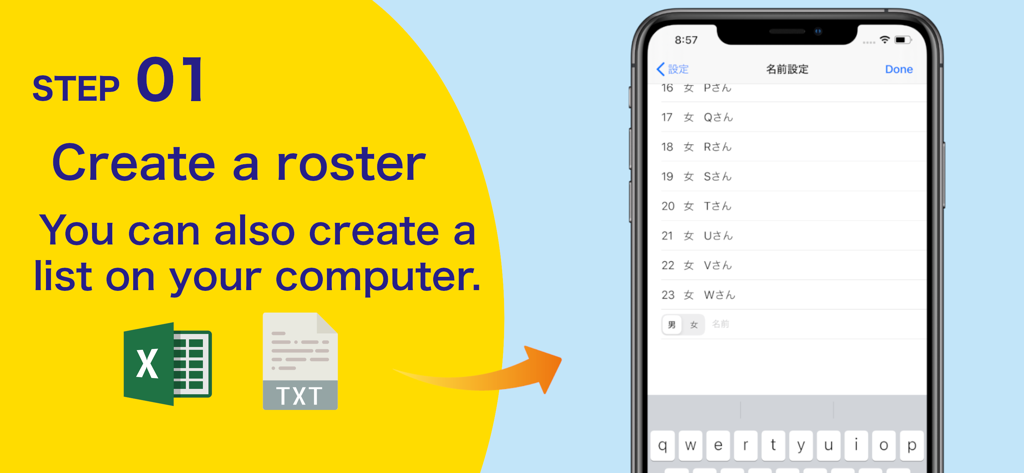
Excel 및 텍스트 파일 가져오기 옵션을 포함하여 Change Seats 앱에서 학생 명단을 만드는 방법을 보여주는 튜토리얼 화면

Excel 및 텍스트 파일 가져오기 옵션을 포함하여 Change Seats 앱에서 학생 명단을 만드는 방법을 보여주는 튜토리얼 화면

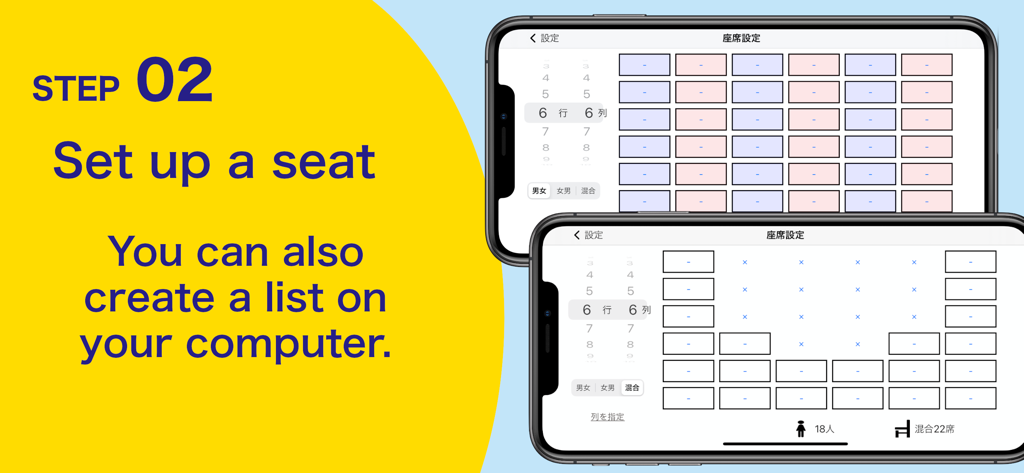
Change Seats 모바일 애플리케이션에서 교실 좌석 배치 구성 인터페이스

Change Seats 모바일 애플리케이션에서 교실 좌석 배치 구성 인터페이스

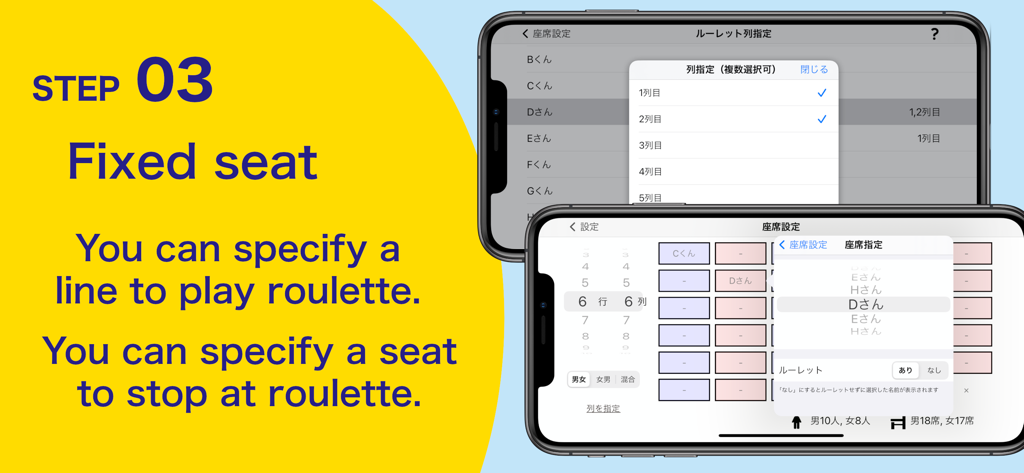
Change Seats 앱 내에서 수동 좌석 할당 및 고정 좌석 설정을 보여주는 인터페이스

Change Seats 앱 내에서 수동 좌석 할당 및 고정 좌석 설정을 보여주는 인터페이스

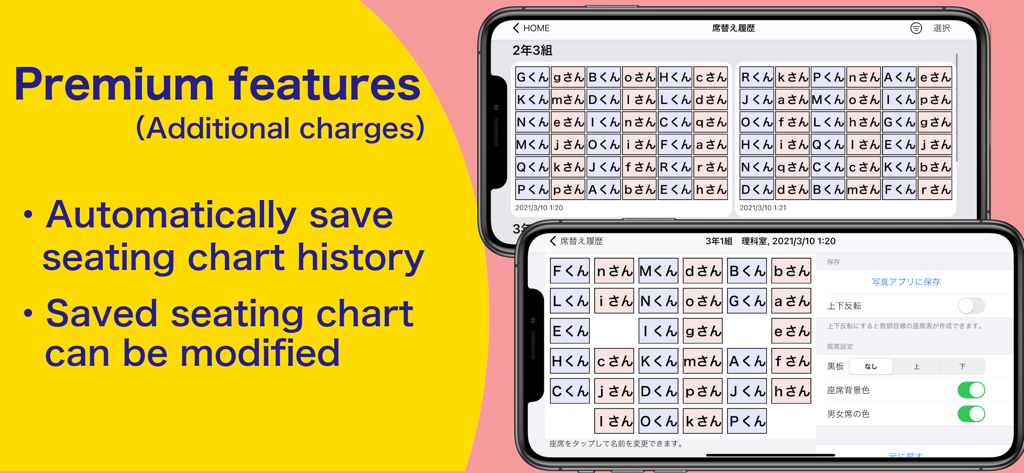
Change Seats 앱의 교실 좌석 배치도와 프리미엄 기능 목록을 표시하는 iPhone 화면

Change Seats 앱의 교실 좌석 배치도와 프리미엄 기능 목록을 표시하는 iPhone 화면

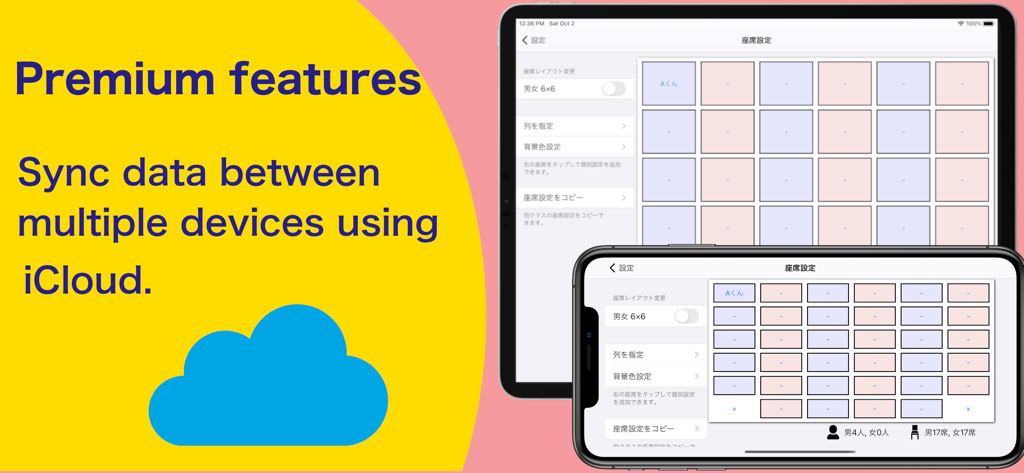
iCloud를 통해 iPhone 및 iPad 간에 좌석 배치도 동기화를 보여주는 Change Seats 앱 프리미엄 기능 인터페이스

iCloud를 통해 iPhone 및 iPad 간에 좌석 배치도 동기화를 보여주는 Change Seats 앱 프리미엄 기능 인터페이스

공정하고 정리된 교실을 위한 최고의 도구

이 앱을 돋보이게 하는 도구, 12K+ 명의 사용자가 선택.

🎮

게임화된 좌석 선택

편애에 대한 불만을 없애고 전환을 재미있게 만드는 무작위 룰렛 휠로 흥미를 더하세요.

🤫

신중한 전략적 배치

IEP 요구 사항을 충족하고 행동을 관리하기 위해 특정 좌석을 미리 고정하세요. 동시에 무작위로 보이도록 유지하세요.

🖥️

원활한 스마트보드 동기화

Dropbox를 통해 학생 목록을 가져오고 교실 뒷자리에서도 잘 보이는 고시인성 차트를 투사하세요.

앱 소개

에 대해 알아야 할 모든 것 Change Seats.

설명

It is a seat change application that can be used at schools. You can decide your seat with a random roulette wheel. 【Feature】 ● You can enjoy changing seats as if you were playing a game! ● It is also possible to fix the seat! Basically, the seat is decided at random, but you can decide the seat in advance. Therefore, it is possible to operate people who want to sit in the front or who do not want to sit next to each other. Of course, the roulette wheel spins like any other person, so it won't come out. ● You can select how many rows the seats will be from the front. It can also be used when the front seat is good due to vision problems. ● You can also create a list from your computer By linking with Dropbox, you can also create and import a list on your computer. You can work quickly even by entering a large number of names. ● Easy-to-read layout! When using it in a class, please use it by projecting it on a projector or TV. The letters are large so that they are easy to see even at that time. ● Supports various seat arrangements! You can also specify the seat position and number, so you can flexibly change the seat layout. ● You can create multiple seat sets for multiple classes. There is also a function to copy the name from other seat sets, so you can easily enter the name. ● Seating chart creation function You can save the seat data after changing seats in the photo app. Data displayed in the opposite direction from the teacher's perspective can also be saved. ● Premium features You can save your seating chart history by making additional purchases within the app! -It is automatically saved every time the seat change is completed. -You can also change the position, background color, and name of the saved seating chart on the blackboard.

최신 버전

5.22.1

크기

54.0 MB

출시일

2014년 12월 2일

교실 관리 혁신을 시작할 준비가 되셨나요?

시간을 절약하고 공정성을 유지하며 모든 좌석 변경을 학생들에게 매력적이고 게임화된 경험으로 전환하기 위해 Change Seats를 사용하는 12,000명 이상의 교육자들과 함께하세요. 지금 무료로 시작하세요!

다운로드: App Store

App information, icons, screenshots, and descriptions displayed on this page are sourced from the Apple App Store and are the property of their respective developers. Download estimates and rankings are based on MWM's proprietary models and may not reflect actual figures. This page is provided for informational and analytical purposes only.

Believe this page infringes your intellectual property? File a dispute