CPA Exam Prep - mi. Accounting

CPA Exam Prep - mi. Accounting


다운로드: App Store
로고: CPA Exam Prep - mi. Accounting

CPA 시험 대비 - mi. Accounting: 시각적 명확성으로 비즈니스의 언어를 마스터하세요

두꺼운 교과서와의 씨름은 이제 그만, 성공을 시각화하세요. 당사의 인터랙티브 포켓 참고 자료는 겹쳐보기 비교와 실시간 재무제표 영향으로 복잡한 GAAP 및 IFRS 시나리오를 단순화합니다.

개발사

Koji NAKAO

카테고리

Education

다운로드

16K+

사용자 평점

5.0/5

총 평가 수

0

지원 언어

1

더 명확한 관점

이 인터페이스를 사용하는 16K+ 명의 사용자.

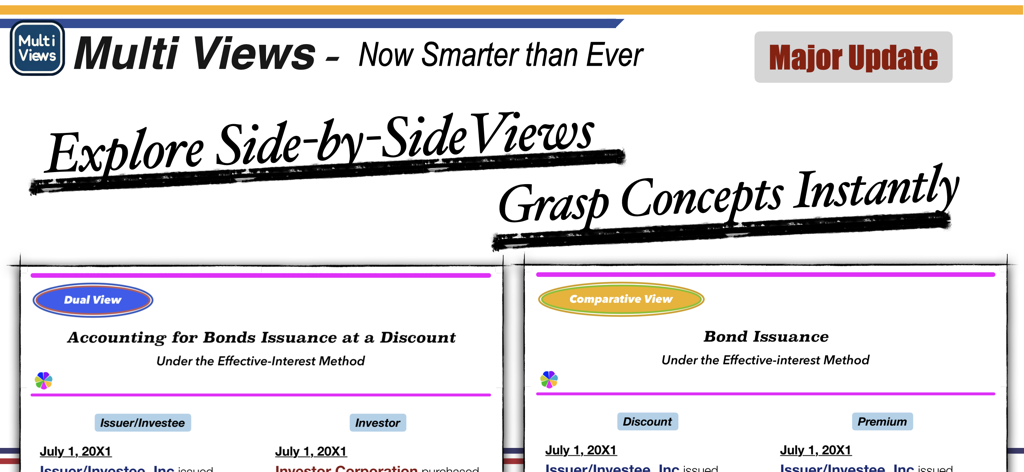
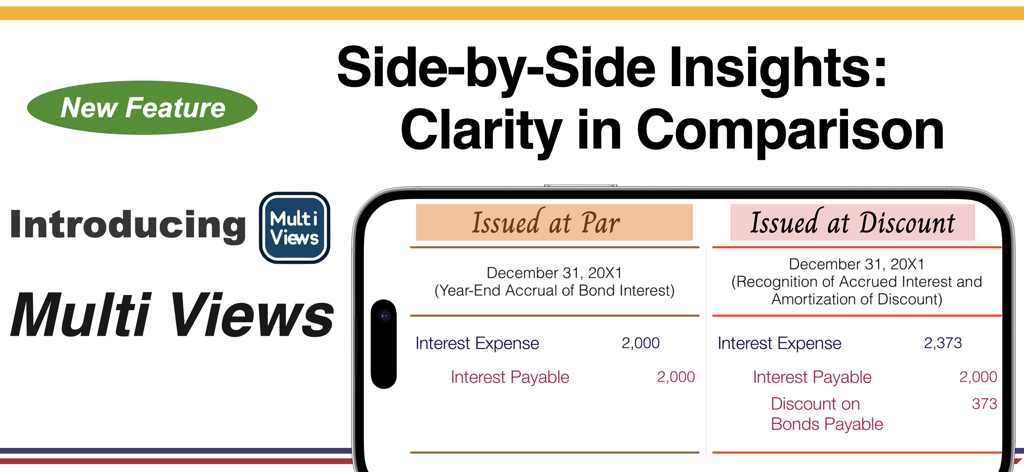
CPA 시험 대비 앱, 회계 개념을 위한 겹쳐보기 멀티 뷰 표시

CPA 시험 대비 앱, 회계 개념을 위한 겹쳐보기 멀티 뷰 표시

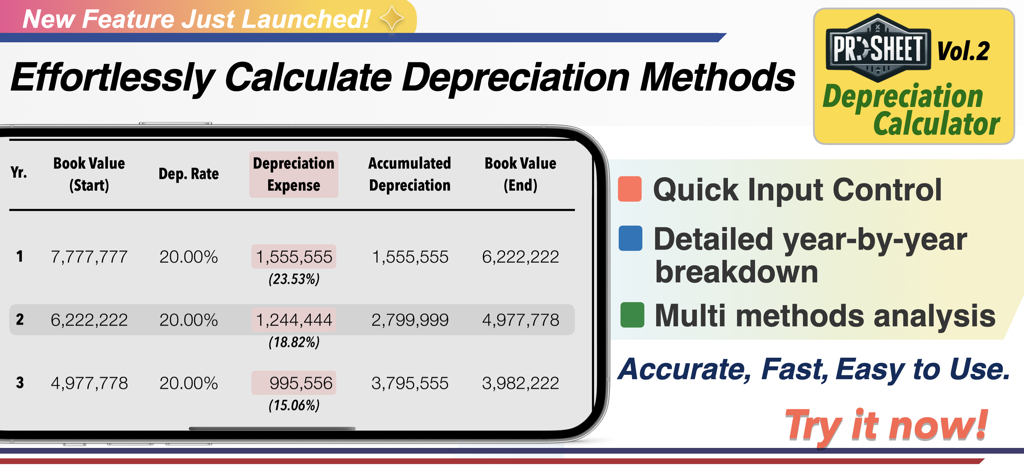
CPA 시험 대비 앱 인터페이스, 연도별 분석표가 있는 프로시트 감가상각 계산기 표시

CPA 시험 대비 앱 인터페이스, 연도별 분석표가 있는 프로시트 감가상각 계산기 표시

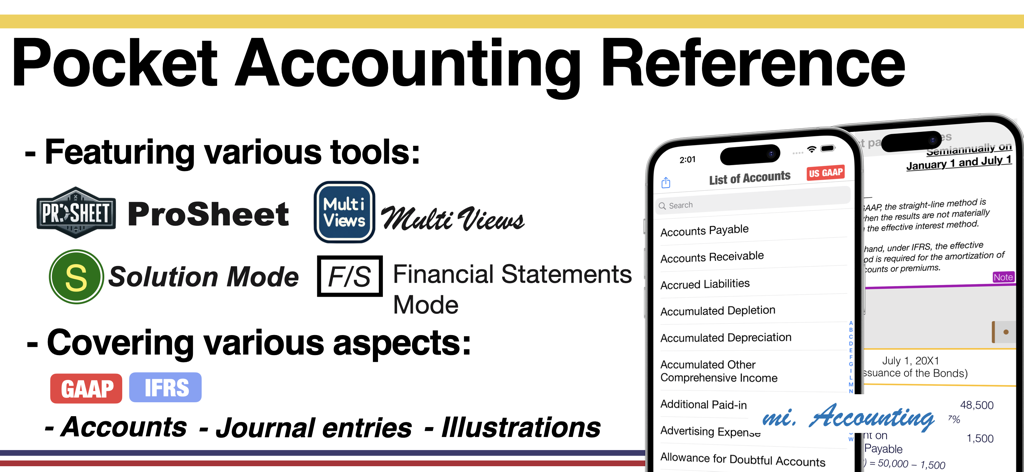
CPA 시험 대비 앱, 프로시트 및 솔루션 모드를 포함한 포켓 회계 참고 자료 기능 표시

CPA 시험 대비 앱, 프로시트 및 솔루션 모드를 포함한 포켓 회계 참고 자료 기능 표시

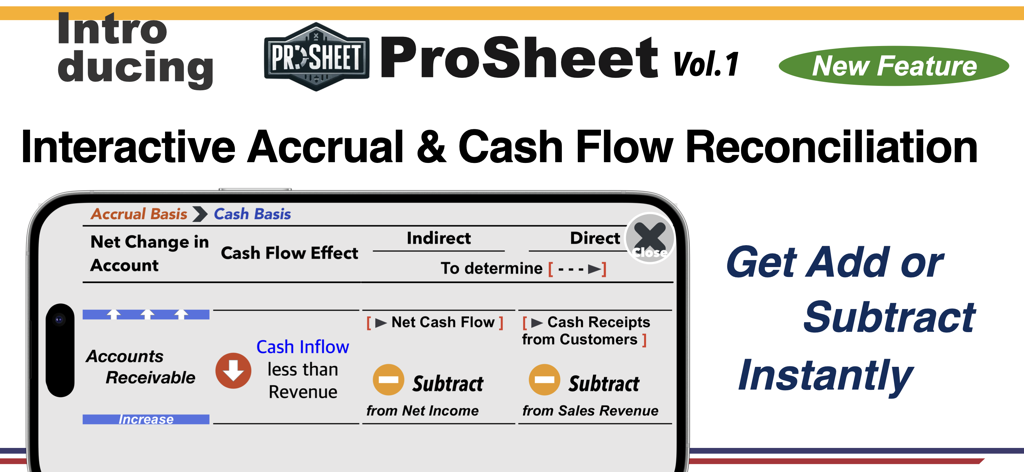
CPA 시험 대비 앱의 프로시트 인터랙티브 기능, 발생주의 및 현금 흐름 조정 표시

CPA 시험 대비 앱의 프로시트 인터랙티브 기능, 발생주의 및 현금 흐름 조정 표시

CPA 시험 대비 앱의 멀티 뷰 기능 스크린샷, 액면가 또는 할인 발행 채권 이자 분개 비교 표시

CPA 시험 대비 앱의 멀티 뷰 기능 스크린샷, 액면가 또는 할인 발행 채권 이자 분개 비교 표시

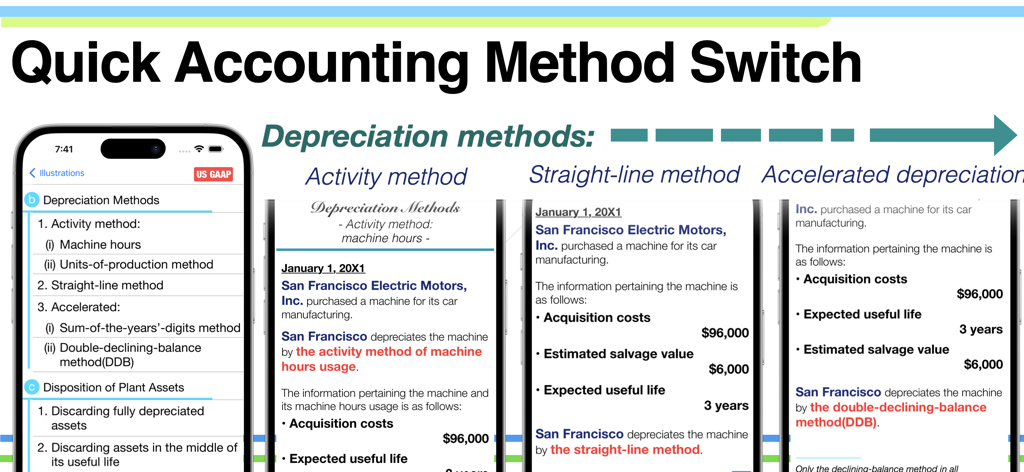
CPA 시험 대비 모바일 앱에서 활동법 및 정액법을 포함한 다양한 감가상각 방법 비교

CPA 시험 대비 모바일 앱에서 활동법 및 정액법을 포함한 다양한 감가상각 방법 비교

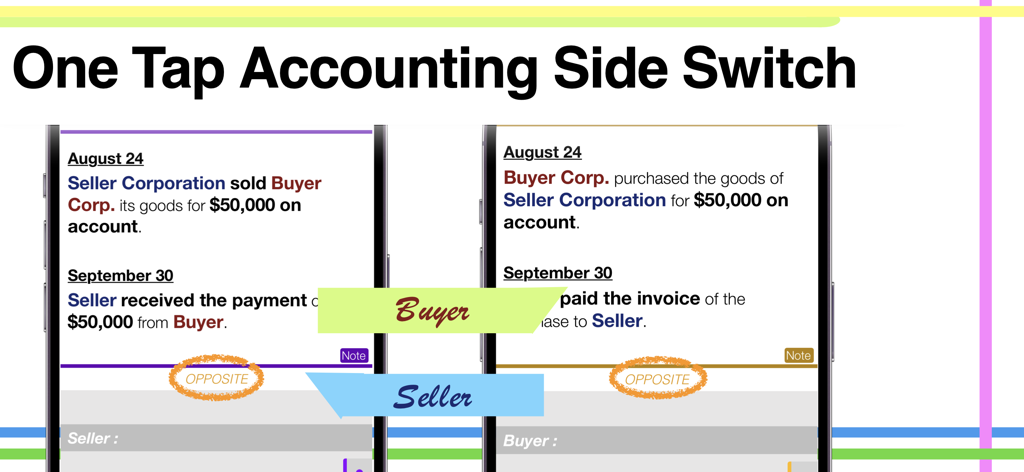
CPA 시험 대비 앱에서 구매자 및 판매자 거래 보기 겹쳐보기 비교

CPA 시험 대비 앱에서 구매자 및 판매자 거래 보기 겹쳐보기 비교

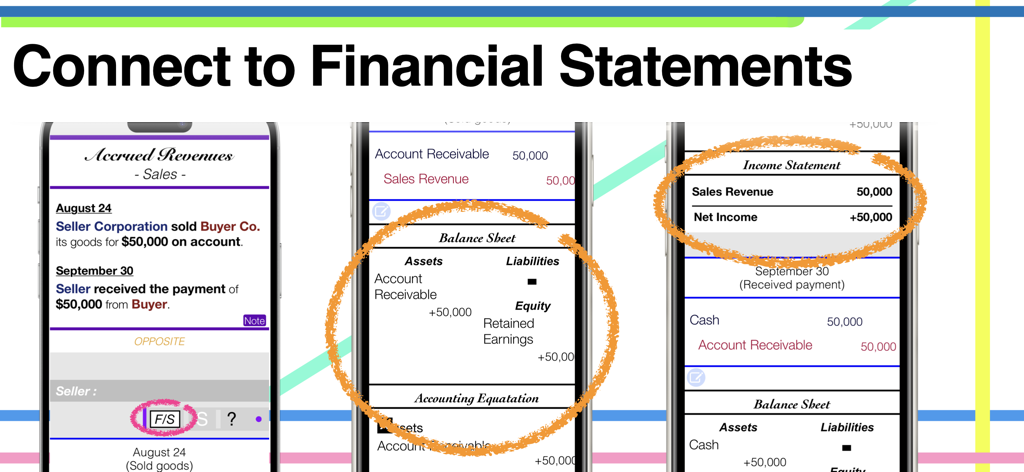
CPA 시험 대비 앱 인터페이스, 분개장이 대차대조표 및 손익계산서와 연결되는 방식 표시

CPA 시험 대비 앱 인터페이스, 분개장이 대차대조표 및 손익계산서와 연결되는 방식 표시

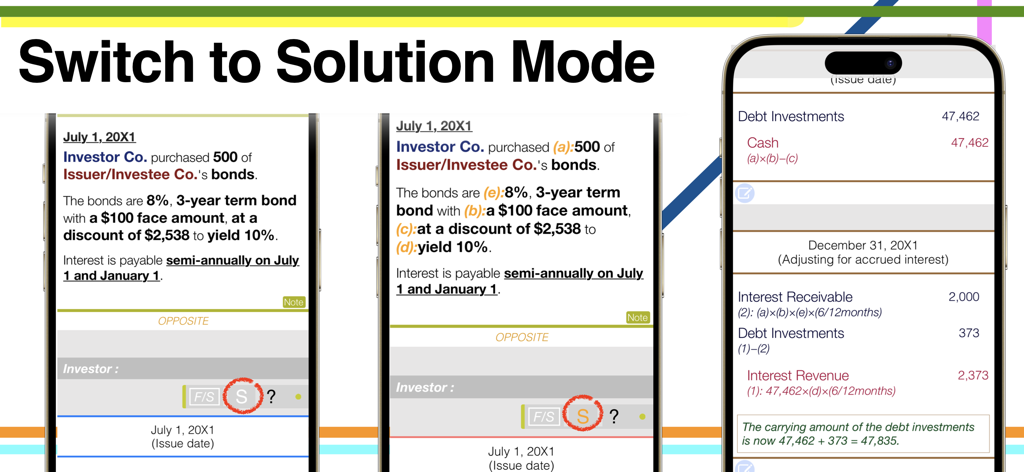
CPA 시험 대비 앱 스크린샷, 상세 회계 분개 및 계산을 위한 솔루션 모드로 전환하는 방법 표시

CPA 시험 대비 앱 스크린샷, 상세 회계 분개 및 계산을 위한 솔루션 모드로 전환하는 방법 표시

쉽게 비즈니스의 언어를 마스터하세요

이 앱을 돋보이게 하는 도구, 16K+ 명의 사용자가 선택.

🔄

양방향 마스터

판매자 대 구매자 또는 임대인 대 임대차인 보기 간을 즉시 전환하세요. 단 한 번의 탭으로 모든 거래의 양면을 이해하여 FAR 시험에서 세부 사항을 놓치지 않도록 하세요.

📊

큰 그림 연결

재무제표 모드를 사용하여 개별 분개장이 대차대조표와 손익계산서로 어떻게 흐르는지 시각화하세요. 숫자가 어떻게 연결되는지 더 이상 추측하지 마세요.

🌐

글로벌 표준 전환

원탭 전환으로 미국 GAAP 및 IFRS 표준 간의 뉘앙스를 마스터하세요. 높은 수준의 회계 인증에 필요한 기술적 차이를 암기하는 데 완벽합니다.

앱 소개

에 대해 알아야 할 모든 것 CPA Exam Prep - mi. Accounting.

설명

For those who want to step into the world of accounting but feel hesitant: This app is your friendly companion, designed to help you explore the essential "Language of Business." Let this app be in your hands and dive into the accounting world with confidence. Your Pocket Accounting Reference: = mi. Accounting = Intuitive, versatile, and fundamental, yet simple, handy, and colorful! Try it for free today. Top Highlights: ProSheet: An innovative feature designed as an interactive quick reference series for various accounting topics. Currently, it includes Volume 2, with more volumes planned for future updates. Multi Views: Display two or three scenarios side by side on a single screen, allowing effective comparison of different accounting methods. Covers various perspectives, such as seller vs. buyer and investor vs. investee, helping you understand differences at a glance. Solution Mode: Access detailed explanations and computations by tapping the [S] button in Solution Mode. This feature provides insights into the rationale behind each illustration and journal entry. Solution Mode is accessible by tapping the blink button at the bottom of an illustration. Financial Statements Mode: Shows how each journal entry contributes to the overall financial statements, illustrating the impact of individual entries on the bigger financial picture. More Features: - Covers US GAAP and IFRS Standards: Just one tap to switch between these standards. - Accounts List by Classification: Tap and hold on any classification to reorder the list by that category. - Flip to Opposite View: Easily switch to the opposite side with a single tap of the 'Opposite' button. - Easy Navigation to Other Methods or Illustrations: Simply flick right or left to show different views. - Journal Entry to Account Details: Tap and hold the account name in the journal entry to reveal that account's details. Table of Contents (Categories): 1. Current Assets 2. Fixed Assets, Intangible Assets 3. Current Liabilities 4. Long-Term Liabilities 5. Equity 6. Investments 7. Diluted Securities 8. Leases 9. Revenue Recognition 10. Accounting for Income Taxes 11. Statement of Cash Flows ProSheet: Volume 1: "Interactive Accrual & Cash Flow Reconciliation" Learn to effortlessly adjust account balances between accrual and cash basis.

최신 버전

6.1.2

크기

8.3 MB

출시일

2017년 12월 22일

시각적 자신감으로 회계 마스터하기

복잡한 GAAP 및 IFRS 표준을 명확하고 인터랙티브한 통찰력으로 바꾸세요. 수천 명의 미래 CPA와 함께 오늘 무료로 인터랙티브 포켓 참고 자료를 다운로드하세요.

다운로드: App Store

App information, icons, screenshots, and descriptions displayed on this page are sourced from the Apple App Store and are the property of their respective developers. Download estimates and rankings are based on MWM's proprietary models and may not reflect actual figures. This page is provided for informational and analytical purposes only.

Believe this page infringes your intellectual property? File a dispute