CSS Inspector for Safari

CSS Inspector for Safari


다운로드: App Store
로고: CSS Inspector for Safari

Safari용 CSS Inspector: 모든 웹사이트의 디자인 비밀을 밝히세요

디자이너와 개발자를 위한 궁극의 동반자입니다. iPhone, iPad, Mac에 최적화된 사람이 읽기 쉬운 인터페이스로 색상, 타이포그래피 및 레이아웃을 즉시 검사하세요.

다운로드: App Store

개발사

Alfredo Grassau

카테고리

Developer Tools

다운로드

1K+

사용자 평점

1.0/5

총 평가 수

0

지원 언어

12

한눈에 보는 정확성

이 인터페이스를 사용하는 1K+ 명의 사용자.

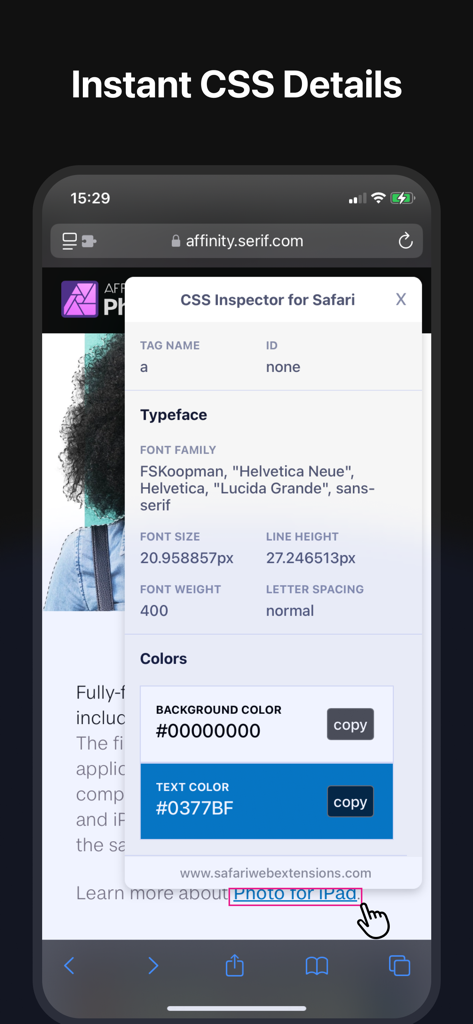
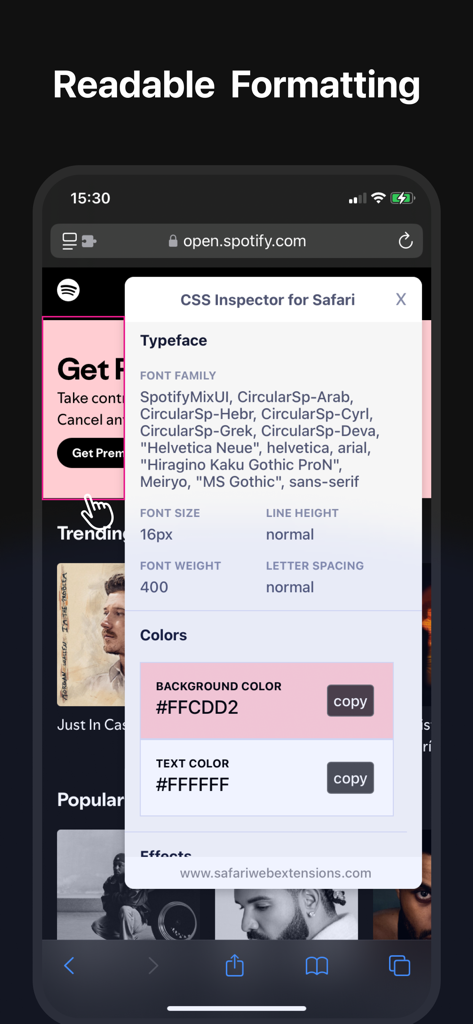
Safari용 CSS Inspector 모바일 인터페이스가 선택한 웹페이지 요소의 글꼴 및 색상 속성을 표시합니다.

Safari용 CSS Inspector 모바일 인터페이스가 선택한 웹페이지 요소의 글꼴 및 색상 속성을 표시합니다.

Safari용 CSS Inspector의 모바일 보기에서 글꼴 패밀리 및 16진수 색상 코드를 표시합니다.

Safari용 CSS Inspector의 모바일 보기에서 글꼴 패밀리 및 16진수 색상 코드를 표시합니다.

Safari용 CSS Inspector가 글꼴 및 색상 세부 정보와 함께 iPhone, iPad 및 MacBook에서 인터페이스를 보여줍니다.

Safari용 CSS Inspector가 글꼴 및 색상 세부 정보와 함께 iPhone, iPad 및 MacBook에서 인터페이스를 보여줍니다.

웹 디자인을 손쉽게 마스터하세요

이 앱을 돋보이게 하는 도구, 1K+ 명의 사용자가 선택.

🎯

인터랙티브 레이아웃 검사

마우스를 올리거나 탭하여 모든 웹사이트의 숨겨진 구조를 드러내세요. 노트북을 열지 않고도 여백, 패딩 및 요소 계층 구조를 즉시 시각화하세요.

🎨

디자인 데이터 단순화

더 이상 복잡한 코드를 뒤질 필요가 없습니다. 제작자를 위해 설계된 깔끔하고 사람이 읽기 쉬운 형식으로 타이포그래피, 색상 팔레트 및 스타일링에 액세스하세요.

원탭 디자인 캡처

마음에 드는 색상이나 글꼴을 찾으셨나요? 속성을 즉시 클립보드에 복사하고 iPhone, iPad, Mac 전반에 걸쳐 영감을 동기화하세요.

앱 소개

에 대해 알아야 할 모든 것 CSS Inspector for Safari.

설명

Discover a world where understanding website designs becomes a breeze with the "CSS Inspector for Safari" extension. Have you ever looked at a website and wondered about its design intricacies? What colors are they using? What typography makes it stand out? Which margins and paddings are giving it that unique layout? Say goodbye to the complexities and dive into the world of CSS with unmatched ease. Features: Hover to Highlight: As you move your cursor across the page, every website element gets highlighted, enabling you to understand page structures without any guesswork. Click for Detailed Insights: Upon clicking an element, a dedicated small window pops up. Explore typography specifics, grasp color schemes, understand effects applied, and get details about sizes, margins, and paddings. Human-Readable Format: No more getting lost in technical jargon. The information is displayed in a well-organized, clear, and comprehensible manner. Quick Copy Feature: Found a color you like? Maybe a specific shade or gradient caught your eye? No need to jot it down or remember; with a simple click, you can copy information directly from the pop-up window. Cross-Device Compatibility: CSS Inspector is available on macOS, iOS, and iPadOS, ensuring that you have a consistent and optimized browsing experience across all your Apple devices. Beyond these features, "CSS Inspector for Safari" is built with user experience at its core. It’s lightweight, ensuring that your browsing speed remains unhindered. Whether you're a professional working on a project, a student learning about web designs, or someone who enjoys understanding the digital spaces they visit, "CSS Inspector for Safari" is your go-to tool. Experience a nuanced way to explore websites, gather design inspirations, or simply feed your curiosity. Join thousands of users who have transformed their Safari browsing experience. Equip yourself with a tool that not only adds value but also empowers your digital journey. Download "CSS Inspector for Safari" and make the web a canvas of learning and exploration!

최신 버전

1.1.38

크기

5.4 MB

출시일

2023년 10월 16일

발견하는 모든 디자인을 해독할 준비가 되셨나요?

Safari를 궁극의 디자인 툴킷으로 전환한 수천 명의 디자이너 및 개발자에 동참하세요. 지금 Safari용 CSS Inspector를 다운로드하고 iPhone, iPad, Mac 전반에 걸쳐 전문가 수준의 통찰력을 발견하세요.

다운로드: App Store

App information, icons, screenshots, and descriptions displayed on this page are sourced from the Apple App Store and are the property of their respective developers. Download estimates and rankings are based on MWM's proprietary models and may not reflect actual figures. This page is provided for informational and analytical purposes only.

Believe this page infringes your intellectual property? File a dispute