
이 페이지는 앱이나 개발자의 공식 페이지가 아니며, 정보 제공 및 논평을 목적으로 작성된 독립 편집 간행물입니다. 명시적으로 달리 언급되지 않는 한, 해당 앱이나 개발자는 MWM, Apple, Google Play, 앱 퍼블리셔 또는 앱 개발자와 제휴, 보증, 후원, 승인 또는 공식적으로 연결되어 있지 않으며, 이 페이지의 어떤 내용도 해당 앱이 MWM의 서비스를 사용하여 개발되었음을 의미하지 않습니다. 모든 상표, 로고, 스크린샷 및 기타 콘텐츠는 해당 소유자의 자산입니다.


다운로드
100M+사용자 평점
총 평가 수
15.2M개발사
카테고리
Developer Tools지원 언어
33최신 버전
4.1.0크기
16.7 MB출시일
2014년 7월 23일TestFlight 앱 분석: 주요 기능 및 사용자 가치
얼리 어답터 및 앱 개선 기여자 관점
개발자에게 직접 피드백 제공
이 도구는 사용자가 앱 사용 중 발견한 문제점이나 개선 사항, 제안 등을 개발자에게 직접 전달하여 앱의 품질 향상에 적극적으로 기여할 수 있게 해줍니다.
베타 버전 앱 및 앱 클립 테스트
이 앱은 사용자가 App Store에 정식 출시되기 전의 앱과 앱 클립의 베타 버전을 미리 경험하고 평가할 수 있게 해주며, 새로운 기술과 기능을 가장 먼저 접할 기회를 제공합니다.
자동 충돌 로그 및 사용 데이터 수집
이 도구는 앱 사용 중 발생하는 충돌 로그와 사용 패턴 정보를 자동으로 수집하여 개발자가 앱의 안정성과 성능 문제를 신속하게 파악하고 해결하는 데 도움을 줍니다.
간편한 테스트 참여 초대
이 앱은 개발자가 이메일 또는 공개 링크를 통해 테스터를 쉽게 초대할 수 있게 하며, 사용자는 제공된 링크를 통해 관심 있는 베타 테스트 프로그램에 손쉽게 참여할 수 있습니다.
자주 묻는 질문
에 대해 알아야 할 모든 것 TestFlight
What is TestFlight and what does it do?
TestFlight enables users to test beta versions of apps and App Clips, providing valuable feedback directly to developers before their apps are released on the App Store.
How do developers invite testers to TestFlight?
Developers invite testers to TestFlight beta programs through email invitations or by providing a public link. Testers then accept these invitations to begin testing.
What data does TestFlight collect during beta testing?
When you test a beta app via TestFlight, Apple collects and sends crash logs, usage information, and any submitted feedback to the developer. Apple may also use crash logs and usage for its own product improvement.
How do developers use the data collected by TestFlight?
Developers use the information collected by TestFlight, including crash logs, usage data, and feedback, to improve their apps and related products before their official release.
Can users view all their beta apps in TestFlight?
Yes, TestFlight displays all beta apps a user is currently testing or has previously tested within its main interface. This includes apps that require updates.
Does TestFlight allow users to update beta apps?
Yes, TestFlight allows users to update beta apps directly from its interface. An 'Update' button appears next to apps with newer versions available for installation.
How do I accept a beta app invitation using TestFlight?
Yes, TestFlight presents a dedicated screen to accept beta app invitations, displaying app details, developer, category, and build expiration, with an 'Accept' button.
Can I send feedback to developers directly through TestFlight?
Yes, TestFlight provides a dedicated feedback interface where users can share thoughts, describe issues, and directly submit feedback to the app's developer.
Can I attach screenshots to my feedback in TestFlight?
Yes, TestFlight allows users to attach screenshots to their feedback submissions, providing developers with visual context for reported issues or suggestions.
Does TestFlight share my email address with developers when I submit feedback?
Yes, TestFlight indicates that beta feedback and device information are collected and shared with the developer, along with the user's email address.
Can I manage which devices I use for TestFlight beta testing?
Yes, TestFlight provides a settings menu where users can manage the devices they use for testing apps, listing current and other associated devices.
Does TestFlight support automatic updates for beta apps?
Yes, TestFlight features an option for 'Automatic updates for new apps'. This toggle enables automatic installation of new beta versions when they become available.
Can I provide feedback if I decide not to join a TestFlight beta app?
Yes, TestFlight allows users to provide feedback even if they choose not to join a beta app, using a 'Leave Feedback' option within the app list.
다음 스크린샷과 설명은 앱의 공식 스토어 목록에서 직접 가져온 것이며 앱 개발자의 자산입니다.
앱 스토어
스크린샷
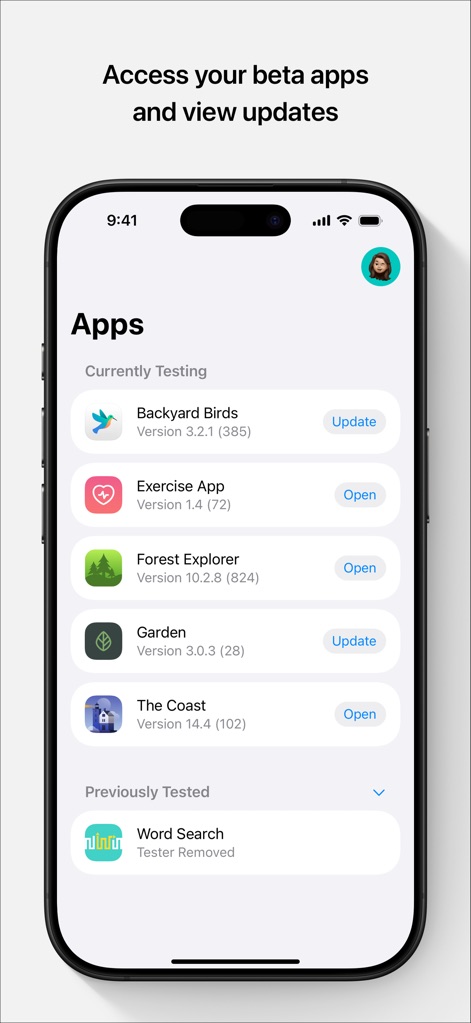
베타 앱 현황
이 앱은 "현재 테스트 중"인 베타 앱 목록을 보여주며, "업데이트" 버튼으로 최신 버전을 간편하게 받을 수 있습니다.
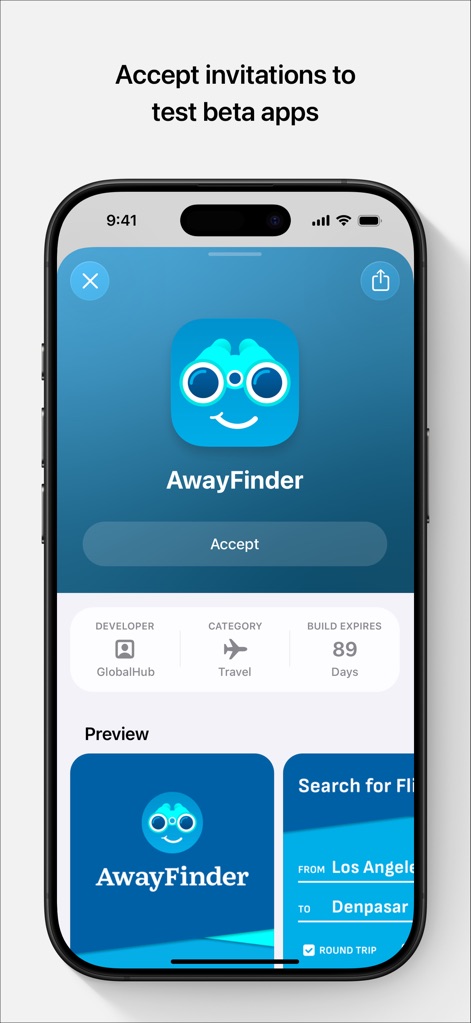
초대 수락 화면
이 도구는 개발자("GlobalHub") 정보와 함께 "수락" 버튼으로 새로운 베타 앱 테스트에 참여할 수 있도록 안내합니다.
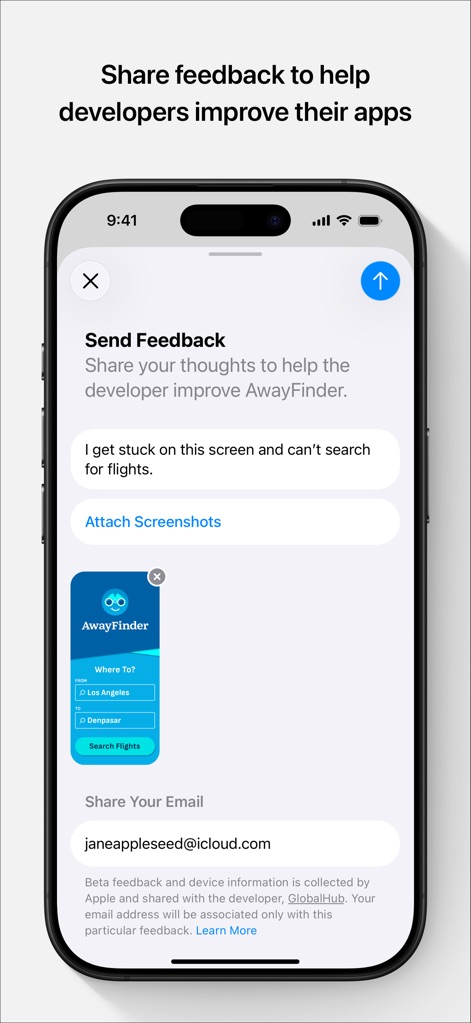
상세 피드백 작성
사용자는 "생각 공유" 입력창에 의견을 작성하고 "스크린샷 첨부" 기능을 사용하여 문제 상황을 명확히 전달합니다.
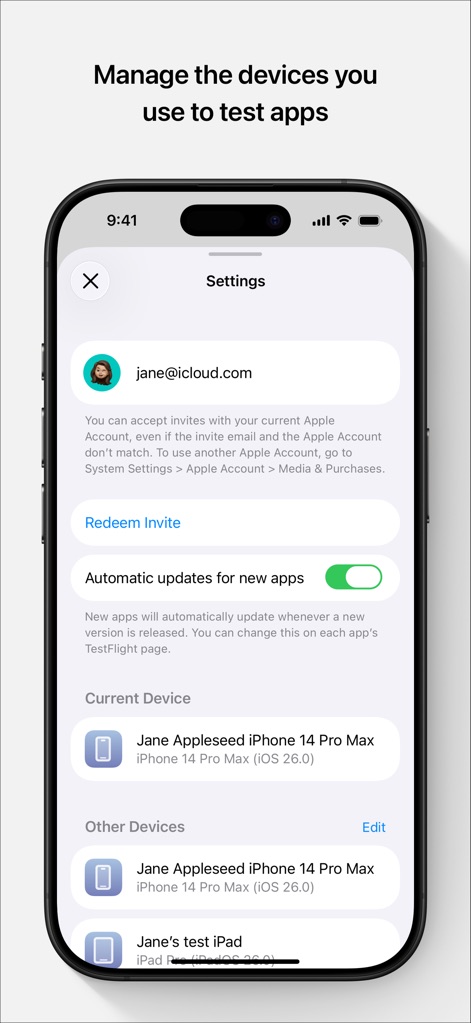
테스트 환경 설정
이 앱은 사용자 "Apple ID" 계정 정보를 표시하고, "자동 업데이트" 설정을 통해 앱 관리 편의성을 제공합니다.
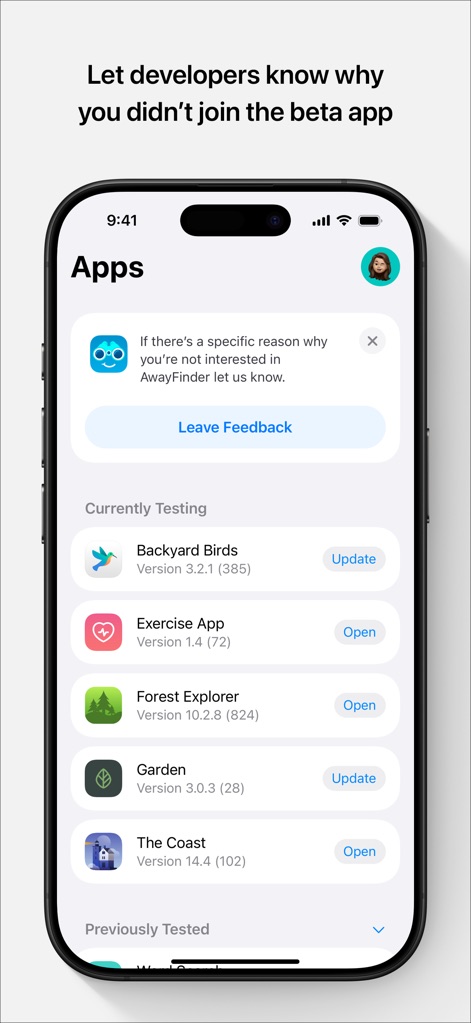
미참여 피드백
사용자는 특정 베타 앱 미참여 시 "피드백 남기기" 버튼을 통해 사유를 전달하고, "현재 테스트 중"인 다른 앱들을 확인할 수 있습니다.
설명
Download
비슷한 앱
유사한 기능과 사용자 경험을 가진 앱

이 페이지는 앱이나 개발자의 공식 페이지가 아니며, 정보 제공 및 논평을 목적으로 작성된 독립 편집 간행물입니다. 명시적으로 달리 언급되지 않는 한, 해당 앱이나 개발자는 MWM, Apple, Google Play, 앱 퍼블리셔 또는 앱 개발자와 제휴, 보증, 후원, 승인 또는 공식적으로 연결되어 있지 않으며, 이 페이지의 어떤 내용도 해당 앱이 MWM의 서비스를 사용하여 개발되었음을 의미하지 않습니다. 모든 상표, 로고, 스크린샷 및 기타 콘텐츠는 해당 소유자의 자산입니다.