
이 페이지는 앱이나 개발자의 공식 페이지가 아니며, 정보 제공 및 논평을 목적으로 작성된 독립 편집 간행물입니다. 명시적으로 달리 언급되지 않는 한, 해당 앱이나 개발자는 MWM, Apple, Google Play, 앱 퍼블리셔 또는 앱 개발자와 제휴, 보증, 후원, 승인 또는 공식적으로 연결되어 있지 않으며, 이 페이지의 어떤 내용도 해당 앱이 MWM의 서비스를 사용하여 개발되었음을 의미하지 않습니다. 모든 상표, 로고, 스크린샷 및 기타 콘텐츠는 해당 소유자의 자산입니다.


Zoom Workplace
산산조각 난 업무를 한 손에 쥐고, 정보의 흐름을 지배하라. 이 앱은 인공지능의 칼날로 시간과 소통의 장벽을 베어낸다.
다운로드
250M+사용자 평점
총 평가 수
8.8M개발사
카테고리
Business지원 언어
17최신 버전
7.0.0크기
408.4 MB출시일
2012년 8월 15일Zoom Workplace 핵심 기능 분석
AI 기반 협업 플랫폼의 주요 역량 평가
AI 기반 회의 요약 및 다음 단계 제안
이 도구는 회의 후 자동으로 요약본과 다음 단계를 제공하여 사용자가 다시는 회의록을 작성할 필요가 없게 해줍니다.
AI 기반 문서 및 아이디어 초안 작성
이 앱은 간단한 프롬프트로 AI 컴패니언이 이메일, 채팅 응답 및 화이트보드 아이디어를 작성하도록 지원하여 업무 효율성을 높여줍니다.
회의 중 AI 기반 실시간 질문
사용자가 회의 중에 흐름을 끊지 않고 '무엇을 놓쳤나요?' 또는 '제 이름이 언급되었나요?'와 같은 질문을 AI 컴패니언에게 할 수 있게 해줍니다.
통합 비디오 회의 및 커뮤니케이션
이 앱은 선명한 비디오 및 오디오를 통해 회의를 주최하거나 참여하고, Zoom Chat으로 메시지를 주고받으며, Zoom Phone으로 비즈니스 통화를 처리하는 통합 커뮤니케이션 환경을 제공합니다.
AI 기반 화이트보드 및 브레인스토밍
이 도구는 화이트보드를 통해 아이디어를 시각화하고, AI 컴패니언에게 요청하여 즉시 마인드맵을 생성하게 하여 창의적인 협업을 지원합니다.
회의 중 실시간 문서 협업 (Docs)
사용자가 회의 중에 Docs에서 실시간으로 문서를 작성, 편집 및 공동 작업할 수 있게 해주어 생산성을 향상시킵니다.
통합 이메일 및 캘린더 관리
사용자의 이메일과 캘린더를 하나의 통합된 보기로 제공하여, 앱을 전환할 필요 없이 회의 일정을 잡고 메시지를 확인할 수 있도록 돕습니다.
클립을 통한 비동기식 업데이트
이 앱은 짧은 비디오 메시지 및 화면 녹화(클립)를 기록하고 공유하여, 팀원들이 각자의 시간에 업데이트를 확인할 수 있게 해줍니다.
자주 묻는 질문
에 대해 알아야 할 모든 것 Zoom Workplace
What is Zoom Workplace?
Zoom Workplace is an AI-first, open collaboration platform combining team chat, meetings, phone, whiteboard, calendar, mail, and docs. It streamlines communication and boosts productivity.
Does Zoom Workplace include an AI assistant?
Yes, Zoom Workplace includes AI Companion. It summarizes unread messages, drafts content, and provides meeting summaries. It is available with a paid Zoom license.
Is AI Companion an additional cost with Zoom Workplace?
No, AI Companion is available at no additional cost with your paid Zoom license for Zoom Workplace. It functions as your personal assistant across the platform.
Can I use Zoom Workplace on my mobile device?
Yes, you can use Zoom Workplace for iOS with any free or paid Zoom license. AI Companion features are also available on your mobile device.
Does Zoom Workplace support SMS messaging?
Yes, Zoom Workplace supports sending SMS text messages through its integrated phone functionality. This feature is part of its streamlined communication tools.
What productivity tools does Zoom Workplace offer?
Zoom Workplace helps improve productivity with Zoom Docs for organizing information, automated meeting summaries via AI Companion, and virtual whiteboards for brainstorming.
Can I move a Zoom Workplace meeting between devices?
Yes, you can seamlessly move a live meeting or call between different devices with a single tap in Zoom Workplace, enabling flexible work across locations.
Does Zoom Workplace offer security features?
Yes, Zoom Workplace ensures data security with enterprise-grade security and supports Single Sign-On (SSO). This protects your information while working on the go.
How do I upgrade to Zoom Workplace Pro?
You upgrade your free account to Zoom Workplace Pro. This subscription includes AI Companion, unlimited meetings up to 30 hours, and cloud recording.
What are the benefits of Zoom Workplace Pro?
Zoom Workplace Pro offers unlimited meetings up to 30 hours each, cloud recording up to 10GB, and the ability to assign meeting co-hosts and schedulers, plus AI Companion.
Can Zoom Workplace integrate with Apple CarPlay?
Yes, Zoom Workplace supports Apple CarPlay, allowing users to stay focused on the road. It also offers customizable Siri Shortcuts for hands-free voice commands.
Does Zoom Workplace allow chat message summarization?
Yes, Zoom Workplace uses AI Companion to provide a summary of your unread Team Chat messages, helping you get caught up quickly and efficiently.
다음 스크린샷과 설명은 앱의 공식 스토어 목록에서 직접 가져온 것이며 앱 개발자의 자산입니다.
앱 스토어
스크린샷
AI 기반 협업 시작
이 앱은 "Zoom Workplace" 로고와 중앙의 빛나는 AI 아이콘을 통해 AI 기반 협업 플랫폼으로서의 정체성을 시각적으로 강조합니다.
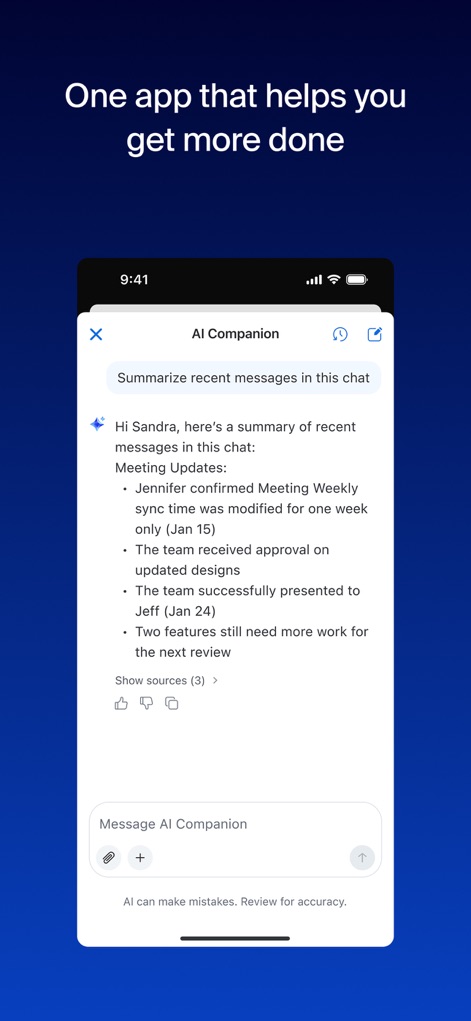
AI 요약으로 효율성 증대
이 스크린샷은 AI Companion이 채팅 메시지를 요약하여 "미팅 업데이트"와 "향후 작업" 등의 핵심 정보를 빠르고 간결하게 제공하는 모습을 보여줍니다.
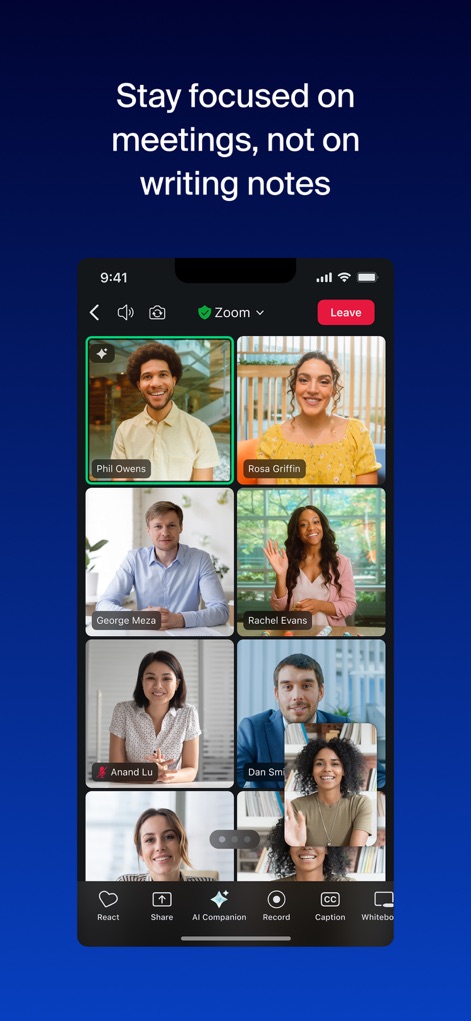
집중하는 회의 경험
이 이미지는 여러 참가자의 화상 피드가 그리드 형태로 배열된 Zoom 미팅 화면을 보여주며, 하단의 "AI Companion" 및 "기록" 버튼으로 효율적인 회의 관리를 지원합니다.
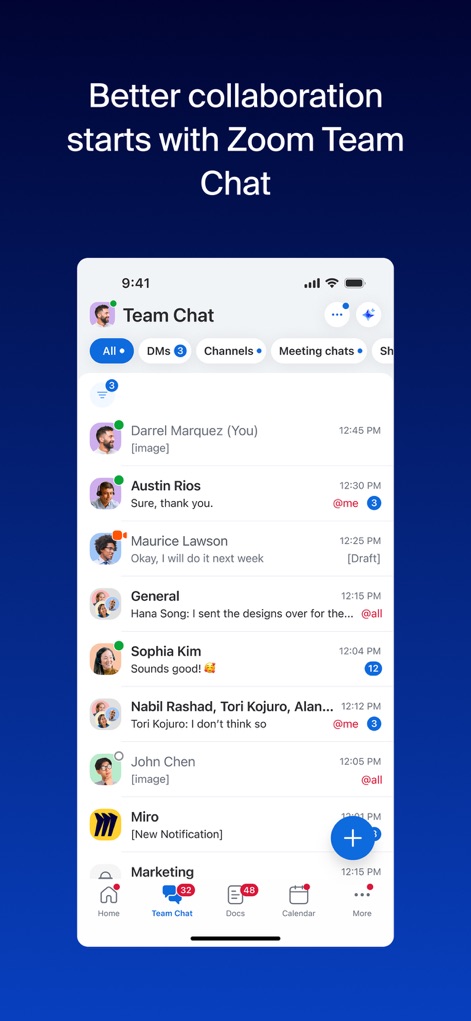
팀 채팅으로 소통 강화
이 스크린샷은 "모두", "DM", "채널" 탭을 통해 다양한 대화를 쉽게 관리할 수 있는 팀 채팅 인터페이스와 여러 사용자의 메시지 교환 목록을 시각적으로 보여줍니다.
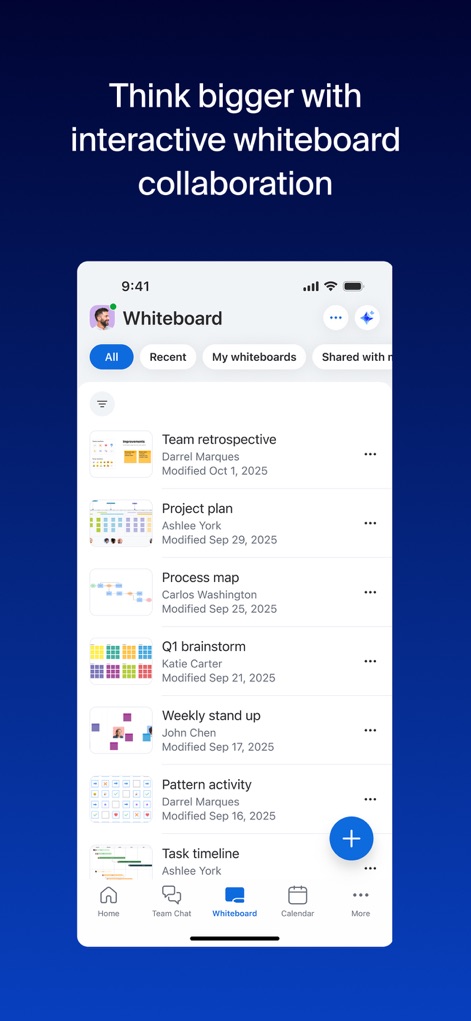
아이디어 구상 및 협업
이 이미지는 "최근", "내 화이트보드", "공유됨" 필터 옵션을 갖춘 화이트보드 인터페이스를 보여주며, "팀 회고"와 "프로젝트 계획" 등 다양한 협업 보드를 통해 아이디어 공유를 가능하게 합니다.
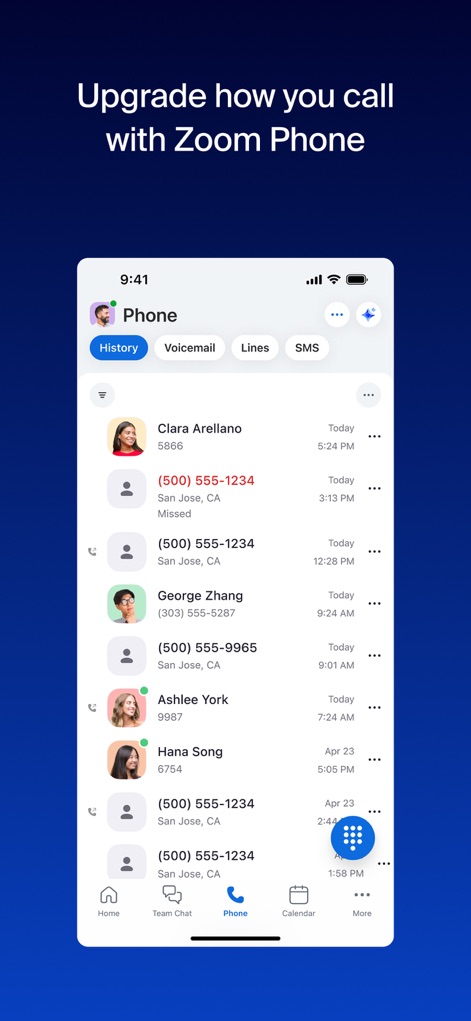
통합된 비즈니스 통화
이 스크린샷은 "기록", "음성사서함", "회선" 등의 탭을 통해 통화 내역을 관리할 수 있는 Zoom Phone 인터페이스와 여러 사용자의 최근 통화 목록을 보여줍니다.
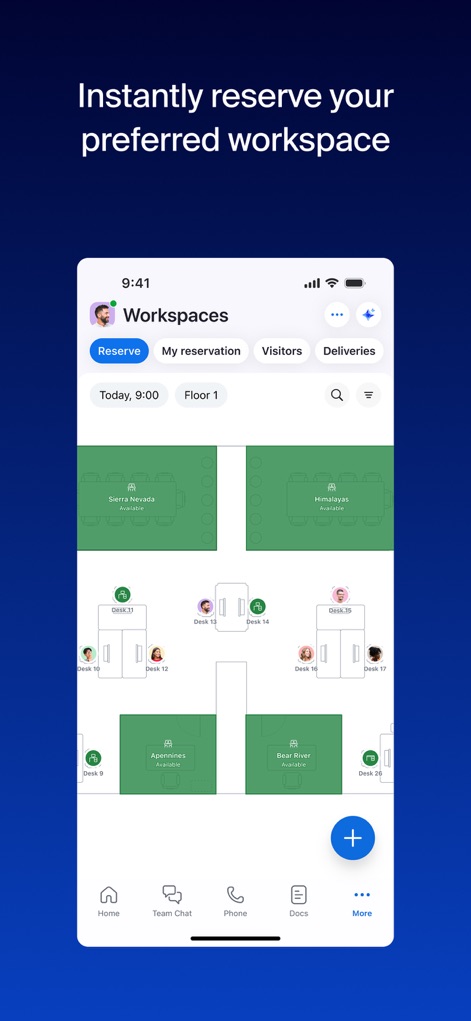
스마트한 업무 공간 예약
이 이미지는 "예약", "내 예약", "방문자" 탭으로 공간 관리를 지원하는 Workspaces 인터페이스를 보여주며, "Floor 1"의 다양한 데스크(예: Desk 13, Desk 14)를 선택하여 예약할 수 있습니다.
모든 기능을 한 곳에서
이 앱은 "Zoom Workplace"라는 앱 이름과 중앙에 빛나는 AI 아이콘을 통해 모든 협업 기능이 통합된 AI 기반 플랫폼임을 시각적으로 다시 한번 강조합니다.
설명
Download
비슷한 앱
유사한 기능과 사용자 경험을 가진 앱

GoTo
GoTo Group, Inc.

Lark - Team Collaboration
LARK TECHNOLOGIES PTE. LTD.

RingCentral
RingCentral, Inc

MTS Link
VEBINAR TEKHNOLOGII, OOO

Pronto Team Communication
Hit Labs, Inc.

Zoho Cliq - Team Communication
Zoho Corporation

Microsoft Teams
Microsoft Corporation

Google Meet
Google LLC
Google Chat
Google LLC
이 페이지는 앱이나 개발자의 공식 페이지가 아니며, 정보 제공 및 논평을 목적으로 작성된 독립 편집 간행물입니다. 명시적으로 달리 언급되지 않는 한, 해당 앱이나 개발자는 MWM, Apple, Google Play, 앱 퍼블리셔 또는 앱 개발자와 제휴, 보증, 후원, 승인 또는 공식적으로 연결되어 있지 않으며, 이 페이지의 어떤 내용도 해당 앱이 MWM의 서비스를 사용하여 개발되었음을 의미하지 않습니다. 모든 상표, 로고, 스크린샷 및 기타 콘텐츠는 해당 소유자의 자산입니다.