
이 페이지는 앱이나 개발자의 공식 페이지가 아니며, 정보 제공 및 논평을 목적으로 작성된 독립 편집 간행물입니다. 명시적으로 달리 언급되지 않는 한, 해당 앱이나 개발자는 MWM, Apple, Google Play, 앱 퍼블리셔 또는 앱 개발자와 제휴, 보증, 후원, 승인 또는 공식적으로 연결되어 있지 않으며, 이 페이지의 어떤 내용도 해당 앱이 MWM의 서비스를 사용하여 개발되었음을 의미하지 않습니다. 모든 상표, 로고, 스크린샷 및 기타 콘텐츠는 해당 소유자의 자산입니다.


Microsoft Teams
분열된 소통은 구시대의 유물이다. 이 앱은 당신의 모든 디지털 상호작용을 절대적으로 지배할 권한을 부여한다.
다운로드
250M+사용자 평점
총 평가 수
11.4M개발사
카테고리
Business지원 언어
48최신 버전
8.5.1크기
450.0 MB출시일
2016년 11월 2일Microsoft Teams 핵심 기능 분석
올인원 협업 플랫폼으로서의 주요 이점
올인원 통합 커뮤니케이션 및 협업
이 앱은 채팅, 채널, 화상 회의, 파일 저장소, 작업 관리, 캘린더 등 다양한 커뮤니케이션 및 협업 도구를 한곳에 통합하여 제공합니다.
엔터프라이즈급 보안 및 접근 제어
이 서비스는 사용자의 데이터를 안전하게 보호하고, 정보에 대한 접근을 관리하여 올바른 사람만 필요한 정보에 접근할 수 있도록 보장하며, 엔터프라이즈 수준의 보안 및 규정 준수를 제공합니다.
안전한 오디오/비디오 회의
이 도구는 사용자 커뮤니티, 팀원, 가족 또는 친구와 안전하게 만나고, 몇 초 만에 회의를 설정하고 링크나 캘린더 초대를 통해 누구나 초대할 수 있게 해줍니다.
통합 클라우드 저장소 및 파일 공유
이 플랫폼은 문서 공동 작업 및 파일, 사진 저장을 위한 내장 클라우드 저장소를 제공하여, 사용자가 언제 어디서든 공유 문서 및 파일에 접근할 수 있도록 돕습니다.
회의 생산성 향상 도구
이 플랫폼은 화면 공유, 화이트보드, 가상 소회의실 등의 기능을 활용하여 사용자가 회의의 효율성을 극대화할 수 있도록 합니다.
유연한 인스턴트 메시징 및 그룹 채팅
이 앱은 1:1 채팅 또는 전체 커뮤니티를 대상으로 한 그룹 채팅을 지원하며, @멘션을 통해 특정 사용자의 주의를 끌 수 있고, GIF, 이모지 등을 사용하여 풍부한 표현이 가능합니다.
효율적인 작업 및 프로젝트 관리
이 도구는 작업 목록을 사용하여 프로젝트와 계획을 체계적으로 관리할 수 있게 하며, 작업을 할당하고 기한을 설정하여 모든 팀원이 최신 정보를 공유하도록 돕습니다.
커뮤니티 내 콘텐츠 체계화
이 앱은 커뮤니티 내에서 이벤트, 사진, 링크, 파일 등 공유 콘텐츠를 체계적으로 정리하여 사용자가 정보를 쉽게 찾고 시간을 절약할 수 있도록 지원합니다.
자주 묻는 질문
에 대해 알아야 할 모든 것 Microsoft Teams
What is Microsoft Teams?
Microsoft Teams is a comprehensive application that brings people together for communication and collaboration. It combines communities, events, chats, channels, meetings, storage, tasks, and calendars into a single platform.
What communication features does Microsoft Teams include?
Microsoft Teams offers secure audio and video calls, 1-1 or group chats, @mentions, and integrations like Skype chats and contacts. Users can express themselves with GIFs, emojis, and message animations.
Can users collaborate on documents and files within Microsoft Teams?
Yes, Microsoft Teams allows users to collaborate on documents and store files and photos using built-in cloud storage. Shared content can be organized within communities, and meetings feature screen sharing and whiteboards.
Does Microsoft Teams support video meetings and calls?
Yes, Microsoft Teams supports video meetings and calls. Users can connect with anyone securely, set up meetings instantly, and invite participants via link or calendar invite. The app displays multiple participants in a grid view.
Can I manage tasks and projects directly within Microsoft Teams?
Yes, Microsoft Teams allows users to manage projects and plans. It includes task lists to assign tasks, set due dates, and track completion, ensuring everyone remains synchronized on project progress.
What security and privacy features does Microsoft Teams provide?
Microsoft Teams provides secure collaboration, user control over data, and tools for community owners to remove inappropriate content or members. It incorporates enterprise-level security and compliance from Microsoft 365.
Is Microsoft Teams free to use?
Yes, basic features of Microsoft Teams are available for free. However, commercial features require a paid Microsoft 365 commercial subscription or a trial subscription of Microsoft Teams for work.
Does Microsoft Teams allow switching between work and personal accounts?
Yes, Microsoft Teams supports switching easily between work and personal accounts. The app provides an interface where users can select or add different organizational or individual profiles from a dedicated menu.
How does Microsoft Teams help organize community events?
Microsoft Teams provides a dedicated space to organize community events, along with photos, links, and files. Users can view and join scheduled events directly from their calendar within the app interface.
Does Microsoft Teams integrate with Skype?
Yes, Skype is now part of Microsoft Teams. Users can continue their chats, calls, and access contacts from Skype directly within Microsoft Teams Free, consolidating communication efforts.
다음 스크린샷과 설명은 앱의 공식 스토어 목록에서 직접 가져온 것이며 앱 개발자의 자산입니다.
앱 스토어
스크린샷

통합된 소통 허브
이 앱은 다양한 그룹 채팅을 통해 사용자들이 협업할 수 있도록 돕습니다. '휴가 계획' 및 '지역 리더'와 같은 대화 목록이 표시됩니다.

대화와 회의 관리
사용자는 메시지에 이모티콘으로 반응하며 활발하게 소통할 수 있습니다. 또한, '축구 클럽 회의'와 같은 예정된 모임에 쉽게 참여할 수 있습니다.

다자간 화상 회의
이 도구는 여러 참가자와 동시에 선명한 화상 통화를 제공하여 원활한 소통을 지원합니다. 다양한 참가자의 얼굴과 하단 제어 버튼이 명확하게 보입니다.

커뮤니티 통합 관리
사용자는 '프로젝트 리더'와 같은 다양한 커뮤니티를 한눈에 확인하고 관리할 수 있습니다. 각 커뮤니티 옆에는 참여 인원 수가 표시되어 현황을 쉽게 파악할 수 있습니다.

프로젝트 진행 상황 공유
이 앱은 '연습 세션'과 같은 공지사항을 게시하고, 사용자들이 댓글로 반응할 수 있는 공유 작업 공간을 제공합니다. 상단에는 '이벤트' 및 '사진' 탭이 있어 관련 콘텐츠를 쉽게 찾을 수 있습니다.

체계적인 팀 협업
사용자는 고정된 채널과 '마케팅 디자인' 팀 아래의 여러 채널을 통해 체계적으로 프로젝트를 관리할 수 있습니다. '아이콘 요청'과 같은 특정 채널에는 읽지 않은 메시지 알림이 표시됩니다.
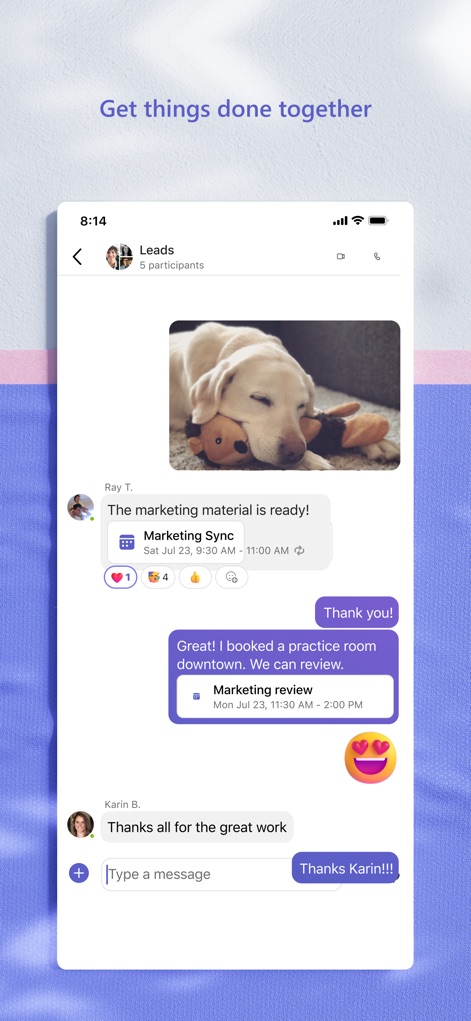
다채로운 대화 경험
이 도구는 '마케팅 동기화'와 같은 회의 일정을 공유하고, 이미지 및 텍스트 메시지를 통해 풍부한 대화 경험을 제공합니다. 'Thank you!' 메시지와 이모티콘으로 감정을 표현할 수 있습니다.

간편한 계정 전환
사용자는 'Contoso'와 같은 회사 계정과 '개인' 계정 사이를 쉽게 전환하여 업무와 사생활을 분리할 수 있습니다. 상태 메시지 설정 및 알림 관리 기능도 함께 제공됩니다.

일정 및 회의 관리
이 앱은 '마케팅 검토'와 같은 예정된 회의와 '컨퍼런스 준비'와 같은 이벤트를 달력 형태로 보여줍니다. 사용자는 각 회의 옆의 '참여' 버튼을 통해 즉시 접속할 수 있습니다.
설명
Download
비슷한 앱
유사한 기능과 사용자 경험을 가진 앱

GoTo
GoTo Group, Inc.

Lark - Team Collaboration
LARK TECHNOLOGIES PTE. LTD.

RingCentral
RingCentral, Inc

MTS Link
VEBINAR TEKHNOLOGII, OOO

Pronto Team Communication
Hit Labs, Inc.

Zoho Cliq - Team Communication
Zoho Corporation

Zoom Workplace
Zoom Communications, Inc.

Google Meet
Google LLC

Google Chat
Google LLC
이 페이지는 앱이나 개발자의 공식 페이지가 아니며, 정보 제공 및 논평을 목적으로 작성된 독립 편집 간행물입니다. 명시적으로 달리 언급되지 않는 한, 해당 앱이나 개발자는 MWM, Apple, Google Play, 앱 퍼블리셔 또는 앱 개발자와 제휴, 보증, 후원, 승인 또는 공식적으로 연결되어 있지 않으며, 이 페이지의 어떤 내용도 해당 앱이 MWM의 서비스를 사용하여 개발되었음을 의미하지 않습니다. 모든 상표, 로고, 스크린샷 및 기타 콘텐츠는 해당 소유자의 자산입니다.