
이 페이지는 앱이나 개발자의 공식 페이지가 아니며, 정보 제공 및 논평을 목적으로 작성된 독립 편집 간행물입니다. 명시적으로 달리 언급되지 않는 한, 해당 앱이나 개발자는 MWM, Apple, Google Play, 앱 퍼블리셔 또는 앱 개발자와 제휴, 보증, 후원, 승인 또는 공식적으로 연결되어 있지 않으며, 이 페이지의 어떤 내용도 해당 앱이 MWM의 서비스를 사용하여 개발되었음을 의미하지 않습니다. 모든 상표, 로고, 스크린샷 및 기타 콘텐츠는 해당 소유자의 자산입니다.


Workday
업무는 더 이상 책상에 묶여있지 않다. Workday는 당신에게 HR 프로세스를 모바일로 즉시 지휘할 권한을 부여하며, 이는 곧 당신이 어디에 있든 업무에서 벗어날 수 없음을 의미한다.
다운로드
25M+사용자 평점
총 평가 수
2.3M개발사
카테고리
Business지원 언어
21최신 버전
2026.03.1크기
196.6 MB출시일
2009년 6월 5일Workday 앱 분석: HR 및 팀 관리를 위한 모바일 솔루션
Workday 시스템을 활용하는 모든 임직원을 위한 주요 기능 및 영향력 평가
보안 및 생체 인식 인증
이 앱은 Touch ID 및 Face ID와 같은 생체 인식 인증을 지원하여 사용자의 데이터를 안전하게 보호하며, 오직 허가된 사용자만이 정보에 접근할 수 있도록 보장합니다.
HR 셀프 서비스
이 도구는 사용자가 급여 명세서 확인, 휴가 요청 및 조회, 출퇴근 기록, 근무 시간표 제출, 경비 정산 등 자신의 HR 관련 업무를 모바일에서 효율적으로 처리할 수 있게 합니다.
관리자 승인 및 팀 관리
이 앱은 관리자가 직원의 요청을 신속하게 승인하고, 팀원들의 프로필을 조회하며, 업무 변경, 보상 변경, 성과 피드백 제공과 같은 주요 인사 조치를 모바일에서 직접 수행할 수 있도록 지원합니다.
실시간 알림 및 즉시 조치
이 앱은 사용자에게 시간 추적, 중요 업데이트 및 승인 관련 푸시 알림을 제공하며, 앱 내에서 알림을 확인하고 즉시 필요한 조치를 취할 수 있도록 지원합니다.
대시보드 및 보고서
이 도구는 관리자에게 대화형 보고서와 맞춤형 대시보드를 제공하여 비즈니스에 중요한 통찰력을 신속하게 파악하고 의사결정을 지원합니다.
기업 디렉토리 및 동료 프로필
사용자는 이 앱을 통해 회사 디렉토리를 검색하고 동료의 프로필을 안전하게 조회하며, 동료에게 피드백을 남길 수 있어 사내 소통과 협업을 촉진합니다.
자주 묻는 질문
에 대해 알아야 할 모든 것 Workday
What can employees do with the Workday app?
Employees use the Workday app to review pay, view or request time off, check in and out, submit timesheets and expenses. They can also browse the company directory, view profiles, leave feedback, and take learning courses.
What actions can managers perform using the Workday app?
Managers use the Workday app to approve employee requests, view team profiles, and perform actions like job changes or compensation adjustments. They can also provide performance feedback and gain business insights through interactive reports and dashboards.
Is the Workday app secure?
Yes, the Workday app secures user data. If a mobile device is lost or stolen, data remains safe. The app supports Touch ID and Face ID for authorized access, ensuring only the user can access their information.
Do I need authorization to use the Workday mobile app?
Yes, an organization must authorize access to the Workday mobile app. Users only access mobile features enabled by their organization and based on their specific role. Not all Workday features are available on mobile.
Can I check in and out for work using the Workday app?
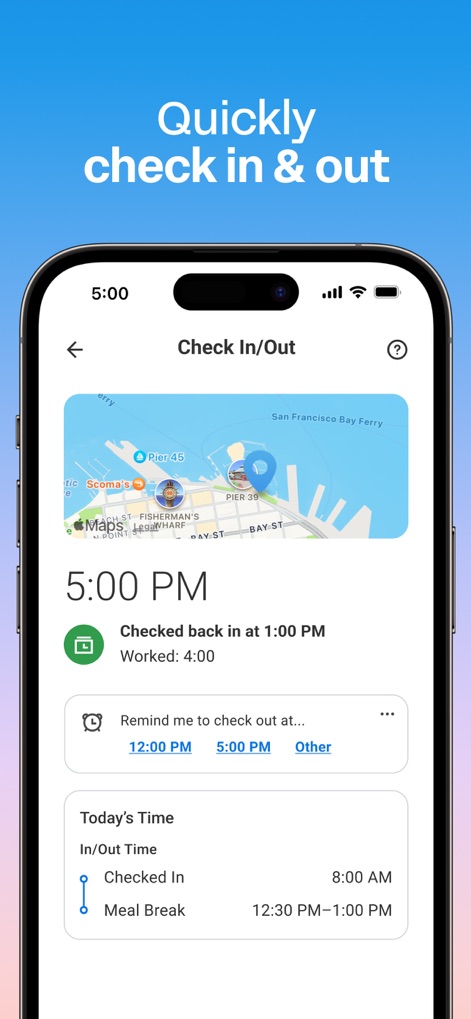
Yes, employees can quickly check in and out for work directly from the Workday app. The app also allows users to view their time worked and set reminders for checking in or out.
How do I view my payslips on the Workday app?
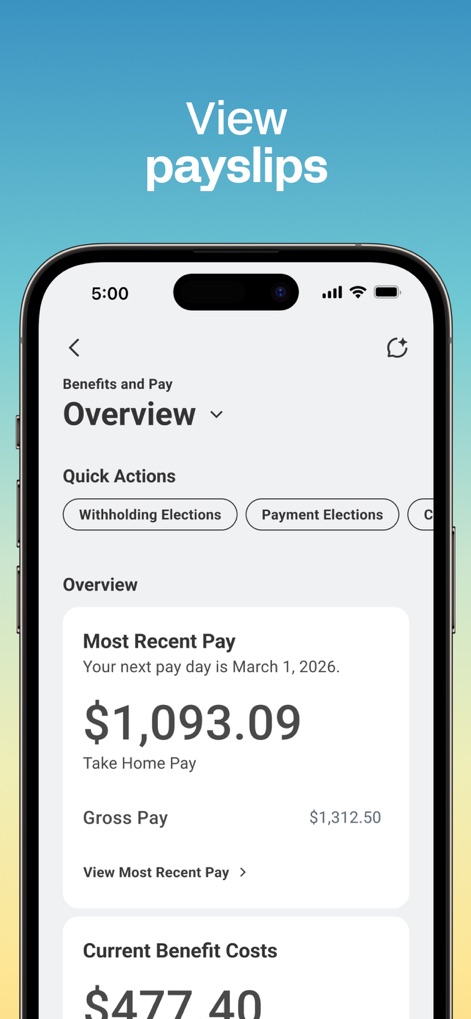
Users can view their payslips and pay details through the Workday app. The "Benefits and Pay" section displays information such as most recent pay, gross pay, and current benefit costs.
Does the Workday app allow submitting expense reports?
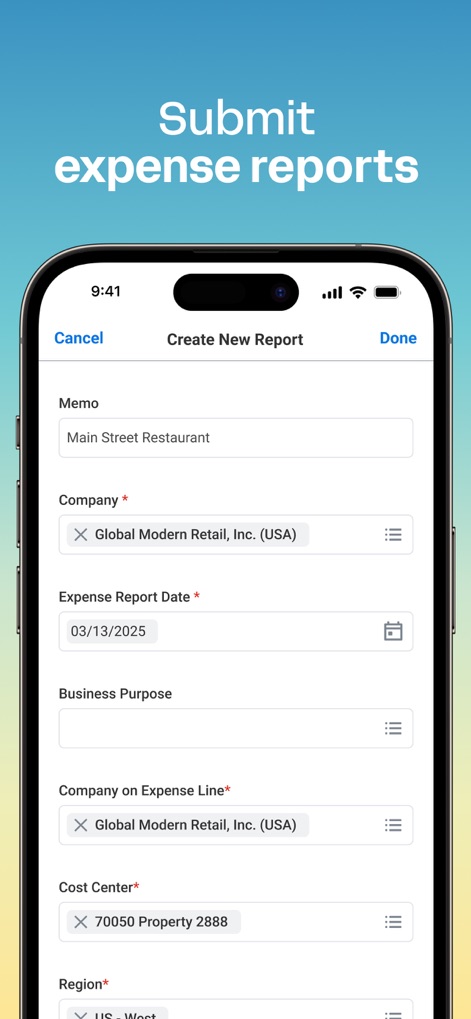
Yes, the Workday app allows users to submit expense reports. The app provides a dedicated interface to create new reports, including fields for memo, company, expense date, and business purpose.
Can I request and manage time off with the Workday app?
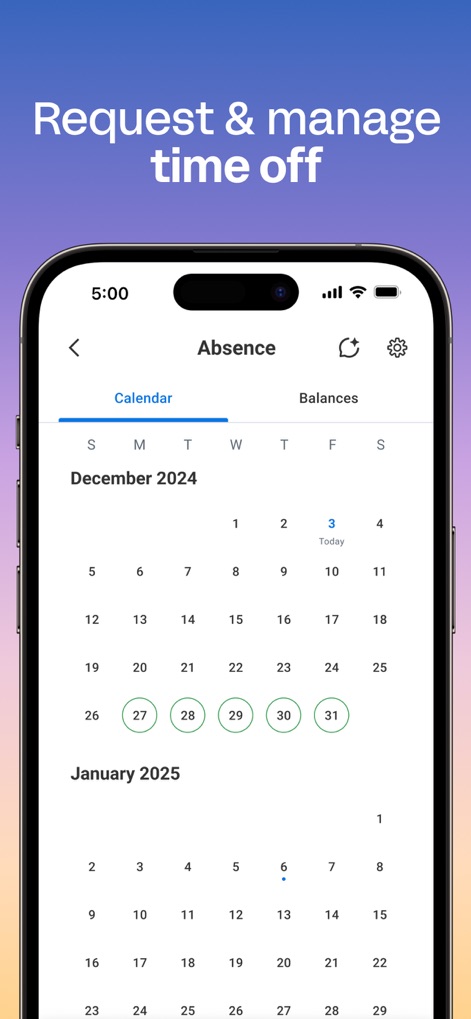
Yes, users can request and manage time off using the Workday app. The app features a calendar view to track absences and shows the approval status for vacation hours.
Does the Workday app send push notifications?
Yes, the Workday app sends push notification alerts and reminders. These notifications cover time tracking, important updates, and approvals, allowing users to take immediate action directly from the app.
Can I view coworker profiles and the organizational chart in the Workday app?
Yes, the Workday app allows users to browse the company directory and securely view coworker profiles. Managers can view team profiles and the organizational chart.
다음 스크린샷과 설명은 앱의 공식 스토어 목록에서 직접 가져온 것이며 앱 개발자의 자산입니다.
앱 스토어
스크린샷

직관적인 HR 허브
사용자는 개인화된 환영 메시지와 함께 'Announcements' 섹션에서 최신 공지사항을 확인하고, 'Most Used Apps' 섹션에서 주요 HR 기능에 빠르게 접근할 수 있습니다.
간편한 근태 관리
이 앱은 사용자가 지도를 통해 현재 위치를 확인하며 'Checked In/Out' 시간을 정확히 기록하고, 'Today's Time' 섹션에서 근무 및 휴게 시간 이력을 상세히 볼 수 있도록 지원합니다.
급여 정보 한눈에
사용자는 'Benefits and Pay Overview' 화면에서 가장 최근 급여 정보와 'Gross Pay' 상세 내역을 확인할 수 있으며, 'Quick Actions' 버튼을 통해 급여 관련 설정을 신속하게 처리할 수 있습니다.
모바일 경비 정산
이 앱을 통해 사용자는 'Expense Report Date'를 포함한 경비 보고서 날짜를 손쉽게 입력하고, 'Memo' 및 'Business Purpose'와 같은 다양한 경비 항목을 상세하게 기록하여 제출할 수 있습니다.
유연한 휴가 신청
사용자는 'Absence' 화면의 달력에서 원하는 휴가 날짜를 시각적으로 선택하고, 'Balances' 탭을 통해 남은 휴가 일수를 쉽게 확인할 수 있습니다.
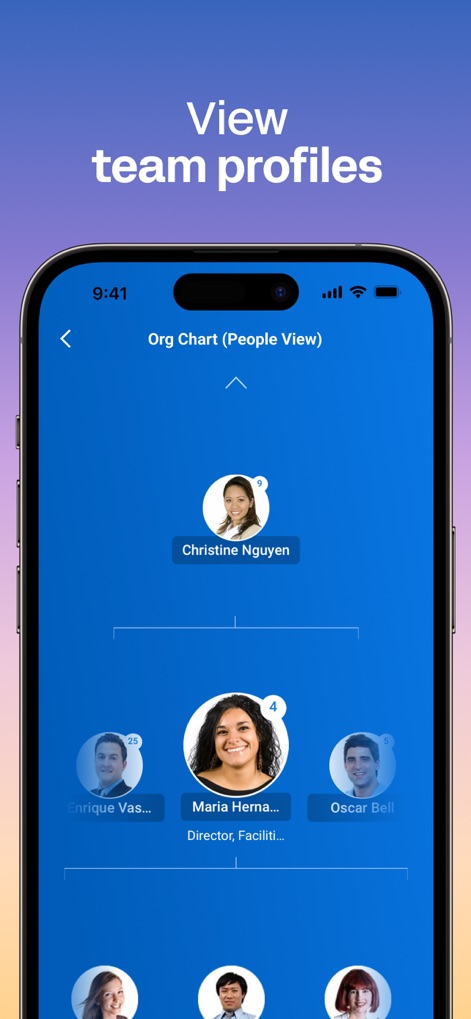
조직도와 팀원 프로필
이 도구는 'Org Chart (People View)'를 통해 팀원들의 조직도를 시각적으로 보여주며, 각 팀원의 사진과 'Director, Facilitie'와 같은 직책 정보를 명확하게 표시합니다.
설명
Download
비슷한 앱
유사한 기능과 사용자 경험을 가진 앱









이 페이지는 앱이나 개발자의 공식 페이지가 아니며, 정보 제공 및 논평을 목적으로 작성된 독립 편집 간행물입니다. 명시적으로 달리 언급되지 않는 한, 해당 앱이나 개발자는 MWM, Apple, Google Play, 앱 퍼블리셔 또는 앱 개발자와 제휴, 보증, 후원, 승인 또는 공식적으로 연결되어 있지 않으며, 이 페이지의 어떤 내용도 해당 앱이 MWM의 서비스를 사용하여 개발되었음을 의미하지 않습니다. 모든 상표, 로고, 스크린샷 및 기타 콘텐츠는 해당 소유자의 자산입니다.