DeDuplicate - Cloud Cleaner

DeDuplicate - Cloud Cleaner


다운로드: App Store
로고: DeDuplicate - Cloud Cleaner

DeDuplicate - 클라우드 클리너: 저장 공간 확보 및 불필요한 파일 삭제

Google Drive, OneDrive, Dropbox 전반의 중복 파일을 찾고 삭제하는 가장 스마트한 방법. 빠르고 안전하며 100% 개인 정보 보호 — 파일을 다운로드하지 않고 스캔합니다.

개발사

Paolo Pugliese

카테고리

Utilities

다운로드

6K+

사용자 평점

4.4/5

총 평가 수

200

지원 언어

33

정확한 정리 작업

이 인터페이스를 사용하는 6K+ 명의 사용자.

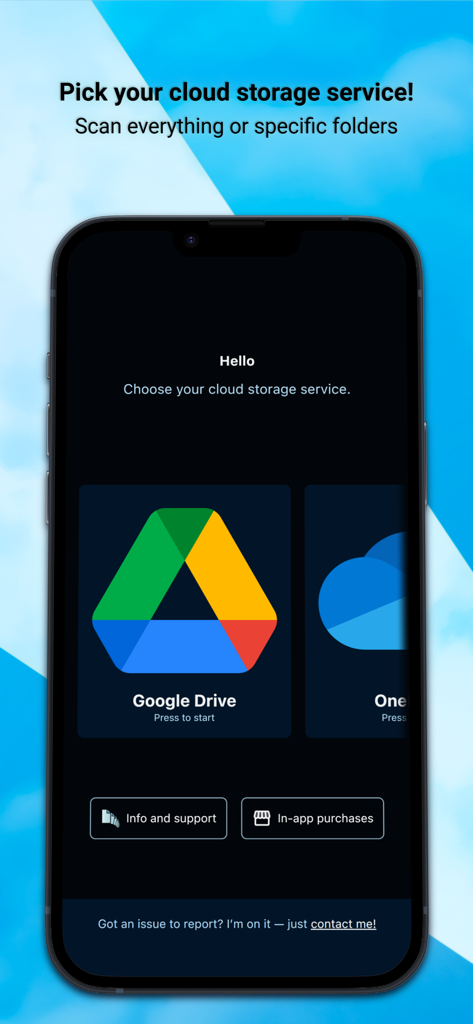
Google Drive 및 OneDrive와 같은 클라우드 서비스 선택 옵션을 보여주는 DeDuplicate 앱 인터페이스, 중복 파일 스캔용

Google Drive 및 OneDrive와 같은 클라우드 서비스 선택 옵션을 보여주는 DeDuplicate 앱 인터페이스, 중복 파일 스캔용

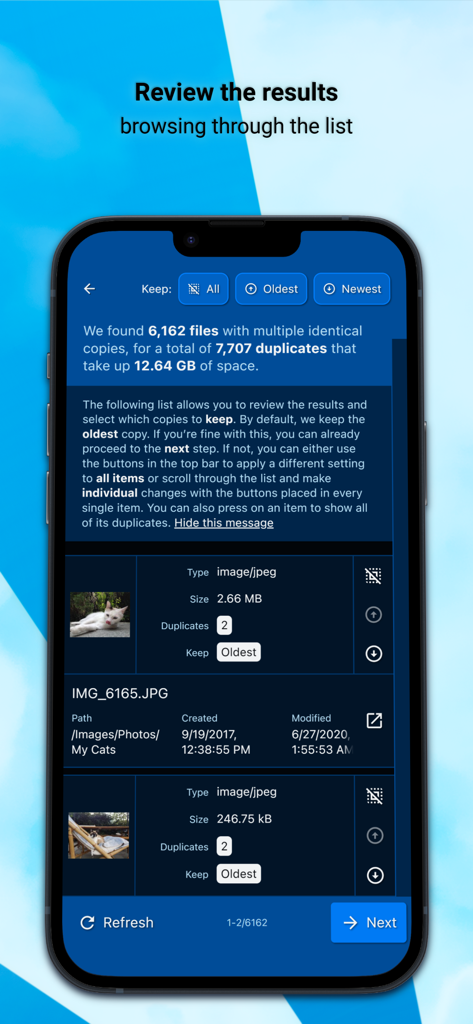
클라우드 저장 공간을 확보하기 위해 DeDuplicate 앱에서 감지된 중복 이미지 파일 목록 검토

클라우드 저장 공간을 확보하기 위해 DeDuplicate 앱에서 감지된 중복 이미지 파일 목록 검토

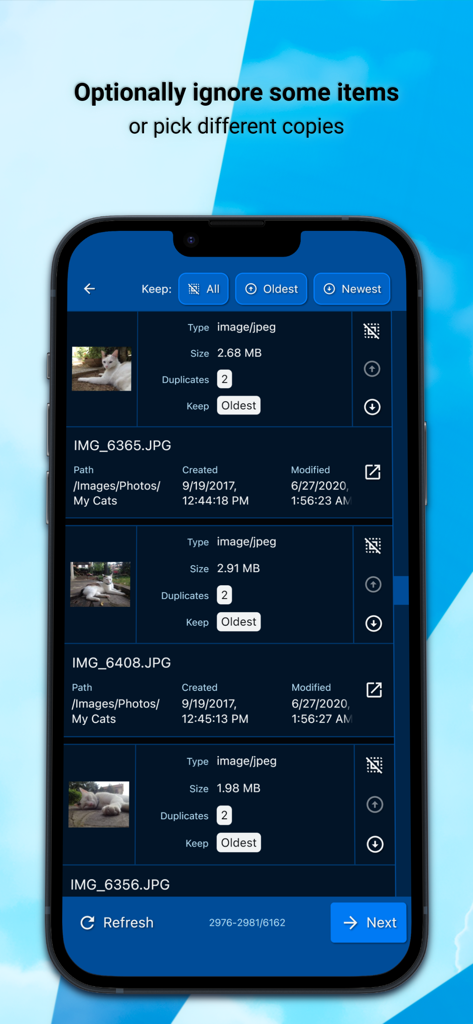
최신 또는 가장 오래된 버전을 선택하고 보관할 수 있는 옵션과 함께 중복 사진을 보여주는 인터페이스

최신 또는 가장 오래된 버전을 선택하고 보관할 수 있는 옵션과 함께 중복 사진을 보여주는 인터페이스

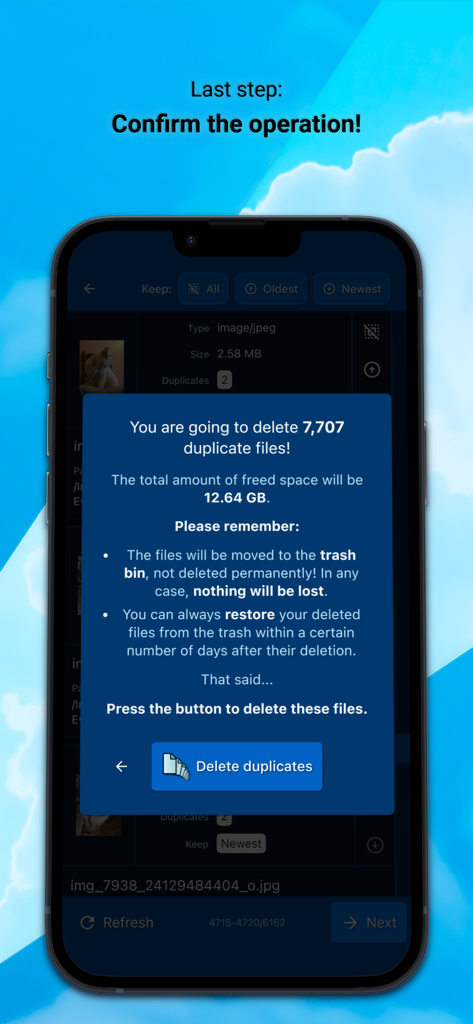
발견된 중복 파일 요약과 확보될 총 저장 공간을 보여주는 DeDuplicate 앱 확인 화면

발견된 중복 파일 요약과 확보될 총 저장 공간을 보여주는 DeDuplicate 앱 확인 화면

저장 공간 및 디지털 마음의 평화 되찾기

이 앱을 돋보이게 하는 도구, 6K+ 명의 사용자가 선택.

🛡️

개인 정보 보호 우선 로컬 스캔

귀하의 파일은 안전하게 보호됩니다. 앱은 클라우드 제공업체와 직접 연결되며 모든 것을 기기에서 로컬로 처리하여 타사 서버가 귀하의 데이터에 접근하지 못하도록 합니다.

다운로드 없는 효율성

대역폭과 시간을 절약하세요. DeDuplicate는 콘텐츠의 단 한 바이트도 다운로드하지 않고 메타데이터와 해시 값을 분석하여 스캔을 매우 빠르고 데이터 제한에 친화적으로 만듭니다.

🎯

비트 단위 일치

추측은 이제 그만. 파일 이름뿐만 아니라 콘텐츠를 기반으로 정확한 중복 파일을 식별하기 위해 고급 해시 값을 사용하므로 고유한 파일을 잃을 염려가 없습니다.

앱 소개

에 대해 알아야 할 모든 것 DeDuplicate - Cloud Cleaner.

설명

Google Drive, OneDrive, Dropbox, and other cloud services don’t offer built-in tools to find and remove duplicates. If you store many files in the cloud, it’s easy to lose control and waste space. Automatic mobile backups make this problem even worse. DeDuplicate scans your cloud storage, finds identical files, and lets you remove the extra copies to free up space. How it works: 1) Log into your account. 2) Choose one or more folders (or the entire drive) and start the scan. Scan time depends on the NUMBER of files, not their size. 3) Review the detected duplicates and optionally ignore some of them. 4) Confirm the operation. What makes DeDuplicate different: • Efficient and fast: files are NOT downloaded. DeDuplicate uses metadata provided by cloud services, so it saves bandwidth, requires no extra storage, and scans are very quick (e.g. ~100,000 files in under 10 minutes, depending on network speed). • Accurate detection: only EXACT duplicates are detected using file hash values. File names are ignored; contents must be identical. • Privacy-first: everything runs locally on your device. The app connects directly to cloud providers, with no intermediary servers and no file data collection. • Cross-platform support. DeDuplicate currently supports the following cloud services: (PERSONAL ACCOUNTS - see notes below!) • OneDrive • Dropbox • Google Drive (∗) • MEGA • Box • pCloud • Yandex.Disk IMPORTANT: DeDuplicate is designed and tested primarily with PERSONAL/CONSUMER ACCOUNTS. Business, school, or enterprise accounts may behave differently and are not fully supported yet. Improving support for those account types is planned for a future update! NOTES ABOUT GOOGLE DRIVE: - Due to recent changes in Google’s requirements for third-party apps, DeDuplicate currently does not have a “verified” status. You can still use Google Drive normally, but signing in requires a small workaround, which is explained step by step inside the app! - Google proprietary file types (such as Google Docs, Google Sheets, etc.) are treated specially by Google Drive and are NOT included in DeDuplicate’s scan. WHY DO YOU NEED THIS APP? Until now, the only practical way to remove duplicates from cloud storage was a very time-consuming workaround: downloading everything to your computer, using one of the many “offline” duplicate-file utilities, and then syncing the changes back to the cloud. In the worst-case scenario, this even means re-uploading everything from scratch. That’s hardly a viable option when you have over 500 GB of unorganized cat pictures :) DeDuplicate is actively developed. If you encounter any issues, please take the time to contact us!

최신 버전

2.7.0

크기

26.0 MB

출시일

2021년 11월 18일

디지털 불필요한 파일 요금 납부 중단

몇 분 안에 Google Drive, OneDrive, Dropbox의 기가바이트 단위 공간을 확보하세요. 다운로드 없이, 데이터 수집 없이 — 더 깔끔한 클라우드를 경험하세요.

다운로드: App Store

App information, icons, screenshots, and descriptions displayed on this page are sourced from the Apple App Store and are the property of their respective developers. Download estimates and rankings are based on MWM's proprietary models and may not reflect actual figures. This page is provided for informational and analytical purposes only.

Believe this page infringes your intellectual property? File a dispute