Find Your Car with AR

Find Your Car with AR

다운로드: App Store
로고: Find Your Car with AR

AR로 내 차 찾기: 주차장에서 헤매는 일은 이제 그만

차량을 찾는 데 시간을 낭비하지 마세요. 3D 증강현실을 사용하여 주차한 곳을 정확히 확인하고, 주차 계기판을 추적하고, iPhone 또는 Apple Watch의 직관적인 시각적 안내를 통해 길을 찾으세요.

다운로드: App Store

개발사

Davide Vincenzi

카테고리

Navigation

다운로드

426K+

사용자 평점

4.0/5

총 평가 수

3K+

지원 언어

11

돌아가는 시각적 경로

이 인터페이스를 사용하는 426K+ 명의 사용자.

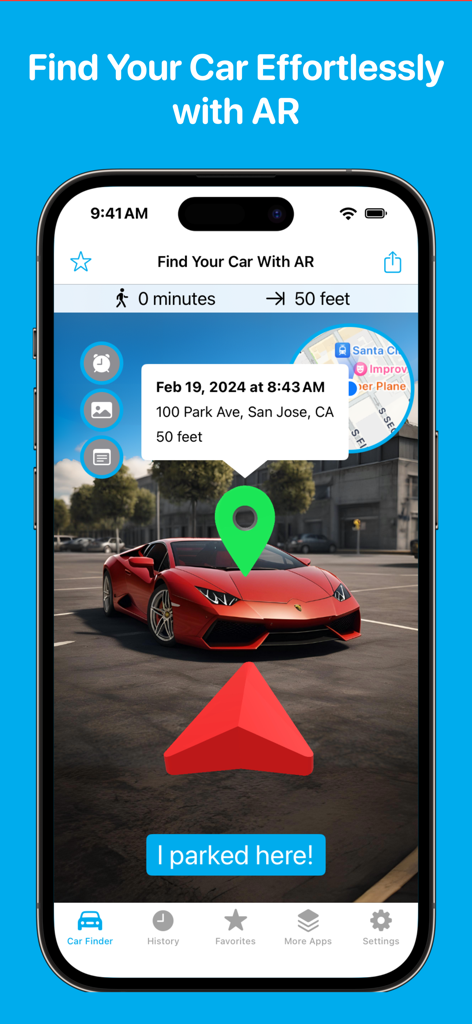
Find Your Car with AR 앱 인터페이스가 주차장에 주차된 차량을 향하는 3D 빨간색 화살표와 녹색 위치 핀을 보여줍니다.

Find Your Car with AR 앱 인터페이스가 주차장에 주차된 차량을 향하는 3D 빨간색 화살표와 녹색 위치 핀을 보여줍니다.

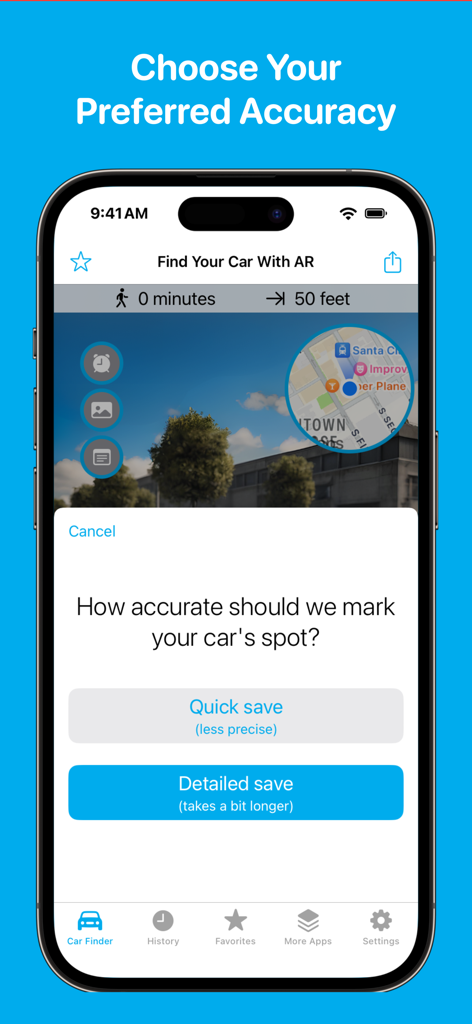
Find Your Car with AR 앱의 iPhone 화면에 주차 위치에 대한 빠른 저장 또는 자세한 저장 선택 옵션이 표시됩니다.

Find Your Car with AR 앱의 iPhone 화면에 주차 위치에 대한 빠른 저장 또는 자세한 저장 선택 옵션이 표시됩니다.

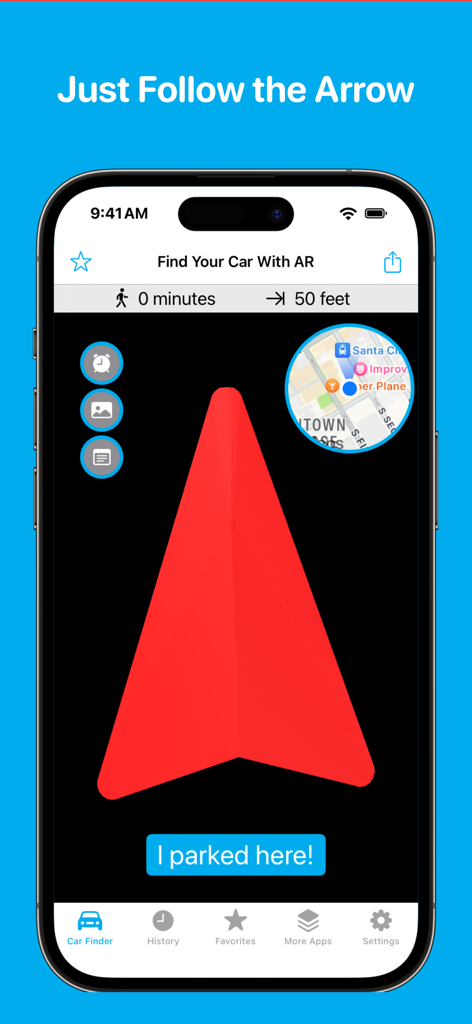
Find Your Car with AR 앱 인터페이스에 차량 위치를 위한 큰 빨간색 방향 화살표와 미니 맵이 표시됩니다.

Find Your Car with AR 앱 인터페이스에 차량 위치를 위한 큰 빨간색 방향 화살표와 미니 맵이 표시됩니다.

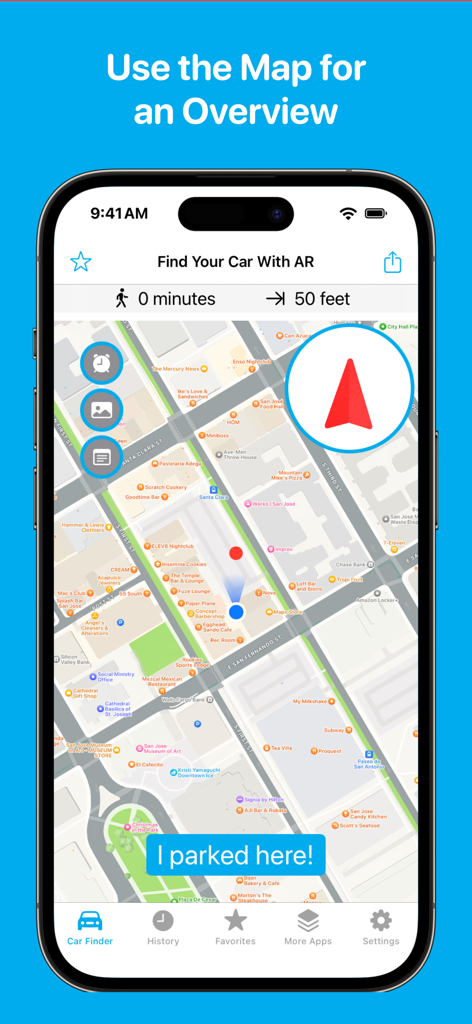
Find Your Car with AR 앱 인터페이스에 주차된 차량 위치의 2D 지도 개요가 표시됩니다.

Find Your Car with AR 앱 인터페이스에 주차된 차량 위치의 2D 지도 개요가 표시됩니다.

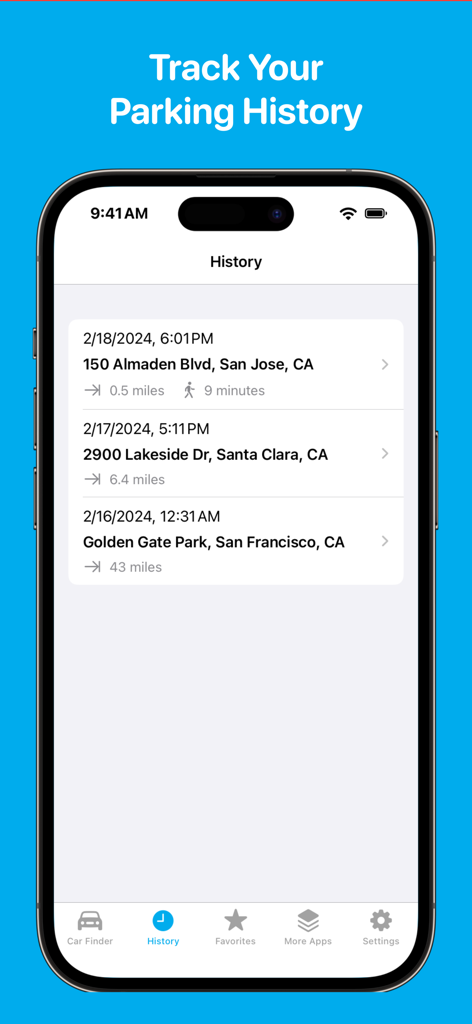
날짜, 시간, 주소가 포함된 이전 주차 위치 목록을 보여주는 모바일 앱 화면

날짜, 시간, 주소가 포함된 이전 주차 위치 목록을 보여주는 모바일 앱 화면

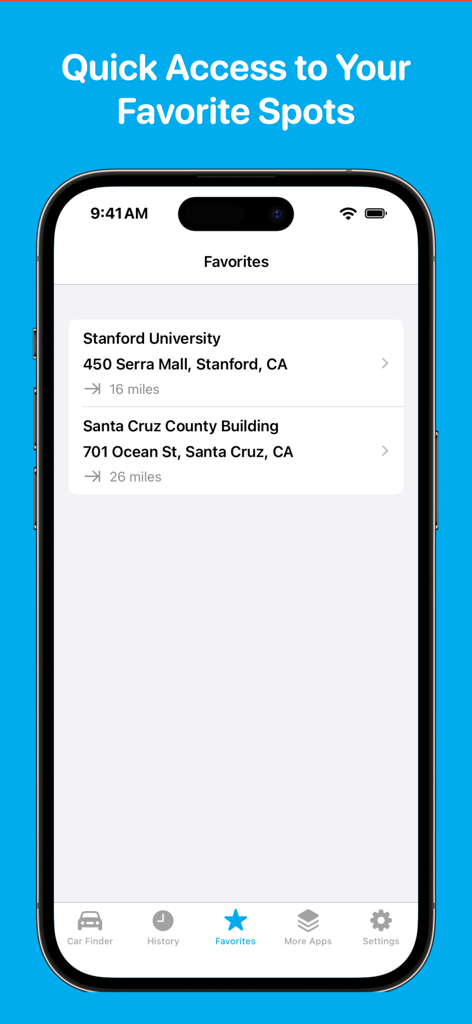
스탠포드 대학교 및 산타 크루즈 카운티 건물과 같은 즐겨찾기 저장된 주차 위치 목록을 보여주는 iPhone 화면

스탠포드 대학교 및 산타 크루즈 카운티 건물과 같은 즐겨찾기 저장된 주차 위치 목록을 보여주는 iPhone 화면

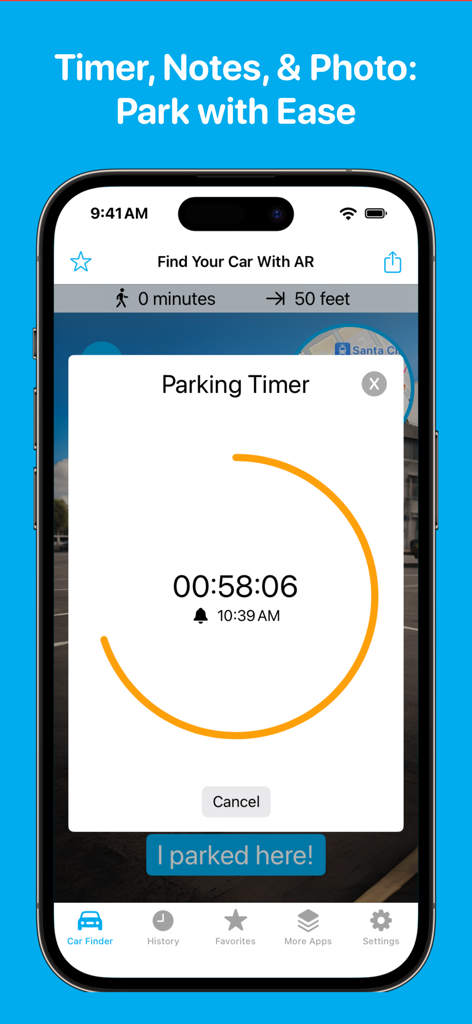
Find Your Car with AR 모바일 앱의 주차 타이머 기능

Find Your Car with AR 모바일 앱의 주차 타이머 기능

자신 있게 세상을 탐색하세요

이 앱을 돋보이게 하는 도구, 426K+ 명의 사용자가 선택.

🚀

정밀 AR 위치 추적

3D 증강현실로 주차 위치 기억 상실을 없애세요. 2D 지도의 혼란 없이 가상 화살표를 따라 실제 세계에 겹쳐진 안내를 통해 주차한 곳으로 직접 이동하세요.

💸

비싼 티켓 피하기

통합 주차 타이머로 돈을 절약하고 스트레스를 줄이세요. 미터 만료 전에 적시에 알림을 받아 비싼 시티 벌금을 다시는 내지 않도록 하세요.

매끄러운 손목 내비게이션

가방이나 장비를 들고 손을 자유롭게 사용하세요. Apple Watch 연동 기능을 사용하여 붐비는 경기장이나 등산로를 탐색하는 동안 간편한 방향 안내와 햅틱 알림을 받으세요.

앱 소개

에 대해 알아야 할 모든 것 Find Your Car with AR.

설명

Find Your Car Easily with AR Find your car fast with 3D Augmented Reality (AR). No more wandering—just follow the AR guide back to your spot. As Seen On: PC Magazine, Lifewire, New York Magazine, Fox News: “Super easy to use, with AR that takes you right back to your car.” Quick and Easy Steps - Park your car, tap “I parked here,” and choose between a quick or detailed GPS save for more precise directions. - When you're ready, follow the AR arrow to find your car. - Need to save a new spot? Just tap “I parked here” again. What's New in Version 4 - New 3D AR Navigation: Get super accurate directions right to your car. - Notes & Photos: Write notes or take pictures of your parking spot for easy reference. - Parking Timer: Get alerts before your parking time ends to avoid tickets. Premium Features - Apple Watch Directions: Get directions right from your wrist. - Favorites & History: Save and revisit your favorite spots easily. - Customizable AR: Personalize your AR arrow by changing its color. - Ad-Free Experience: Enjoy uninterrupted use with no ads. Not Just for Cars Find Your Car with AR isn't just for parking lots. Use it for outdoor adventures, like hiking trails or campgrounds. Many users have shared stories of how they used the app to find their way back after a long hike or to locate their campsite in a large park. It works great outdoors to guide you back to where you need to be. Other Uses Include: - Finding your way back to a hiking trailhead. - Locating your tent in a crowded campground. - Tracking mushroom foraging spots. - Remembering where you left your bike. - Keeping track of a meeting point in a large outdoor event. Never Lose Track Again Download Find Your Car with AR now and make finding your car (or anything else) the easiest thing you do today!

최신 버전

4.1.1

크기

20.7 MB

출시일

2010년 5월 10일

다시는 길을 잃지 마세요

붐비는 도시 주차장부터 외딴 등산로까지, 426,000명 이상의 사용자가 몇 초 안에 자신의 위치를 찾는 데 동참하세요. 지금 다운로드하고 3D AR이 당신의 차, 캠핑장 또는 등산로로 바로 안내하게 하세요.

다운로드: App Store

App information, icons, screenshots, and descriptions displayed on this page are sourced from the Apple App Store and are the property of their respective developers. Download estimates and rankings are based on MWM's proprietary models and may not reflect actual figures. This page is provided for informational and analytical purposes only.

Believe this page infringes your intellectual property? File a dispute