FlutterFlow - Build Different

FlutterFlow - Build Different


다운로드: App Store
로고: FlutterFlow - Build Different

FlutterFlow - 생각의 속도로 전문적인 앱 구축

멋진 인터페이스를 디자인하고, 강력한 백엔드를 통합하고, 기록적인 시간 내에 앱 스토어에 배포하세요. 필요할 때마다 깔끔한 Flutter 코드를 내보낼 수 있습니다. 플랫폼 종속성 없이 순수한 성능만 제공합니다.

개발사

FlutterFlow, Inc.

카테고리

Developer Tools

다운로드

26K+

사용자 평점

4.2/5

총 평가 수

200

지원 언어

1

당신의 빌드를 시각화하세요

이 인터페이스를 사용하는 26K+ 명의 사용자.

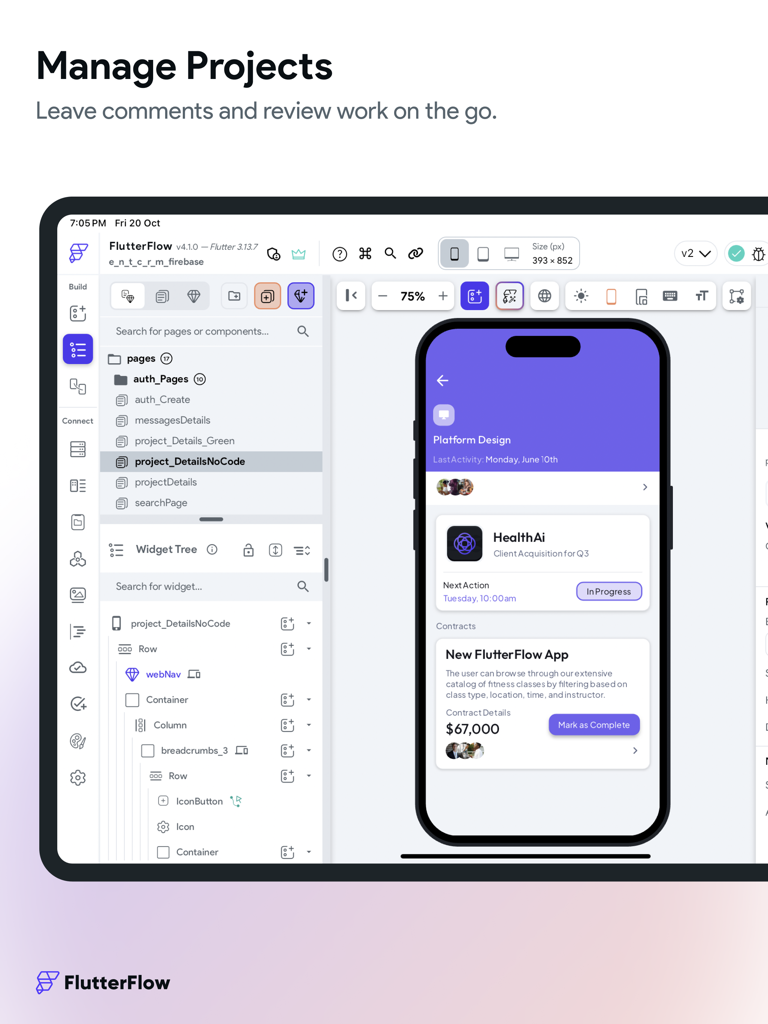
FlutterFlow iPad 앱 빌더 인터페이스, 위젯 트리와 모바일 미리보기가 있는 프로젝트 편집기를 보여줍니다.

FlutterFlow iPad 앱 빌더 인터페이스, 위젯 트리와 모바일 미리보기가 있는 프로젝트 편집기를 보여줍니다.

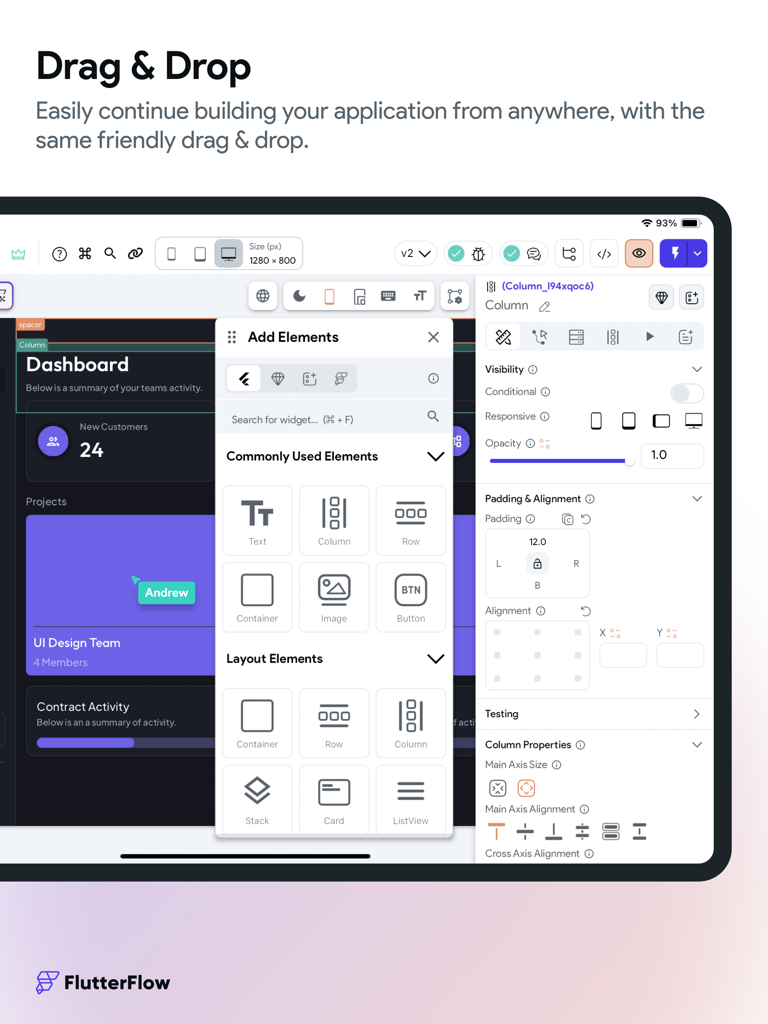
FlutterFlow iPad 앱 비주얼 빌더, 모바일 앱 개발을 위한 드래그 앤 드롭 구성 요소를 보여줍니다.

FlutterFlow iPad 앱 비주얼 빌더, 모바일 앱 개발을 위한 드래그 앤 드롭 구성 요소를 보여줍니다.

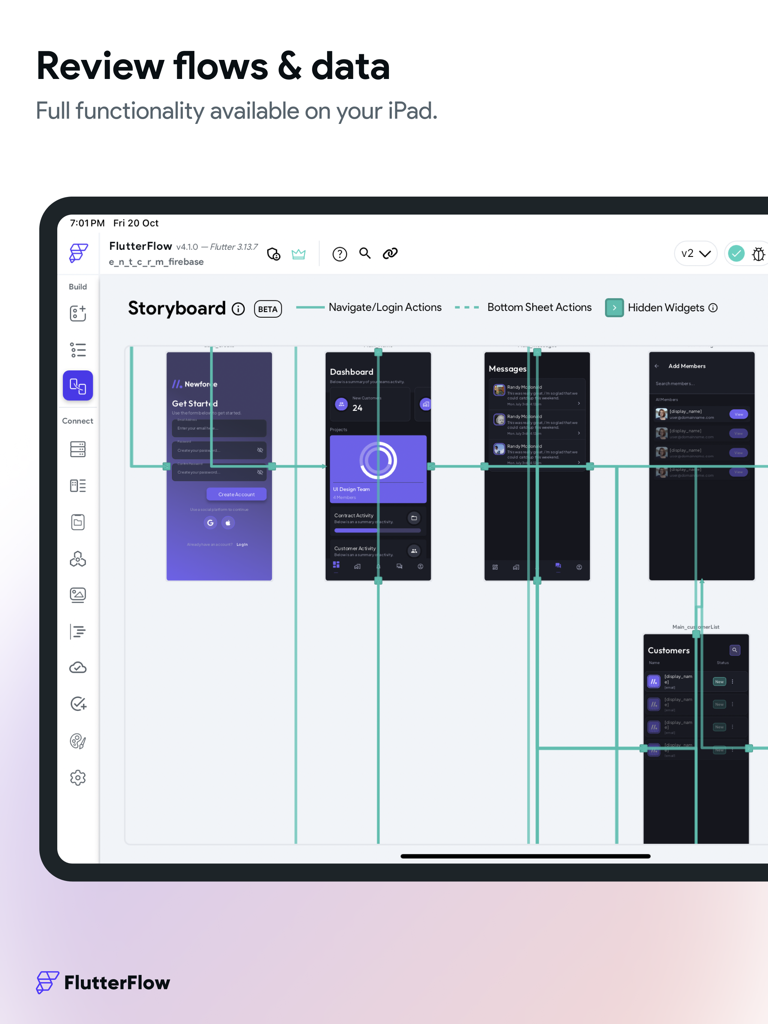
FlutterFlow iPad 앱, 시각적 앱 개발 및 흐름 검토를 위한 스토리보드 인터페이스를 보여줍니다.

FlutterFlow iPad 앱, 시각적 앱 개발 및 흐름 검토를 위한 스토리보드 인터페이스를 보여줍니다.

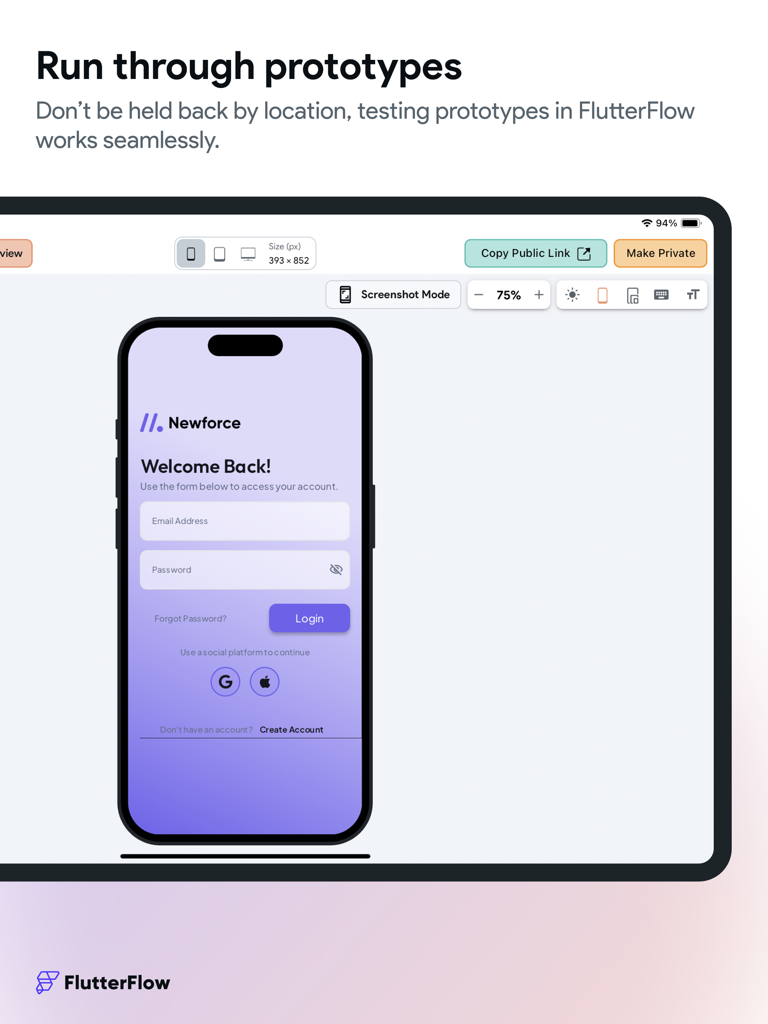
FlutterFlow iPad 인터페이스, 테스트를 위한 모바일 앱 로그인 화면 프로토타입을 보여줍니다.

FlutterFlow iPad 인터페이스, 테스트를 위한 모바일 앱 로그인 화면 프로토타입을 보여줍니다.

번개처럼 빠른 속도로 전문적인 앱 구축

이 앱을 돋보이게 하는 도구, 26K+ 명의 사용자가 선택.

🎨

시각적 우선 개발

Figma와 프로덕션 간의 격차를 해소하세요. 전문적인 UI를 위해 설계된 드래그 앤 드롭 빌더로 픽셀 완벽하고 반응형인 인터페이스를 구축하세요.

💻

깔끔한 코드, 종속성 없음

당신의 작업을 소유하세요. 빌드하는 동안 사람이 읽을 수 있는 Flutter 코드를 생성합니다. 전체 소스 코드를 내보내거나 필요할 때마다 사용자 지정 Dart 함수로 확장하세요.

🚀

즉시 확장 가능

복잡한 백엔드 설정을 건너뛰세요. Firebase 또는 Supabase와 원활하게 연결하고 원클릭으로 앱 스토어에 직접 배포하세요.

앱 소개

에 대해 알아야 할 모든 것 FlutterFlow - Build Different.

설명

FlutterFlow is a low-code platform for building beautiful cross-platform apps. Create beautiful UI, generate clean code, and deploy to the app stores or web in one click. Fully extensible with custom code. Unlike other no-code tools, FlutterFlow makes it easy to view and export Flutter code that can be customized. Key Features: 1. Visual Builder: Create beautiful and responsive user interfaces with our drag-and-drop designer. Choose from a wide selection of pre-built widgets or create your own custom components. 2. Powerful Backend: FlutterFlow provides easy integration with Firebase, Supabase, or REST APIs. No need to write complex server-side code – we've got you covered! 3. Deploy to Mobile App Stores and Web: With FlutterFlow, you can streamline the process of getting your app to the users. You even have the ability to use custom domains for your web applications, scaling to professional-grade web apps out of the box. 4. 170+ Prebuilt Components: Drag and drop cards, user profiles, list items, and other pre-designed components to help build your app. We are adding more every week! 5. Custom Code: Add advanced functionality without downloading and modifying the code! Add Flutter and Dart code inside FlutterFlow by creating Custom Functions, Widgets, and Actions. 6. Download Code: As you build in FlutterFlow, we automatically create the code for your app. With one click, you can download your entire source code! 7. 3rd Party Integrations: Algolia to power search, Braintree/PayPal to process payments, and a lot more in store! 8. Github Integration: Use our integration with GitHub to easily deploy the latest changes to your repository. Design system: Our new Themes V2 feature gives you the power to take advantage of default widget styling, robust color system, typographic styles, and design libraries all within FlutterFlow. • Manage Theme Colors like a Pro: Import theme colors and font styles from Figma or easily create and manage them within FlutterFlow. • Typographic Styles: Implement proper typographic styles so that your designs remain consistent across device sizes. • Atomic Level Styling: With our default widget styling, control different variations of widgets like buttons, textfields, containers, and choice chips to keep consistent styling across your applications. • Save & Share Design Libraries: Easily share design systems across projects by creating design libraries, which allow you to implement the same theme across multiple projects. Storyboarding: Our new Storyboard view allows you to visualize the design and navigation of your entire application. By mapping out the screens and user interactions, you can ensure that your app's navigation is intuitive and user-friendly. Storyboards can also help you identify and resolve potential navigation issues or dead-ends. Build Collaboratively: Work with a team to build even faster. • Commenting: Leave feedback directly in projects, assign users to specific comments, and iterate faster than ever. • Shareable Project Links: Shareable links connected to live data make testing and collecting user feedback easy. • Teams: Easily add team members to a project and manage project permissions. Work together on your project at the same time. This is great for agencies and companies. • Version Control: Save named versions and easily revert to previous versions. Along with having access to Snapshots which are saved every 10 minutes! With the FlutterFlow app for iPad, you can create apps for any industry – from e-commerce and social media to healthcare and education. Whether you're a startup looking to bring your app idea to life or a business seeking a powerful tool to streamline app development, FlutterFlow is the perfect solution. Download the FlutterFlow app today and experience the future of app development at your fingertips! FlutterFlow Terms of Service: https://flutterflow.io/tos FlutterFlow Privacy Policy: https://flutterflow.io/pp

최신 버전

6.4.110

크기

255.5 MB

출시일

2023년 9월 14일

전문가처럼 구축하고 스타트업처럼 출시하세요

수천 명의 빌더와 함께 비전을 실제 작동하는 프로덕션 준비 앱으로 전환하세요. FlutterFlow를 사용하여 iPad 또는 데스크톱에서 직접 다음 빅 아이디어를 디자인, 코딩, 배포하세요.

다운로드: App Store
FAQ

자주 묻는 질문

에 대해 알아야 할 모든 것 FlutterFlow - Build Different

FlutterFlow는 무엇인가요?

FlutterFlow는 아름다운 크로스 플랫폼 앱을 구축하기 위한 로우코드 플랫폼입니다. 사용자는 UI를 생성하고, 깔끔한 Flutter 코드를 생성하며, 앱 스토어나 웹에 배포할 수 있습니다.

FlutterFlow는 앱 개발을 위해 드래그 앤 드롭 비주얼 빌더를 제공하나요?

네, FlutterFlow는 드래그 앤 드롭 비주얼 디자이너를 갖추고 있습니다. 사용자는 미리 만들어진 위젯이나 사용자 지정 구성 요소를 광범위하게 선택하여 반응형 사용자 인터페이스를 만들 수 있습니다.

FlutterFlow는 Firebase와 같은 외부 백엔드 서비스와 통합되나요?

네, FlutterFlow는 Firebase, Supabase 또는 REST API와 쉽게 통합됩니다. 이를 통해 복잡한 서버 측 코드를 작성할 필요 없이 백엔드 기능을 구현할 수 있습니다.

FlutterFlow는 모바일 앱 스토어와 웹에 애플리케이션을 배포할 수 있나요?

네, FlutterFlow는 앱을 모바일 앱 스토어와 웹에 원클릭으로 배포할 수 있습니다. 또한 전문적인 웹 애플리케이션을 위한 사용자 지정 도메인도 지원합니다.

FlutterFlow 프로젝트 내에서 사용자 지정 코드를 사용할 수 있나요?

네, 사용자는 FlutterFlow 내에 사용자 지정 Flutter 및 Dart 코드를 추가할 수 있습니다. 여기에는 앱 기능을 확장하기 위한 사용자 지정 함수, 위젯 및 작업을 만드는 것이 포함됩니다.

FlutterFlow에서 제 애플리케이션의 전체 소스 코드를 다운로드할 수 있나요?

네, FlutterFlow는 앱의 소스 코드를 자동으로 생성합니다. 사용자는 개발 중 언제든지 클릭 한 번으로 전체 소스 코드를 다운로드할 수 있습니다.

FlutterFlow는 어떤 타사 통합을 지원하나요?

FlutterFlow는 검색을 위한 Algolia, 결제 처리를 위한 Braintree/PayPal과 같은 타사 서비스와 기타 통합 기능을 지원합니다.

FlutterFlow는 버전 관리를 위해 GitHub와 통합되나요?

FlutterFlow는 GitHub 통합을 제공하여 사용자의 리포지토리에 최신 변경 사항을 쉽게 배포하고 버전 관리 및 협업을 간소화합니다.

FlutterFlow의 Themes V2 기능은 어떤 용도로 사용되나요?

FlutterFlow의 Themes V2 기능은 강력한 색상 시스템, 타이포그래피 스타일 및 디자인 라이브러리를 제공합니다. 테마 색상과 글꼴을 관리하고 원자 수준에서 위젯 스타일을 지정할 수 있습니다.

Storyboard 뷰는 FlutterFlow 내에서 앱 개발에 어떻게 도움이 되나요?

FlutterFlow의 Storyboard 뷰는 앱의 디자인과 탐색을 시각화합니다. 화면과 사용자 상호 작용을 매핑하여 직관적인 탐색을 보장하고 잠재적인 문제를 해결하는 데 도움이 됩니다.

여러 사용자가 FlutterFlow에서 단일 프로젝트를 공동 작업할 수 있나요?

네, FlutterFlow는 댓글, 공유 가능한 프로젝트 링크, 프로젝트 권한 및 동시 작업을 위한 팀 관리와 같은 기능을 통해 공동 빌딩을 지원합니다.

FlutterFlow에는 버전 관리 및 자동 저장 기능이 포함되어 있나요?

FlutterFlow에는 사용자가 명명된 버전을 저장하고 이전 버전으로 되돌릴 수 있는 버전 관리 기능이 포함되어 있습니다. 또한 10분마다 자동 스냅샷을 저장합니다.

App information, icons, screenshots, and descriptions displayed on this page are sourced from the Apple App Store and are the property of their respective developers. Download estimates and rankings are based on MWM's proprietary models and may not reflect actual figures. This page is provided for informational and analytical purposes only.

Believe this page infringes your intellectual property? File a dispute