GNSS View

GNSS View

다운로드: App Store
로고: GNSS View

GNSS View: 위성 가시성 및 위치 정확도 마스터하기

QZSS, GPS 및 글로벌 위성 편대를 실시간으로 시각화하세요. 전문 등급 AR 디스플레이와 스카이 플롯을 활용하여 HDOP/VDOP를 모니터링하고 드론 비행, 측량 및 탐사를 위한 최적의 신호 정확도를 보장하세요.

개발사

NEC Corporation

카테고리

Navigation

다운로드

259K+

사용자 평점

4.2/5

총 평가 수

100

지원 언어

1

정밀도를 시각화합니다.

이 인터페이스를 사용하는 259K+ 명의 사용자.

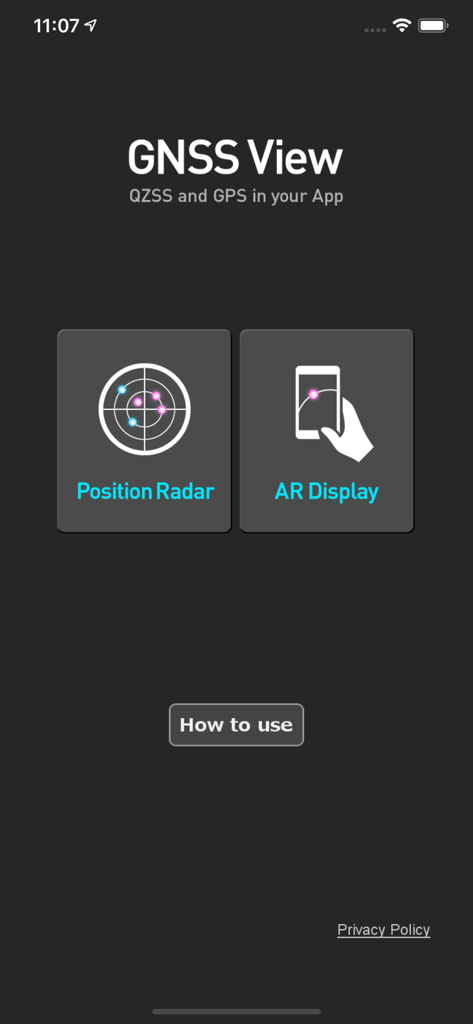
GNSS View 모바일 앱 홈 화면 (Position Radar 및 AR Display 버튼 포함)

GNSS View 모바일 앱 홈 화면 (Position Radar 및 AR Display 버튼 포함)

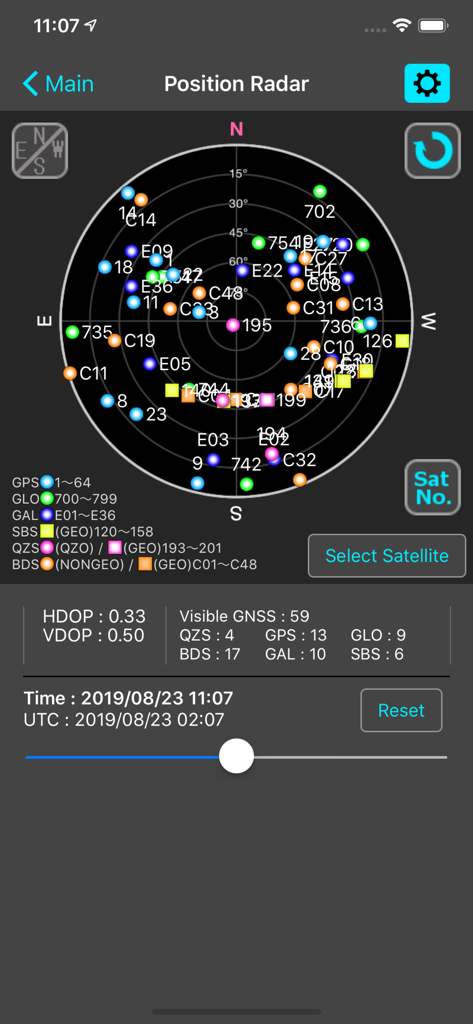
GNSS View 앱 Position Radar 화면 (HDOP 및 VDOP 지표가 있는 위성 스카이 플롯 표시)

GNSS View 앱 Position Radar 화면 (HDOP 및 VDOP 지표가 있는 위성 스카이 플롯 표시)

실시간 위성 가시성 및 정밀 분석

이 앱을 돋보이게 하는 도구, 259K+ 명의 사용자가 선택.

🛰️

글로벌 멀티-위성 편대 추적

고정밀 작업을 위해 최대 신뢰성을 보장하기 위해 QZSS, GPS, GLONASS, Galileo 및 BeiDou를 동시에 모니터링하세요.

👁️

AR 스카이 시각화

AR 카메라 보기를 사용하여 실제 환경에 위성 위치를 오버레이하여 시야선 방해물을 즉시 식별하세요.

📊

전문적인 정확도 지표

작업을 시작하기 전에 신호 기하학을 확인하고 위치 오류를 완화하기 위해 중요한 HDOP, VDOP 및 고도 마스크 데이터에 액세스하세요.

앱 소개

에 대해 알아야 할 모든 것 GNSS View.

설명

This application enables you to see where the Quasi-Zenith Satellite System in the sky! ●What is QZSS? Quasi-Zenith Satellite System (QZSS) is a Japanese satellite positioning system composed mainly of satellites in quasi-zenith orbits (QZO). Satellite positioning systems use satellite signals to calculate position information. One famous example is the American Global Positioning System (GPS) and the QZSS is sometimes called the Japanese GPS. For details, please refer to the following Website "Quasi-Zenith Satellite System". URL : https://qzss.go.jp/en ●What is GNSS View? GNSS View provides that iOS version application that is based on the website application "GNSS View". This application enables you to know position of positioning satellites such as QZSS and GPS in the specified time and location. The positioning satellites displayed in the GNSS View are not based on the satellite information directly received by the smartphone but are displayed based on the satellite arrangement calculated based on the publicly released orbit information. ●GNSS View 3 functions 【Main】 ・You can move to the Position Radar screen or AR Display screen from the application startup screen. ・You can see the operating manual and privacy policy of this application via the website. 【Position Radar】 ・It is provided radar view of positioning satellites such as QZSS and GPS as a sky plot at the specified time and location. ・Positioning satellites can be specified from QZSS, GPS, GLONASS, BeiDou, Galileo, SBAS. ・You can also select specified signal satellites to see on the radar. ・You can see selected satellites by setting elevation mask angle. ・You can switch east and west of satellite arrangement, turn on / off rotation, and switch on / off display of satellite number. ・It displays HDOP, VDOP, the total number of satellites and the number of each positioning satellites in the satellite arrangement displayed on the radar. 【AR Display】 ・Position of positioning satellites such as QZSS and GPS on the sky from your current location is able to see through your camera at the specified time. ・In order to display satellites, it is necessary to turn on the position information of the smartphone and complete the positioning. Therefore, it may take time to display. ・Positioning satellites can be specified from QZSS, GPS, GLONASS, BeiDou, Galileo, SBAS. ・You can also select specified signal satellites to see on the radar. ・You can see selected satellites by setting elevation mask angle. ●Supported versions ・iOS 18 ・iOS 17 ・iOS 16 ・iOS 15 ・iOS 14 ・iOS 13

최신 버전

6.0.1

크기

4.3 MB

출시일

2014년 10월 31일

정확도를 시각화하고 위치 데이터를 마스터하세요.

259,000명 이상의 전문가와 기술 애호가들이 NEC의 신뢰할 수 있는 실시간 위성 추적, AR 시각화 및 미션 크리티컬 신호 분석 도구를 사용하는 데 동참하세요.

다운로드: App Store

App information, icons, screenshots, and descriptions displayed on this page are sourced from the Apple App Store and are the property of their respective developers. Download estimates and rankings are based on MWM's proprietary models and may not reflect actual figures. This page is provided for informational and analytical purposes only.

Believe this page infringes your intellectual property? File a dispute