GPX PhotoGraph

GPX PhotoGraph

다운로드: App Store
로고: GPX PhotoGraph

GPX PhotoGraph: GPS 추적 및 사진 지오태깅을 위한 완벽한 정밀 도구 모음

높은 정확도의 트랙을 기록하고, 사진 메타데이터를 일괄 수정하며, 사진작가 및 아웃도어 애호가를 위해 설계된 전문가급 도구로 위치 워크플로우를 자동화하세요.

다운로드: App Store

개발사

Cardinate Consulting LLC

카테고리

Photo & Video

다운로드

100

사용자 평점

1.0/5

총 평가 수

0

지원 언어

33

모든 픽셀에 담긴 정밀도

이 인터페이스를 사용하는 100 명의 사용자.

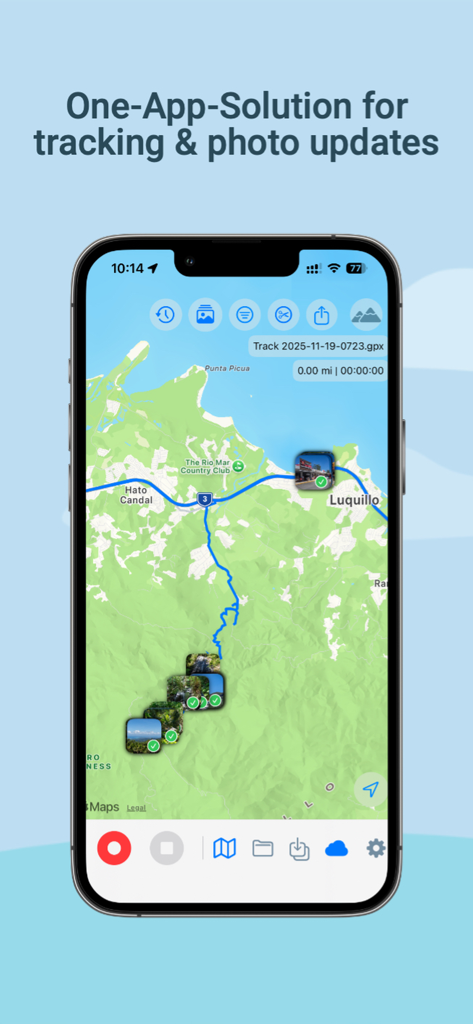
GPX PhotoGraph 앱의 iPhone 스크린샷으로, 파란색 GPS 트랙과 지형도에 표시된 여러 사진을 보여줍니다.

GPX PhotoGraph 앱의 iPhone 스크린샷으로, 파란색 GPS 트랙과 지형도에 표시된 여러 사진을 보여줍니다.

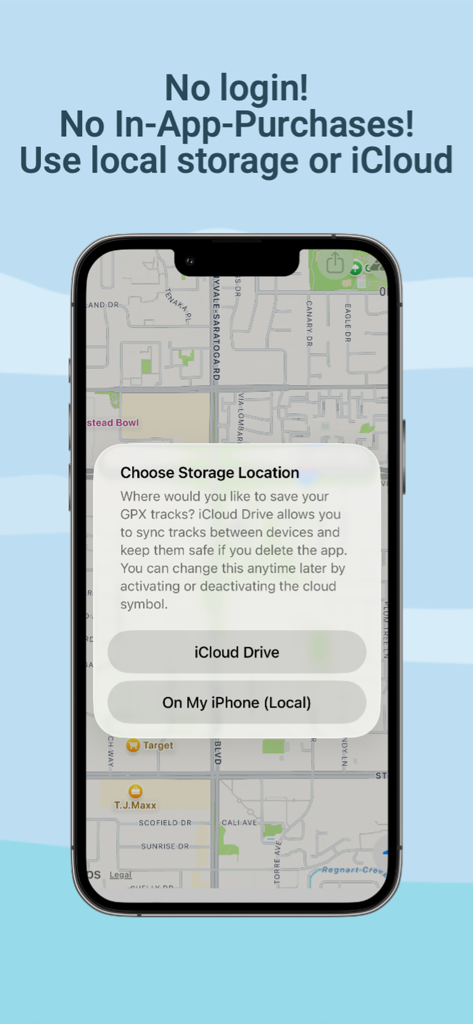
iCloud Drive와 로컬 iPhone 저장 공간 간의 저장 공간 선택을 표시하는 GPX PhotoGraph 화면.

iCloud Drive와 로컬 iPhone 저장 공간 간의 저장 공간 선택을 표시하는 GPX PhotoGraph 화면.

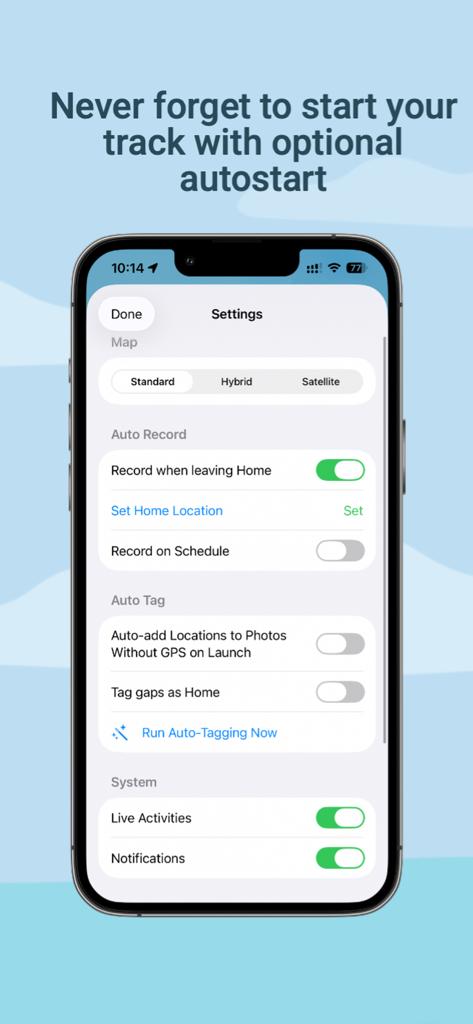
자동 추적 및 사진 위치 태그 옵션을 보여주는 GPX PhotoGraph 앱의 설정 화면

자동 추적 및 사진 위치 태그 옵션을 보여주는 GPX PhotoGraph 앱의 설정 화면

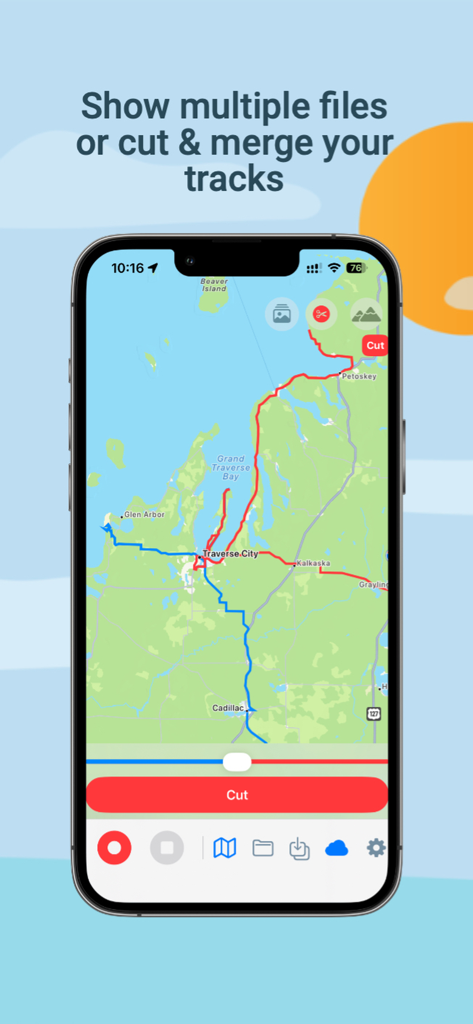
GPS 트랙 파일을 자르고 병합하는 도구를 보여주는 지도 인터페이스인 GPX PhotoGraph 앱 인터페이스

GPS 트랙 파일을 자르고 병합하는 도구를 보여주는 지도 인터페이스인 GPX PhotoGraph 앱 인터페이스

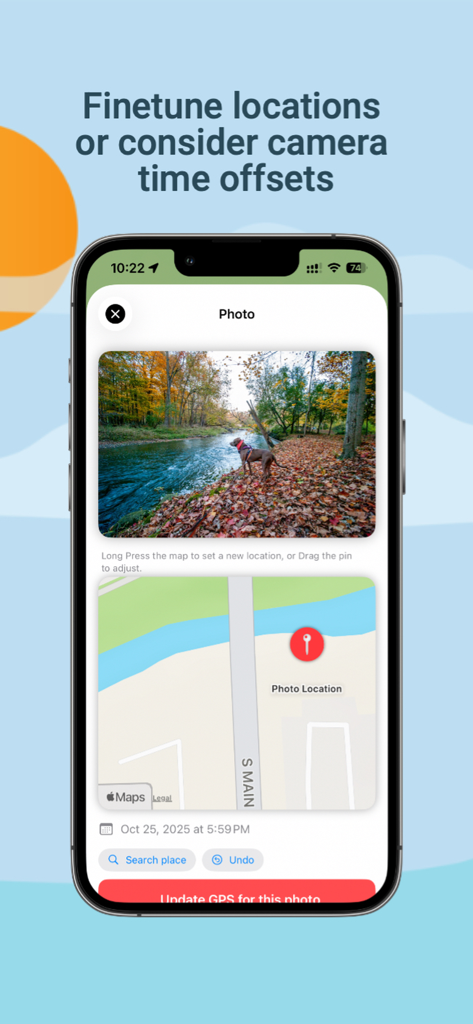
사진 GPS 위치 메타데이터를 수동으로 조정하고 업데이트하기 위한 지도 인터페이스

사진 GPS 위치 메타데이터를 수동으로 조정하고 업데이트하기 위한 지도 인터페이스

위치 데이터 마스터하기

이 앱을 돋보이게 하는 도구, 100 명의 사용자가 선택.

📸

스마트 일괄 지오태깅

DSLR 또는 미러리스 카메라의 수천 장의 사진을 GPS 트랙과 자동으로 동기화하여 몇 초 안에 누락되거나 잘못된 위치 메타데이터를 수정하세요.

📍

설정 후 자동 추적

자동 시작/중지 트리거 및 Apple Watch 통합 기능이 있는 높은 정확도의 백그라운드 녹화를 통해 촬영에 집중하는 동안에도 경로를 놓치지 않습니다.

🛡️

개인 정보 보호 우선 데이터 도구

100% 온디바이스 처리를 통해 GPX 파일을 병합, 자르기 및 내보내는 전문가용 제품군으로, 비밀 촬영 위치를 완전히 비공개로 유지합니다.

앱 소개

에 대해 알아야 할 모든 것 GPX PhotoGraph.

설명

THE COMPLETE GPX & PHOTO LOCATION TOOLKIT GPX PhotoGraph combines high-accuracy GPX tracking, photo location correction, and professional GPX tools in one elegant app. Whether you're a photographer, traveler, hiker, or data enthusiast — this app gives you full control over your GPS data and photo locations. Record GPX Tracks With Precision - High-accuracy GPS tracking - Live altitude chart and distance/time stats - Background mode optimized for minimal battery drain - Optional automation: start recording when leaving Home or on a schedule - Works on iPhone and Apple Watch New in Version 2.0: Smarter Tracking GPX PhotoGraph now includes powerful automation and customization options: - Auto Record (optional): start recording automatically when leaving Home - Schedule-based recording (optional): record GPX tracks on selected days/times - Map styles: switch between Standard, Hybrid, and Satellite Apple Watch Companion - Start / Pause / Resume a recording from your wrist - Live map showing your current location - Real-time stats synced from your iPhone - Ultra-low battery usage Perfect for hikes and photowalks Siri & Shortcuts Integration Control the app hands-free: - “Start GPX Tracking” - “Pause tracking” - “Resume tracking” - “Stop and save GPX” Use Siri Suggestions, automation triggers, and Shortcuts actions. Photo Map & Location Fixing Finally fix the photos that imported with wrong or missing GPS. - Batch-fix thousands of photos automatically using your GPX tracks - Correct or adjust the GPS location for individual photos - Long-press the map to set a new location - Drag the pin for fine-tuning - Works with iCloud Photos and local libraries - Exports new GPS metadata to your images safely A must-have for photographers who shoot with cameras without GPS. New in Version 2.0: Auto-Tag Photos - Optional Auto-Tagging can add GPS to photos without location data - Uses your recorded GPX tracks and photo timestamps - Can run automatically on app launch or manually from Settings GPX Tools Built for Power Users - Import GPX files (improved compatibility with more GPX sources) - Export GPX files - Merge multiple recordings - Cut a GPX at custom times - Remove duplicates - Full GPX extension support (speed, altitude, bearing) - Custom fields for future features (e.g., incline, compass) See Your Photos on the Map - View your photos directly on your GPX route - Identify where every image was taken Great for photowalks, hikes, or travel logs. Privacy-First - All processing happens on your device - No accounts, no trackers, no cloud servers (iCloud optional) - Only your existing Photos metadata is used File Storage Flexibility Choose where your GPX files go: - Local device only, or - iCloud Drive for cross-device sync and backup You can switch anytime in Settings. Perfect For - Landscape photographers - Travel photographers - Hikers & trail runners - Cyclists - Wildlife photographers - Anyone who wants clean GPS data for their photos Download GPX PhotoGraph and take full control of your GPS tracks and photo locations.

최신 버전

2.0

크기

16.0 MB

출시일

2025년 11월 26일

정확한 위치 데이터로 워크플로우를 완성하세요

산을 오르거나 미러리스 카메라로 촬영하든, GPS 데이터를 추적, 수정 및 관리하는 전문가용 도구 모음을 받으세요. 지금 GPX PhotoGraph를 다운로드하세요.

다운로드: App Store
FAQ

자주 묻는 질문

에 대해 알아야 할 모든 것 GPX PhotoGraph

GPX PhotoGraph란 무엇인가요?

GPX PhotoGraph는 사진작가, 여행자, 하이커를 위해 정확도가 높은 GPX 추적, 사진 위치 보정, 전문적인 GPX 도구를 결합한 앱입니다.

GPX PhotoGraph는 자동 GPX 트랙 기록 기능을 제공하나요?

네, GPX PhotoGraph는 자동 GPX 트랙 기록 기능을 제공합니다. 사용자는 집에서 출발할 때 또는 일정에 따라 기록을 시작하도록 설정할 수 있습니다.

GPX PhotoGraph는 사진 위치를 일괄적으로 보정할 수 있나요?

네, GPX PhotoGraph는 기록된 GPX 트랙을 사용하여 수천 장의 사진을 자동으로 일괄 수정할 수 있습니다. iCloud 사진 및 로컬 라이브러리와 함께 작동합니다.

GPX PhotoGraph는 Apple Watch에서 사용할 수 있나요?

네, GPX PhotoGraph에는 Apple Watch 컴패니언 앱이 있습니다. 이를 통해 사용자는 기록을 시작, 일시 중지, 재개하고 실시간 지도를 확인하며 실시간 통계를 볼 수 있습니다.

GPX PhotoGraph는 사용자 개인 정보를 어떻게 처리하나요?

GPX PhotoGraph는 개인 정보 보호를 최우선으로 합니다. 모든 처리는 기기에서 이루어지며, 계정, 추적기 또는 클라우드 서버가 필요하지 않습니다(iCloud는 선택 사항).

GPX PhotoGraph에는 인앱 구매가 있나요?

아니요, GPX PhotoGraph에는 인앱 구매가 포함되어 있지 않습니다. 파일 관리를 위해 로컬 저장소 또는 iCloud를 사용합니다.

GPX PhotoGraph는 여러 GPX 기록을 병합할 수 있나요?

네, GPX PhotoGraph는 여러 GPX 기록을 병합하는 도구를 제공합니다. 또한 지정된 시간에 GPX 트랙을 자르고 중복을 제거할 수 있습니다.

GPX PhotoGraph는 사용자 로그인이 필요한가요?

아니요, GPX PhotoGraph는 사용자 로그인이 필요하지 않습니다. 사용자는 GPX 파일을 로컬에 저장하거나 iCloud Drive를 통해 동기화할 수 있습니다.

GPX PhotoGraph는 Siri와 통합되나요?

네, GPX PhotoGraph는 Siri 및 단축어와 통합됩니다. 사용자는 "GPX 추적 시작" 또는 "GPX 중지 및 저장"과 같은 명령으로 핸즈프리 제어가 가능합니다.

GPX PhotoGraph로 GPX 파일을 어디에 저장할 수 있나요?

GPX PhotoGraph는 유연한 파일 저장 옵션을 제공하여 사용자가 로컬 기기 저장소 또는 iCloud Drive를 선택하여 기기 간 동기화 및 백업을 할 수 있습니다.

App information, icons, screenshots, and descriptions displayed on this page are sourced from the Apple App Store and are the property of their respective developers. Download estimates and rankings are based on MWM's proprietary models and may not reflect actual figures. This page is provided for informational and analytical purposes only.

Believe this page infringes your intellectual property? File a dispute