GV Connect

GV Connect

다운로드: App Store
로고: GV Connect

GV Connect: Google Voice를 위한 최고의 파워 유저 앱

자동 설정, 보안 오프라인 액세스 및 최고의 효율성을 위해 설계된 전문적인 iOS 인터페이스로 비즈니스 커뮤니케이션을 완벽하게 제어하세요.

개발사

Andreas Amann

카테고리

Utilities

다운로드

247K+

사용자 평점

3.3/5

총 평가 수

2K+

지원 언어

1

한눈에 보는 제어

이 인터페이스를 사용하는 247K+ 명의 사용자.

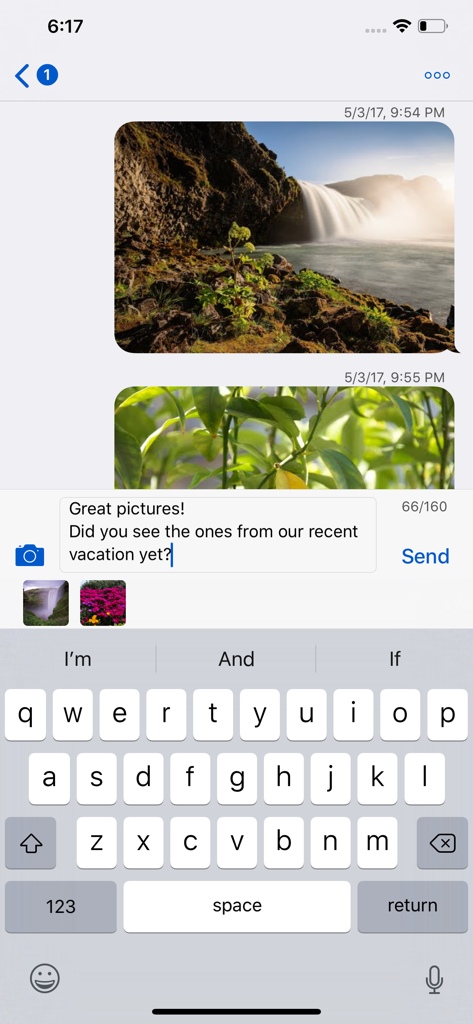
GV Connect 앱이 iPhone에서 사진 메시지와 iMessage와 유사한 인터페이스가 있는 문자 대화를 보여줍니다.

GV Connect 앱이 iPhone에서 사진 메시지와 iMessage와 유사한 인터페이스가 있는 문자 대화를 보여줍니다.

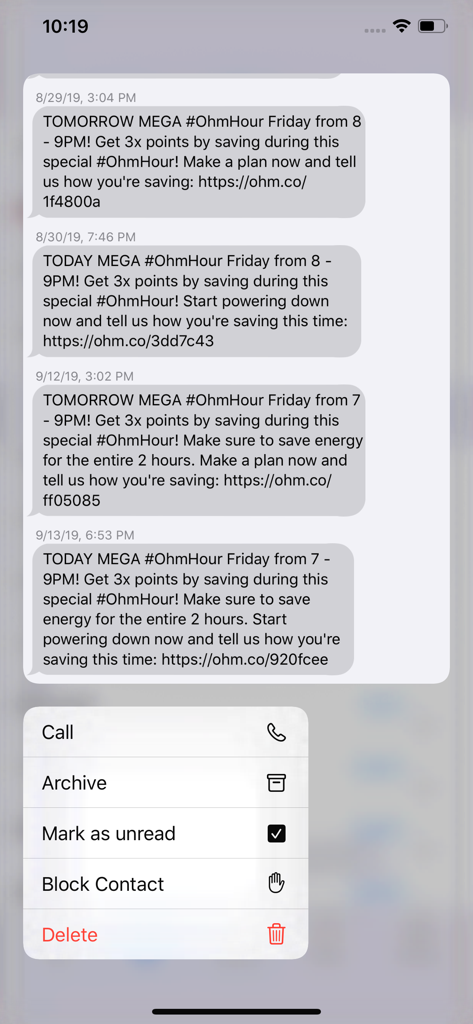
GV Connect 모바일 앱이 통화 및 보관 작업에 대한 컨텍스트 메뉴와 함께 문자 메시지 기록을 표시합니다.

GV Connect 모바일 앱이 통화 및 보관 작업에 대한 컨텍스트 메뉴와 함께 문자 메시지 기록을 표시합니다.

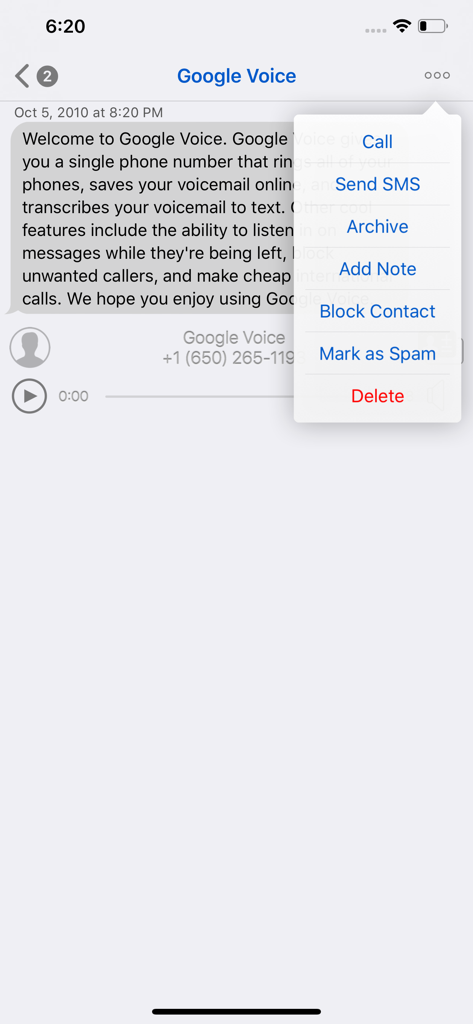
GV Connect 앱 인터페이스가 메시지 세부 정보와 통화, SMS, 보관 옵션이 있는 팝업 메뉴를 보여줍니다.

GV Connect 앱 인터페이스가 메시지 세부 정보와 통화, SMS, 보관 옵션이 있는 팝업 메뉴를 보여줍니다.

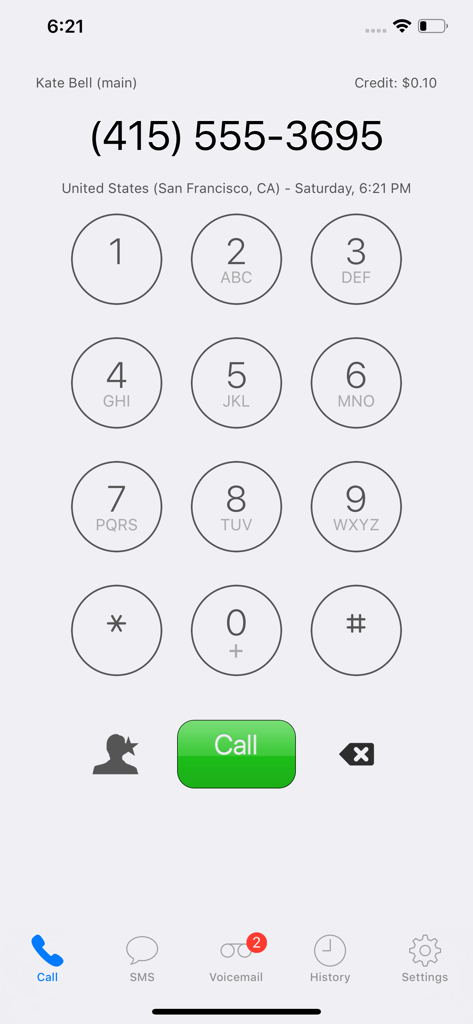
GV Connect 앱의 다이얼러 화면이 전화 키패드와 통화 버튼을 보여줍니다.

GV Connect 앱의 다이얼러 화면이 전화 키패드와 통화 버튼을 보여줍니다.

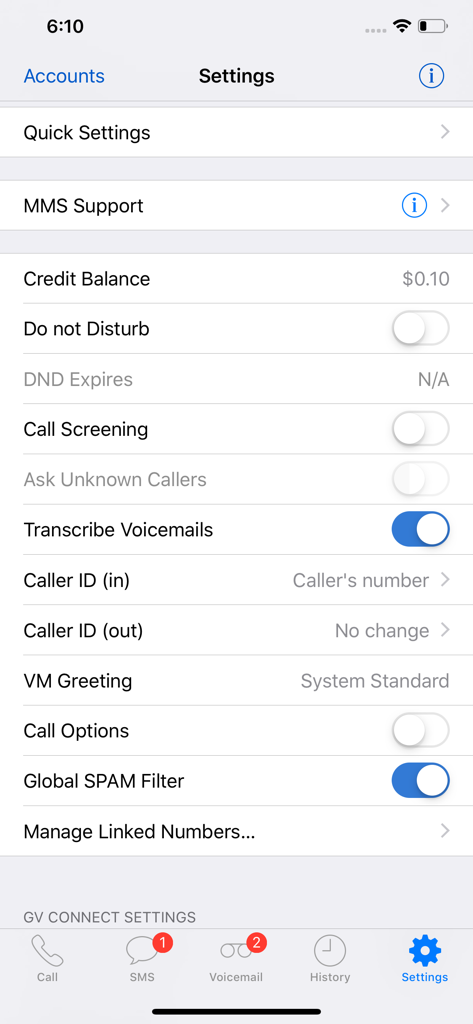
GV Connect 앱의 설정 메뉴가 Google Voice 계정 관리 옵션을 보여줍니다.

GV Connect 앱의 설정 메뉴가 Google Voice 계정 관리 옵션을 보여줍니다.

파워 유저 컨트롤로 워크플로우를 마스터하세요

이 앱을 돋보이게 하는 도구, 247K+ 명의 사용자가 선택.

📍

위치 인식 자동화

사무실을 떠나거나 집에 도착할 때 자동으로 전달 프로필을 전환하거나 방해 금지 모드를 만료되도록 설정합니다.

💼

비즈니스 등급 관리

대화에 개인 메모를 추가하고, 스레드를 보관하고, 전체 기록을 오프라인으로 검색하여 비즈니스 생활을 체계적으로 관리하세요.

🛡️

기본 iOS 보안

TouchID 또는 FaceID로 고객 데이터를 보호하고 장치 키체인에 자격 증명을 안전하게 저장하여 원활하고 개인적인 경험을 제공합니다.

앱 소개

에 대해 알아야 할 모든 것 GV Connect.

설명

GV Connect is the most feature-complete Google Voice application available for your iPhone or iPad — text, call, and interact with your existing GV accounts using a beautiful and streamlined interface that gives you full control over your account settings: • Place calls using your Google Voice number rather than your mobile number - enter number directly, select a contact from your device's contacts, or call back any number in your history. The application supports direct call (iPhone only), callback (Click2Call), and offline calling (see application website for a description of these calling modes) • Send and receive text messages (SMS) from your Google Voice number - including support for long SMS, group messages, picture messages (MMS – available as In-App purchase), and support for non-English messages. Supports in-line replies with an iMessage-like interface • Automatically check for new messages and voicemails - even when the application is in the background • Listen to voicemails and recorded conversations right on your device (allowing you to pause, rewind, or fast forward to any point within the message) - voicemails will show the transcription of the message when available • Un/-archive messages, mark them as un-/read or starred, attach notes to conversations, block/unblock senders, trash or delete conversations • Easily search in your history by contact, message, or note text - supports continuing searches online for messages that have not yet been cached locally • Messages are stored on your device for offline access • Quickly change various Google Voice account settings (call forwarding, do-not-disturb — including the option to have DND automatically expire at a specified time, message notifications, …) • Add, verify, and remove forwarding phone numbers • Quick Settings allow saving and restoring complete account settings (DND, forwarding, …) for easy switching between different profiles • Support for automatic selection of Quick Settings based on current location (available as In-App Purchase) • Direct access to your device's contacts without needing to synchronize them with Google • Quick access to favorite phone numbers for calls and SMS • Universal application which runs optimized on iPhone (including iPhone X), iPod Touch, and iPad (including split-screen multi-tasking on supported devices running iOS 12.0 or later) • Optional application passcode lock (with TouchID/FaceID option on supported devices) • Supports gesture navigation when typing text for easier placement of the cursor: swipe left/right with one or two fingers to move the caret position backwards/forward by character or word. Swipe left/right with three fingers to go to the beginning/end of the existing text * Recipient of an honorable mention in the 2010 Best App Ever Awards * NOTE: An existing Google Voice account with a GV phone number is required to use this application - signup for new Google Voice accounts is currently limited to residents of the US. Please note that GV Connect is NOT a VoIP application and will not allow making or receiving calls from an iPad/iPod Touch without a separate VoIP application. GV Connect stores your account password securely in your device's Keychain for faster login when launching the application. All communication is done exclusively via secure connections (SSL) to the Google Voice servers owned and operated by Google and no contact information (other than the contact's phone number which is required to place a call or send a message) is sent to Google or any other party. All operations are fully synchronized with your Google Voice account. Please read the FAQ section on the application website if you encounter any issues or use the feedback email link in its about screen to ask for support.

최신 버전

3.10.6

크기

6.2 MB

출시일

2010년 9월 17일

완벽하게 구현된 파워 유저의 Google Voice

iPhone 및 iPad를 위한 가장 기능이 풍부한 클라이언트로 전문적인 커뮤니케이션을 완벽하게 제어하세요. 247,000명 이상의 사용자와 함께 오늘 워크플로우를 업그레이드하세요.

다운로드: App Store
FAQ

자주 묻는 질문

에 대해 알아야 할 모든 것 GV Connect

GV Connect는 무엇인가요?

GV Connect는 iPhone 및 iPad를 위한 기능이 완벽한 애플리케이션입니다. 사용자는 Google Voice 계정으로 문자 메시지를 보내고, 통화하고, 상호 작용할 수 있으며, 계정 설정에 대한 완전한 제어를 제공합니다.

GV Connect는 Google Voice 번호를 사용하여 전화를 걸 수 있나요?

예, GV Connect는 모바일 번호가 아닌 Google Voice 번호를 사용하여 전화를 겁니다. 직접 통화(iPhone), 콜백(Click2Call), 오프라인 통화 모드를 지원합니다.

GV Connect는 문자 메시지(SMS)를 지원하나요?

예, GV Connect는 Google Voice 번호로 문자 메시지(SMS)를 보내고 받을 수 있습니다. 여기에는 긴 SMS, 그룹 메시지, 사진 메시지(MMS) 및 비영어 메시지가 포함됩니다.

GV Connect는 사진 메시지(MMS)를 보낼 수 있나요?

예, GV Connect는 사진 메시지(MMS)를 보내는 것을 지원합니다. 이 기능은 애플리케이션 내 구매로 제공됩니다. 설정에도 MMS 지원이 표시됩니다.

GV Connect는 음성 메일을 지원하나요?

예, GV Connect는 새 메시지와 음성 메일을 자동으로 확인합니다. 사용자는 장치에서 음성 메일을 들을 수 있으며, 제공되는 경우 전사도 가능합니다.

GV Connect를 통해 Google Voice 계정 설정을 관리할 수 있나요?

예, GV Connect를 사용하면 다양한 Google Voice 계정 설정을 빠르게 변경할 수 있습니다. 여기에는 착신 전환, 방해 금지, 메시지 알림이 포함됩니다.

GV Connect를 사용하려면 Google Voice 계정이 필요한가요?

예, GV Connect를 사용하려면 GV 전화 번호가 있는 기존 Google Voice 계정이 필요합니다. 새로운 Google Voice 계정 가입은 현재 미국 거주자로 제한됩니다.

GV Connect는 보안을 위해 TouchID 또는 FaceID를 지원하나요?

예, GV Connect는 선택적 애플리케이션 암호 잠금을 제공합니다. 여기에는 지원되는 장치에서 향상된 보안을 위해 TouchID/FaceID 옵션이 포함됩니다.

GV Connect는 내 Google Voice 비밀번호를 저장하나요?

예, GV Connect는 더 빠른 로그인을 위해 장치의 Keychain에 Google Voice 계정 비밀번호를 안전하게 저장합니다. 모든 통신은 Google Voice 서버에 대한 보안 SSL 연결을 사용합니다.

GV Connect에서 연락처를 차단할 수 있나요?

예, GV Connect를 사용하면 보낸 사람을 차단할 수 있습니다. 이 기능은 대화 메뉴와 음성 메일 옵션에서 액세스하여 원치 않는 연락처를 관리할 수 있습니다.

GV Connect는 어떤 종류의 장치를 지원하나요?

GV Connect는 iPhone(iPhone X 포함), iPod Touch 및 iPad에 최적화된 범용 애플리케이션입니다. iOS 12.0 이상을 실행하는 지원되는 장치에서 분할 화면 멀티태스킹을 지원합니다.

GV Connect로 음성 메일을 전사할 수 있나요?

예, GV Connect의 음성 메일은 사용 가능한 경우 전사를 표시합니다. 애플리케이션 설정에는 이 기능을 활성화하기 위한 '음성 메일 전사' 토글이 포함되어 있습니다.

GV Connect는 빠른 설정을 제공하나요?

예, GV Connect는 전체 계정 설정을 저장하고 복원하기 위한 빠른 설정을 포함합니다. 또한 애플리케이션 내 구매로 현재 위치에 따라 자동 선택을 제공합니다.

GV Connect는 VoIP 애플리케이션인가요?

아니요, GV Connect는 VoIP 애플리케이션이 아닙니다. 별도의 VoIP 애플리케이션 없이는 iPad/iPod Touch에서 전화를 걸거나 받을 수 없습니다.

GV Connect에서 크레딧 잔액을 어떻게 확인할 수 있나요?

사용자는 GV Connect 내에서 크레딧 잔액을 확인할 수 있습니다. 잔액은 애플리케이션 설정 메뉴와 다이얼패드 인터페이스에서 볼 수 있습니다.

App information, icons, screenshots, and descriptions displayed on this page are sourced from the Apple App Store and are the property of their respective developers. Download estimates and rankings are based on MWM's proprietary models and may not reflect actual figures. This page is provided for informational and analytical purposes only.

Believe this page infringes your intellectual property? File a dispute