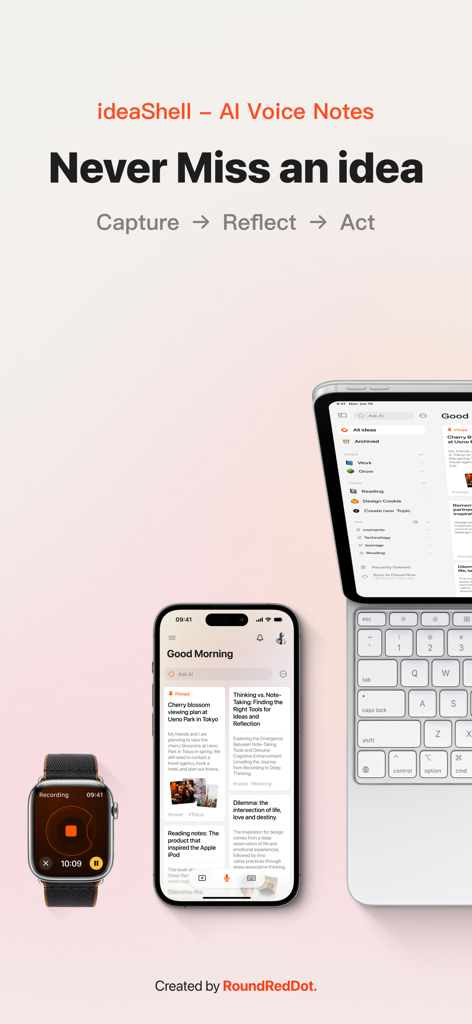
Apple Watch, iPhone, iPad 및 키보드에서 표시되는 ideaShell AI 음성 메모 앱 인터페이스
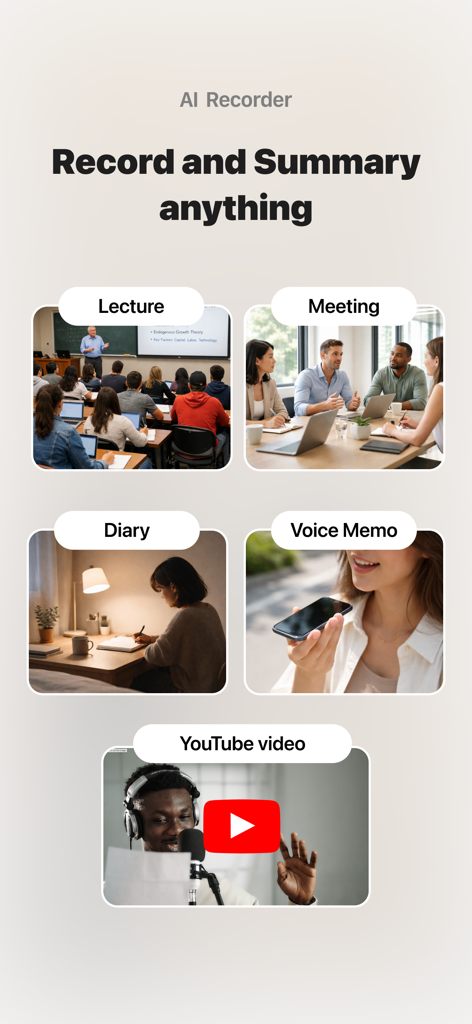
강의 및 회의를 포함한 ideaShell AI 음성 메모의 사용 사례
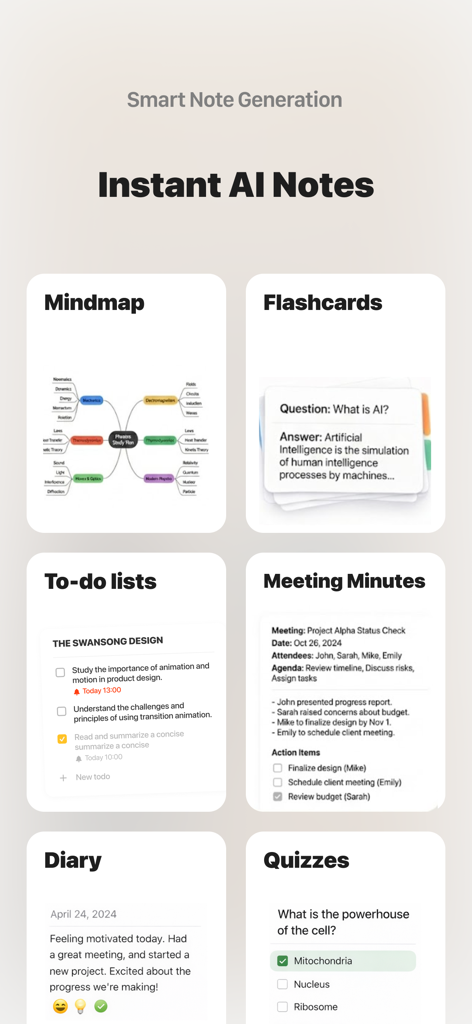
마인드맵, 플래시카드, 회의록을 포함한 ideaShell의 다양한 AI 생성 메모 형식 쇼케이스
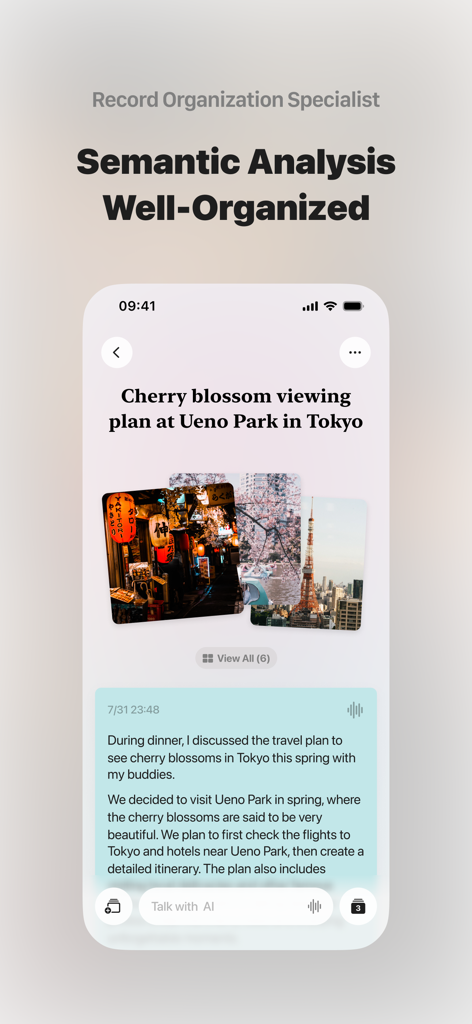
AI 전사 텍스트와 이미지를 포함한 잘 구성된 여행 계획 메모가 있는 ideaShell 앱을 보여주는 모바일 화면
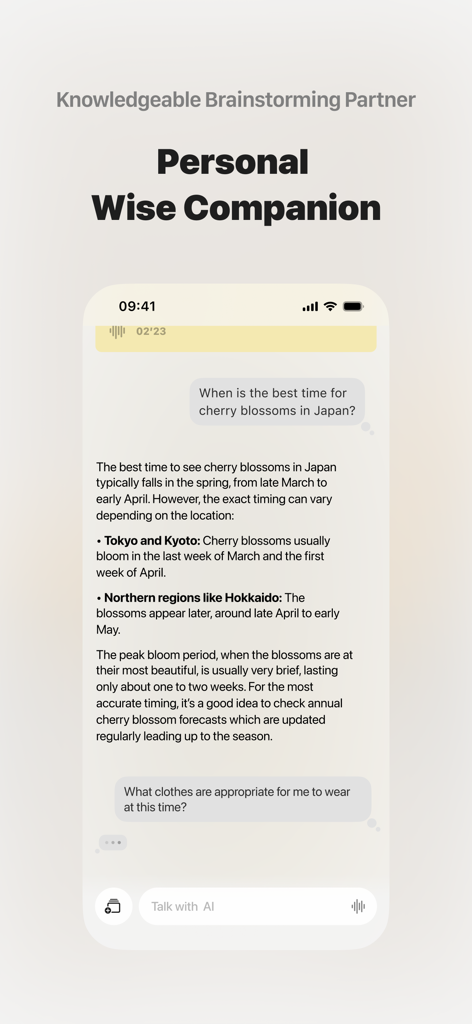
계획 및 연구를 위한 개인 브레인스토밍 동반자 역할을 하는 AI와의 채팅 인터페이스인 ideaShell 앱의 채팅 인터페이스
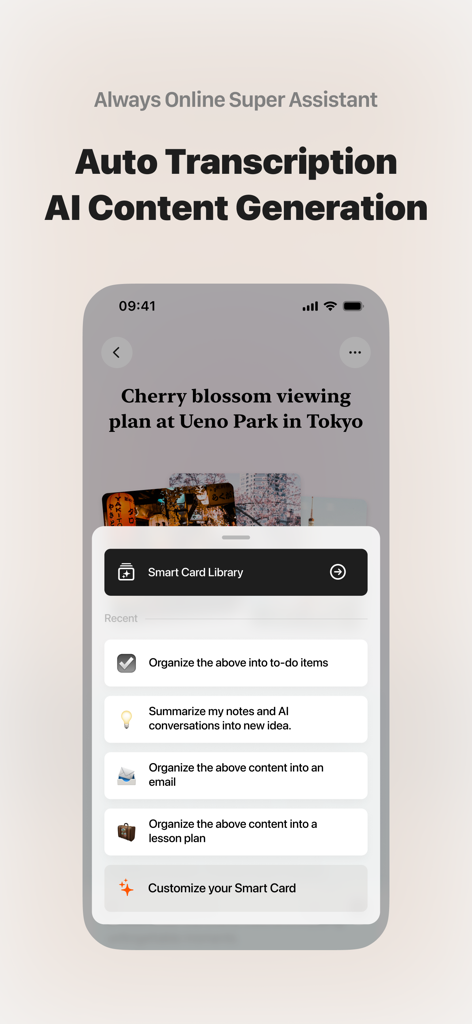
작업 및 이메일을 위한 스마트 카드와 같은 AI 콘텐츠 생성 옵션을 표시하는 ideaShell 앱 인터페이스
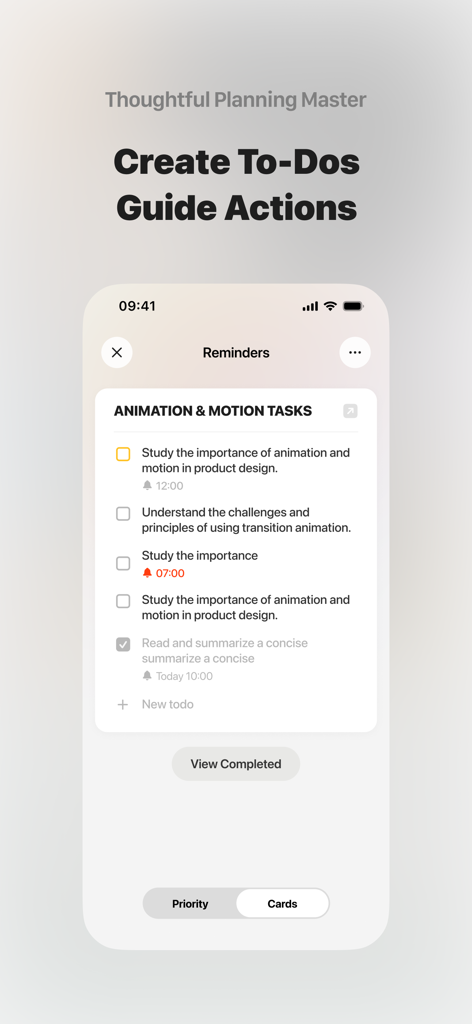
생산적인 계획을 위한 AI 생성 작업 체크리스트를 보여주는 ideaShell의 모바일 인터페이스
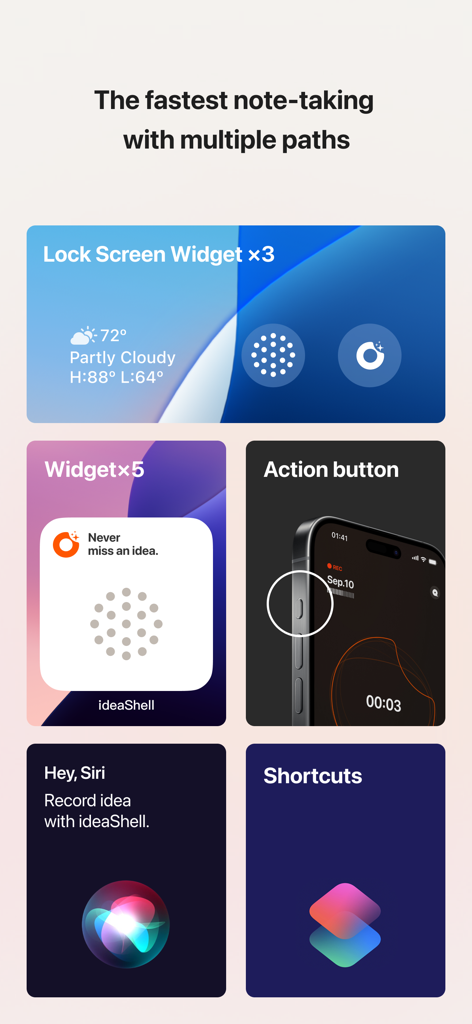
위젯, 액션 버튼, Siri 및 단축키를 통한 ideaShell 빠른 녹화 기능 표시
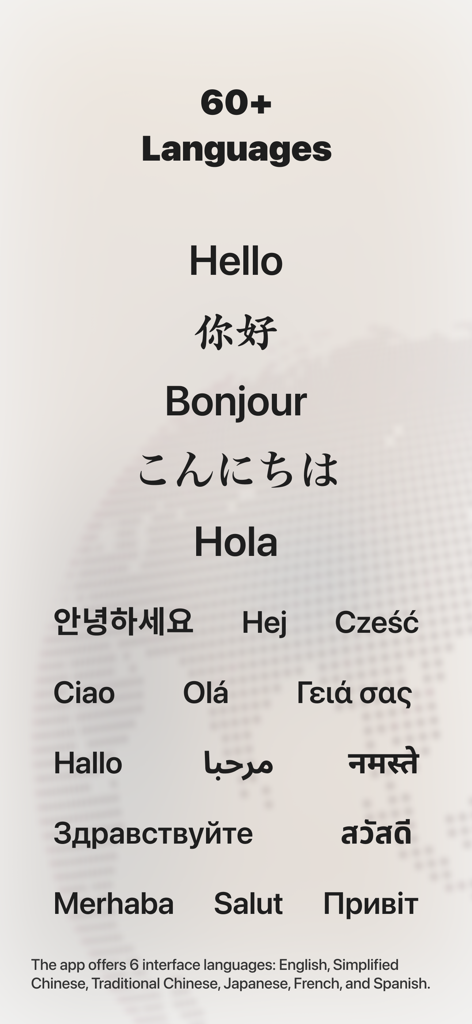
ideaShell에서 60개 이상의 언어와 여러 인터페이스 옵션을 지원하는 화면
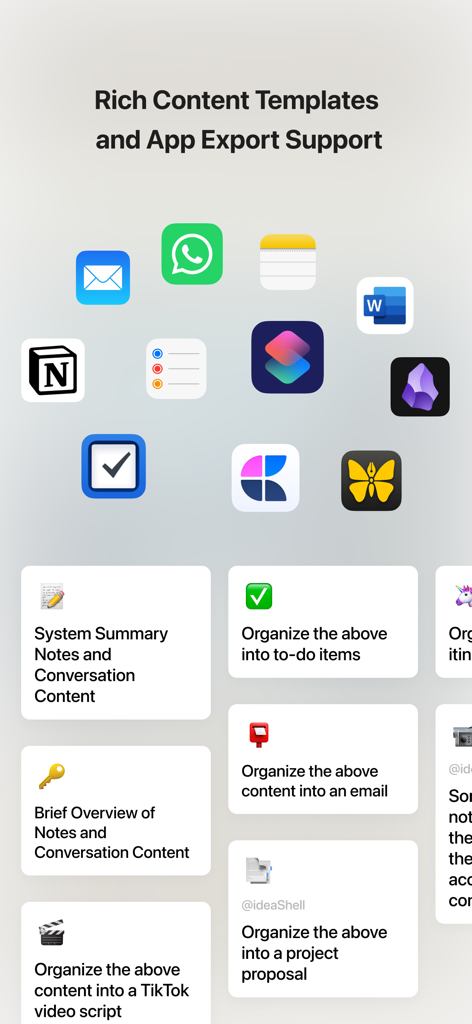
Notion, Obsidian, Things와 같은 앱과의 콘텐츠 템플릿 및 지원 내보내기 통합을 보여주는 ideaShell 앱 스크린샷
순간적인 아이디어를 구조화된 성공으로
이 앱을 돋보이게 하는 도구, 163K+ 명의 사용자가 선택.
🎙️
마찰 없는 즉시 캡처
Apple Watch, Siri 또는 iPhone 액션 버튼을 통해 아이디어를 기록하세요. 화면을 보지 않고도 생각이 떠오르는 순간 모든 생각을 캡처할 수 있습니다.
🧠
AI 기반 사고 합성
AI가 불필요한 단어를 제거하고 음성을 논리적인 메모로 다듬으며 스마트한 제목과 태그를 자동으로 생성하여 힘든 작업을 처리합니다.
🚀
두 번째 뇌에 동력 부여
음성을 실행 가능한 스마트 카드로 변환하세요. 구조화된 데이터를 Notion, Obsidian 또는 좋아하는 작업 관리자로 직접 원활하게 내보낼 수 있습니다.
앱 소개
에 대해 알아야 할 모든 것 ideaShell: AI Voice Notes.
설명
ideaShell: AI-powered smart voice notes - Record every thought anytime, anywhere with your voice.
Every great idea in the world starts with a flash of inspiration—don’t let them slip away!
Record your thoughts with one tap, discuss them effortlessly with AI, and turn small ideas into big plans.
[Key Features Overview]
1. AI Voice Transcription & Organization - A faster, more direct way to capture ideas—Good ideas are always fleeting.
○ Voice Transcription: No need to worry about typing pressure or expressing every word perfectly, and no need to wait until you have fully formed your thoughts. Simply speak as you normally would, and ideaShell instantly converts your thoughts into text, refining the key points, removing filler, and creating efficient notes that are easy to understand.
○ AI Optimization: Powerful automated text structuring, title generation, tagging, and formatting. Content remains logically clear, easy to read, and convenient to search. Well-organized notes make finding information faster.
○ Multiple Entry Points: To ensure quicker recording, we support Apple Watch, Siri, action buttons, lock screen widgets, and various shortcuts for fast access, allowing you to capture every inspiration as it comes.
2. AI Discussions & Summaries - A smarter way to think, catalyzing your ideas—Good ideas should never remain static.
○ Discuss with AI: A good idea or a spark of inspiration is often just the beginning. Based on your inspiration, you can engage in conversations with the knowledgeable AI, continuously asking questions, discussing, and gaining insights, eventually forming more complete ideas with greater depth of thought.
○ AI-Created Smart Cards: ideaShell comes with a variety of well-designed creation commands. Your ideas and discussions can ultimately be displayed and exported in the form of smart cards, generating to-do lists, summaries, email drafts, video scripts, work reports, creative proposals, and more. You can also fully customize the content and format of the output.
3. Smart Card Content Creation - A more convenient way to create and take action—Good ideas shouldn’t just stay as ideas.
○ To-Do Guides for Next Steps: The true value of notes lies not in keeping them on paper but in the self-growth and actions that follow. With smart cards, AI can turn your ideas into actionable to-do lists, which can be imported into system reminders or apps like Things and Omnifocus.
○ Continue Your Creation with Multiple Apps: ideaShell isn’t an all-in-one product; it prefers connections. Through automation and integrations, your content can seamlessly connect with your preferred apps and workflows, supporting exports to Notion, Craft, Word, Bear, Ulysses, and many other creation tools.
4. Ask AI—Smart Q&A & Efficient Note Search
○ Smart Q&A: Engage with AI on any topic, and directly create new notes from the content.
○ Personal Knowledge Base: AI remembers all your recorded notes. You can search notes using natural language, and AI will understand and display relevant content for you (coming soon).
[Other Features]
○ Multi-device input: Supports native apps for Apple Watch and iPad, enabling quick recording anytime, anywhere.
○ Hand-drawn input: Supports drawing with a stylus to capture your inspiration, allowing unrestricted creativity and richer expression.
○ Custom themes: Create content themes through tags, making it easier to view and manage.
○ Automatic tagging: Set preferred tags for AI to prioritize, making automatic tagging more practical and convenient for organization and categorization.
○ Image text recognition: Search and discuss image text content with AI.
ideaShell - Never miss an idea. Capture every thought.
Terms of Service:https://www.roundreddot.com/terms
Privacy Policy:https://www.roundreddot.com/privacy
최신 버전
1.9.33
크기
202.3 MB
출시일
2024년 5월 28일
생각을 실행으로 옮길 준비가 되셨나요?
163,000명 이상의 성과 우수자들이 놓치지 않는 위대한 아이디어를 다운로드하세요. ideaShell을 다운로드하고 오늘 바로 당신의 두 번째 뇌를 구축하세요.
FAQ
자주 묻는 질문
에 대해 알아야 할 모든 것 ideaShell: AI Voice Notes
ideaShell: AI 음성 메모란 무엇인가요?
ideaShell은 AI 기반의 스마트 음성 메모 앱으로, 생각을 포착하고 AI 받아쓰기 및 정리를 통해 이를 다듬으며, 아이디어를 실행 가능한 계획 및 다양한 콘텐츠 형식으로 전환할 수 있도록 토론을 가능하게 합니다.
ideaShell은 음성 메모를 어떻게 받아쓰나요?
ideaShell은 말하는 생각을 즉시 텍스트로 변환하고, 핵심 사항을 다듬으며, 불필요한 부분을 제거하여 효율적이고 이해하기 쉬운 메모를 만듭니다. 타이핑 압박 없이 자연스러운 음성을 지원합니다.
ideaShell이 자동으로 메모를 정리해 줄 수 있나요?
네, ideaShell은 AI 최적화를 사용하여 텍스트 구조화, 제목 생성, 태그 지정 및 서식을 자동으로 지정합니다. 이를 통해 콘텐츠는 논리적으로 명확하고 읽기 쉬우며 검색에 편리하게 유지됩니다.
ideaShell은 빠른 녹음을 위해 어떤 진입점을 제공하나요?
ideaShell은 Apple Watch, Siri, 액션 버튼, 잠금 화면 위젯 및 다양한 바로가기 등 빠른 녹음을 위한 여러 진입점을 제공하여 빠르게 접근할 수 있습니다.
ideaShell에서 AI와 아이디어를 논의할 수 있나요?
네, ideaShell을 사용하면 사용자는 자신의 영감을 바탕으로 지식이 풍부한 AI와 대화에 참여할 수 있습니다. 사용자는 질문하고, 토론하고, 통찰력을 얻어 더 완전하고 깊이 있는 아이디어를 형성할 수 있습니다.
ideaShell은 어떤 종류의 스마트 카드를 만들 수 있나요?
ideaShell은 할 일 목록, 요약, 이메일 초안, 비디오 스크립트, 작업 보고서 및 창의적인 제안을 포함한 다양한 출력을 위한 스마트 카드를 만듭니다. 사용자는 콘텐츠와 형식을 사용자 지정할 수도 있습니다.
ideaShell이 다른 생산성 앱과 통합되나요?
네, ideaShell은 다양한 앱 및 워크플로와의 통합 및 내보내기를 지원합니다. 여기에는 Notion, Craft, Word, Bear, Ulysses, Things, Omnifocus 및 시스템 미리 알림이 포함됩니다.
ideaShell이 메모에서 실행 가능한 할 일 목록을 만들 수 있나요?
네, ideaShell은 스마트 카드를 활용하여 AI가 아이디어를 실행 가능한 할 일 목록으로 전환할 수 있도록 합니다. 이러한 목록은 시스템 미리 알림 또는 Things 및 Omnifocus와 같은 앱으로 가져올 수 있습니다.
ideaShell이 받아쓰기를 위해 여러 언어를 지원하나요?
네, ideaShell은 받아쓰기를 위해 60개 이상의 언어를 지원합니다. 앱 인터페이스는 영어, 중국어(간체), 중국어(번체), 일본어, 프랑스어 및 스페인어로 제공됩니다.
ideaShell을 Apple Watch 또는 iPad에서 사용할 수 있나요?
네, ideaShell은 Apple Watch 및 iPad용 네이티브 앱을 제공합니다. 이를 통해 언제 어디서든 여러 Apple 기기에서 빠르게 녹음하고 기능에 액세스할 수 있습니다.
ideaShell에 이미지 텍스트 인식 기능이 포함되어 있나요?
네, ideaShell에는 이미지 텍스트 인식 기능이 포함되어 있습니다. 사용자는 앱 내에서 이미지에서 추출된 콘텐츠를 검색하고 AI와 토론할 수 있습니다.
ideaShell이 메모 검색을 어떻게 도와주나요?
ideaShell의 AI는 모든 녹음된 메모를 기억하여 사용자가 자연어로 검색할 수 있도록 합니다. AI는 쿼리를 이해하고 관련 콘텐츠를 표시합니다. 이 개인 지식 기반 기능은 곧 출시될 예정입니다.
App information, icons, screenshots, and descriptions displayed on this page are sourced from the Apple App Store and are the property of their respective developers. Download estimates and rankings are based on MWM's proprietary models and may not reflect actual figures. This page is provided for informational and analytical purposes only.
Believe this page infringes your intellectual property? File a dispute