Importass Seguridad Social

Importass Seguridad Social


다운로드: App Store
로고: Importass Seguridad Social

Importass Seguridad Social: 전 세계 어디서나 이용 가능한 스페인 사회보장 사무소

근로 이력을 안전하게 관리하고, 공식 인증서를 다운로드하고, 스마트폰으로 직접 행정 업무를 처리하세요. 해외 거주 전문가를 위한 효율성과 마음의 평화를 몇 번의 탭으로 경험하세요.

다운로드: App Store

개발사

Gerencia Informatica de la Seguridad Social

카테고리

Productivity

다운로드

634K+

사용자 평점

2.5/5

총 평가 수

200

지원 언어

1

간편함을 직접 확인하세요

이 인터페이스를 사용하는 634K+ 명의 사용자.

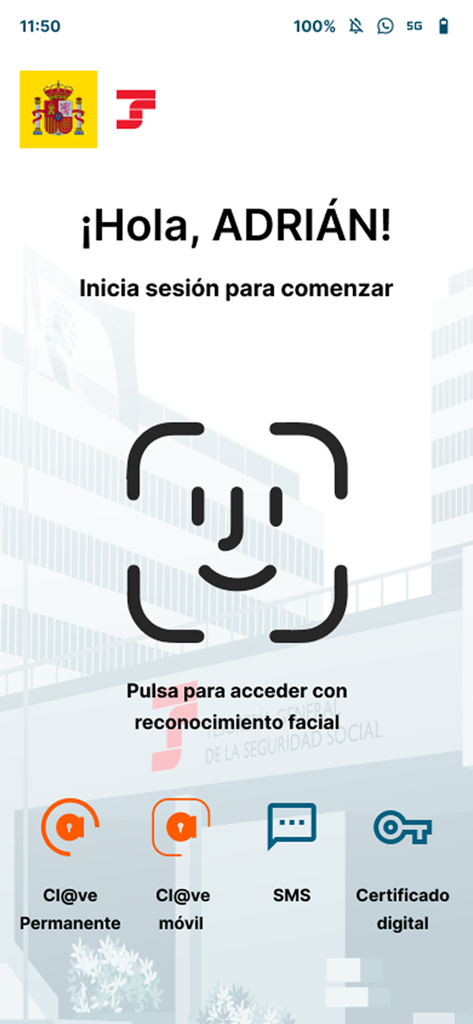
Importass 앱 로그인 화면, 안면 인식 및 디지털 ID 옵션 표시

Importass 앱 로그인 화면, 안면 인식 및 디지털 ID 옵션 표시

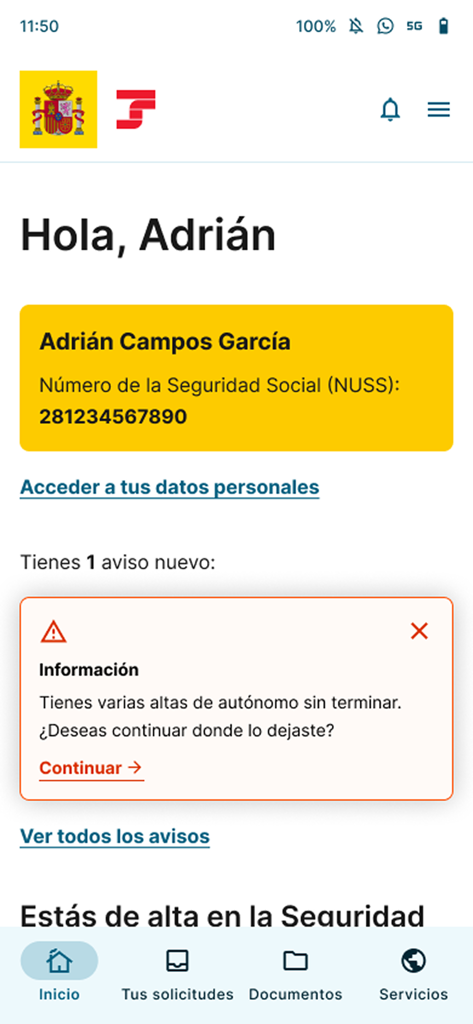
Importass Seguridad Social 앱 홈 화면, 사용자의 사회보장번호가 표시된 프로필 표시

Importass Seguridad Social 앱 홈 화면, 사용자의 사회보장번호가 표시된 프로필 표시

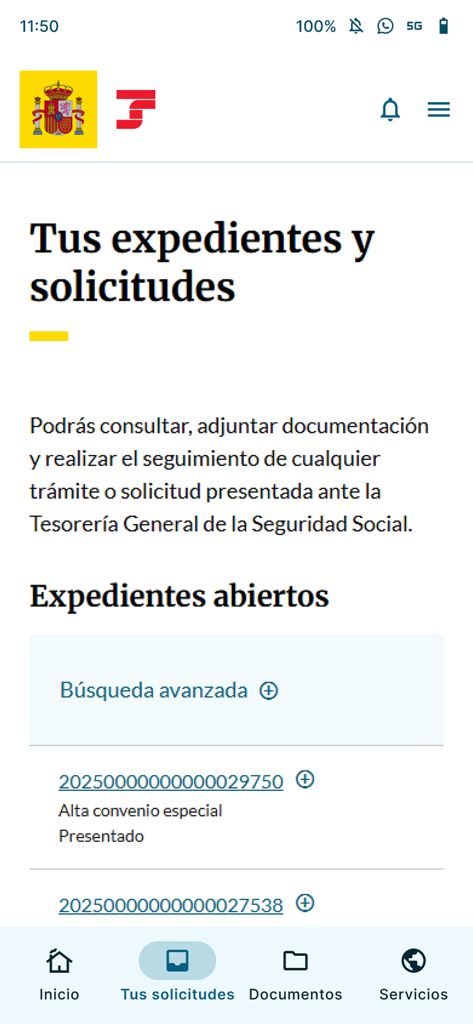
Importass 모바일 앱 화면, 열려 있는 행정 파일 및 요청 목록 표시

Importass 모바일 앱 화면, 열려 있는 행정 파일 및 요청 목록 표시

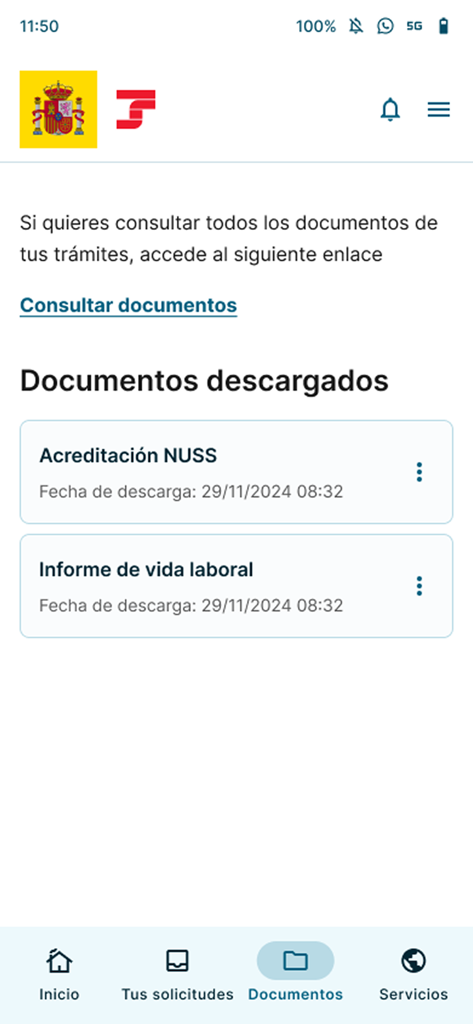
근로 이력 보고서 및 NUSS 인증서와 같은 다운로드된 문서가 표시되는 Importass 앱 화면

근로 이력 보고서 및 NUSS 인증서와 같은 다운로드된 문서가 표시되는 Importass 앱 화면

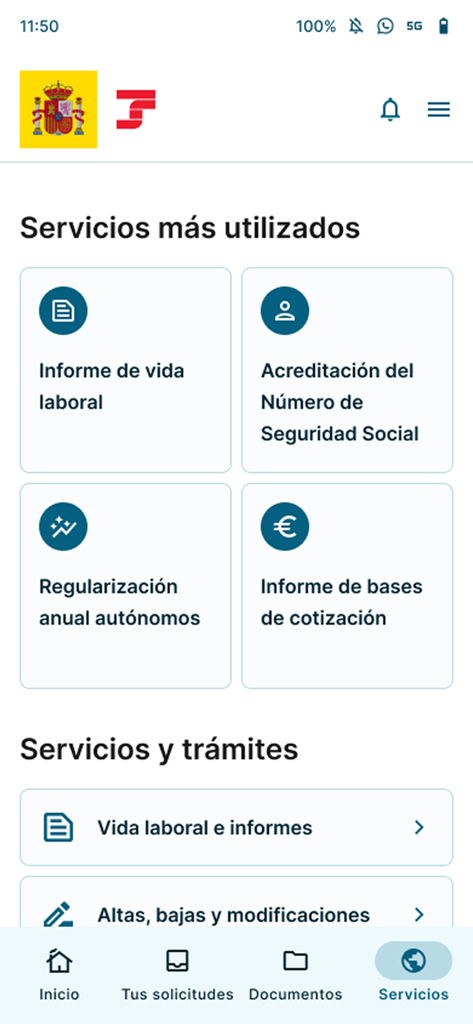
Importass 앱 인터페이스, 근로 이력 및 NUSS 인증과 같은 인기 있는 사회보장 서비스 표시

Importass 앱 인터페이스, 근로 이력 및 NUSS 인증과 같은 인기 있는 사회보장 서비스 표시

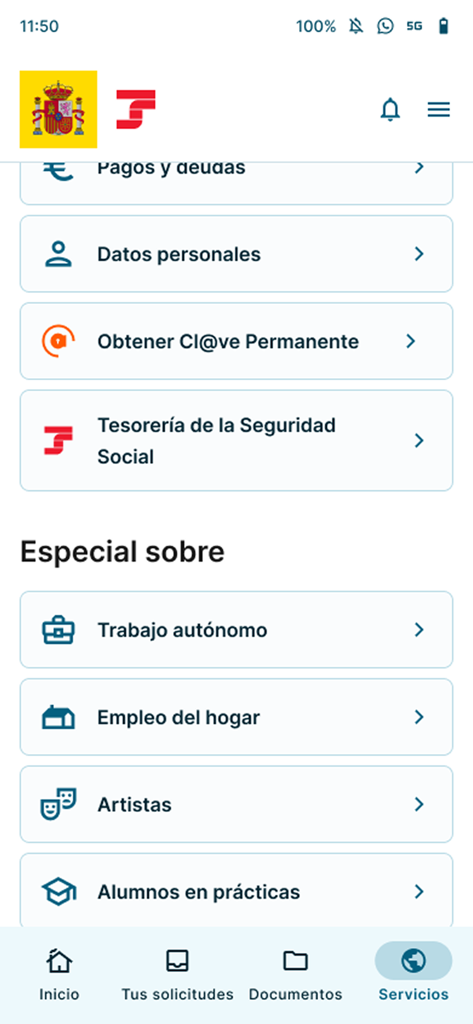
Importass Seguridad Social 앱의 서비스 메뉴, 자영업 및 가정부 업무 옵션 표시

Importass Seguridad Social 앱의 서비스 메뉴, 자영업 및 가정부 업무 옵션 표시

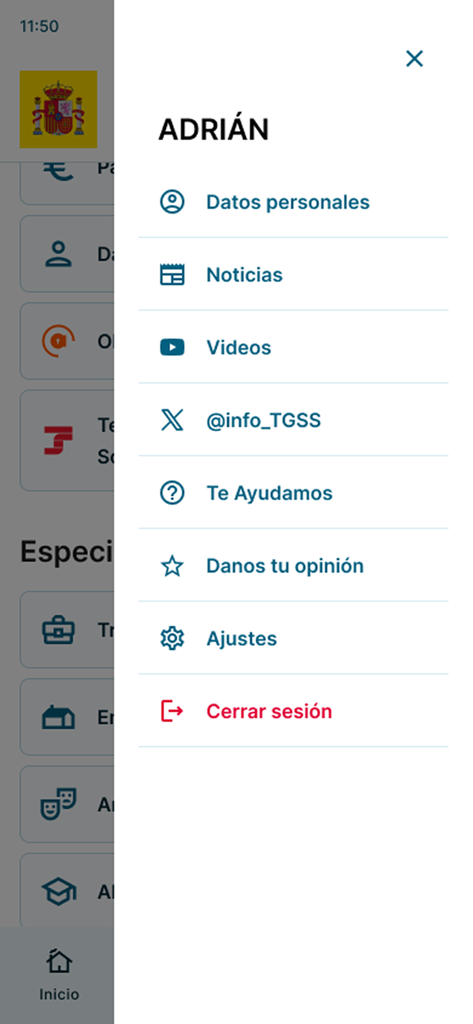
Importass Seguridad Social 앱의 사용자 프로필 측면 메뉴, 개인 데이터 및 설정 옵션 표시

Importass Seguridad Social 앱의 사용자 프로필 측면 메뉴, 개인 데이터 및 설정 옵션 표시

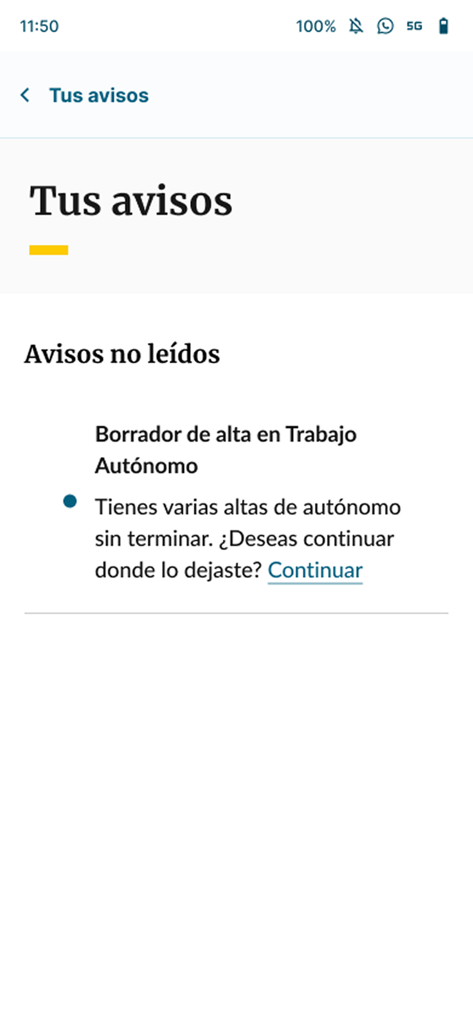
Importass 앱의 자영업 등록 미확인 알림 화면

Importass 앱의 자영업 등록 미확인 알림 화면

매끄러운 글로벌 관리

이 앱을 돋보이게 하는 도구, 634K+ 명의 사용자가 선택.

📄

즉각적인 공식 보고서

근로 이력서 또는 상태 증명서를 몇 초 만에 다운로드하세요. 인터넷 연결 없이도 필수 문서를 정리하고 액세스할 수 있습니다.

🛡️

고급 생체 인식 보안

귀하의 데이터는 최고 수준의 보안으로 보호됩니다. 기존의 복잡한 절차 없이 FaceID, TouchID 또는 Cl@ve를 사용하여 안전하게 프로필에 액세스하세요.

📈

스마트 보험료 시뮬레이션

자영업자 또는 가정 고용주이든 관계없이 고정밀 시뮬레이션 도구를 사용하여 납부액을 계산하고 등록을 관리하세요.

리뷰 분석

사용자 리뷰 인사이트.

감정 점수

13%
부정적

요약

This mobile app receives overwhelmingly negative feedback, primarily due to persistent login and authentication issues across various methods like Clave Permanente, digital certificates, and biometrics, frequently resulting in "unexpected errors" or infinite loading screens, particularly noted by iOS users. While recent updates have reportedly improved access for some using digital certificates and Cl@ve PIN, the app is widely criticized for its poor usability, lack of intuitiveness, and general functional unreliability. Users express frustration over the inability to perform essential procedures and a lack of support for features like Autofirma mobile. Despite these widespread issues, a few positive reviews acknowledge the app's potential utility and value recent developer efforts to implement improvements.

주요 테마

Login & Authentication Reliability(5)
Digital Certificate Support(3)
Overall Functionality(2)
Updates & Developer Response(2)
Ease of Use / User Experience(1)

앱 소개

에 대해 알아야 할 모든 것 Importass Seguridad Social.

설명

Importass Seguridad Social es la aplicación móvil oficial de la Tesorería General de la Seguridad Social, responsable de la recaudación y afiliación de los trabajadores y empresas en el sistema de Seguridad Social. A través de esta aplicación, podrás realizar trámites y consultar información pública y personal de manera sencilla y gratuita, igual que lo haces a través del portal web de la Tesorería General de la Seguridad Social, Importass. Seguridad y Acceso: La aplicación ofrece acceso seguro a tu información personal mediante Cl@ve Permanente, Cl@ve Móvil, Certificado Digital o vía SMS, si tienes comunicado tu teléfono móvil a la Seguridad Social. También podrás configurar el acceso biométrico de tu dispositivo. Si no dispones de identificación digital, también puedes solicitar tus trámites identificándote con una foto y tu documento de identidad. Servicios Destacados: • Informes y Certificados: Descarga tu informe de vida laboral, tu informe de situación actual como trabajador o tu informe de bases de cotización. • Número de Seguridad Social (NUSS): Obtén tu número de la Seguridad Social y su acreditación. • Datos Personales: Consulta, completa y modifica los datos personales que tienes comunicados a la Tesorería General de la Seguridad Social. • Deudas y Pagos: Consulta, aplaza o paga deudas a la Seguridad Social, obtén documentos de pago, solicita la devolución de ingresos, y solicita el informe o certificado de estar al corriente con la Seguridad Social. Para Trabajadores Autónomos: • Altas y bajas: Tramita tu alta, baja, solicita la acreditación de estas situaciones y comunica tus variaciones en trabajo autónomo. • Regularización: Conoce el resultado de tu regularización y realiza los trámites relacionados. • Recibos: Consulta tus recibos emitidos por la TGSS. • Simulación de Cuota: Simula tu cuota. Para Empleadores de Hogar: • Gestión de Empleados: Tramita el alta, baja, solicita la acreditación de estas situaciones y comunica la variación de las condiciones laborales de la persona empleada. • Recibos: Consulta tus recibos emitidos por la TGSS. • Simulación de Cuota: Simula la cuota. Para Empleados de Hogar: • Información de Actividad: Consulta toda la información relacionada con tu actividad y tu cuota. Para Artistas por Cuenta Ajena: • Gestión de Ingresos: Solicita la devolución de ingresos, opta por la regularización por retribuciones, y da de baja en el censo de artistas. Para Alumnos en Prácticas: • Información de alumnos en prácticas: Consulta la información sobre tus prácticas sean o no remuneradas. Otros Informes y Certificados: • Acreditaciones: Obtén la acreditación de no estar inscrito como empresario, justificante de jornadas reales trabajadas, y acreditación de la actividad agraria por cuenta propia. Ventajas de la Aplicación: Accede a los certificados o informes descargados previamente desde el menú Servicios, disponibles en cualquier momento y lugar, incluso sin conexión a Internet. Notificaciones: Recuerda activar las notificaciones para recibir comunicaciones relevantes para ti. Puede acceder a la declaración de accesibilidad en https://sede.seg-social.gob.es/binarios/es/AccApple

최신 버전

2.2.5

크기

39.5 MB

출시일

2024년 7월 10일

사회보장 사무소를 주머니에 담으세요

600,000명 이상의 전문가와 함께하세요. 공식 보고서를 즉시 다운로드하고 어디서든 모든 업무를 완벽하게 안전하게 처리하세요.

다운로드: App Store
FAQ

자주 묻는 질문

에 대해 알아야 할 모든 것 Importass Seguridad Social

Importass Seguridad Social 앱에 어떻게 로그인하나요?

Importass Seguridad Social 앱은 Cl@ve Permanente, Cl@ve Móvil, Certificado Digital, SMS 또는 생체 인식 인증을 사용하여 안전한 액세스를 제공합니다. 디지털 신원 확인이 없는 사용자는 사진과 신분증으로 로그인할 수 있습니다.

Importass Seguridad Social 앱에서 제 개인 정보는 안전하게 보호되나요?

예, Importass Seguridad Social 앱은 개인 정보에 대한 안전한 액세스를 제공합니다. 사용자 데이터를 보호하기 위해 Cl@ve Permanente 및 디지털 인증서와 같은 강력한 식별 방법을 사용합니다.

Importass Seguridad Social 앱을 사용하여 사회 보장 번호(NUSS)를 받을 수 있나요?

예, Importass Seguridad Social 앱을 통해 사회 보장 번호(NUSS)와 그 증명서를 직접 받을 수 있습니다. 이 서비스는 모든 사용자에게 제공됩니다.

Importass Seguridad Social에서 근로 이력 보고서(Informe de vida laboral)를 어떻게 다운로드하나요?

Importass Seguridad Social 앱에서 근로 이력 보고서(Informe de vida laboral)를 다운로드할 수 있습니다. 이 보고서는 서비스 화면의 'Informes y Certificados' 섹션 또는 'Servicios más utilizados'에서 액세스할 수 있습니다.

Importass Seguridad Social 앱 내에서 제 개인 정보를 수정할 수 있나요?

예, Importass Seguridad Social 앱을 사용하면 Tesorería General de la Seguridad Social에 전달된 개인 정보를 애플리케이션에서 직접 조회, 완성 및 수정할 수 있습니다.

Importass Seguridad Social 앱에서 부채 및 납부 관리가 가능한가요?

예, Importass Seguridad Social 앱을 사용하면 사회 보장에 대한 부채를 조회, 연기 또는 납부할 수 있습니다. 또한 납부 문서를 받고 소득 환급 또는 정기 증명서를 요청할 수 있습니다.

Importass Seguridad Social 앱은 자영업자를 위해 어떤 특정 서비스를 제공하나요?

Importass Seguridad Social 앱은 자영업자를 위해 등록 및 등록 해지 처리, 변경 사항 통지, 정산 결과 확인, 기여금 시뮬레이션과 같은 서비스를 제공합니다.

인터넷 연결 없이 Importass Seguridad Social 앱에서 다운로드한 문서에 액세스할 수 있나요?

예, Importass Seguridad Social 앱은 인터넷 연결 없이도 언제 어디서든 서비스 메뉴에서 이전에 다운로드한 인증서 또는 보고서에 액세스할 수 있도록 합니다.

Importass 앱을 통해 사회 보장으로부터 중요한 통신을 어떻게 받나요?

관련 통신을 받으려면 Importass Seguridad Social 앱 내에서 알림을 활성화해야 합니다. 이렇게 하면 상태와 관련된 중요한 업데이트 또는 경고에 대한 정보를 받을 수 있습니다.

Importass Seguridad Social을 사용하여 사회 보장 신청 상태를 추적할 수 있나요?

예, Importass Seguridad Social 앱을 통해 Tesorería General de la Seguridad Social에 제출된 모든 신청 또는 요청의 상태를 조회하고, 문서를 첨부하고, 추적할 수 있습니다.

App information, icons, screenshots, and descriptions displayed on this page are sourced from the Apple App Store and are the property of their respective developers. Download estimates and rankings are based on MWM's proprietary models and may not reflect actual figures. This page is provided for informational and analytical purposes only.

Believe this page infringes your intellectual property? File a dispute