수동으로 선별한 사전과 완전한 개인 정보 보호를 통해 데스크톱 타이핑 속도를 경험하세요. '전체 접근'이 필요 없으며, 파워 유저를 위한 순수하고 고성능의 입력만 제공합니다.
개발사
然 赵
카테고리
Utilities
다운로드
0
사용자 평점
4.1/5
총 평가 수
0
지원 언어
1
모든 스트로크의 정밀도
이 인터페이스를 사용하는 0 명의 사용자.
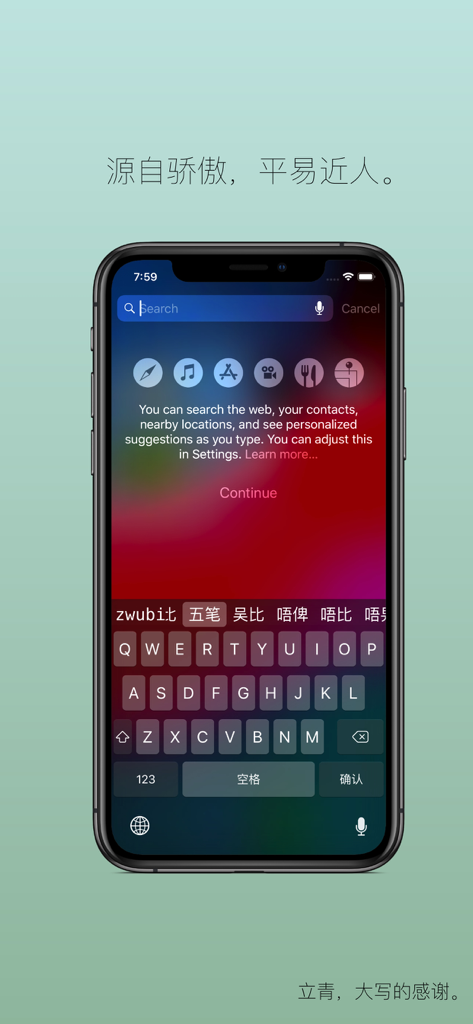
iPhone 화면에 표시되는 낙격 오필 사용자 지정 키보드 인터페이스.
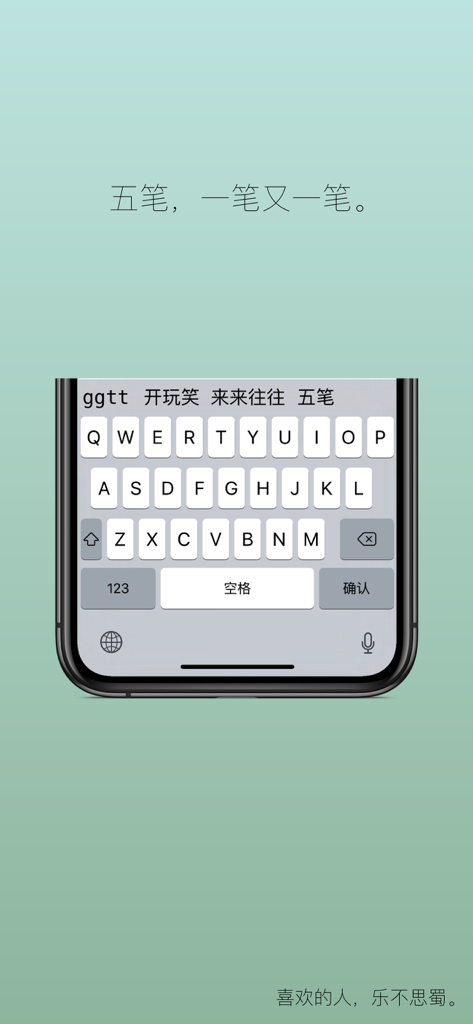
스마트폰에 표시되는 낙격 오필 중국어 입력 방식 키보드 인터페이스
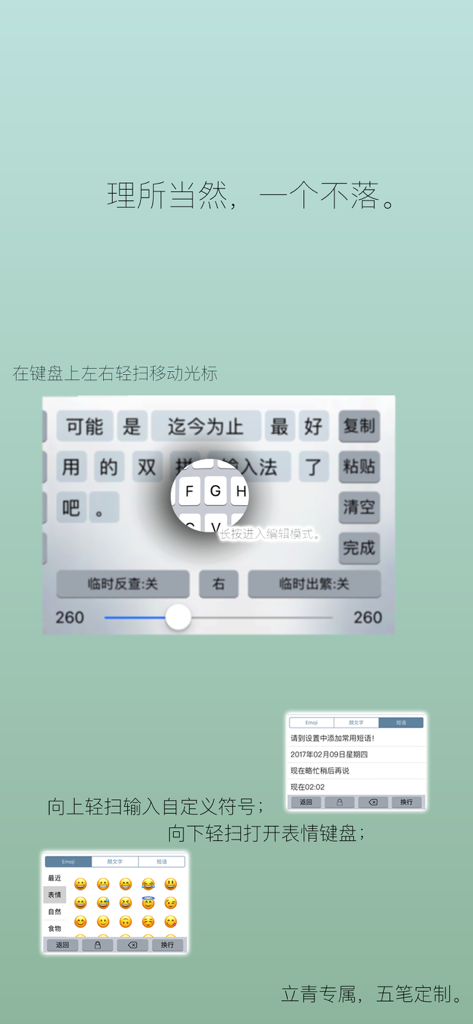
커서 제어 및 이모티콘 접근을 위한 스와이프 제스처를 보여주는 낙격 오필 키보드 앱 인터페이스
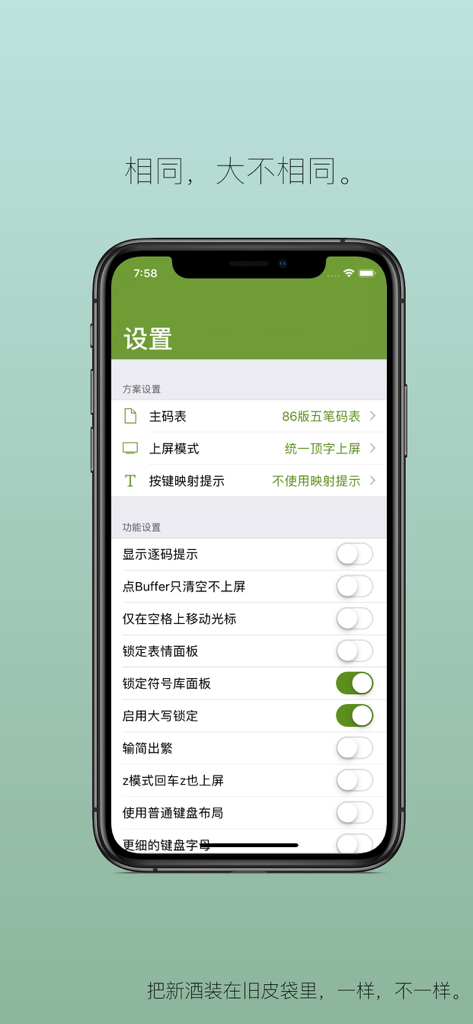
입력 방식 사용자 지정에 대한 다양한 구성 옵션을 표시하는 iPhone의 낙격 오필 앱 설정 화면
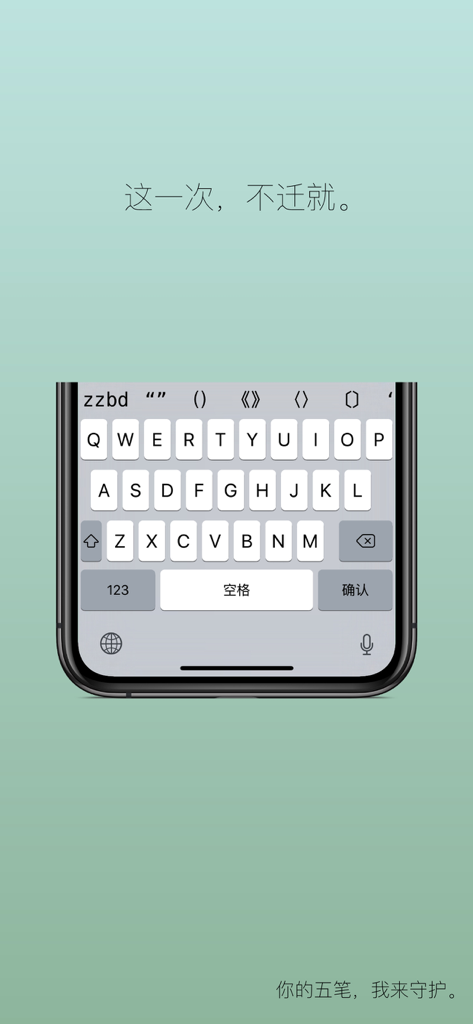
중국어 슬로건이 있는 낙격 오필 입력 방식용 미니멀리스트 iOS 키보드 인터페이스
iOS용 데스크톱급 오필 성능
이 앱을 돋보이게 하는 도구, 0 명의 사용자가 선택.
🔒
개인 정보 우선 아키텍처
'전체 접근'이 필요 없습니다. 키 입력 내용을 업로드하거나 기록을 저장하지 않으므로 데이터는 기기에 엄격하게 보관되며 클라우드로 전송되지 않습니다.
📥
사용자 지정 가능한 코드 테이블
Wi-Fi 또는 공유를 통해 사용자 지정 매핑을 원활하게 가져옵니다. 장인 정신으로 선별된 테이블로 워크스테이션에서와 동일한 '블라인드 타이핑' 속도를 달성하세요.
⚡
파워 유저 생산성
선택 지연 없이 고속 출력을 위해 설계된 52가지 사용자 지정 가능한 제스처와 특수 오필 최적화로 워크플로를 마스터하세요.
앱 소개
에 대해 알아야 할 모든 것 落格五笔-立青专属五笔定制版.
설명
**Log Wubi: The True Wubi Experience on iOS, Now Customizable!**
For the first time ever, Log Wubi brings a truly customizable Wubi input method to iOS! Thanks to Li Qing's meticulously hand-compiled Wubi dictionary, meticulously organized and weighted word by word, typing with Wubi on your iPhone and iPad is now as smooth and satisfying as on your computer.
Start today and enjoy a Wubi input experience on your mobile devices that's virtually identical to what you're used to on your desktop.
— "Wubi, one stroke at a time."
* Log Wubi is a universal app. Purchase it once and use it on both your iPhone and iPad.
* **Log Wubi will NEVER request "Full Access."** We do not spy on your privacy, upload your typing history, or record anything you type – ever!
* **Log Wubi will NEVER request "Full Access."** We do not spy on your privacy, upload your typing history, or record anything you type – ever!
* **Log Wubi will NEVER request "Full Access."** We do not spy on your privacy, upload your typing history, or record anything you type – ever!
And that's not all – it's packed with even more thoughtful features!
"
Don't be too quick to be impressed.
We've got more exciting new features for you.
Emoji and Kaomoji
Add flair and color to your text,
and bring life to your world.
"
- Long-press the backspace key to delete continuously.
- Slide left or right on the keyboard to move the cursor.
- Input Emoji and Kaomoji for expressive typing.
- A durable and aesthetically pleasing keyboard interface.
- Long-press to quickly adjust keyboard height.
- Customize quick phrases for faster input.
- Smart Emoji suggestions.
- Configuration syncs across all your devices!
- Customizable key gesture points.
- Choose between "Direct Input" and "Top Word Input" for four-character input.
- Use "zrq," "zxq," and "zsj" to input date, weekday, and time, respectively.
- Import contacts as dictionary entries.
- Input Simplified Chinese, output Traditional Chinese.
- Split phrases for copying.
- Full VoiceOver support.
- Possibly the second input method to support the in-line Buffer mode!
- Import any custom dictionary.
- Import any key mapping scheme.
- Import dictionaries via Wi-Fi.
- Import dictionaries by sharing from other apps.
- The spacebar swipe acts as a universal matching key.
- Smart suggestions for inputting special symbols.
- Switch between uppercase and lowercase letters.
- Word association – possibly the only input method that follows your cursor!
- Reversed gestures – tell us, who else allows you to get this creative?
- Freely switch keyboard font thickness.
- Enable dark mode system-wide, just like the system!
- Automatic space after numbers and letters.
- Pressing 'z' repeats the last input.
- 'z' + Pinyin for Pinyin input guidance.
- Normal and Mac keyboard modes.
- Long-press Enter to create a new line.
- Key click sounds.
- More specialized Wubi features.
- Up to 52 customizable gestures in dual directions – it's FAST!
- One-handed mode, just like the native system!
- No keycap labels mode.
**Please Note:**
* Log Wubi does not support full Pinyin input.
* Third-party input methods do not support Bluetooth keyboards.
* Due to a system bug, you may need to re-add the third-party keyboard in settings when it shows as "null."
* "Please resist hollow input method software that charges fees by using freely shared dictionaries! Supporting such practices ultimately harms developers and users alike." — Users who use such dictionaries are welcome to purchase Log Wubi at their leisure. This input method will **NOT** harm you or them! (Because Log Wubi uses our own meticulously compiled dictionaries! Hahahahahaha.)
* Some users find the keyboard jumps around and is difficult to use. Please be aware.
* Log Wubi does not allow the use of a certain double-spell dictionary.
---
"Although I'm not a double-spell user, I was moved by the developer's passion. It's been a long time since we've seen such an enthusiastic developer in the input method space..." — By Glider, author of QIM Input Method
"Thank you Li Qing for every late night you dedicated to Log Input Method. Log Wubi was born for him, and the dictionary was compiled by him manually. Now, you can have it too." — By Zhao Ran, author of Log Input Method
"Under Log's excellent dictionary platform, with specialized optimizations for Wubi, I've rediscovered the joy of typing Wubi on a keyboard." — By Li Qing
"This input method is so good, I'm crazy about it! Thank you, author, for letting me meet you in this life! No matter the fate, no matter the time, we will be together forever; no matter the seas dry up or the rocks erode, we will never be separated!" — By a user with a username that's already taken#$
"Log is currently the best Wubi input method on the iOS 10 platform." — By 流星1969
"This is the best Wubi input method I've used for iOS." — By Kevin
"The interface is simple, feeling like the system input method with an added Wubi function. The macro function in word selection is really great." — By 很好很快有意思真不错
"Currently the most user-friendly and best-looking Wubi input method I've encountered." — By ArkesBao
"Good Wubi, good dictionary." — By 罗立青
"Easy to use." — By 被门夹过的核桃还能补脑吗
"1. I really like the clean and simple interface. Much better than others. 2. The response is fast enough. Truly lightning fast." — By 无梦空灵
"Worth recommending!" — By 衣上酒痕
"The speed, smoothness, and stability are undeniable." — By lsuen
"This is the first time I've found such a satisfying input method on my phone. It's not laggy at all. I really want to give it a hundred-star rating." — By 飞翔的红叶
——————I am the cute separator————————
Input methods are different from other apps. They are more intimately connected to you than any other app. They guard your privacy, shoulder the work of your communication and translation with the internet, and serve as the bridge between humans and machines.
* TG Group: https://t.me/joinchat/AAAAAECjhwHK6_kZ-exGUw (Click the developer's website to join)
* User Forum: https://im.logcg.com/support (Click to jump to technical support)
최신 버전
2.67
크기
91.6 MB
출시일
2017년 4월 19일
손끝의 기대를 저버리지 않는 전문적인 입력
번거로움을 거부하고 개인 정보를 지킵니다. 지금 낙격 오필을 다운로드하여 iPhone 및 iPad에서 오랫동안 기다려온 물 흐르듯한 경험을 되찾으세요.
App information, icons, screenshots, and descriptions displayed on this page are sourced from the Apple App Store and are the property of their respective developers. Download estimates and rankings are based on MWM's proprietary models and may not reflect actual figures. This page is provided for informational and analytical purposes only.
Believe this page infringes your intellectual property? File a dispute