Miracast + Screen Mirror

Miracast + Screen Mirror

다운로드: App Store
로고: Miracast + Screen Mirror

Miracast + Screen Mirror: 초 단위로 화면을 모든 기기와 공유하세요

생태계 장벽을 허무세요. 케이블이나 추가 하드웨어 없이 iPhone 또는 iPad를 Windows PC, 스마트 TV, 여러 브라우저로 거의 제로에 가까운 지연 시간으로 손쉽게 미러링하세요.

개발사

枭波 王

카테고리

Photo & Video

다운로드

116K+

사용자 평점

4.0/5

총 평가 수

1K+

지원 언어

1

어디서든 당신의 화면

이 인터페이스를 사용하는 116K+ 명의 사용자.

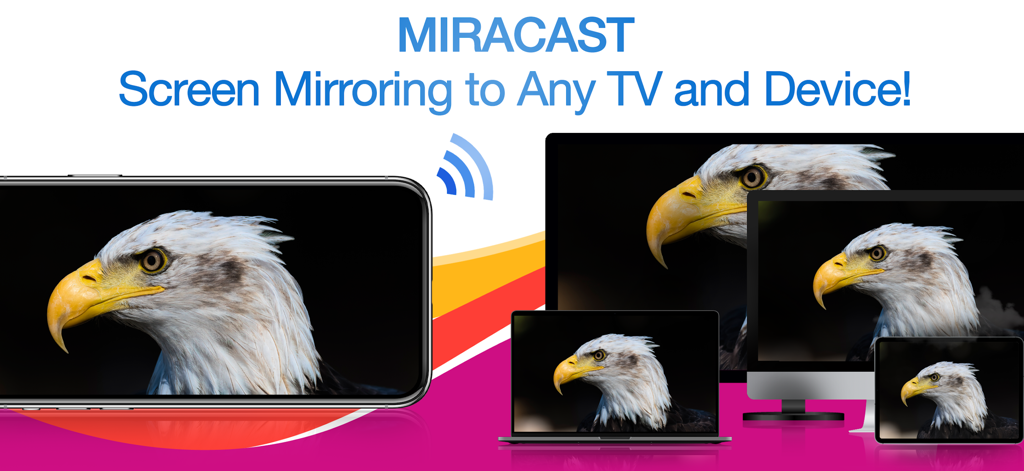
iPhone이 독수리 이미지를 무선으로 노트북, 데스크톱 모니터, 태블릿에 동시에 미러링하는 모습

iPhone이 독수리 이미지를 무선으로 노트북, 데스크톱 모니터, 태블릿에 동시에 미러링하는 모습

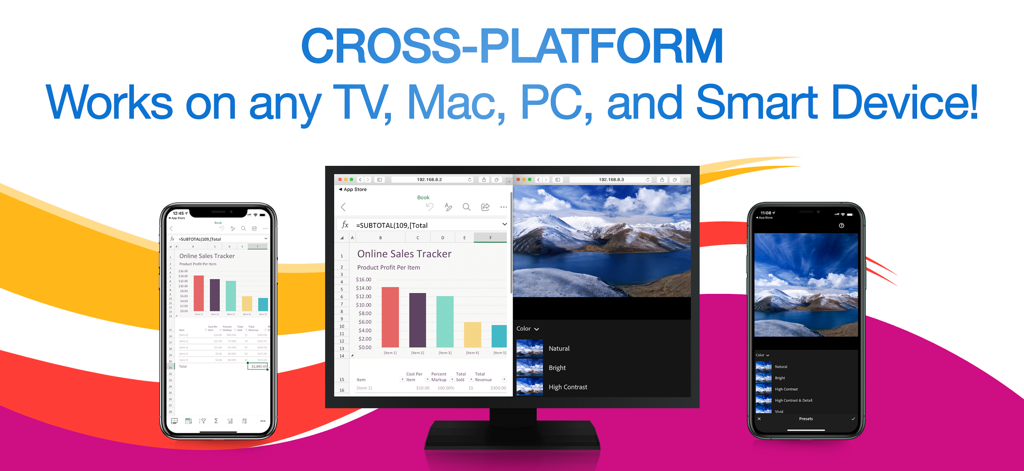
Miracast 앱이 여러 iPhone에서 스프레드시트와 사진을 컴퓨터 모니터에 동시에 미러링하는 것을 보여주는 모습

Miracast 앱이 여러 iPhone에서 스프레드시트와 사진을 컴퓨터 모니터에 동시에 미러링하는 것을 보여주는 모습

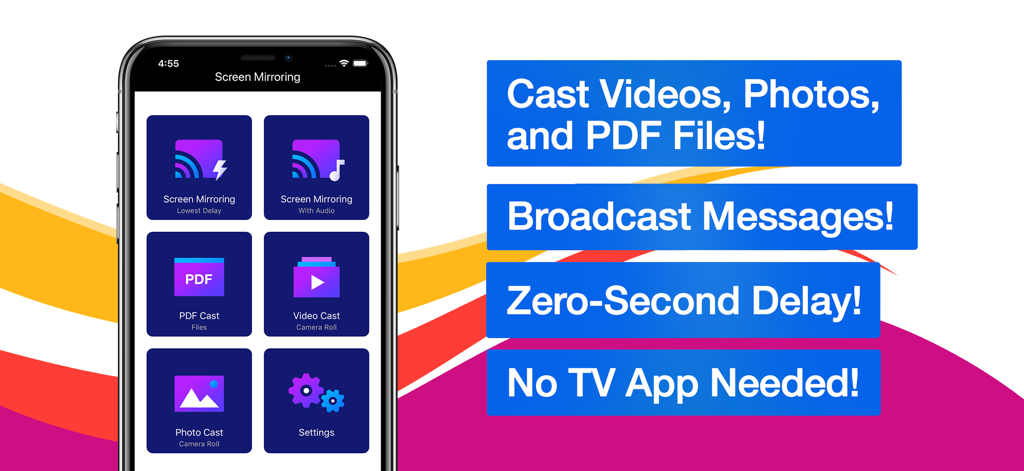
동영상, 사진, PDF 파일을 전송하는 옵션이 있는 Miracast 및 화면 미러링 앱 인터페이스

동영상, 사진, PDF 파일을 전송하는 옵션이 있는 Miracast 및 화면 미러링 앱 인터페이스

혼합된 환경을 위한 끊김 없는 미러링

이 앱을 돋보이게 하는 도구, 116K+ 명의 사용자가 선택.

💻

보편적인 크로스 플랫폼 지원

호환성 문제로 더 이상 고민하지 마세요. 케이블이나 추가 하드웨어 없이 웹 브라우저만 사용하여 iPhone을 Windows PC, Mac, 비 Apple TV로 직접 미러링하세요.

📡

동시 다중 기기 전송

프레젠테이션이나 수업에 완벽합니다. 화면을 여러 수신기에 동시에 방송하여 회의실의 모든 사람이 같은 내용을 볼 수 있도록 하세요.

초저지연 성능

실시간 속도를 경험하세요. 앱을 시연하거나 동영상을 공유할 때, 불편한 지연 없이 모든 동작을 따라가는 거의 즉각적인 미러링을 즐기세요.

리뷰 분석

사용자 리뷰 인사이트.

감정 점수

5%
부정적

요약

Users express strong dissatisfaction with the app, primarily due to its aggressive and often misleading subscription model, where many features are locked behind paywalls even after supposed "free trials." Many reviewers report that the app simply "doesn't work" or fails to perform basic screen mirroring functions as advertised, with common issues including lack of video or audio. Furthermore, users frequently highlight problems with device compatibility, such as non-functionality with Samsung devices, iPads, or specific dongles like Anycast, and difficulty obtaining refunds for non-working purchases.

주요 테마

Subscription Model(35)
App Functionality(20)
Screen Mirroring Issues(10)
Misleading Practices(9)
Refund Process(3)
General Satisfaction(1)

앱 소개

에 대해 알아야 할 모든 것 Miracast + Screen Mirror.

설명

** Instantly mirror your iPhone or iPad's screen and media to multiple devices simultaneously – quickly, easily & nearly no delays! Mirror your iPhone/iPad screen to multiple computers or devices in near real time. Your iPhone/iPad screen can be viewed on a web browser on any computer or device with zero interruptions or uncomfortable delays. Everything you do on your iPhone/iPad is wirelessly mirrored without cables or adapters. Stay connected on the go, wherever you are. You can wirelessly mirror your iPhone/iPad's screen or stream files to receivers such as Smart TVs, PCs, Macs, Smartphones, Tablets, Laptops, Game Consoles, etc. Exclusive Features: • Multi-Screen Mirroring - Mirror your iPhone/iPad's screen and audio to a number of computers and devices, even simultaneously. • Cross-Platform - Never worry about compatibility issues again – any computer or device with a web browser is supported. • Virtually No Delays - Enjoy quick and easy screen mirroring and media casting with almost no delays at all. • Multi-Media Support - Beside your iPhone or iPad's screen, you can also cast videos, photos, or PDFs to multiple digital devices simultaneously. • Broadcast Messages - While mirroring your screen, you can broadcast text messages or images to your viewers at the same time. • Mirror Multiple Screens - You can view multiple mirrored screens on the same device simultaneously. • Simple and Intuitive UI - Beautiful, modern icons and other interface design elements make this app a brand new experience on iOS and iPadOS. NOTES: • Please make sure all of your computers and devices are connected to the same network. This app is unavailable on complex network environments, such as Firewall on Private Network, VLANs, Subnets, VPN, or Proxy. It only work on simple network environment, such as ordinary home networks (home use wireless router or switch). • Mirroring performance and quality depends on your network health and hardware devices. *** Upgrade to Premium to unlock all the great features *** Information about the auto-renewable subscription: • Payment will be charged to iTunes Account at confirmation of purchase. • Subscription automatically renews unless auto-renew is turned off at least 24-hours before the end of the current period. • Account will be charged for renewal within 24-hours prior to the end of the current period. The cost depends on the selected plan. • Subscriptions may be managed by the user and auto-renewal may be turned off by going to the user's Account Settings after purchase. • Any unused portion of the free trial will be forfeited when the user purchases a subscription. Privacy Policy: https://appsupport11.blogspot.com/2020/07/privacy-policy.html Terms of Use: https://appsupport11.blogspot.com/2020/10/terms.html

최신 버전

4.5

크기

13.8 MB

출시일

2020년 9월 4일

iPhone을 모든 화면으로 미러링할 준비가 되셨나요?

Apple 생태계에서 벗어나세요. 케이블이나 지연 시간 없이 Windows, 스마트 TV 또는 여러 브라우저로 동시에 화면, 동영상, PDF를 전송하기 시작하세요.

다운로드: App Store

App information, icons, screenshots, and descriptions displayed on this page are sourced from the Apple App Store and are the property of their respective developers. Download estimates and rankings are based on MWM's proprietary models and may not reflect actual figures. This page is provided for informational and analytical purposes only.

Believe this page infringes your intellectual property? File a dispute