MoviePro - Pro Video Camera

MoviePro - Pro Video Camera


다운로드: App Store
로고: MoviePro - Pro Video Camera

MoviePro: iPhone 및 iPad용 전문가용 시네마 카메라

기기를 프로덕션 준비 완료된 강력한 도구로 바꿔보세요. 시네마틱 정밀도로 모든 샷을 캡처하기 위해 수동 제어, ProRes 코덱 및 고급 오디오 모니터링 기능을 잠금 해제하세요.

다운로드: App Store

개발사

Deepak Sharma

카테고리

Photo & Video

다운로드

473K+

사용자 평점

4.3/5

총 평가 수

5K+

지원 언어

1

손끝으로 만나는 시네마

이 인터페이스를 사용하는 473K+ 명의 사용자.

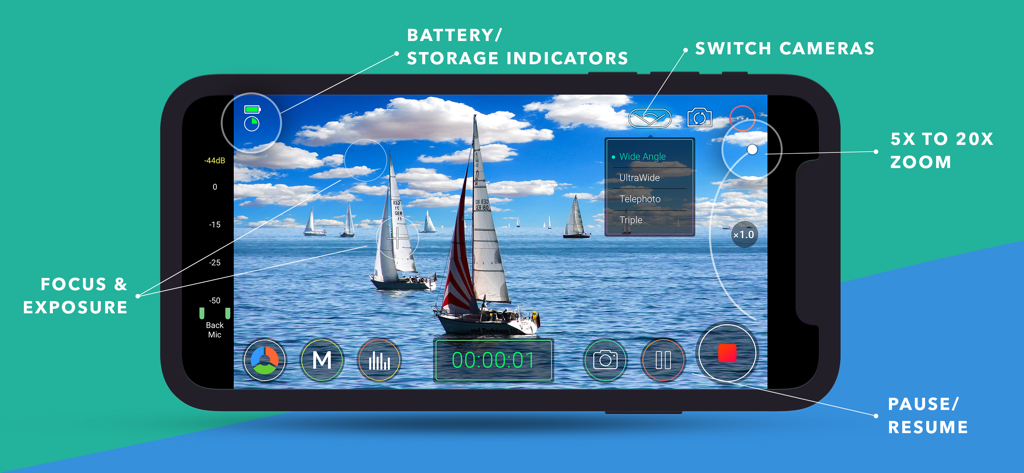
전문 영상 녹화를 위한 수동 초점 노출 및 줌 컨트롤을 보여주는 MoviePro 인터페이스

전문 영상 녹화를 위한 수동 초점 노출 및 줌 컨트롤을 보여주는 MoviePro 인터페이스

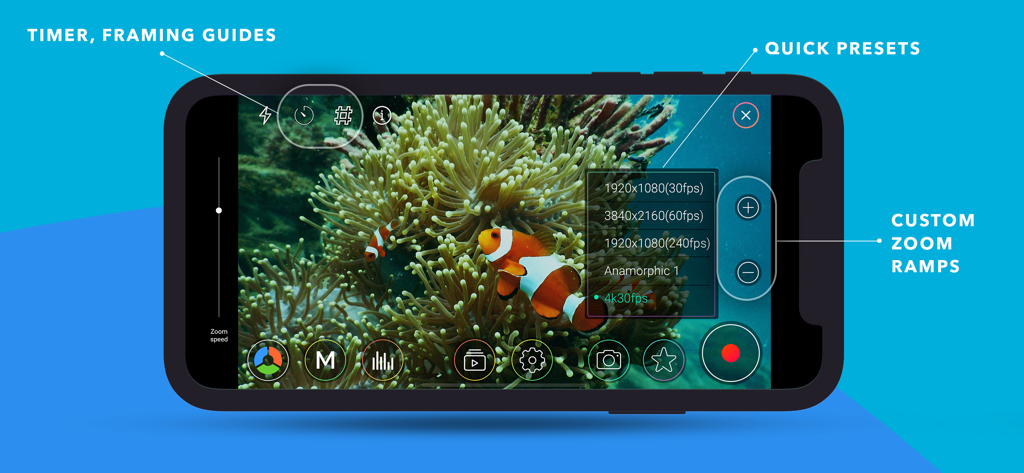
수동 영상 녹화 컨트롤, 해상도 사전 설정 및 사용자 지정 줌 램프를 보여주는 MoviePro 앱 인터페이스.

수동 영상 녹화 컨트롤, 해상도 사전 설정 및 사용자 지정 줌 램프를 보여주는 MoviePro 앱 인터페이스.

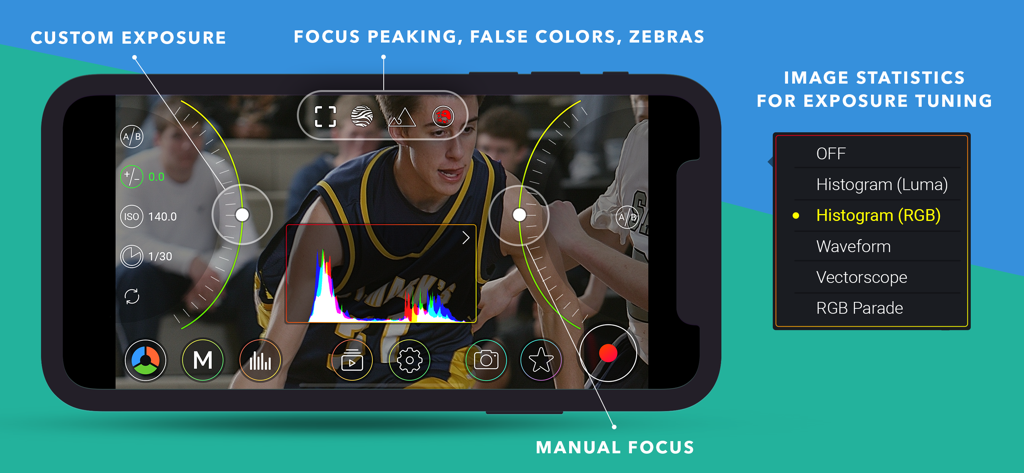
수동 노출 초점 컨트롤 및 실시간 RGB 히스토그램 통계가 포함된 전문가 영상 녹화를 위한 MoviePro 앱 인터페이스

수동 노출 초점 컨트롤 및 실시간 RGB 히스토그램 통계가 포함된 전문가 영상 녹화를 위한 MoviePro 앱 인터페이스

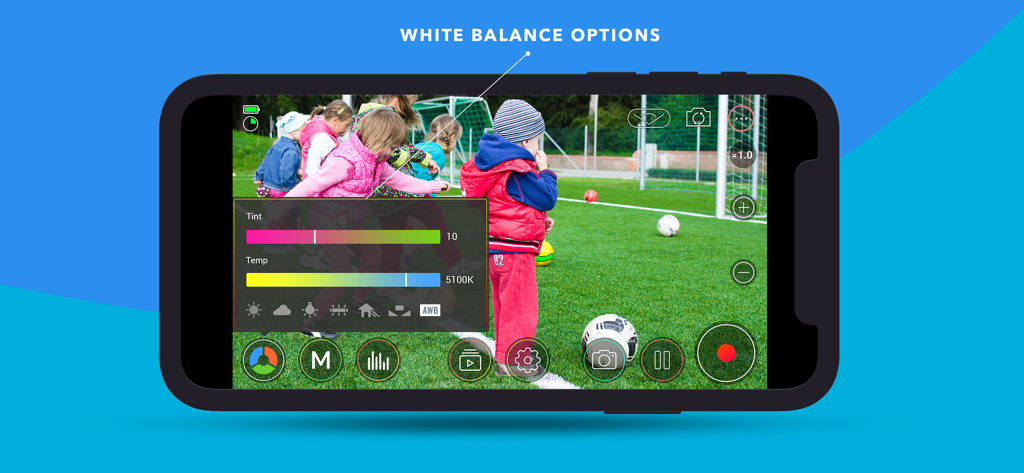
수동 화이트 밸런스 색조 및 온도 컨트롤을 표시하는 MoviePro 비디오 카메라 인터페이스.

수동 화이트 밸런스 색조 및 온도 컨트롤을 표시하는 MoviePro 비디오 카메라 인터페이스.

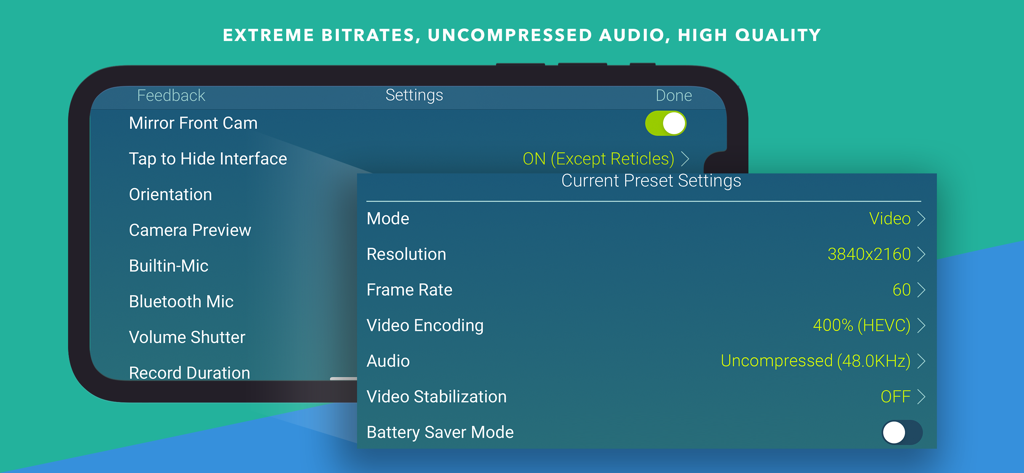
4K 해상도 및 압축되지 않은 오디오와 같은 고급 비디오 및 오디오 사전 설정 설정을 보여주는 MoviePro 앱 인터페이스.

4K 해상도 및 압축되지 않은 오디오와 같은 고급 비디오 및 오디오 사전 설정 설정을 보여주는 MoviePro 앱 인터페이스.

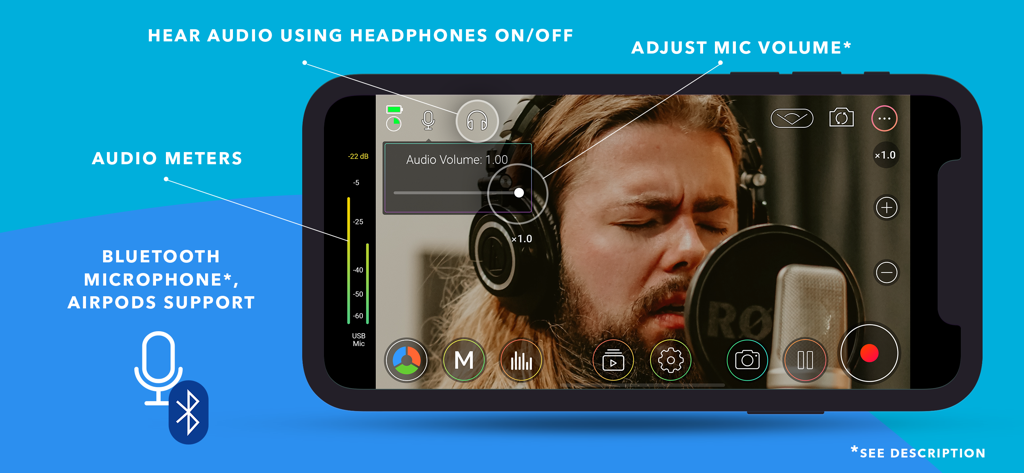
iPhone에서 전문 오디오 미터 및 마이크 볼륨 컨트롤 설정을 보여주는 MoviePro 앱 인터페이스

iPhone에서 전문 오디오 미터 및 마이크 볼륨 컨트롤 설정을 보여주는 MoviePro 앱 인터페이스

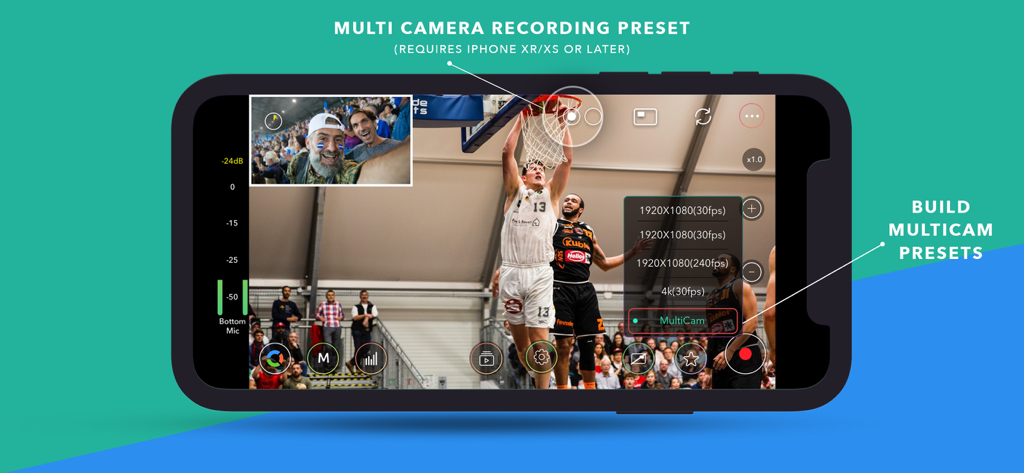
iPhone에서 Picture-in-Picture 사전 설정을 사용한 멀티 카메라 녹화를 보여주는 MoviePro 앱 인터페이스

iPhone에서 Picture-in-Picture 사전 설정을 사용한 멀티 카메라 녹화를 보여주는 MoviePro 앱 인터페이스

iPhone을 시네마 카메라로 바꾸세요

이 앱을 돋보이게 하는 도구, 473K+ 명의 사용자가 선택.

🎛️

완벽한 수동 정밀도

기본 자동 설정의 예측 불가능성을 제거하기 위해 수동 포커스 풀, 노출 잠금 및 사용자 지정 화이트 밸런스로 모든 샷을 마스터하세요.

🎬

프로덕션 준비 워크플로우

최대 동적 범위를 유지하기 위해 ProRes, Apple Log 및 고비트 전송률 4K로 캡처하여 후반 작업에서 전문적인 색상 보정을 하세요.

🎧

전문 오디오 및 모니터링

실시간 오디오 미터, 마이크 게인 제어 및 AirPods 또는 외부 전문 마이크를 통한 실시간 모니터링으로 완벽한 사운드를 확보하세요.

앱 소개

에 대해 알아야 할 모든 것 MoviePro - Pro Video Camera.

설명

MoviePro is a professional video recording app that unlocks advanced camera capabilities on iPhone and iPad. Designed for beginners and professionals alike, MoviePro delivers precise control over video, audio, and color — far beyond the standard Camera app. With support for high-end codecs, manual controls, live monitoring tools, and external accessories, MoviePro turns your device into a production-ready camera. Capture With Precision • Wide range of video resolutions, from 4K to low-resolution formats • Extensive aspect-ratio support, including cinematic and anamorphic ratios • Frame rates from 240 fps down to 1 fps • Adjustable bitrate and compression levels Supported Codecs • HEVC and H.264 • ProRes 4444, ProRes 422, HQ, LT, and Proxy* Advanced Color Support • Rec.709, P3, BT.2020, and Apple Log* • Log recording on supported iPhone Pro models • Dolby Vision HDR* Professional Camera Controls • Manual focus, exposure, and white balance • Separate focus and exposure reticles • Focus pull support • Up to 20× zoom with adjustable zoom speed Stabilization & Camera Features • Extended cinematic video stabilization modes • MultiCam recording with multiple layout options* • Center Stage support on compatible iPads • Portrait Effect with front camera** Advanced Audio Recording • Built-in, external, and Bluetooth microphone support • AirPods support • Stereo audio recording • Mic gain control for external microphones • Live audio monitoring • Real-time audio meters Live Monitoring & Assist Tools • Histogram, Waveform, and Vectorscope • Focus peaking • Zebras, False Colors, and clipping indicators Output, Storage & Workflow • Record directly to Camera Roll • Record to the Files app or external storage • Clean HDMI / AirPlay output • Upload directly to YouTube or Dropbox • AirDrop via Files app • iTunes File Sharing Power Features • Custom recording presets • Battery saver mode for long sessions • Configurable recording duration Designed for Production Use • Lock interface orientation • Hide controls with or without reticles • Composition guides • Countdown timer Accessory Support • Clean HDMI / AirPlay output • Popular gimbals • Moondog Labs anamorphic lenses • 35mm image flip support Metadata • Location tagging • Copyright information embedded in video files Remote Control & Apple Watch MoviePro Remote • Free companion app • Control MoviePro from another iPhone or iPad • Change camera settings and start or stop recording remotely Apple Watch • Companion app installs automatically • Start and stop recording from Apple Watch • Live video preview on your wrist Support support@moviepro.app @movieproapp on Twitter * Features depend on device capabilities ** Portrait Effect can be enabled from Control Center Terms of Service https://www.apple.com/legal/internet-services/itunes/dev/stdeula/ Credit Attribution YouTube graphic icon by Icons8 (https://icons8.com)

최신 버전

9.0.8

크기

50.0 MB

출시일

2012년 8월 29일

iPhone을 전문가용 시네마 카메라로 바꾸세요

470,000명 이상의 영화 제작자 및 크리에이터와 함께하세요. 다음 프로덕션을 위해 완벽한 수동 제어, ProRes 녹화 및 시네마틱 정밀도를 잠금 해제하세요.

다운로드: App Store

App information, icons, screenshots, and descriptions displayed on this page are sourced from the Apple App Store and are the property of their respective developers. Download estimates and rankings are based on MWM's proprietary models and may not reflect actual figures. This page is provided for informational and analytical purposes only.

Believe this page infringes your intellectual property? File a dispute