MultiTimer: Multiple timers

MultiTimer: Multiple timers


다운로드: App Store
로고: MultiTimer: Multiple timers

MultiTimer: 전체 시간 제어를 위한 전문가용 대시보드

맞춤 설정 가능한 보드, 광고 없는 집중, 원활한 Apple Watch 통합 기능으로 기본 시계를 넘어서세요. 모든 작업, 운동, 집중 업무 시간을 정확하게 추적해야 하는 고성과자를 위해 설계되었습니다.

개발사

PERSAPPS (PERSEPS), TOO

카테고리

Utilities

다운로드

171K+

사용자 평점

4.7/5

총 평가 수

15K+

지원 언어

15

당신의 시간, 시각화

이 인터페이스를 사용하는 171K+ 명의 사용자.

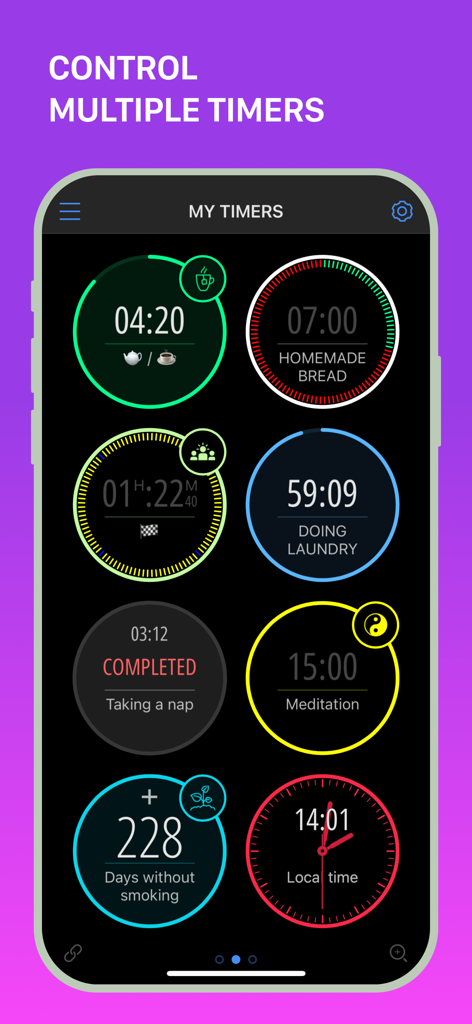
MultiTimer 앱 인터페이스는 요리, 세탁, 명상을 위한 다양한 활성 타이머가 있는 대시보드를 보여줍니다.

MultiTimer 앱 인터페이스는 요리, 세탁, 명상을 위한 다양한 활성 타이머가 있는 대시보드를 보여줍니다.

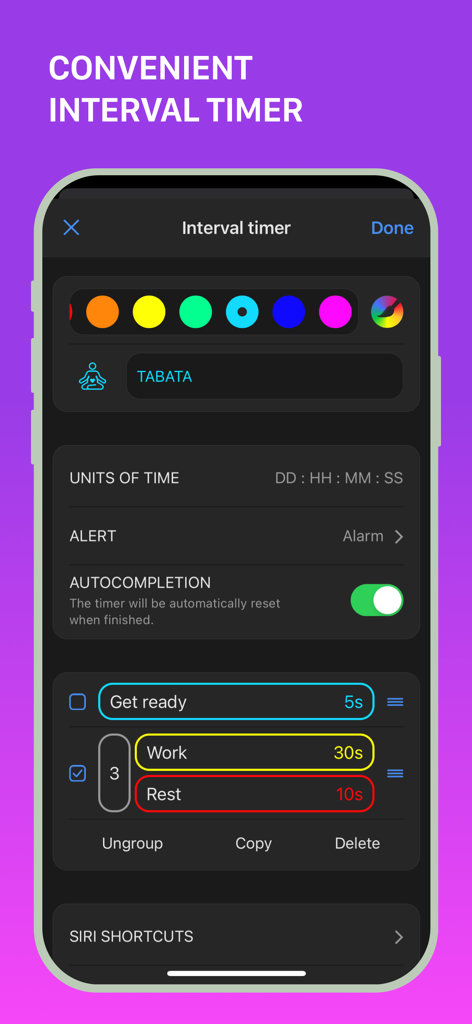
타바타 운동을 위한 MultiTimer 앱의 맞춤 설정 가능한 간격 타이머 설정.

타바타 운동을 위한 MultiTimer 앱의 맞춤 설정 가능한 간격 타이머 설정.

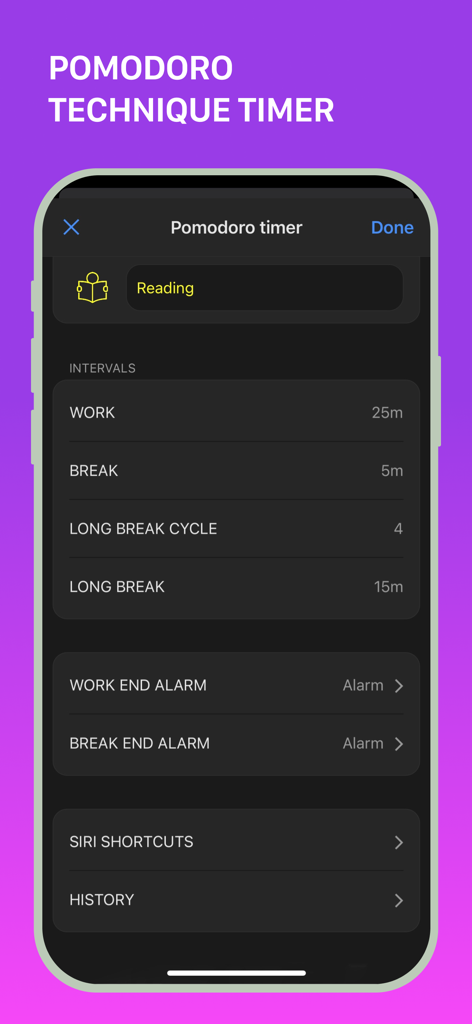
MultiTimer 앱 뽀모도로 기법 타이머 설정으로 작업 및 휴식 간격을 보여줍니다.

MultiTimer 앱 뽀모도로 기법 타이머 설정으로 작업 및 휴식 간격을 보여줍니다.

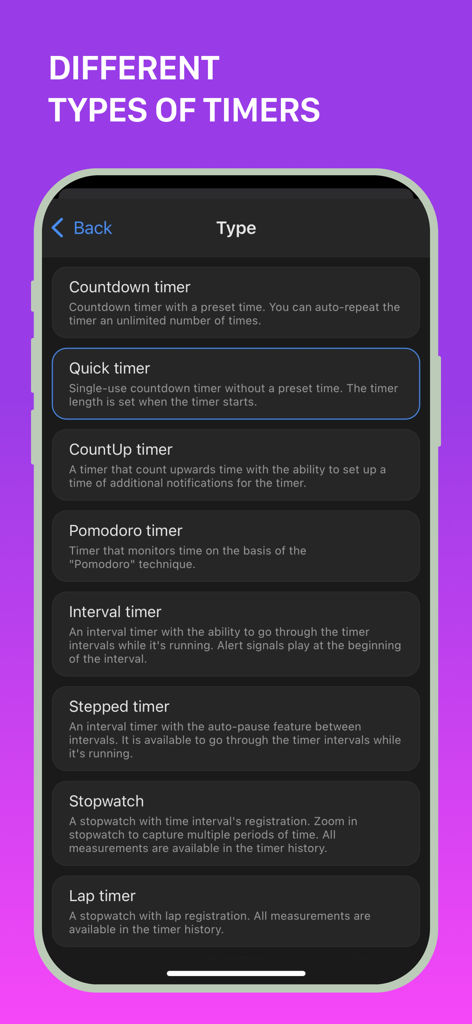
뽀모도로 및 간격 타이머를 포함한 MultiTimer 앱의 다양한 타이머 유형 목록

뽀모도로 및 간격 타이머를 포함한 MultiTimer 앱의 다양한 타이머 유형 목록

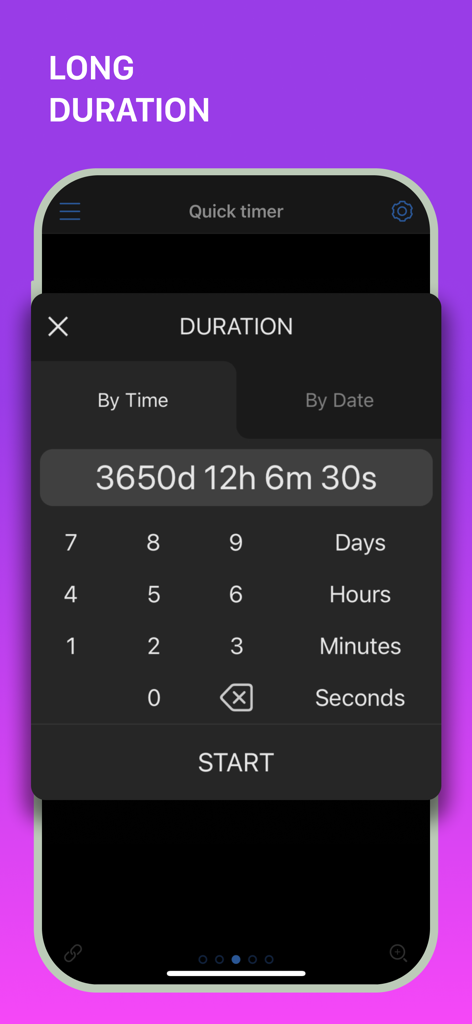
MultiTimer 앱의 인터페이스로 일, 시간, 분에 걸쳐 긴 시간 카운트다운 타이머 설정.

MultiTimer 앱의 인터페이스로 일, 시간, 분에 걸쳐 긴 시간 카운트다운 타이머 설정.

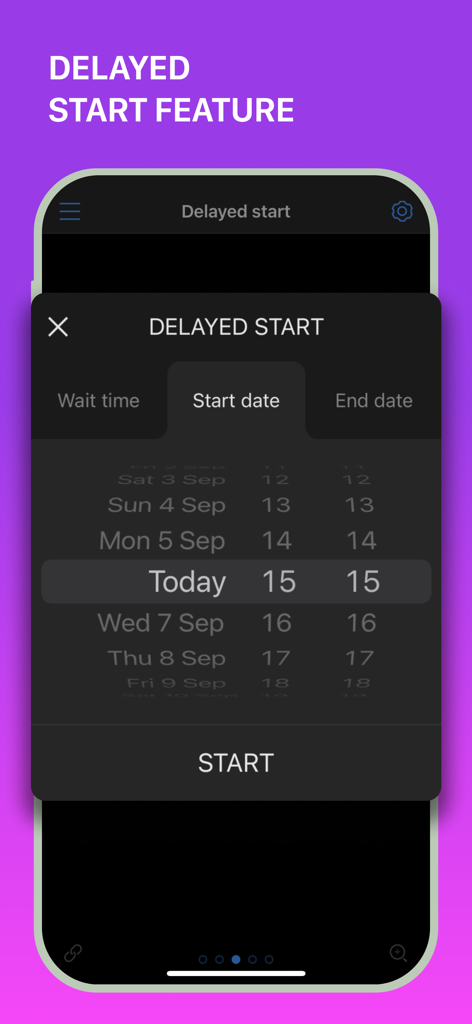
MultiTimer 앱은 iPhone 화면에서 날짜 및 시간 선택기를 사용하여 지연 시작 기능을 보여줍니다.

MultiTimer 앱은 iPhone 화면에서 날짜 및 시간 선택기를 사용하여 지연 시작 기능을 보여줍니다.

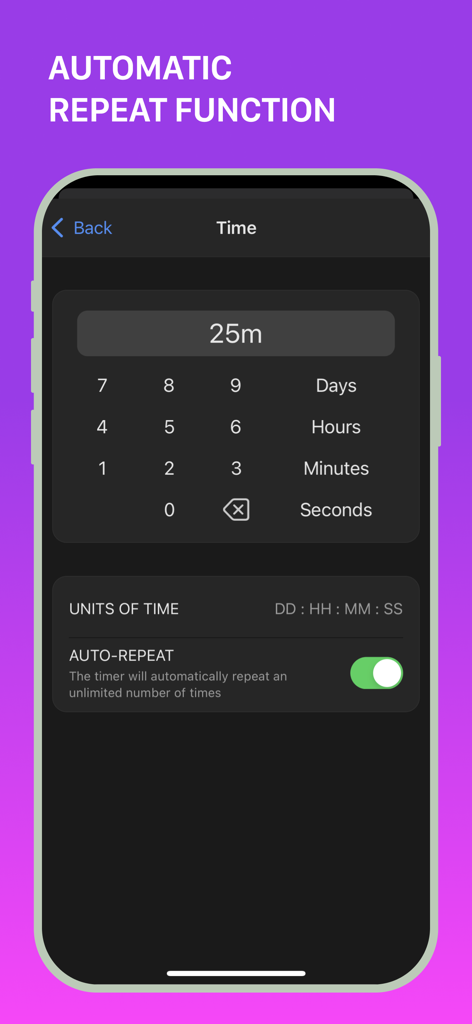
MultiTimer 앱 화면은 카운트다운 타이머에 대한 자동 반복 기능 토글을 보여줍니다.

MultiTimer 앱 화면은 카운트다운 타이머에 대한 자동 반복 기능 토글을 보여줍니다.

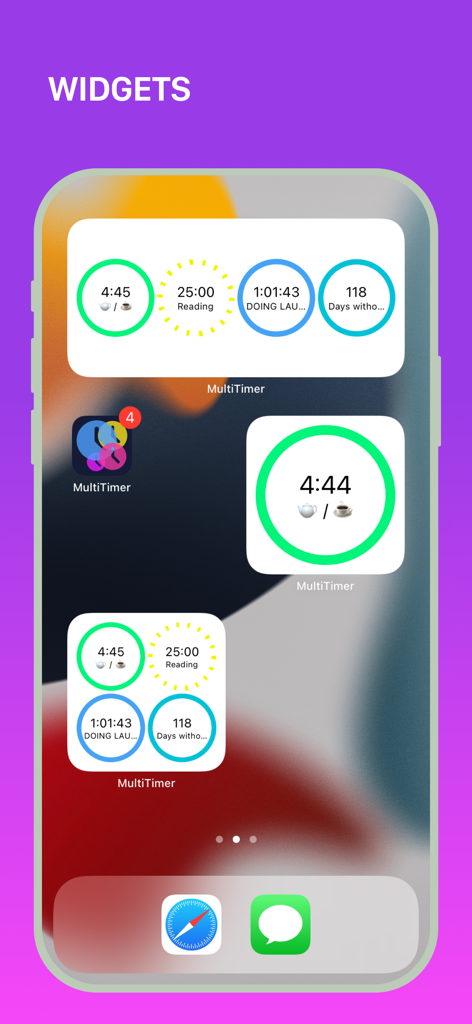
iPhone 홈 화면에 독서, 세탁, 요리를 위한 활성 카운트다운을 보여주는 다양한 MultiTimer 위젯 크기가 표시됩니다.

iPhone 홈 화면에 독서, 세탁, 요리를 위한 활성 카운트다운을 보여주는 다양한 MultiTimer 위젯 크기가 표시됩니다.

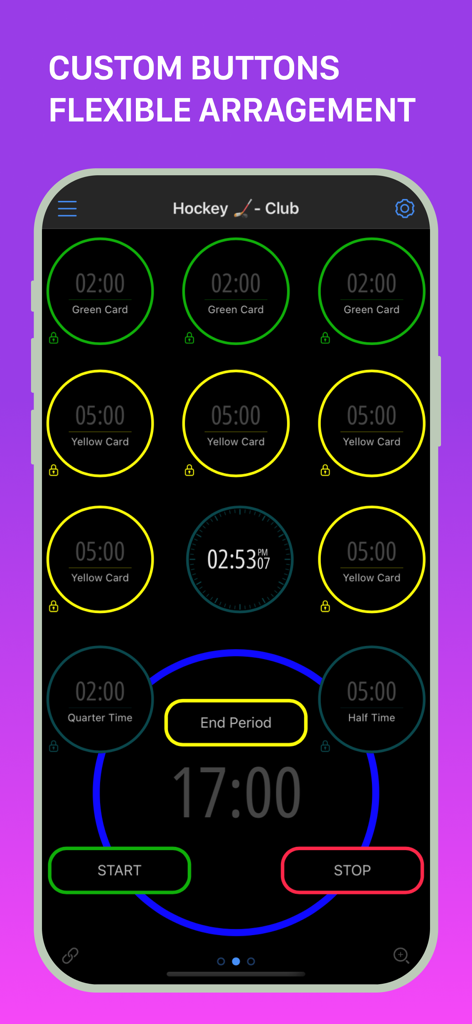
MultiTimer 앱 인터페이스는 페널티 카드와 경기 시간을 위한 여러 타이머가 있는 맞춤형 하키 대시보드를 보여줍니다.

MultiTimer 앱 인터페이스는 페널티 카드와 경기 시간을 위한 여러 타이머가 있는 맞춤형 하키 대시보드를 보여줍니다.

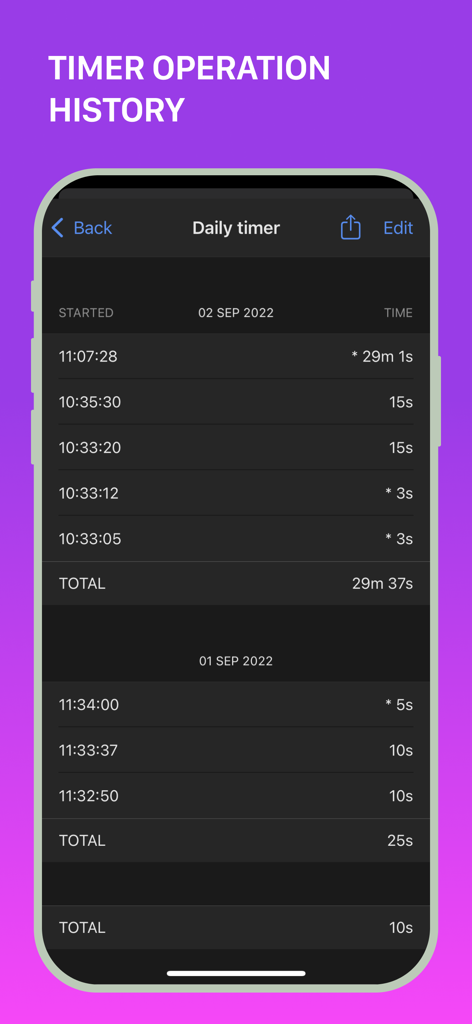
MultiTimer 앱의 상세한 작동 기록 및 시간 로그를 보여주는 모바일 화면

MultiTimer 앱의 상세한 작동 기록 및 시간 로그를 보여주는 모바일 화면

정확하게 하루를 마스터하세요

이 앱을 돋보이게 하는 도구, 171K+ 명의 사용자가 선택.

🗂️

전용 작업 공간 보드

사무실, 주방 또는 체육관별로 삶을 별도의 보드로 구성하세요. 관련 타이머를 하나의 시각적 대시보드로 그룹화하여 정신적 명확성을 유지하세요.

전문적인 집중 도구

내장된 뽀모도로, 간격, 카운트업 타이머로 생산성을 최적화하세요. 집중 업무 시간, 청구 가능한 시간 또는 고강도 훈련에 완벽합니다.

마찰 없는 생태계 동기화

당신의 시간은 어디에나 따라갑니다. iPhone에서 타이머를 시작하고 Apple Watch에서 확인하고 iCloud 동기화를 통해 모든 Apple 기기에서 알림을 받으세요.

앱 소개

에 대해 알아야 할 모든 것 MultiTimer: Multiple timers.

설명

MultiTimer – Unlock New Productivity and Time Management Opportunities! **NO ADS** Whether it’s daily tasks, cooking, studying, or workouts, MultiTimer offers customizable timers for any situation. With options like task timers, kitchen timers, Pomodoro timers, and many other features, you'll always be organized and efficient. **VERSATILE TIMERS FOR ANY SITUATION Create multiple timers for any purpose. Choose from: - Countdown - Quick Start - CountUp - Pomodoro - Interval Timer - Stopwatch - Counter - Clock - Buttons - Container **FLEXIBLE LAYOUT FOR YOUR NEEDS Customize timer boards the way you like. Choose between adaptive and flexible layouts. Copy, delete, and move timers at your discretion. Create multiple boards to place different timers side by side and manage them effortlessly. **PERSONALIZE YOUR TIME Give your timers and counters a personal touch with numerous labels, colours, icons, alert styles, custom sounds, and notifications. **MAXIMUM CONTROL & CUSTOMIZATION Full control over your timers. Set timer start delays, add or subtract time from running timers, and choose the "Auto-repeat" option for automatic timer restart. **SAVE TIME WITH EASE Track and save the entire history of your timers and counters. **SHARE TIMERS Use the web feature to share a link with friends, family, or colleagues to track ongoing or upcoming events or tasks. **AND MANY OTHER GREAT FEATURES - Place timers on separate screens (boards) or manage them in fullscreen mode. - Sync timer data across devices using iCloud. - Use all available types of widgets. - Check out Siri integration, shortcuts, and x-callback-URL support. - Try 3D Touch for quick timer management through the pop-up menu. - Use MultiTimer on your Apple Watch. - Export boards and timers to another device. - Use the built-in tools to run and manage multiple timers at the same time. MultiTimer is your indispensable assistant, whether in the kitchen, gym, at work, or in the office. Focus on what really matters with quick timer settings, optimize your time management, and achieve your goals faster and more efficiently. Download MultiTimer and start managing your time today with unlimited boards, timers, and various features (some features are part of the Pro upgrade). We love feedback! Send your suggestions and ideas to support@persapps.com or use the "Feedback" option in the app settings. **ADDITIONAL INFORMATION: Terms of Use: http://persapps.com/terms/ Standard Agreement: https://www.apple.com/legal/internet-services/itunes/dev/stdeula/ Icons by icons8: https://icons8.com/

최신 버전

7.4.3

크기

93.4 MB

출시일

2015년 5월 30일

매 순간을 마스터할 준비가 되셨나요?

혼돈 대신 통제를 선택한 171,000명 이상의 성공적인 사용자들과 함께하세요. 지금 MultiTimer를 다운로드하고 모든 Apple 기기에서 원활하고 광고 없는 생산성 대시보드를 경험해 보세요.

다운로드: App Store

App information, icons, screenshots, and descriptions displayed on this page are sourced from the Apple App Store and are the property of their respective developers. Download estimates and rankings are based on MWM's proprietary models and may not reflect actual figures. This page is provided for informational and analytical purposes only.

Believe this page infringes your intellectual property? File a dispute