Music Editor - Audio Editor

Music Editor - Audio Editor


다운로드: App Store
로고: Music Editor - Audio Editor

음악 편집기 - 오디오 편집기: 당신의 올인원 모바일 사운드 스튜디오

정밀한 다듬기, 쉬운 믹싱, 즉각적인 비디오-MP3 추출. 800만 명 이상의 크리에이터와 함께 iPhone에서 바로 TikTok, Reels 등을 위한 전문가 수준의 오디오를 만드세요.

개발사

BetterApp Tech Co., Limited

카테고리

Music

다운로드

896K+

사용자 평점

4.5/5

총 평가 수

3K+

지원 언어

18

손끝에서 펼쳐지는 정밀함

이 인터페이스를 사용하는 896K+ 명의 사용자.

여성 DJ와 1000만 이상 사용자 선택 문구가 표시된 Music Editor 앱의 홍보 이미지

여성 DJ와 1000만 이상 사용자 선택 문구가 표시된 Music Editor 앱의 홍보 이미지

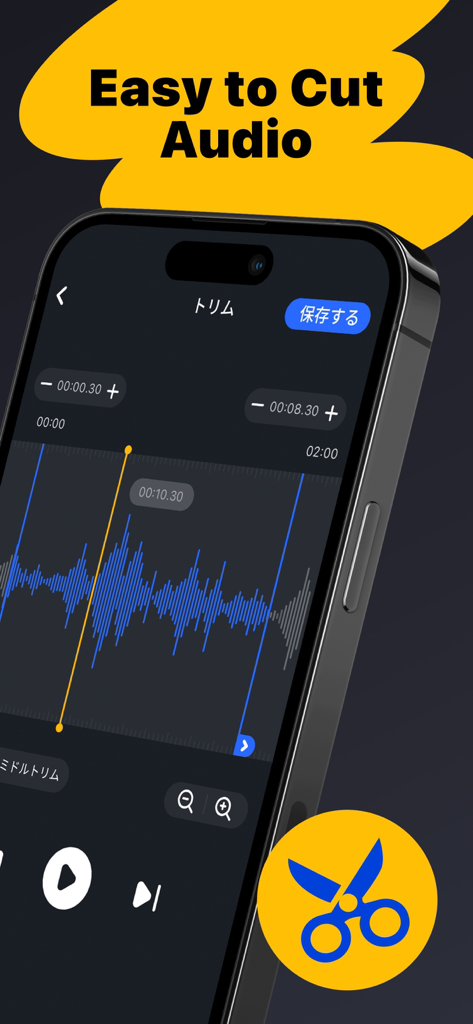
파란색 파형이 표시된 Music Editor 앱 인터페이스로 오디오 클립을 다듬고 '오디오 자르기 쉬움'이라는 제목이 표시됨.

파란색 파형이 표시된 Music Editor 앱 인터페이스로 오디오 클립을 다듬고 '오디오 자르기 쉬움'이라는 제목이 표시됨.

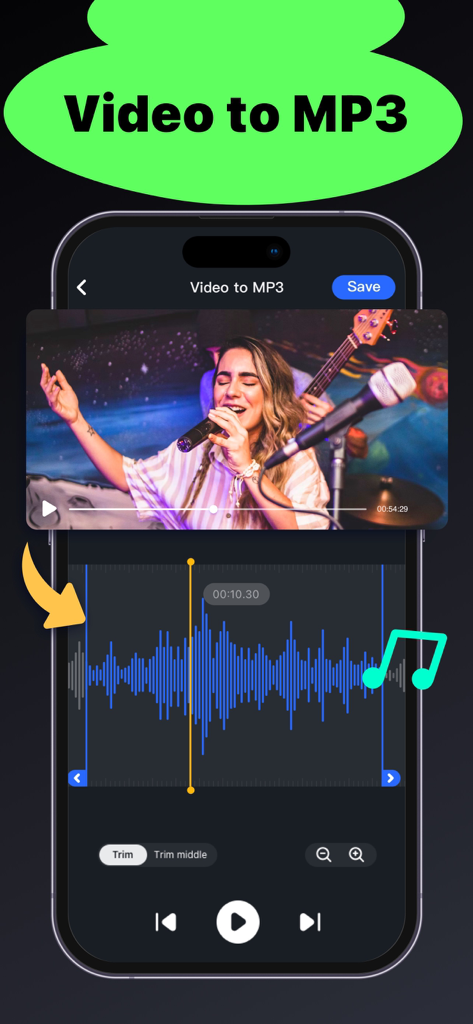
오디오 파형 다듬기가 포함된 비디오-MP3 추출 기능을 보여주는 Music Editor 앱의 인터페이스

오디오 파형 다듬기가 포함된 비디오-MP3 추출 기능을 보여주는 Music Editor 앱의 인터페이스

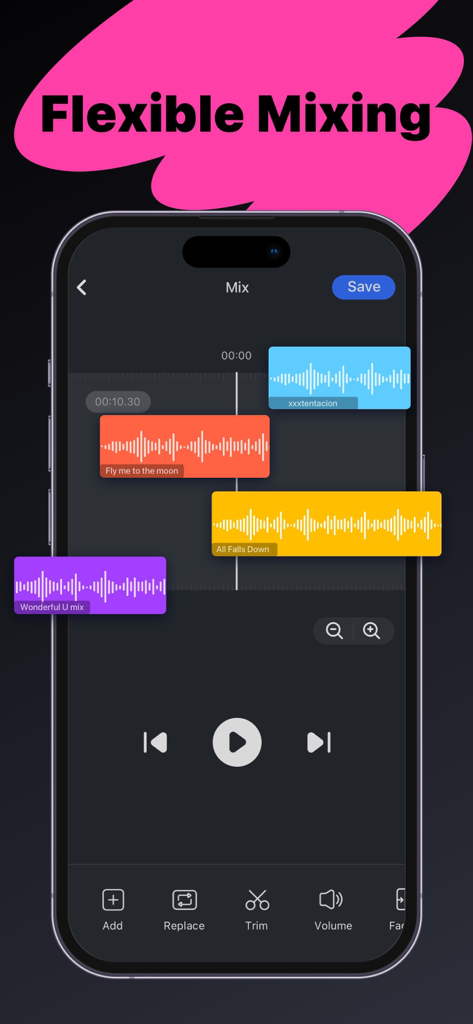
Music Editor 앱에서 화려한 파형으로 멀티트랙 오디오 믹싱 기능을 보여주는 iPhone 화면

Music Editor 앱에서 화려한 파형으로 멀티트랙 오디오 믹싱 기능을 보여주는 iPhone 화면

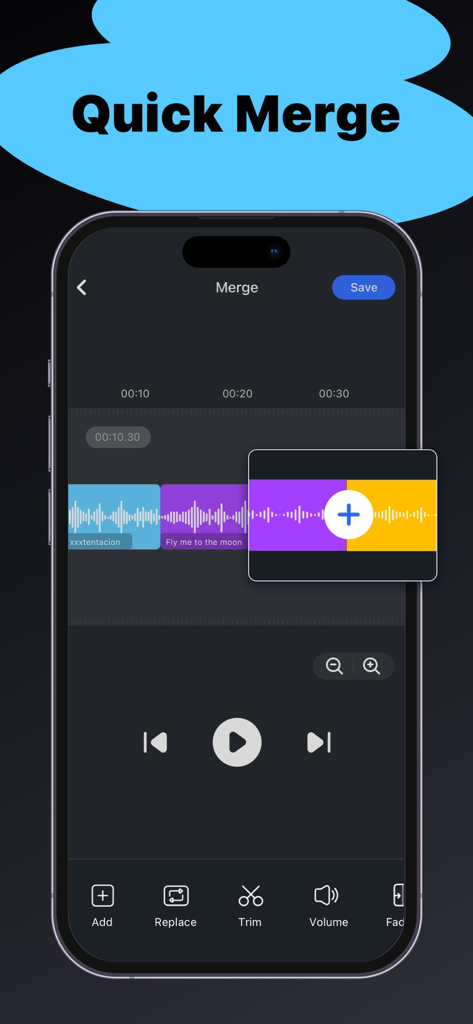
타임라인에서 여러 색상으로 구분된 오디오 클립이 결합되는 Music Editor 앱의 빠른 병합 기능 표시 iPhone 화면

타임라인에서 여러 색상으로 구분된 오디오 클립이 결합되는 Music Editor 앱의 빠른 병합 기능 표시 iPhone 화면

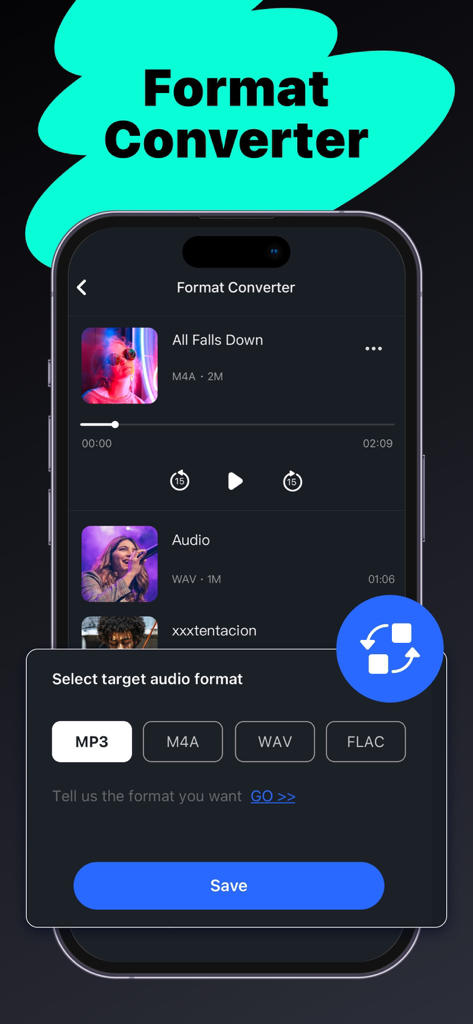
MP3 및 WAV를 포함한 오디오 형식 변환 옵션을 보여주는 Music Editor 앱 인터페이스

MP3 및 WAV를 포함한 오디오 형식 변환 옵션을 보여주는 Music Editor 앱 인터페이스

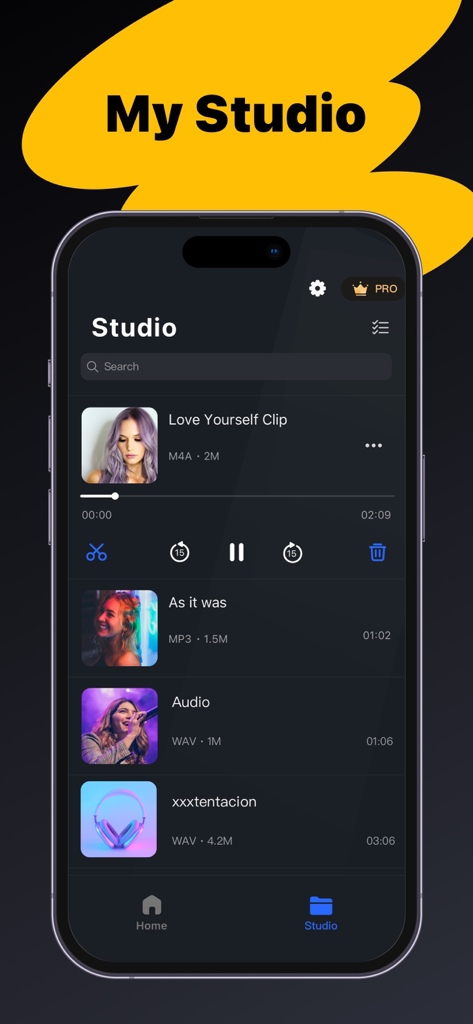
재생 컨트롤이 있는 편집된 음악 클립 스튜디오 라이브러리를 보여주는 모바일 앱 화면

재생 컨트롤이 있는 편집된 음악 클립 스튜디오 라이브러리를 보여주는 모바일 앱 화면

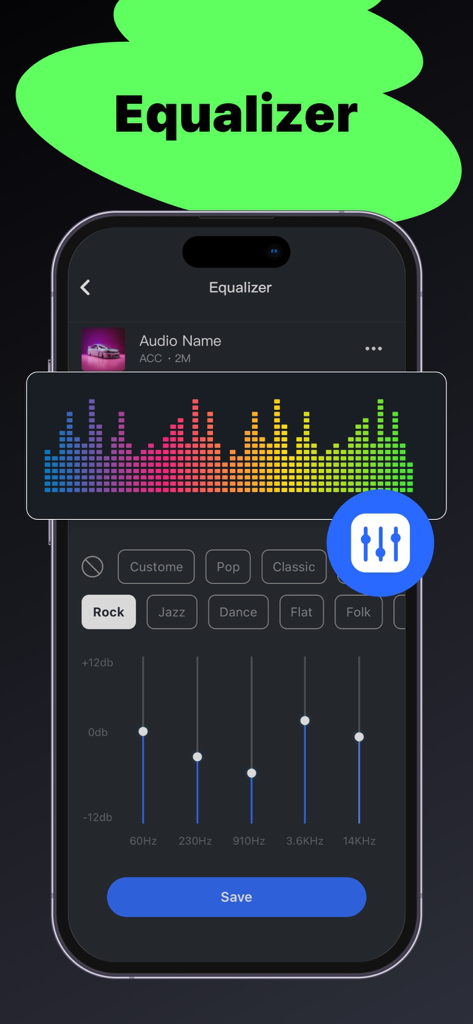
주파수 슬라이더와 음악 장르 사전 설정이 특징인 Music Editor 앱의 이퀄라이저 인터페이스

주파수 슬라이더와 음악 장르 사전 설정이 특징인 Music Editor 앱의 이퀄라이저 인터페이스

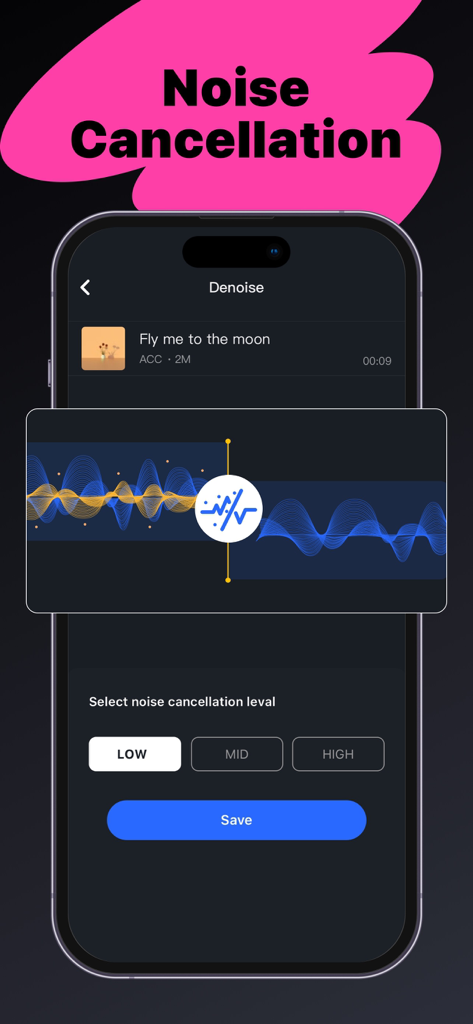
조정 가능한 레벨과 파형 시각화를 특징으로 하는 노이즈 캔슬링을 위한 모바일 앱 인터페이스

조정 가능한 레벨과 파형 시각화를 특징으로 하는 노이즈 캔슬링을 위한 모바일 앱 인터페이스

초 단위로 오디오 마스터하기

이 앱을 돋보이게 하는 도구, 896K+ 명의 사용자가 선택.

✂️

정밀 다듬기

직관적인 파형 그래프를 사용하여 밀리초 단위의 정확도로 오디오를 잘라내세요. 다음 게시물에 완벽한 훅을 포착하는 데 적합합니다.

🎬

즉각적인 비디오 추출

소셜 미디어에서 유행하는 사운드를 찾으셨나요? 어떤 비디오든 고품질 MP3로 즉시 변환하여 자신만의 창의적인 프로젝트에 사용하세요.

🗗

멀티트랙 믹싱

좋아하는 트랙을 레이어링하고, 배경 음악을 추가하고, 클립을 원활하게 병합하여 전문가 수준의 매시업과 보이스오버를 만드세요.

리뷰 분석

사용자 리뷰 인사이트.

감정 점수

24%
부정적

요약

This app receives overwhelmingly negative feedback, primarily due to numerous issues with its subscription model and core functionalities. Users frequently report being charged for pro features that either don't activate, are blocked, or cease to function after purchase or re-download, often struggling with refunds or unexpected auto-renewals. Additionally, common complaints include severe bugs such as app freezing, inability to save or merge audio, poor audio quality, and projects being inexplicably deleted. The presence of excessive ads, even for paid subscribers, further detracts from the user experience, leading many to feel the app is a waste of money with limited useful features.

주요 테마

Subscription & Payment Issues(26)
Core Feature Malfunction(21)
General Positive Feedback(9)
Excessive Advertising(3)
Poor User Experience(2)

앱 소개

에 대해 알아야 할 모든 것 Music Editor - Audio Editor.

설명

Audio Editor is an easy-to-use music editing application with rich editing features. Its flexible editing operations and clear layouts will bring you a pleasant editing experience. *WHAT IS AUDIO EDITOR? Audio Editor is a useful tool for your music editing needs, with a variety of audio editing features, you can: - Trim Music, and cut music clips precisely. - Merge and Mix Music, combine music clips. - Extract music from videos. - Convert audio to different formats. - Record audio file. *REASONS FOR CHOOSING THIS AUDIO EDITOR APP. This all-in-one audio editor provides rich audio editing functions, come try it! 1. Music Trimmer: - Trim music clips precisely with the built-in wave graph. - Cut music easily by dragging the trim handle. 2. Music Merger and Mixer: - Combine several music clips, even in different formats. - Add background sounds to your music, mix music flexibly with the multitrack feature. - The Music Mixing feature is available for Premium Members. 3. Convert video to MP3: - Extract audio from videos. - Make Music MV to MP3 instantly. 4. Format Converter & Compressor: - Convert format without quality loss, MP3/ M4A/ WAV/ FLAC formats are now supported. - Useful and customizable music compressor with adjustable bitrate and sample rate. 5. Recorder: - Record audio instantly with a built-in audio recorder *WHERE TO IMPORT AUDIO FILES? You have several ways to import audio files. - Import from Files/iCloud: Select music from Files, Apple Music, or iCloud. - Import from the video: Extract mp3 tracks from the video. - Import by recording. - Import from your Studio: Import edited files for re-editing. In summary, it’s an easy-to-use audio editor application that can meet all your editing needs. Audio Editor is a free app and most of the features are FREE. Premium Members now have access to additional features including music mixing. If you have any questions or feedback, please contact us at: betterapp88@gmail.com Privacy Policy: http://www.betterapptech.com/about-us/privacy-policy/ Terms of Use: http://www.betterapptech.com/about-us/terms-of-service/

최신 버전

1.0.52

크기

91.1 MB

출시일

2022년 10월 24일

사운드를 업그레이드할 준비가 되셨나요?

iOS에서 거의 100만 명의 크리에이터와 함께하세요. 지금 바로 Music Editor를 다운로드하고 전문가처럼 다듬기, 믹싱, 변환을 시작하세요.

다운로드: App Store
FAQ

자주 묻는 질문

에 대해 알아야 할 모든 것 Music Editor - Audio Editor

What is Music Editor - Audio Editor?

Music Editor - Audio Editor는 풍부한 음악 편집 기능을 제공하는 사용하기 쉬운 애플리케이션입니다. 사용자는 음악을 자르고, 병합하고, 믹싱하고, 녹음하고, 형식을 변환하고, 비디오에서 오디오를 추출할 수 있습니다.

Is Music Editor - Audio Editor a free app?

네, Music Editor - Audio Editor는 무료 앱입니다. 대부분의 기능은 무료로 사용할 수 있으며, 음악 믹싱과 같은 추가 기능은 프리미엄 회원에게 제공됩니다.

Can I trim music clips using the Audio Editor app?

네, Audio Editor 앱을 사용하면 음악 클립을 정밀하게 자를 수 있습니다. 내장된 파형 그래프와 사용하기 쉬운 트림 핸들이 있어 음악을 자를 수 있습니다.

Does the Music Editor app support merging and mixing audio files?

네, Music Editor는 여러 음악 클립을 다른 형식으로도 병합하는 것을 지원합니다. 또한 배경음악과 음악을 결합할 수 있는 유연한 멀티트랙 믹싱 기능을 제공합니다.

Can Music Editor - Audio Editor extract audio from videos?

네, Music Editor - Audio Editor는 비디오에서 오디오를 추출할 수 있습니다. 이 기능을 사용하여 비디오 파일을 MP3 형식으로 즉시 변환할 수 있습니다.

What audio formats does the Audio Editor app support for conversion?

Audio Editor 앱은 오디오를 MP3, M4A, WAV 및 FLAC 형식으로 변환하는 것을 지원합니다. 품질 손실 없이 변환하며 사용자 정의 가능한 컴프레서가 포함되어 있습니다.

How can I import audio files into the Music Editor app?

사용자는 여러 소스에서 오디오 파일을 가져올 수 있습니다: 파일/iCloud에서, 비디오에서 추출하여, 앱 내에서 직접 녹음하거나, '내 스튜디오'에 있는 이전에 편집한 파일에서 가져올 수 있습니다.

Does the Audio Editor app have an equalizer feature?

네, Audio Editor 앱에는 이퀄라이저 기능이 포함되어 있습니다. Rock, Jazz, Pop, Classic, Flat, Folk와 같은 사전 설정을 제공하며, 주파수 슬라이더를 조절할 수 있습니다.

Does the Music Editor app offer noise cancellation?

네, Music Editor 앱에는 "Denoise"로 표시된 노이즈 캔슬링 기능이 있습니다. 사용자는 노이즈 감소를 위해 낮음, 중간, 높음 수준을 선택할 수 있습니다.

Can I record audio directly within the Music Editor - Audio Editor app?

네, Music Editor - Audio Editor 앱에는 내장된 오디오 레코더가 포함되어 있습니다. 사용자는 애플리케이션 내에서 즉시 오디오를 녹음할 수 있습니다.

What features are exclusive to Premium Members in the Audio Editor app?

Audio Editor 앱의 프리미엄 회원은 추가 기능, 특히 음악 믹싱 기능에 액세스할 수 있습니다. 대부분의 다른 기능은 무료로 사용할 수 있습니다.

App information, icons, screenshots, and descriptions displayed on this page are sourced from the Apple App Store and are the property of their respective developers. Download estimates and rankings are based on MWM's proprietary models and may not reflect actual figures. This page is provided for informational and analytical purposes only.

Believe this page infringes your intellectual property? File a dispute