Offline Music ®

Offline Music ®

다운로드: App Store
로고: Offline Music ®

오프라인 음악 ®: 클라우드 라이브러리, 어디서든 데이터 걱정 없이

Dropbox, iCloud 또는 Wi-Fi에서 MP3를 쉽게 동기화하고 새로운 인디 아티스트를 발견하세요. 지하철에서든 비행기에서든 전체 컬렉션을 영원히 오프라인으로 가져가세요.

개발사

Plane Cubes

카테고리

Utilities

다운로드

1M+

사용자 평점

4.6/5

총 평가 수

9K+

지원 언어

1

시각적인 둘러보기

이 인터페이스를 사용하는 1M+ 명의 사용자.

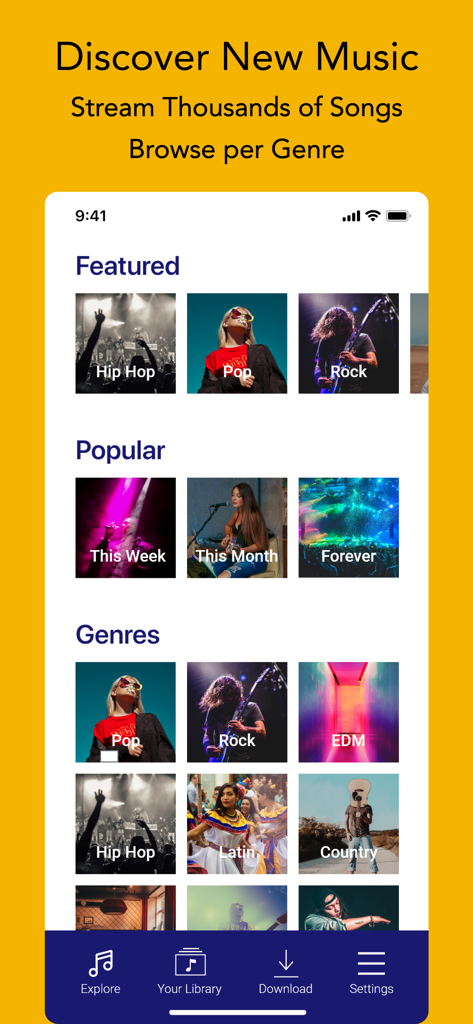
오프라인 음악 앱 검색 화면에 팝, 록, EDM과 같은 추천 노래 및 장르 카테고리 표시

오프라인 음악 앱 검색 화면에 팝, 록, EDM과 같은 추천 노래 및 장르 카테고리 표시

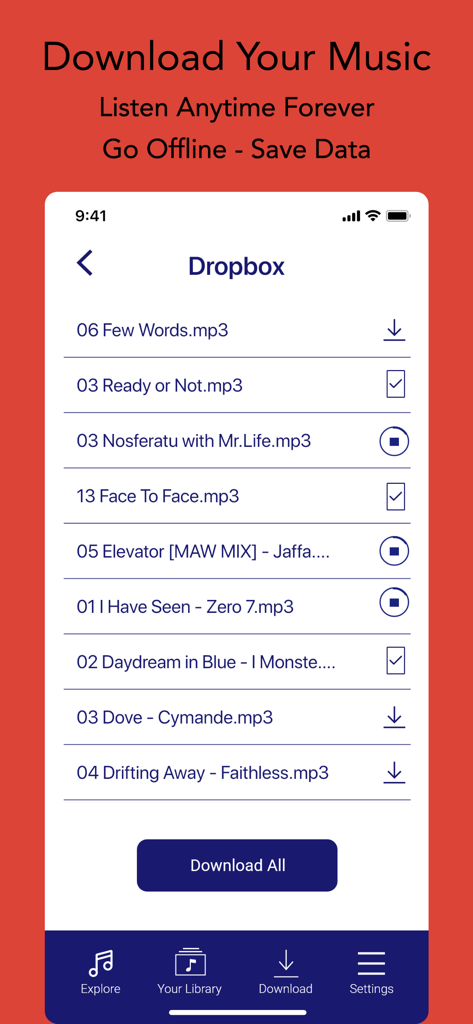
오프라인에서 듣기 위해 Dropbox에서 MP3 파일을 다운로드하는 인터페이스

오프라인에서 듣기 위해 Dropbox에서 MP3 파일을 다운로드하는 인터페이스

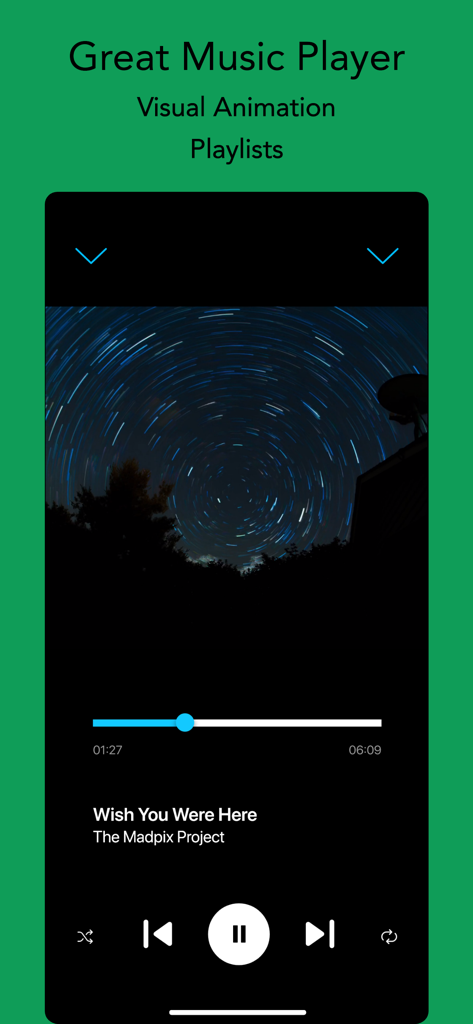
오프라인 음악 앱의 플레이어 인터페이스, 재생 컨트롤 및 별이 빛나는 앨범 커버 이미지 표시

오프라인 음악 앱의 플레이어 인터페이스, 재생 컨트롤 및 별이 빛나는 앨범 커버 이미지 표시

당신의 음악, 당신의 규칙

이 앱을 돋보이게 하는 도구, 1M+ 명의 사용자가 선택.

✈️

완벽한 오프라인 자유

지하철, 비행기, 로드 트립에 완벽합니다. 신호가 전혀 잡히지 않는 곳에서도 다운로드한 트랙을 어디서든 들을 수 있습니다.

☁️

간편한 클라우드 동기화

MP3 컬렉션에 생명을 불어넣으세요. 컴퓨터 없이 iCloud, Dropbox 또는 Wi-Fi 전송에서 파일을 빠르게 가져올 수 있습니다.

💎

독점적인 인디 발견

트렌드를 앞서가세요. 독립 아티스트의 수천 곡을 탐색하고 당신만큼 독특한 라이브러리를 구축하세요.

앱 소개

에 대해 알아야 할 모든 것 Offline Music ®.

설명

> Browse thousands of songs. Discover new Music per Genre. Everyday new tracks. > Download your Music, Save Data & Listen Offline Forever Offline Music ® allows you to discover music by new independent artists. You can also download your favorite MP3 Music from the Clouds to be able to play offline. Features: - Browse per genre to discover great music (Hip Hop, Rock, Pop, Jazz...) - Download your favorites mp3 songs offline to save Data (via Dropbox, iCloud, Wi-Fi transfer) - Catalog with thousands of artists & constantly updated - Offline Music Player with visualization - Trendy design in all simplicity - Create Playlists Download today to enjoy a unique experience! Disclaimer: All the music available via the Explore tab has been created by independent artists. They have chosen to distribute their work through the brilliant platform Jamendo, which is the provider of the content. You can stream all music from the curated catalog without limit. But it is not possible to download that music. SUBSCRIPTION: We offer 2 auto-renewing subscriptions: - Length: weekly and monthly - Payment will be charged to iTunes Account at confirmation of purchase - You will be able to access the Premium features of the app for the duration of the subscription - Subscription automatically renews for the same price and duration period as the original period unless auto-renew is turned off at least 24-hours before the end of the current period - The account will be charged for renewal within 24-hours prior to the end of the current period at the cost of the chosen package. - Subscriptions may be managed by the user and auto-renewal may be turned off by going to the user's iTunes Account Settings after purchase - No cancellation of the current subscription is allowed during the active subscription period - You may cancel a subscription during its free trial period via the subscription setting through your Apple account. This must be done 24 hours before the end of the subscription period to avoid being charged. Please visit https://support.apple.com/en-us/HT202039 for more information on how to proceed. - You may turn off the auto-renewal of your subscription via your Apple Account Settings. However, you are not able to cancel the current subscription during its active period - Any unused portion of a free-trial period will be forfeited when the user purchases a subscription. By using our app, you agree to our Terms of Use & Privacy Policy Terms: https://planecubes.com/terms/ Privacy: https://planecubes.com/privacy/

최신 버전

1.2.4

크기

66.5 MB

출시일

2020년 4월 3일

음악을 어디든 가져갈 준비가 되셨나요?

데이터를 절약하고 버퍼링을 건너뛰는 1백만 명 이상의 사용자와 함께하세요. 지금 다운로드하여 클라우드 라이브러리를 가져오고 좋아하는 트랙을 영원히 오프라인으로 즐기세요.

다운로드: App Store

App information, icons, screenshots, and descriptions displayed on this page are sourced from the Apple App Store and are the property of their respective developers. Download estimates and rankings are based on MWM's proprietary models and may not reflect actual figures. This page is provided for informational and analytical purposes only.

Believe this page infringes your intellectual property? File a dispute