Scrcpy Remote

Scrcpy Remote

다운로드: App Store
로고: Scrcpy Remote

Scrcpy Remote: 안전한 데스크톱 액세스를 위한 전문가의 선택

모바일 장치를 고성능 워크스테이션으로 전환하세요. 제로 구성 Tailscale 통합, VNC 지원 및 파워 유저를 위해 설계된 저지연 화면 미러링을 통해 Linux, macOS 및 Windows를 안전하게 제어하세요.

개발사

森 王

카테고리

Utilities

다운로드

22K+

사용자 평점

4.0/5

총 평가 수

100

지원 언어

4

모든 화면을 제어하세요

이 인터페이스를 사용하는 22K+ 명의 사용자.

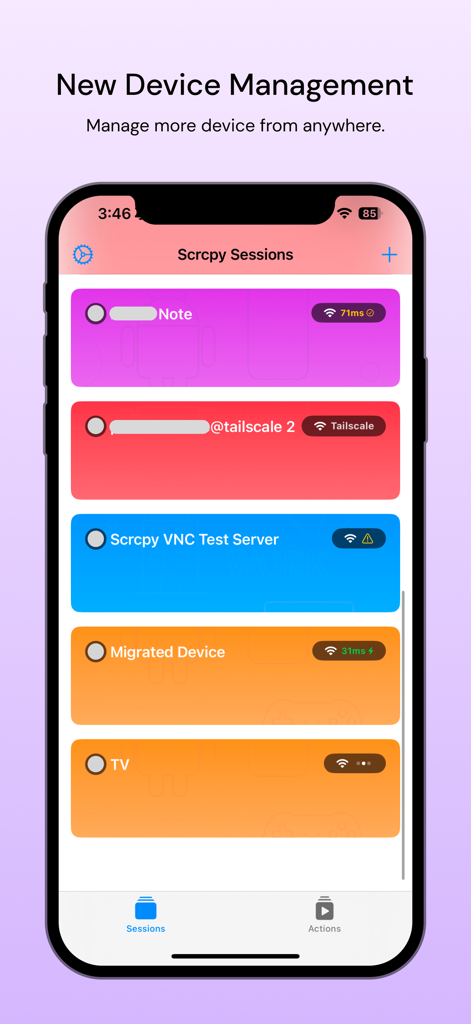
활성 장치 세션 및 Tailscale 연결 목록을 보여주는 Scrcpy Remote 앱 대시보드.

활성 장치 세션 및 Tailscale 연결 목록을 보여주는 Scrcpy Remote 앱 대시보드.

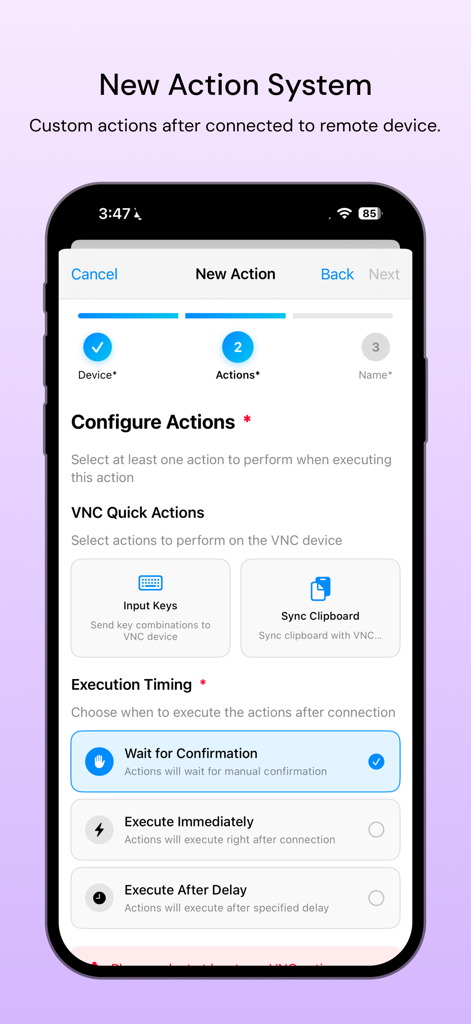
사용자 지정 작업 및 실행 타이밍 설정을 위한 Scrcpy Remote 화면

사용자 지정 작업 및 실행 타이밍 설정을 위한 Scrcpy Remote 화면

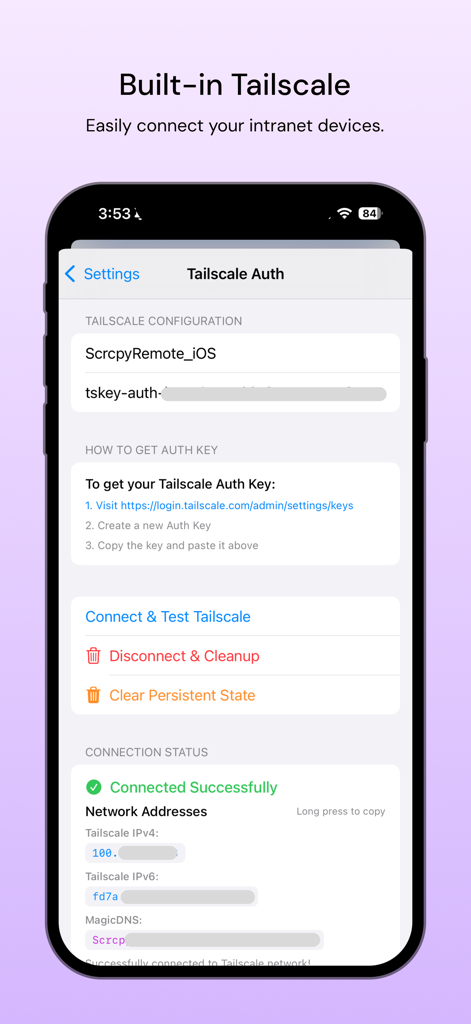
안전한 원격 데스크톱 액세스를 위한 내장 Tailscale 인증 및 구성 설정을 보여주는 Scrcpy Remote 앱 인터페이스.

안전한 원격 데스크톱 액세스를 위한 내장 Tailscale 인증 및 구성 설정을 보여주는 Scrcpy Remote 앱 인터페이스.

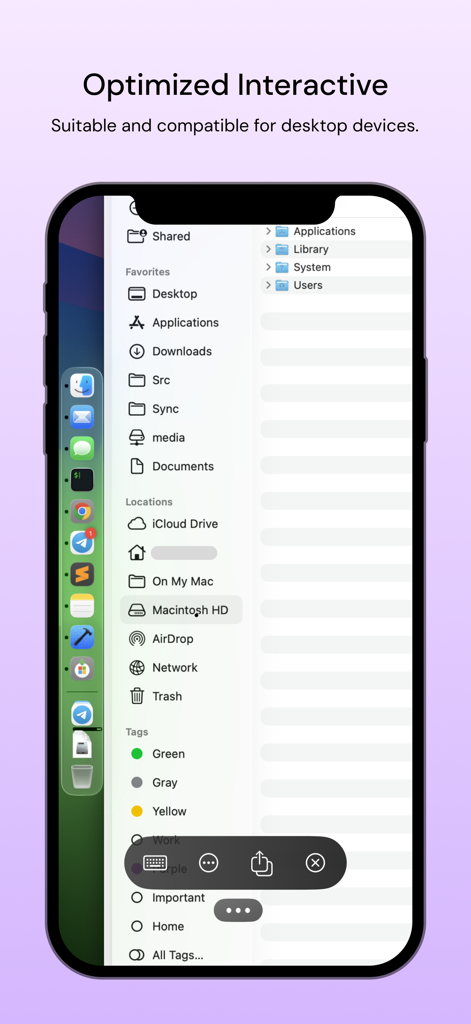
원격 macOS 데스크톱 파일 시스템을 제어하는 Scrcpy Remote 앱 인터페이스를 보여주는 iPhone 화면

원격 macOS 데스크톱 파일 시스템을 제어하는 Scrcpy Remote 앱 인터페이스를 보여주는 iPhone 화면

프로슈머를 위한 최고의 데스크톱 제어

이 앱을 돋보이게 하는 도구, 22K+ 명의 사용자가 선택.

🛡️

제로 구성 보안 네트워킹

암호화된 P2P 연결을 위해 기본 Tailscale 통합을 활용하세요. 포트 전달의 보안 위험 없이 홈 랩 또는 사무실 워크스테이션에 액세스하세요.

🖥️

진정한 크로스 플랫폼 유동성

Linux, macOS 및 Windows에 대한 완벽한 지원으로 OS 사일로를 해체하세요. 저지연 VNC 성능으로 전체 다중 장치 환경을 제어하는 하나의 앱입니다.

⌨️

프로급 입력 및 미러링

iPad 또는 iPhone을 모바일 씬 클라이언트로 전환하세요. 복잡한 개발 및 관리 작업을 위한 정확한 마우스 및 키보드 지원을 통해 고품질 화면 미러링을 경험하세요.

앱 소개

에 대해 알아야 할 모든 것 Scrcpy Remote.

설명

Scrcpy Remote - Desktop Remote Control Scrcpy Remote is a powerful remote desktop application that enables seamless control of your Linux, Windows, or macOS computers from anywhere. With built-in VNC server support, you can access your desktop remotely for work, device management, and productivity tasks. 1. Universal Desktop Access Connect to Linux, Windows, and macOS computers. Full desktop control with mouse and keyboard support. High-quality screen mirroring and interaction. 2. Flexible Connectivity Options Network Connection: Access devices over local network or internet. Tailscale Integration: Secure peer-to-peer connections through Tailscale network. Reliable connection management with automatic reconnection. 3. VNC Server Compatibility Works with any VNC-enabled computer. Easy setup and configuration. Optimized performance for smooth remote sessions.

최신 버전

4.4.0

크기

65.6 MB

출시일

2022년 6월 19일

원격 워크플로우를 마스터할 준비가 되셨나요?

22,000명 이상의 기술 전문가와 함께 iPad 또는 iPhone에서 Linux, Windows 및 macOS 머신을 안전하고 고성능으로 제어해 보세요.

다운로드: App Store

App information, icons, screenshots, and descriptions displayed on this page are sourced from the Apple App Store and are the property of their respective developers. Download estimates and rankings are based on MWM's proprietary models and may not reflect actual figures. This page is provided for informational and analytical purposes only.

Believe this page infringes your intellectual property? File a dispute