Screen Mirroring ⋆ Miracast TV

Screen Mirroring ⋆ Miracast TV

다운로드: App Store
로고: Screen Mirroring ⋆ Miracast TV

Screen Mirroring ⋆ Miracast TV: 추가 하드웨어 없이 iPhone 화면을 큰 화면으로

iOS 기기와 모든 스마트 TV 간의 격차를 즉시 해소하세요. 비싼 하드웨어나 복잡한 케이블 없이 멋진 HD로 가족 추억을 공유하고, 피트니스 루틴을 따르거나, 프레젠테이션을 선보이세요.

개발사

Plane Cubes

카테고리

Utilities

다운로드

1M+

사용자 평점

4.6/5

총 평가 수

14K+

지원 언어

1

큰 화면 경험

이 인터페이스를 사용하는 1M+ 명의 사용자.

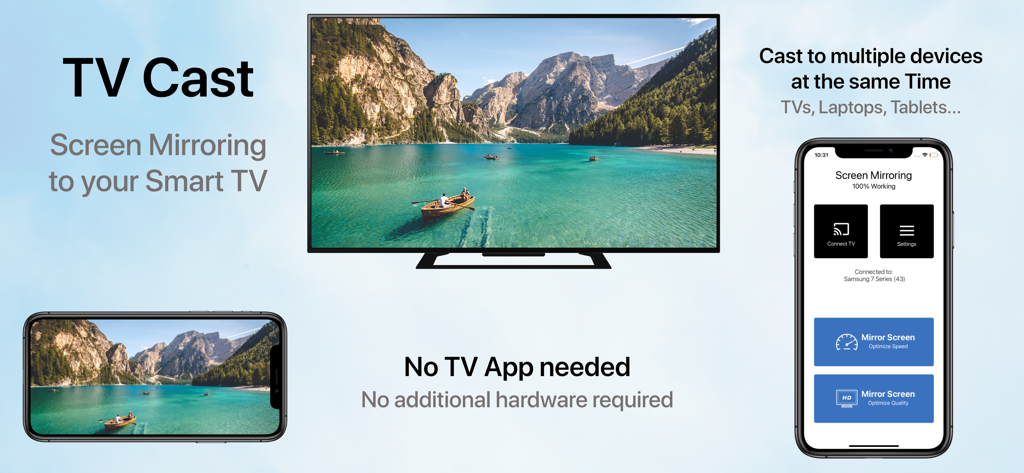
iPhone 화면이 앱 인터페이스가 옆에 있는 가로 비디오를 표시하는 스마트 TV로 미러링되는 모습

iPhone 화면이 앱 인터페이스가 옆에 있는 가로 비디오를 표시하는 스마트 TV로 미러링되는 모습

모든 순간을 큰 화면에서 공유하세요

이 앱을 돋보이게 하는 도구, 1M+ 명의 사용자가 선택.

📺

모든 TV 호환

Apple TV, 케이블 또는 추가 하드웨어 없이 Samsung, LG, Sony 등 다양한 TV로 화면을 미러링하세요.

🚀

초저지연 모드

브라우징 중 실시간 반응을 위한 속도 모드 또는 고화질 영상의 미려함을 위한 품질 모드를 선택하세요.

🔄

세로 및 가로 모드 지원

TikTok을 스크롤하거나 와이드스크린 홈 비디오를 시청할 때 완벽한 화면을 즐기세요.

리뷰 분석

사용자 리뷰 인사이트.

감정 점수

21%
부정적

요약

User reviews for this mobile app are overwhelmingly negative, with a low overall sentiment score. The most significant complaint is that the app frequently 'does not work' as intended, especially concerning its core functionality of connecting to and finding smart TVs, with specific mentions of issues with LG TVs and iPhone 14 Pro to Mi TV box connections. Many users also expressed frustration with an abundance of intrusive advertisements, mandatory paywalls, hidden costs, and difficulty canceling subscriptions. A considerable number of reviews explicitly label the app as a 'scam' or 'fraudulent,' leading to a poor user experience, though a small minority found the app to be satisfactory.

주요 테마

Functionality(17)
Cost & Subscriptions(14)
Connectivity(9)
Ads(8)
Scam Allegations(6)
Overall Experience(6)

앱 소개

에 대해 알아야 할 모든 것 Screen Mirroring ⋆ Miracast TV.

설명

‣‣‣ Mirror your screen to your TV! ‣‣‣ Free and easy to use! " With Screen mirroring HD, it it now easy to mirror your iPhone or iPad!" "I love the fact that you can mirror simultaneously on different devices. "It is very useful to have both Portrait & Landscape modes available" FEATURES: - Mirror your screen to your TVs, Laptop's, Phones, Gaming consoles & Tablets - Two modes available: 'Speed Mode' for low latency and liquid speed & 'Quality Mode' for gorgeous full resolution HD broadcast - Mirror in Landscape or Portrait mode - Mirror to multiple devices simultaneously - No TV App or other software or hardware necessary HOW TO MIRROR: - Connect your iPhone/iPad and your TV to the same WiFi network - (Optional: connect your device to the app) - Choose your mirroring mode and tap on 'Start Mirroring' to start mirroring to your TV and other devices - Open your TV browser and tap the URL. (Tip: save the URL in your bookmarks for quicker access next time you want to mirror your screen.) - Watch your screen mirroring - To stop mirroring, tap 'Stop Mirroring' button or bar - NB: On other devices than TV, just type the URL in your device browser to watch the screen mirroring Download now and leave a review to let us know about your mirroring experience. SUPPORT: - Compatible TVs: Smart TVs with an integrated modern web browser: Samsung TV, LG TV, Sony TV, Panasonic TV,TV, Philips TV, Hitachi TV, TCL TV, Grundig TV... - Compatible Devices: any device (phone, laptop, tablet, Console) with a modern web browser: Safari, Brave, Chrome, Firefox, Edge... - Latency is supreme (0 seconds) when you have fast WiFi network conditions - Please do not use VPN, Proxy, VLANS and Subnets. - Sound is not yet support yet, we are working on it. In the meantime, please use Bluetooth speakers as a workaround. - Black screen issues: Some third party apps prevent screen mirroring. When you try to mirror them, you will just see a black screen on your TV, for example with Netflix... This is a restriction chosen by Netflix and others, so there is currently nothing we can do about it. - Our application has been tested carefully on many TV models, however we can unfortunately not guarantee the products works on ALL TV models. Reach out to us with your TV Brand and Model if you encounter issues. DISCLAIMER:This is not an official application. We are not affiliated with any brand mentioned in any way. SUBSCRIPTION: We offer 2 auto-renewing subscriptions: - Length: weekly and monthly - Payment will be charged to iTunes Account at confirmation of purchase - You will be able to access the Premium features of the app for the duration of the subscription - Subscription automatically renews for the same price and duration period as the original period unless auto-renew is turned off at least 24-hours before the end of the current period - The account will be charged for renewal within 24-hours prior to the end of the current period at the cost of the chosen package. - Subscriptions may be managed by the user and auto-renewal may be turned off by going to the user's iTunes Account Settings after purchase - No cancellation of the current subscription is allowed during the active subscription period - You may cancel a subscription during its free trial period via the subscription setting through your Apple account. This must be done 24 hours before the end of the subscription period to avoid being charged. Please visit https://support.apple.com/en-us/HT202039 for more information on how to proceed. - You may turn off the auto-renewal of your subscription via your Apple Account Settings. However, you are not able to cancel the current subscription during its active period - Any unused portion of a free-trial period will be forfeited when the user purchases a subscription. By using our app, you agree to our Terms of Use & Privacy Policy Terms: https://planecubes.com/terms/ Privacy: https://planecubes.com/privacy/

최신 버전

1.1.0

크기

16.6 MB

출시일

2020년 10월 1일

큰 화면에서 볼 준비가 되셨나요?

100만 명 이상의 사용자와 함께 iPhone과 모든 스마트 TV를 연결하세요. 케이블도, 추가 하드웨어도 필요 없이 즉시 미러링됩니다.

다운로드: App Store
FAQ

자주 묻는 질문

에 대해 알아야 할 모든 것 Screen Mirroring ⋆ Miracast TV

Screen Mirroring ⋆ Miracast TV는 무엇인가요?

Screen Mirroring ⋆ Miracast TV는 iPhone 또는 iPad 화면을 TV, 노트북, 휴대폰, 게임 콘솔, 태블릿과 같은 다양한 장치로 미러링하는 애플리케이션입니다. 무료이며 사용하기 쉽습니다.

Screen Mirroring ⋆ Miracast TV에 별도의 TV 앱이나 하드웨어가 필요한가요?

아니요, Screen Mirroring ⋆ Miracast TV에는 별도의 TV 앱, 추가 소프트웨어 또는 하드웨어가 필요하지 않습니다. 최신 웹 브라우저를 갖춘 호환 장치로 직접 미러링됩니다.

Screen Mirroring ⋆ Miracast TV를 사용하여 화면을 어떻게 미러링하나요?

미러링하려면 iPhone/iPad와 TV를 동일한 WiFi에 연결하세요. 미러링 모드를 선택하고 '미러링 시작'을 탭한 다음, TV 브라우저를 열고 제공된 URL을 입력하세요.

Screen Mirroring ⋆ Miracast TV는 동시에 여러 장치로 화면을 미러링할 수 있나요?

예, Screen Mirroring ⋆ Miracast TV는 동시에 여러 장치로 화면을 미러링할 수 있습니다. 이 기능을 사용하면 TV, 노트북, 휴대폰, 태블릿으로 동시에 캐스팅할 수 있습니다.

Screen Mirroring ⋆ Miracast TV는 어떤 미러링 모드를 제공하나요?

Screen Mirroring ⋆ Miracast TV는 두 가지 모드를 제공합니다: 낮은 지연 시간을 위한 '스피드 모드'와 멋진 전체 해상도 HD 방송 경험을 위한 '품질 모드'.

Screen Mirroring ⋆ Miracast TV는 오디오 미러링을 지원하나요?

아니요, Screen Mirroring ⋆ Miracast TV는 현재 사운드를 지원하지 않습니다. 사용자는 오디오 출력을 위해 블루투스 스피커를 임시 방편으로 사용해야 합니다.

Screen Mirroring ⋆ Miracast TV를 사용하여 미러링할 때 일부 앱에서 검은 화면이 나타나는 이유는 무엇인가요?

Netflix와 같은 일부 타사 앱은 자체 제한으로 인해 화면 미러링을 방지합니다. 이로 인해 이를 미러링하려고 할 때 TV에 검은 화면이 표시됩니다.

Screen Mirroring ⋆ Miracast TV와 호환되는 장치는 무엇인가요?

Screen Mirroring ⋆ Miracast TV는 최신 웹 브라우저가 있는 스마트 TV(예: 삼성, LG)와 최신 웹 브라우저가 있는 모든 장치(휴대폰, 노트북, 태블릿, 콘솔)와 호환됩니다.

Screen Mirroring ⋆ Miracast TV는 구독 서비스를 제공하나요?

예, Screen Mirroring ⋆ Miracast TV는 자동 갱신되는 주간 및 월간 구독을 제공합니다. 구매 확인 시 iTunes 계정으로 요금이 청구됩니다.

Screen Mirroring ⋆ Miracast TV 구독을 취소하려면 어떻게 해야 하나요?

구매 후 iTunes 계정 설정을 통해 Screen Mirroring ⋆ Miracast TV 구독을 관리하고 자동 갱신을 해제할 수 있습니다. 활성 기간 중에는 취소가 허용되지 않습니다.

App information, icons, screenshots, and descriptions displayed on this page are sourced from the Apple App Store and are the property of their respective developers. Download estimates and rankings are based on MWM's proprietary models and may not reflect actual figures. This page is provided for informational and analytical purposes only.

Believe this page infringes your intellectual property? File a dispute