Skincare Routine

Skincare Routine

다운로드: App Store다운로드: Google Play
로고: Skincare Routine

스킨케어 루틴: 제품 레이어링을 마스터하고 성분 충돌을 피하세요

피부 개선의 추측을 덜어내세요. AM/PM 리추얼을 자동으로 정리하고, 사진 일지로 진행 상황을 추적하며, 일회성 구매로 복잡한 활성 성분을 관리하세요. 구독은 절대 필요하지 않습니다.

개발사

Mento Apps Ltd

카테고리

Health & Fitness

다운로드

279K+

사용자 평점

4.6/5

총 평가 수

1K+

지원 언어

16

당신의 피부 개선, 시각적으로 확인하세요

이 인터페이스를 사용하는 279K+ 명의 사용자.

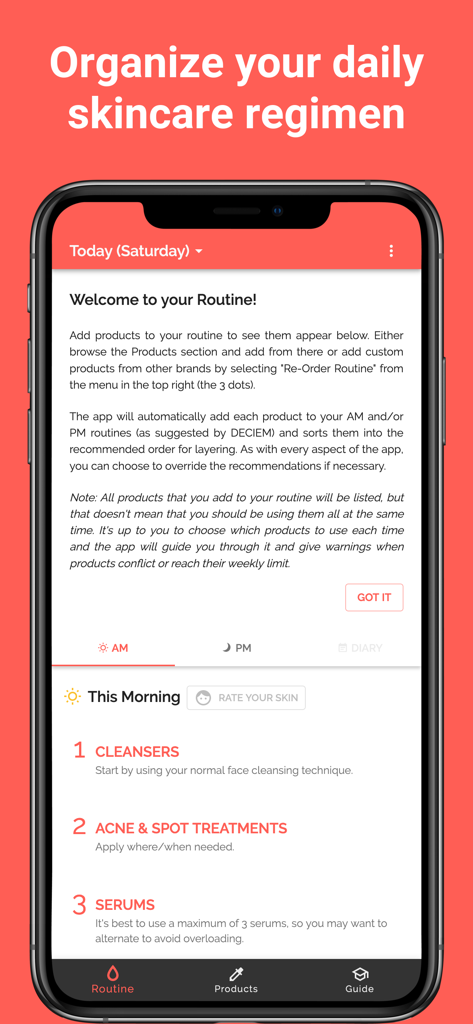
아침 레이어링 단계로 일일 스킨케어 루틴을 정리하는 모바일 앱 인터페이스

아침 레이어링 단계로 일일 스킨케어 루틴을 정리하는 모바일 앱 인터페이스

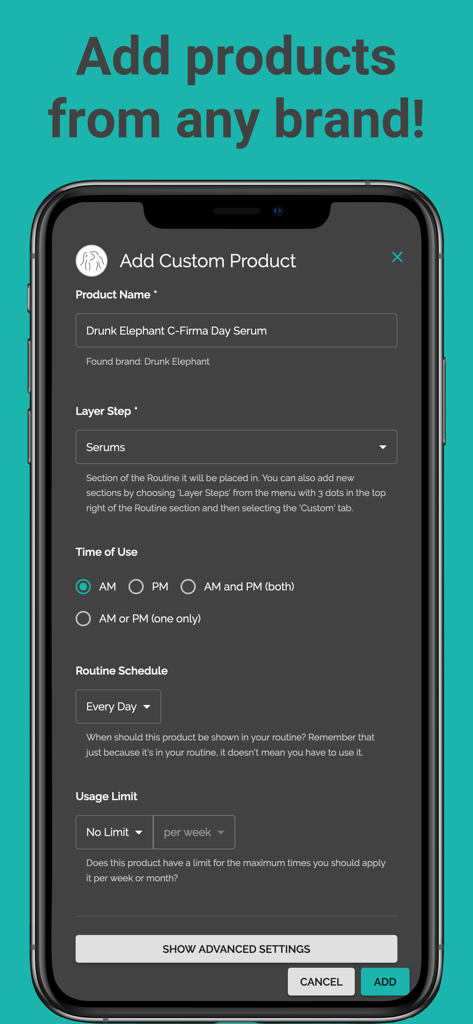
Drunk Elephant의 세럼을 추가하는 스킨케어 루틴 앱의 사용자 정의 제품 추가 화면을 보여주는 스마트폰

Drunk Elephant의 세럼을 추가하는 스킨케어 루틴 앱의 사용자 정의 제품 추가 화면을 보여주는 스마트폰

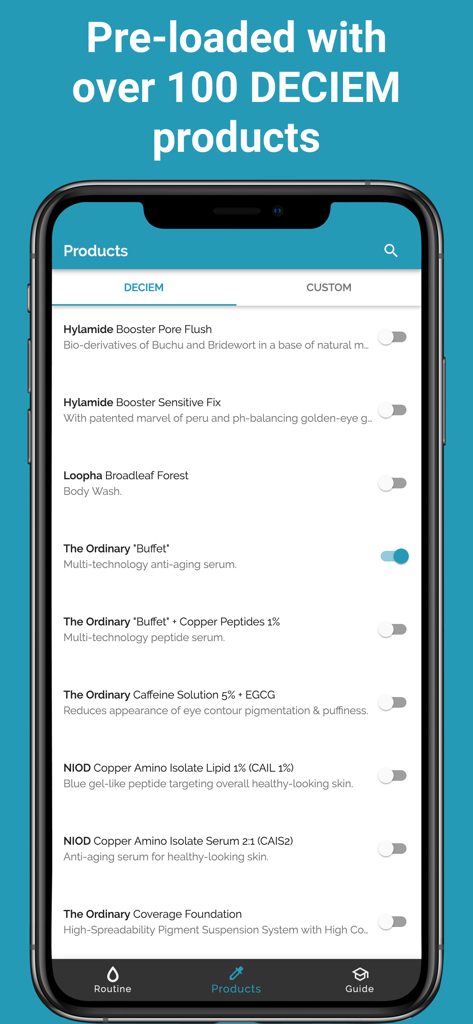
스킨케어 루틴 앱에서 사전 로드된 DECIEM 및 The Ordinary 제품 목록을 표시하는 스마트폰

스킨케어 루틴 앱에서 사전 로드된 DECIEM 및 The Ordinary 제품 목록을 표시하는 스마트폰

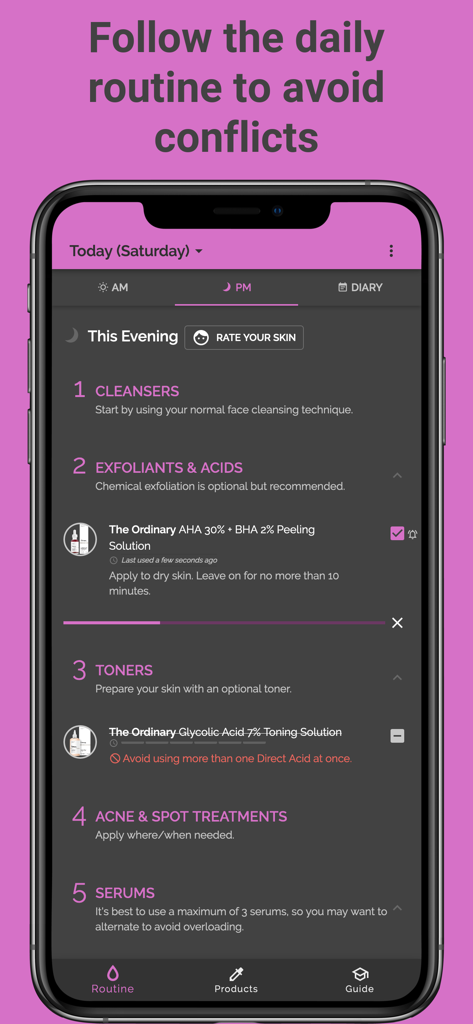
제품 레이어링 단계와 성분 충돌 경고가 있는 야간 스킨케어 루틴을 보여주는 모바일 앱 인터페이스

제품 레이어링 단계와 성분 충돌 경고가 있는 야간 스킨케어 루틴을 보여주는 모바일 앱 인터페이스

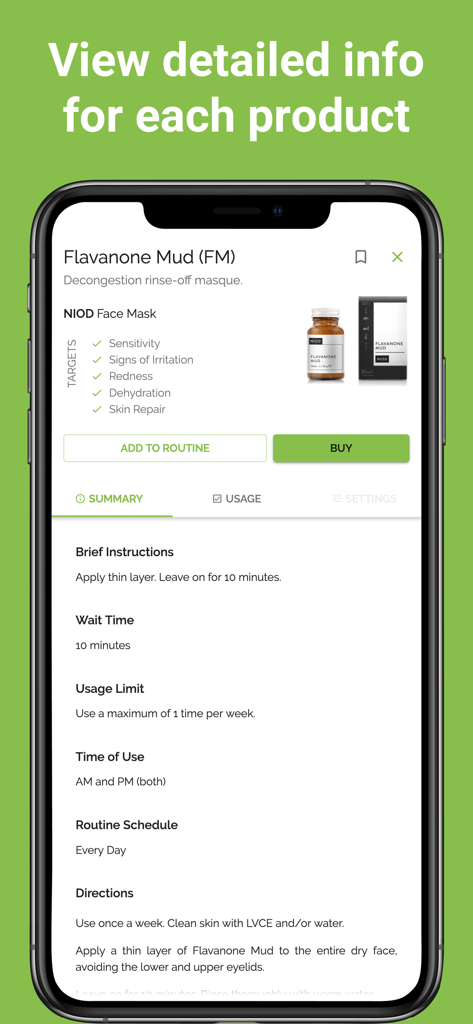
스킨케어 마스크 팩에 대한 지침 및 사용 제한을 포함한 자세한 제품 정보를 보여주는 모바일 화면

스킨케어 마스크 팩에 대한 지침 및 사용 제한을 포함한 자세한 제품 정보를 보여주는 모바일 화면

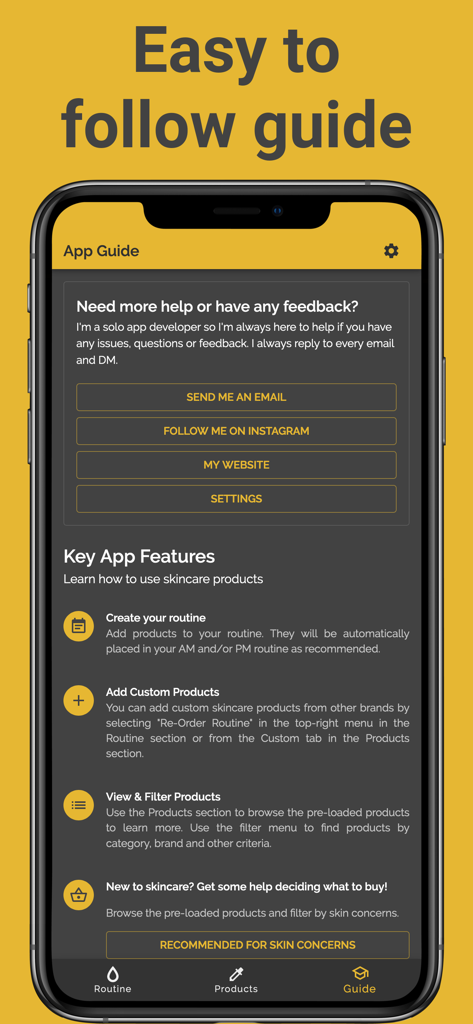
스킨케어 루틴 앱의 쉬운 가이드 및 주요 기능을 보여주는 모바일 앱 스크린샷

스킨케어 루틴 앱의 쉬운 가이드 및 주요 기능을 보여주는 모바일 앱 스크린샷

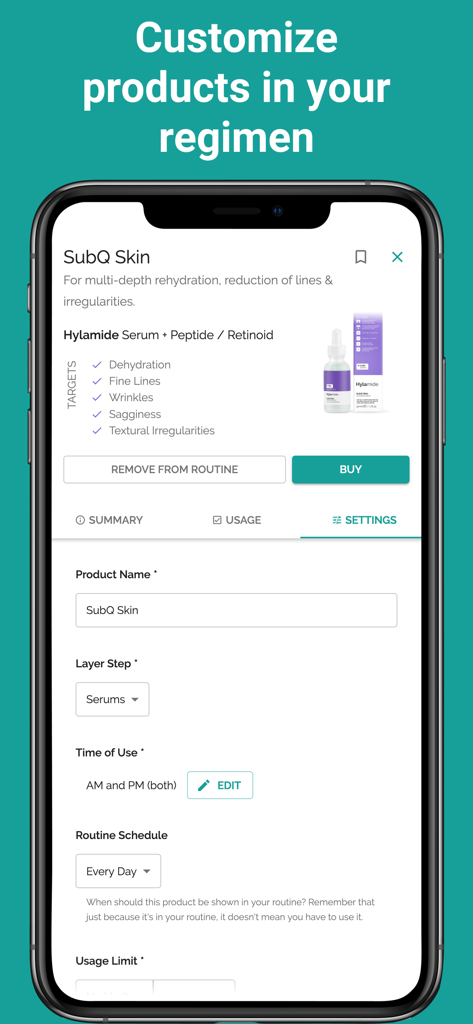
이름, 레이어 단계 및 사용 일정을 포함한 제품 설정을 보여주는 스킨케어 루틴 앱의 모바일 화면

이름, 레이어 단계 및 사용 일정을 포함한 제품 설정을 보여주는 스킨케어 루틴 앱의 모바일 화면

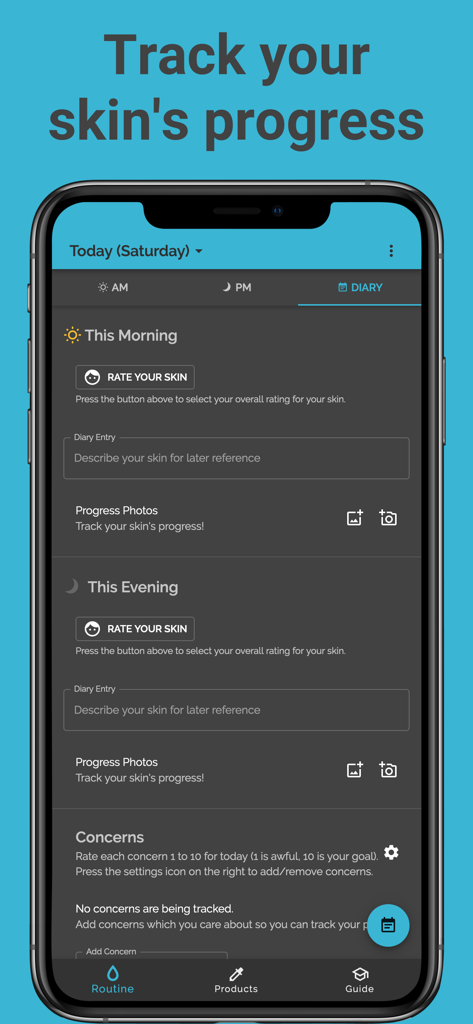
사진과 등급으로 일일 피부 진행 상황을 추적하는 일지 섹션을 보여주는 스킨케어 루틴 앱 스크린샷

사진과 등급으로 일일 피부 진행 상황을 추적하는 일지 섹션을 보여주는 스킨케어 루틴 앱 스크린샷

일상의 완벽한 피부를 완성하세요

이 앱을 돋보이게 하는 도구, 279K+ 명의 사용자가 선택.

🧪

스마트 레이어링 및 충돌 방지

더 이상 피부 장벽 손상이나 제품 낭비는 없습니다. 저희 알고리즘은 자동으로 루틴 순서를 지정하고 레티놀 및 비타민 C와 같은 활성 성분이 섞이면 안 되는 경우 경고합니다.

📸

시각적 진행 상황 추적

전용 피부 일지로 '글로우 업'을 기록하세요. 사진과 일일 메모를 함께 사용하여 어떤 제품이 최고의 피부를 선사하는지 정확하게 파악하세요.

💎

구독 제로, 완벽한 맞춤 설정

월별 요금에서 벗어나세요. 단 한 번의 결제로 평생 피부 건강을 누리세요. 모든 브랜드의 제품을 추가하고 라이프스타일에 맞게 일정을 조정할 수 있습니다.

앱 소개

에 대해 알아야 할 모든 것 Skincare Routine.

설명

Personalised Skin Tracker & Layering Guide – No Subscription! One-off purchase • Automatically orders your AM/PM routine • Avoids ingredient conflicts • Diary with photos. Transform your skincare and beauty regimen with a personalized routine! Skincare Routine helps you discover the best order to apply your skincare and makeup products, track your usage, and achieve your best skin ever. The app comes pre-loaded with DECIEM (The Ordinary, NIOD, Hylamide & Fountain) products but you can add any skin treatments from any brand including Drunk Elephant, Pixi Beauty, Paula's Choice, The Inkey List and any of your favourite brands! Note: The app price is a one-off payment and there are currently no subscriptions or recurring payments. *** Key App Features *** • CREATE YOUR ROUTINE Add products to your routine. They will be automatically placed in your AM and/or PM routine as recommended. • ADD CUSTOM PRODUCTS You can add custom skincare products from other brands by selecting the option in the top-right menu in the Routine section or from the Custom tab in the Products section. • USE YOUR ROUTINE FOR LAYERING ADVICE The products are listed in the recommended layering order, along with advice for when and how to use each product. • KEEP TRACK OF USAGE TO AVOID CONFLICTS Each morning and evening, check each product off your list to keep track of which treatments you have used. This will allow the app to prevent any conflicts by showing you which products should be avoided. • TRACK YOUR SKIN'S PROGRESS Any time you notice your skin is looking particularly good or bad, you can make a note of it by pressing on the face icon next to the morning or evening routine. You can also add a comment to note down more details for your own record and add photos to track your progress. • ADD PHOTOS You can add photos of your skin to your diary tracker and also add photos of custom products. • REMINDERS & TIMERS You can set up notifications to remind you about your daily skin regimen. You can also set timers for products which require a specific wait time. Both can be found in the Settings. *** Advanced App Customisation *** • RE-ORDER YOUR ROUTINE If you don't wish to follow the recommended layering order, you can choose to re-order the products to fully customise your routine by selecting the option from the top right menu (with 3 dots) of the Routine section. You can also change the order of the layer steps, for instance DECIEM recommends oils before moisturisers but some users prefer the other way around. • USE CONFLICTING PRODUCTS When we recommend not using a product due to conflicts with other products or because you've reached the usage limit, you can choose to ignore the warning and use it anyway. You will then have the option to permanently ignore conflicts on that specific product. • SCHEDULE PRODUCTS You can choose specific days of the week for a product if you wish. For instance, you may wish to make it so that the "AHA 30% + BHA 2% Peeling Solution" only appears in your routine on Tuesdays and Fridays. You can also choose dates of the month, e.g. the 1st and 15th of every month. Another useful option is to schedule products for every X days, so you could choose every 2 days to alternate. *** Recommended for skin concerns... *** • Dry & Dehydrated Skin: Achieve plump, healthy-looking hydrated skin. • Acne-Prone Skin: Reduce inflammation to help support clear skin. • Blemishes & Congestion: Reduce inflammation and brighten the skin. • Sensitive Skin: Keep your skin moisturised with this gentle routine. • Mature Skin & Wrinkles: Promote youthful skin and reduce the signs of ageing. • Pigmentation Problems: Gently exfoliate and brighten skin tone. • Oily Skin: Rebalance your skin for a healthy, fresh look. Please note, Skincare Routine (previously known as "Skincare Regimen Organiser") has no connection with DECIEM, The Ordinary or any other skincare brand.

최신 버전

7.4.64

크기

26.6 MB

출시일

2018년 8월 18일

추측 없이 완벽한 피부를 만드세요

레이어링을 완벽하게 만든 279,000명 이상의 사용자와 함께하세요. 오늘 일회성 구매로 개인화된 루틴과 충돌 검사기를 받으세요. 구독은 절대 필요 없습니다.

다운로드: App Store다운로드: Google Play
FAQ

자주 묻는 질문

에 대해 알아야 할 모든 것 Skincare Routine

Does the Skincare Routine app require a subscription?

아니요, Skincare Routine 앱은 구독이 필요하지 않습니다. 일회성 구매로 제공되며 반복 결제가 없습니다.

Can I add custom skincare products from any brand to the Skincare Routine app?

네, Skincare Routine 앱을 사용하면 모든 브랜드의 맞춤형 스킨케어 제품을 추가할 수 있습니다. 제품 섹션의 맞춤 탭 또는 루틴 섹션의 오른쪽 상단 메뉴를 통해 추가할 수 있습니다.

How does the Skincare Routine app automatically order AM/PM routines?

Skincare Routine 앱은 추가된 제품을 AM 및/또는 PM 루틴에 자동으로 배치합니다. 계층화 순서를 추천하며, 원하는 경우 재정렬할 수 있습니다.

How does Skincare Routine app help avoid ingredient conflicts?

Skincare Routine 앱은 제품 사용을 추적합니다. 사용한 트리트먼트를 체크하여 앱이 충돌을 방지하기 위해 피해야 할 제품을 식별하고 표시합니다.

Can I track my skin's progress with photos in the Skincare Routine app?

네, Skincare Routine 앱을 사용하면 피부 진행 상황을 추적할 수 있습니다. 일기에 메모, 댓글, 사진을 추가하여 변화를 기록할 수 있습니다.

Which skincare brands come pre-loaded in the Skincare Routine app?

Skincare Routine 앱에는 DECIEM 제품(The Ordinary, NIOD, Hylamide, Fountain 포함)이 사전 로드되어 있습니다. 사용자는 다른 브랜드의 제품도 추가할 수 있습니다.

Can I schedule specific products for certain days in the Skincare Routine app?

네, Skincare Routine 앱에서는 제품 예약을 할 수 있습니다. 요일, 월별 날짜를 지정하거나 제품을 X일마다 표시하도록 설정할 수 있습니다.

Can users re-order the recommended layering sequence in the Skincare Routine app?

네, 사용자는 Skincare Routine 앱에서 제품 순서를 재정렬할 수 있습니다. 루틴 섹션의 오른쪽 상단 메뉴에서 이 옵션을 사용할 수 있으며, 계층화 단계를 완전히 사용자 지정할 수 있습니다.

Does the Skincare Routine app offer reminders for daily regimens?

네, Skincare Routine 앱은 알림을 제공합니다. 설정에서 찾을 수 있는 일상 스킨케어 루틴에 대한 알림과 특정 대기 시간이 필요한 제품에 대한 타이머를 설정할 수 있습니다.

App information, icons, screenshots, and descriptions displayed on this page are sourced from the Apple App Store and are the property of their respective developers. Download estimates and rankings are based on MWM's proprietary models and may not reflect actual figures. This page is provided for informational and analytical purposes only.

Believe this page infringes your intellectual property? File a dispute